DotSlash: a small text file standing in for a vendored binary
Simplified executable deployment
At a glance
- What is it?
- DotSlash replaces the pile of platform-specific executables a repository would otherwise carry with one readable manifest that names the download URLs, sizes and digests. It suits teams that want a pinned toolchain checked into source control, and it fails you if the host has no network on first run.
- Who is it for?
- Adopt DotSlash when a repository needs one pinned executable on several platforms and you want that choice visible in a diff instead of hidden in a release artefact. Do not adopt it as a general package manager, for offline installers, or for dependency graphs with version resolution needs, since the manifest pins a single file per platform and the first run needs network access.
- Can I use it commercially?
- Yes. Apache-2.0 is a permissive licence: you can use, modify and sell software built on it, as long as you keep its copyright and licence notices.
- Is it still maintained?
- Yes. The repository last received commits 1 day ago.
- What is it written in?
- Mainly Rust, according to GitHub's language statistics.
Answers come from the project's GitHub data, last synced on November 7, 2026, and from our analysis. They are not legal advice.
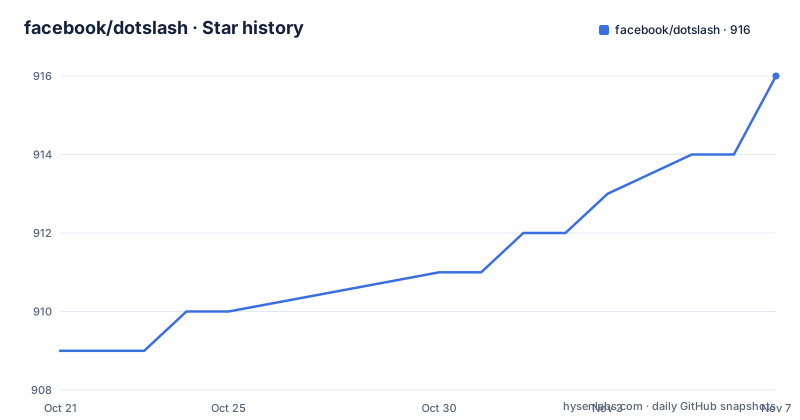
Star history
- facebook/dotslash916 ★ · +7
| Repository | 2026-10-21 | 2026-11-07 |
|---|---|---|
| facebook/dotslash | 909 | 916 |
7 Stars in the last 17 days, measured from the daily GitHub snapshot. Compare with other projects
Editorial analysis
The shell script and two binaries become one node file
The usual way to pin a toolchain into a repository is to commit the binaries and add a launcher that picks the right one for the host. The project documentation shows that shape for Node.js on macOS and Linux, where a single bash script branches on the output of uname.
#!/bin/bash

# Copied from https://stackoverflow.com/a/246128.
DIR="$( cd -- "$( dirname -- "${BASH_SOURCE[0]}" )" &> /dev/null && pwd )"

if [ "$(uname)" == "Darwin" ]; then
  # In this example, assume node-mac-v18.16.0 is a universal macOS binary.
  "$DIR/node-mac-v18.16.0" "$@"
else
  "$DIR/node-linux-v18.16.0" "$@"
fi

exit $?
That script is a maintenance liability on its own. It assumes the two binaries are present, it assumes the naming scheme, and it silently does nothing useful on a platform it was not written for. DotSlash replaces the script and both binaries with a single file named node, and the launcher logic disappears into the manifest.
The result is reviewable. A diff shows a changed URL or a changed digest rather than an opaque blob, and the repository stays small because the executable itself is not stored in git. The project documentation is explicit that the aim is to make it efficient to store executables in source control without hurting repository size, and that this reduces reliance on whatever the host happens to have installed, which is what makes reproducible builds plausible in the first place.
Platform keys and a blake3 digest are what make the manifest trustworthy
A DotSlash file is a JSON document with comments, keyed by platform. Each platform entry carries a size, a hash algorithm, a digest, an archive format, the path of the binary inside the archive, and a list of providers holding download URLs. The example entry for macos-aarch64 looks like this, shown in shortened form.
#!/usr/bin/env dotslash

{
  "name": "node-v18.19.0",
  "platforms": {
    "macos-aarch64": {
      "size": 40660307,
      "hash": "blake3",
      "digest": "6e2ca33951e586e7670016dd9e503d028454bf9249d5ff556347c3d98c347c34",
      "format": "tar.gz",
      "path": "node-v18.19.0-darwin-arm64/bin/node",
The providers list is what makes a failed mirror recoverable. A second URL can sit next to the first, and DotSlash tries them in turn. The example manifest shows one URL per platform, but the structure holds a list rather than a single string.
The digest is the reason to trust the manifest. The project documentation says the first run fetches, decompresses and verifies the archive, and the manifest carries the expected size, the algorithm and the expected digest so that verification needs no separate trust store. The dependency list in Cargo.toml names blake3 with the mmap, rayon and traits-preview features, and also pulls in sha2, so the hash choice in a manifest is not limited to one algorithm. Anyone authoring a DotSlash file picks the algorithm per platform entry, and the pinned blake3 version 1.8.6 means the digest computation is reproducible across machines.
The shebang does the work, and the first run pays for the download
There is no install command in the project documentation for DotSlash itself, and that is reasonable: the instructions point to the installation page on the DotSlash website instead. What you do need is a working dotslash command on your PATH before the file you write can be used, because the file is a script with a shebang line that names the tool.
The same shebang opens the manifest, and the executable bit is what turns it from a text file into a runnable program.
The project documentation asks you to mark the file as executable, then run it the way you would have run the old wrapper. The output is the ordinary Node.js version string.
$ ./node --version
v18.16.0
The ordering matters. The shebang is the mechanism, the executable bit is the switch, and only then does running the file do anything useful. A file committed without the executable bit will simply refuse to run, and the failure message comes from the shell rather than from DotSlash, which is a mildly confusing first experience for anyone who has not seen the pattern before.
A second platform entry in the same file shows how the manifest scales past two operating systems. The Node.js example lists macos-aarch64, macos-x86_64 and linux-x86_64, and the project documentation notes that specifying separate binaries for x86 and arm64 on macOS is straightforward. The same file can therefore serve an Apple Silicon laptop and a Linux CI runner without any host detection code of your own.
Only the first invocation is slow because the cache does the rest
The project documentation warns about a small delay on the first run while DotSlash fetches, decompresses and verifies the archive, and says that later invocations should be instantaneous. The Cargo.toml description is blunter about the shape of the tool: it is for fetching an executable, caching it, and then running it. Cache and download are separate stages, and only the first one touches the network.
That split is what makes the tool workable in a repository that gets built many times per day. Local developers pay the fetch once per machine and per version, and everyone after that starts from a local copy. The dependency list includes the dirs crate, which is the usual way a Rust program locates per-user cache and config directories, and tempfile for staging work, so the cache lives outside the repository rather than inside it.
Archive handling is broad rather than incidental. The dependency list names flate2 for gzip, zstd, bzip2, liblzma for xz and zip for zip archives, plus the tar crate, and the manifest format field in the example is tar.gz. A DotSlash file can therefore point at a compressed archive of several formats, not only a raw binary, and the path field says which member inside that archive is the executable to run. That is what lets one manifest describe a whole Node.js release rather than a single file.
The first run needs a network path, and the project documentation does not document an offline install
The honest limitation sits in the same sentence as the caching behaviour. If the cache is empty, DotSlash has to reach a provider URL, and the project documentation describes no offline seeding procedure, no vendored cache directory and no flag to point at a local archive. On a locked down build machine with no egress, a cold cache means a failed first invocation, and the workaround has to come from outside the tool.
There is a second wrinkle. The manifest is only as good as its URLs. If the upstream project moves a release, or renames the archive, the URL in your manifest goes stale and the tool has nothing to fall back on unless you wrote a second provider URL. The same applies to the digest: if the file behind a URL is replaced, verification fails rather than silently running something different, which is the right default but still a broken build.
A third limit is scope. A DotSlash file pins exactly the artefact it names. It does not resolve a dependency tree, does not pick a version, and does not know about other tools. If the executable you want to vendor pulls in a shared library that is not on the host, the manifest does not solve that for you. The repository itself shows this narrowness: the top level contains node/ and python/ directories, plus a windows_shim/ directory, which look like the packaging work needed to ship the tool on hosts that do not have a native shim convention.
Checked-in binaries and package managers solve neighbouring problems
The nearest alternative to DotSlash is the arrangement it replaces: commit the binaries and ship a launcher script. That approach needs no extra tool and no network, and it works offline once the files are in the repository. Its cost is repository size, noisy diffs whenever the binary changes, and the need to keep one script per platform combination in sync. DotSlash trades a network dependency and a first run delay for a repository that stays small and reviewable.
The other neighbour is a language package manager, which resolves versions, handles transitive dependencies and installs into a managed location. DotSlash does none of that. It fetches one named file, checks it against a digest, caches it and runs it. The Cargo.toml description says exactly that much, and nothing in the manifest format suggests resolution logic.
So the choice is not between a good tool and a bad one. It is between a resolver and a pinner. Where the version is already decided and you want that decision committed and auditable, a manifest beats a resolver, because a lock file and a DotSlash file are the same kind of artefact and a DotSlash file carries the checksum that a lock file usually omits. Where versions must float, or where several tools have to be installed and coordinated, a package manager still wins.
The licence permits both MIT and Apache-2.0, and the tree is still moving
DotSlash is offered under a dual licence. The project documentation says it is licensed under both the MIT license and the Apache-2.0 license, and the Cargo.toml records the same choice in the license field as MIT OR Apache-2.0. The repository root holds LICENSE-MIT and LICENSE-APACHE as separate files, so the terms are there to read. A dual MIT plus Apache-2.0 grant is a permissive one, and the practical question for an engineer is which of the two you comply with, not whether you need a waiver. The Cargo.toml also lists an include set covering the two licence files, the readme, the src directory and the tests directory, which is what gets published into the crate.
On maintenance, the facts are recent. The repository is not archived, and the last push was on 2026-10-18. The crate version in Cargo.toml is 0.5.9, and the release list shows v0.5.9 on 2026-04-09, v0.5.8 on 2025-08-20 and a test release in between on 2025-08-19. The crate requires a Rust edition of 2024 and a rust-version of 1.85, so anyone building from source needs a toolchain at or above that level.
The upgrade cost is therefore low for consumers, since a DotSlash file points at upstream release URLs rather than at a DotSlash version, but not free. The crate is still marked 0.x, the release history in the list spans more than a year, and the build metadata shows the package is generated by autocargo from an internal source path, which is a signal that release plumbing is partly internal. Treat the manifest as the stable contract and the tool as a helper that can move underneath it.
Editorial conclusion
Adopt DotSlash when a repository needs one pinned executable on several platforms and you want that choice visible in a diff instead of hidden in a release artefact. Do not adopt it as a general package manager, for offline installers, or for dependency graphs with version resolution needs, since the manifest pins a single file per platform and the first run needs network access. Before committing, check that the digest and size in your manifest match the upstream release you intend to trust, and confirm how your team will pre-populate the cache for machines that cannot reach the provider URL.
Frequently asked questions
How do I install DotSlash?
The project documentation does not give a command for it and instead points to the installation instructions on the DotSlash website at https://dotslash-cli.com/docs/installation/. You need a working dotslash command on your PATH before a DotSlash file can be executed, and the file also has to be marked executable.
Which platforms can a single DotSlash file target?
The example manifest in the project documentation lists macos-aarch64, macos-x86_64 and linux-x86_64 entries for Node.js v18.19.0. The project documentation also notes that pointing separate binaries at x86 and arm64 on macOS is straightforward, so a single file can cover both architectures of one operating system.
How does DotSlash check that a download is the right file?
Each platform entry carries a size, a hash algorithm, a digest, an archive format and the path of the binary inside the archive. The project documentation says the first run fetches, decompresses and verifies the archive, and the example pins blake3 digests for the Node.js archives.
Does DotSlash work on a machine with no internet access?
Only if the executable is already cached, since the project documentation describes the first run as a fetch followed by decompression and verification, and later runs as instantaneous from the cache. The project documentation does not document an offline install mode or a way to seed the cache from a local archive.
Is DotSlash still being worked on?
The repository is not archived and the last push was on 2026-10-18. The crate version is 0.5.9, and the release list shows v0.5.9 published on 2026-04-09 after v0.5.8 on 2025-08-20.
Official sources
Add this badge to your README
If you maintain this project, the badge below links readers to this analysis and shows its maintenance status from the daily GitHub snapshot. Paste the markdown into your README; add ?metric=license or ?metric=stars to the image URL for a different field.

[](https://hysenlabs.com/projects/facebook-dotslash)Star history chart for your README
[](https://hysenlabs.com/projects/facebook-dotslash)Was this useful?