Sophia Script for Windows: a PowerShell module for Windows 10 and 11 tweaks
:zap: The most powerful PowerShell module for fine-tuning Windows 10 & Windows 11 on GitHub
At a glance
- What is it?
- Sophia Script for Windows is an MIT-licensed PowerShell module that applies more than 150 documented tweaks to Windows 10 and 11, each with a matching restore function, and ships through Scoop, Chocolatey and WinGet.
- Who is it for?
- Adopt Sophia Script for Windows if you administer Windows 10 or 11 machines and want reversible, documented tweaks driven from PowerShell rather than a closed debloat binary. Skip it if you need a supported enterprise configuration channel., or if you are unwilling to read the release notes before every major Windows build.
- Can I use it commercially?
- Yes. MIT is a permissive licence: you can use, modify and sell software built on it, as long as you keep its copyright and licence notices.
- Is it still maintained?
- Yes. The repository received new commits within the last day.
- What is it written in?
- Mainly PowerShell, according to GitHub's language statistics.
Answers come from the project's GitHub data, last synced on November 15, 2026, and from our analysis. They are not legal advice.
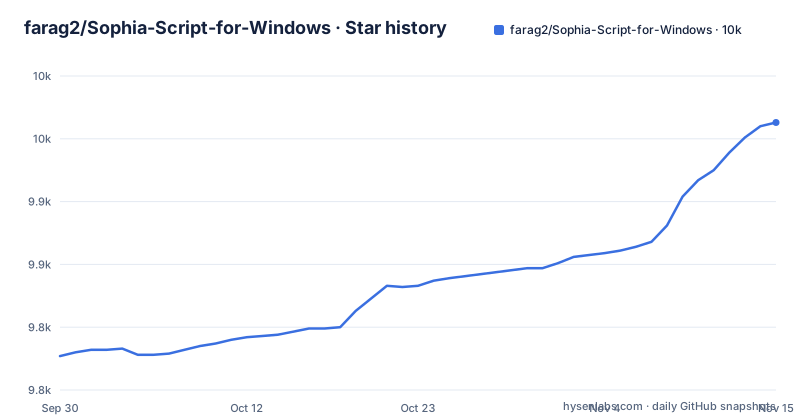
Star history
- farag2/Sophia-Script-for-Windows9,963 ★ · +186
| Repository | 2026-09-30 | 2026-11-15 |
|---|---|---|
| farag2/Sophia-Script-for-Windows | 9.8k | 10k |
186 Stars in the last 46 days, measured from the daily GitHub snapshot. Compare with other projects
Editorial analysis
What Sophia Script for Windows solves, and for whom
Windows exposes hundreds of toggles across Settings, Group Policy, the registry and AppX packages, and many of them have no supported command line equivalent. Sophia Script for Windows packages those toggles into a PowerShell module so they can be applied in one pass instead of clicked through by hand. The README states the module contains more than 150 functions that configure Windows "using Microsoft's officially documented ways", and that every tweak has a corresponding function to restore the default settings. That pairing is the design decision worth noticing: the project treats reversibility as part of the feature set rather than an afterthought.
The audience is narrower than the tagline suggests. This is for people who already accept running a PowerShell script with administrative rights on a machine they own or manage, and who are comfortable reading a function name before invoking it. Someone who wants a one-click installer with no review step is better served by a packaged debloat utility. The README also points at community channels (Telegram and Discord) for questions..
How the module is organised and what it changes
The repository separates concerns into directories rather than one monolith. Scripts/ holds the runnable scripts, src/ holds the module source, and Cursors/ holds cursor files the scripts can install on the fly. Four JSON files at the top level (Windows_Builds.json, supported_windows_builds.json, sophia_script_versions.json and Sophia_Script_Releases.json) appear to carry metadata about Windows builds and releases.
The tweaks themselves are grouped by theme. The README lists configuration of Windows AI, privacy, security and personalization, uninstalling UWP apps, uninstalling OneDrive, enabling DNS-over-HTTPS against a named resolver list (Cloudflare, Google Public DNS, Quad9, Comss.one, AdGuard, OpenDNS), and changing the location of the user folders for Desktop, Documents, Downloads, Music, Pictures and Videos without moving the files themselves. Two behaviours are worth calling out. UWP removal generates the installed app list dynamically and shows localized package names, which avoids the usual problem of guessing at English package identifiers on a non-English system. And applied registry policies appear in the Local Group Policy Editor snap-in, so the result is inspectable with gpedit.msc rather than hidden behind a script-specific abstraction.
The README also states the module has no conflict with VAC, and that archives are built and uploaded through GitHub Actions. Both are claims about the build and release process rather than about any individual tweak, and neither is something a reader can verify from the README alone.
Installing Sophia Script for Windows and running a first function
The README states the module is available via Scoop, Chocolatey and WinGet. Check the package page for your chosen manager for the exact package identifier before running anything. The repository also ships two downloader scripts at the top level, Download_Sophia.ps1 and Download_Latest_Sophia.ps1, which is the route to take if you would rather not add a package manager.
Once the module is present, the README describes TAB completion for functions and their arguments through Import-TabCompletion.ps1, which is the intended way to discover what a function accepts without leaving the shell.
Import-TabCompletion.ps1Typing a partial function name and pressing TAB should list the matching functions and their parameters.
For a first real change, pick a single low-risk function, run it, then run its restore counterpart and confirm the setting returns to its previous value. That round trip is the actual test of whether the module behaves as documented on your build, and it is faster than reading the full function list.
The README notes PowerShell 7 support and ARM64 support, so a modern PowerShell host on an ARM device is within the stated scope.
Where Sophia Script for Windows is the wrong tool
The README states reversibility is per function: which means an operator who applies twenty tweaks and wants to back out has to remember which twenty and call twenty restore functions. On a machine where you did not record what you ran, the restore path is effectively lost.
An organisation that needs an auditable, centrally enforced baseline should treat this as a personal or small-fleet tool and use the supported enterprise mechanisms instead. The fact that applied policies show up in gpedit.msc helps with inspection, but inspection is not enforcement.
Finally, the tweaks are tied to Windows builds. The presence of supported_windows_builds.json in the repository implies a supported set that changes over time, and the release cadence (8.1.0 on 2026-10-31, 8.0.0 on 2026-10-11, 7.3.0 on 2026-09-05) shows the project tracks Windows releases rather than freezing against one. A machine on an unsupported or newly released build is the case where a tweak may silently do nothing or do the wrong thing.
Sophia Script Wrapper versus running the scripts directly
The top-level listing shows Scripts/ and src/ but no Wrapper/ directory, so no graphical wrapper is described here; the README lists interactive prompts and pop-ups and TAB completion for functions and their arguments.
If you are doing this on more than a couple of machines, or you expect to need to explain later what changed, drive the module from a script you keep in version control.
Licence, release cadence and the cost of keeping up
Sophia Script for Windows is MIT licensed, which permits commercial use, modification and redistribution provided the copyright notice and permission notice are retained. That is a permissive licence and it removes the usual redistribution questions for internal tooling. It says nothing about Windows itself: applying these tweaks does not change your Windows licence terms, and the README's claim of using documented methods is a statement about technique, not a warranty. Nothing here is legal advice, and if you redistribute a modified build, read the LICENSE file in the repository rather than this summary.
The upgrade cost is the part that gets underestimated. Windows feature updates move settings, rename policies and retire AppX packages, and a module that tracks those changes has to ship new releases to keep working. The release history shows releases every three to five weeks through autumn 2026, with 7.3.0 in September, 8.0.0 and 8.1.0 in October. The repository also carries CHANGELOG.md and ReleaseNotesTemplate.md, so the intended workflow is to read the notes for the release you are moving to before applying it. Budget time for that reading on every Windows feature update, not just when the module itself breaks.
The last push to the repository was on 2026-11-01, so the project is current. That is a statement about commit activity, not a guarantee about any specific tweak on your specific build.
Frequently asked questions about Sophia Script for Windows
Editorial conclusion
Adopt Sophia Script for Windows if you administer Windows 10 or 11 machines and want reversible, documented tweaks driven from PowerShell rather than a closed debloat binary. Skip it if you need a supported enterprise configuration channel., or if you are unwilling to read the release notes before every major Windows build. Before rolling it out, check supported_windows_builds.json against the build you run, confirm the version in sophia_script_versions.json matches the release you downloaded, and test the restore path for each function you plan to apply.
Frequently asked questions
What script can I use to optimize Windows 11?
Sophia Script for Windows is a PowerShell module that the README describes as containing more than 150 functions for configuring Windows 10 and Windows 11, covering privacy, security, personalization, Windows AI and UWP app removal. It is distributed through Scoop, Chocolatey and WinGet, and every tweak is stated to have a matching function that restores the default setting.
What is Sophia Script for Windows?
It is an MIT-licensed PowerShell module for fine-tuning Windows 10 and Windows 11, maintained in the farag2/Sophia-Script-for-Windows repository. According to the README, it applies tweaks using Microsoft's officially documented methods, and applied registry policies appear in the Local Group Policy Editor snap-in.
How do I install Sophia Script for Windows?
The README states the module is available via Scoop, Chocolatey and WinGet, and the repository also provides Download_Sophia.ps1 and Download_Latest_Sophia.ps1 at the top level. Confirm the exact package identifiers from each manager's package page before installing.
Can I undo the changes Sophia Script for Windows makes?
The README states that every tweak has a corresponding function to restore default settings, so reversal is done function by function.
Does Sophia Script for Windows work on ARM64 devices and with PowerShell 7?
Yes, both are listed in the README's key features: ARM64 support and PowerShell 7 support.
Is Sophia Script for Windows compatible with anti-cheat systems like VAC?
The README states the module has no conflict with VAC and links to Valve's explanation of what VAC is. That is the project's own claim about compatibility.
Official sources
Add this badge to your README
If you maintain this project, the badge below links readers to this analysis and shows its maintenance status from the daily GitHub snapshot. Paste the markdown into your README; add ?metric=license or ?metric=stars to the image URL for a different field.

[](https://hysenlabs.com/projects/farag2-sophia-script-for-windows)Star history chart for your README
[](https://hysenlabs.com/projects/farag2-sophia-script-for-windows)Was this useful?