vim-airline splits the statusline into lettered sections and moves its themes out of the repo
lean & mean status/tabline for vim that's light as air
At a glance
- What is it?
- A Vim Script statusline and tabline plugin under the MIT license. It draws sections A, B, C, X, Y and Z, loads extensions for other plugins only when they are installed, and keeps color themes in a separate repository.
- Who is it for?
- Pick vim-airline if you want a ready-made statusline for Vim 7.2 or later and you are willing to install vim-airline-themes as a second plugin. Skip it if you want every color and symbol decided in your own vimrc from scratch.
- Can I use it commercially?
- Yes. MIT is a permissive licence: you can use, modify and sell software built on it, as long as you keep its copyright and licence notices.
- Is it still maintained?
- Yes. The repository last received commits 8 days ago.
- What is it written in?
- Mainly Vim Script, according to GitHub's language statistics.
Answers come from the project's GitHub data, last synced on November 25, 2026, and from our analysis. They are not legal advice.
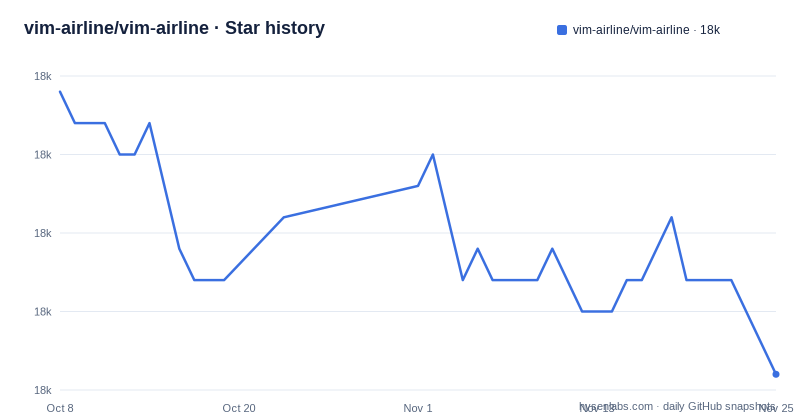
Star history
- vim-airline/vim-airline17,963 ★ · -9
| Repository | 2026-10-08 | 2026-11-25 |
|---|---|---|
| vim-airline/vim-airline | 18k | 18k |
-9 Stars in the last 48 days, measured from the daily GitHub snapshot. Compare with other projects
Editorial analysis
Six lettered sections carry all the statusline content
With no configuration, vim-airline replaces the statusline at the bottom of every Vim window with a row of sections. Section A holds the mode plus flags for crypt, spell and paste, so an INSERT label can sit next to a paste marker. Section B is environment status: VCS branch, hunk summary and battery level. Section C is the filename with a read-only flag, for example ~/.vim/vimrc RO. Sections X, Y and Z follow on the right: filetype, file encoding with fileformat such as utf-8[unix], and the current position.
External plugins such as YCM and syntastic add warnings, errors and statistics in extra sections, and those can be shown on a second line. That second line is a Vim-only option, so Neovim users do not get it. Colors change with conditions like the current mode or whether the file is modified.
Section Z packs percentage, line, total and column into one string
The position block reads like `10% 10/100 ln: 20`. Each part has a fixed meaning. The 10% is how far down the file you are. The 10 after the percentage is the current line. The /100 ln is the total line count. The: 20 is the current column.
The README draws a unicode line-number glyph in front of the line count, which matters for the font question. The project says it looks good with regular fonts and provides configuration points so you can use unicode or powerline symbols. Nothing in the project description promises that the glyphs render in every terminal. If your terminal font lacks them, you will see placeholder boxes in section Z until you change the symbol settings or the font.
Themes were split into vim-airline-themes, so a fresh install has no extra color schemes
The repository's themes moved to a separate repository, vim-airline-themes, as of a specific commit linked from the README. The consequence is practical: installing only vim-airline gives you the default look, and the color schemes for solarized (dark and light), tomorrow, base16, molokai, jellybeans and others come from the second plugin.
The README shows the pairing with Vundle:
Plugin 'vim-airline/vim-airline'
Plugin 'vim-airline/vim-airline-themes'
Anyone upgrading from an old copy that bundled themes needs to add that second line, or their theme setting will point at files that no longer exist in this repository. The cost of the split is one more plugin to install and keep current. The benefit is a smaller core, which fits the stated goal of a tiny core written with extensibility in mind.
Nine ways to install, and two of them need a manual helptags step
The plugin follows the standard runtime path structure, so any plugin manager works. The README lists Pathogen, NeoBundle, Vundle, Plug, VAM, Dein, minpac, the native Vim 8 pack feature and a manual copy. The one-line forms are `NeoBundle 'vim-airline/vim-airline'`, `Plugin 'vim-airline/vim-airline'` for Vundle, `Plug 'vim-airline/vim-airline'`, `call vam#ActivateAddons([ 'vim-airline' ])`, `call dein#add('vim-airline/vim-airline')` and `call minpac#add('vim-airline/vim-airline')`.
Two routes clone the repository by hand and leave help tags to you. Pathogen:
git clone https://github.com/vim-airline/vim-airline ~/.vim/bundle/vim-airlinefollowed by `:Helptags`. The native pack route:
git clone https://github.com/vim-airline/vim-airline ~/.vim/pack/dist/start/vim-airlinefollowed by `:helptags ~/.vim/pack/dist/start/vim-airline/doc`. Skip that step and :help airline finds nothing. The manual route is to copy all of the files into your ~/.vim directory, which gives you no update path.
The tabline stays off until g:airline#extensions#tabline#enabled is set to 1
The smarter tabline shows all buffers when only one tab is open, and it is disabled by default. Turning it on takes one line in your vimrc:
let g:airline#extensions#tabline#enabled = 1
Separators for the tabline are configured independently from the statusline. To get straight tabs, the README sets:
let g:airline#extensions#tabline#left_sep = ' ' let g:airline#extensions#tabline#left_alt_sep = '|'
The formatter field controls how file paths appear in each tab and in the current buffer indicator at the upper right:
let g:airline#extensions#tabline#formatter = 'default'
Four formatters exist: default, jsformatter, unique_tail and unique_tail_improved. The README gives screenshots for each rather than a description in words, so you pick by looking. Someone who never sets the enabled flag will never see the buffer list.
Extensions load only when the other plugin is present
vim-airline ships integrations for ctrlp, unite, denite, tagbar, csv.vim, syntastic, vimagit, flog, virtualenv, tmuxline, promptline, ctrlspace, vimtex, LanguageClient, Vim-CMake and vim.battery, among others. Hunk display covers vim-gitgutter, vim-signify, coc-git and gitsigns.nvim. There are also xkb-switch and xkb-layout entries for keyboard layout display.
These extensions are lazily loaded if and only if the matching plugin is installed, and each can be turned off. That design keeps the cost of the long list at zero for plugins you do not use. The core also advertises that it loads in under a millisecond, a figure that comes from the project itself. The limit is on the other side of the integration: an extension can only show what the third-party plugin exposes, so a plugin missing from the README list gets no dedicated section.
Version support, release gaps and the last push
The minimum supported Vim version is 7.2. Neovim is not mentioned in the feature list, and the second-line display is explicitly Vim only. Release history is uneven: v0.10 came out on 2018-12-15, v0.11 on 2019-11-10 and v0.12 on 2026-05-02, a gap of more than six years between the last two tags. The default branch, master, received a push on 2026-10-14 and the repository is not archived.
The README says master tries to be as stable as possible, and new features merge only after a full regression test. A unit testing suite lives in the test directory next to autoload, doc and plugin. If you pin to tags, you are on a six-year-old v0.11 or a months-old v0.12. If you track master, you get the recent commits. Pick one deliberately, because the tag gap means the two behave differently.
Editorial conclusion
Pick vim-airline if you want a ready-made statusline for Vim 7.2 or later and you are willing to install vim-airline-themes as a second plugin. Skip it if you want every color and symbol decided in your own vimrc from scratch. Before adopting, check that your terminal font renders the powerline symbols you plan to enable.
Frequently asked questions
What is vim-airline?
vim-airline is a status and tabline plugin for Vim, described by its authors as lean and mean and light as air. It draws colored sections such as mode, VCS branch, filename, filetype, encoding and cursor position.
How do I install vim-airline?
Use any plugin manager, for example `Plug 'vim-airline/vim-airline'` or `Plugin 'vim-airline/vim-airline'` for Vundle. With Vim 8 packages, clone into ~/.vim/pack/dist/start/vim-airline and run :helptags on its doc directory.
What does Vim stand for in the vim-airline default screen?
The default Vim start screen reproduced in the vim-airline README reads VIM - Vi IMproved, by Bram Moolenaar et al. vim-airline is a plugin that draws the statusline for that editor.
Official sources
Add this badge to your README
If you maintain this project, the badge below links readers to this analysis and shows its maintenance status from the daily GitHub snapshot. Paste the markdown into your README; add ?metric=license or ?metric=stars to the image URL for a different field.

[](https://hysenlabs.com/projects/vim-airline-vim-airline)Star history chart for your README
[](https://hysenlabs.com/projects/vim-airline-vim-airline)Was this useful?