fastmail/Squire: a 16KB rich text editor that keeps arbitrary HTML
The rich text editor for arbitrary HTML.
At a glance
- What is it?
- Squire is a dependency-free HTML5 rich text editor built for Fastmail's email composition, where forwarded mail has to survive intact. It ships no toolbar, and its HTML is the source of truth.
- Who is it for?
- Adopt Squire if you are building an email client or any editor that must round-trip third-party HTML and you already have a UI toolkit of your own. Do not adopt it if you want a toolbar out of the box, or if your content can live in a structured document model.
- Can I use it commercially?
- Yes. MIT is a permissive licence: you can use, modify and sell software built on it, as long as you keep its copyright and licence notices.
- Is it still maintained?
- Yes. The repository last received commits 15 days ago.
- What is it written in?
- Mainly TypeScript, according to GitHub's language statistics.
Answers come from the project's GitHub data, last synced on November 25, 2026, and from our analysis. They are not legal advice.
Star history
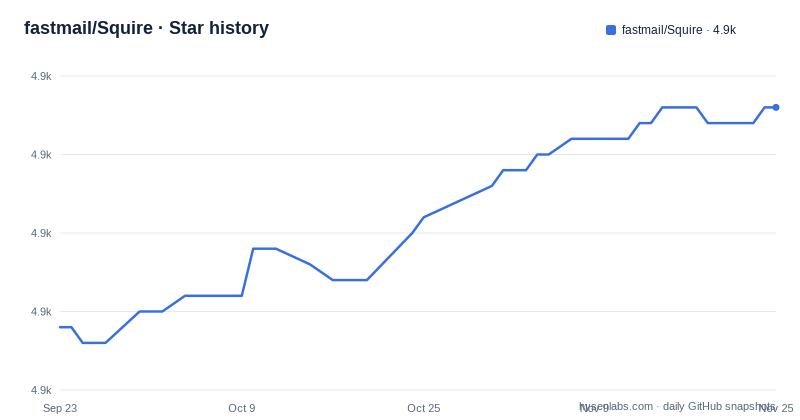
- fastmail/Squire4,928 ★ · +14
| Repository | 2026-09-23 | 2026-11-25 |
|---|---|---|
| fastmail/Squire | 4.9k | 4.9k |
14 Stars in the last 63 days, measured from the daily GitHub snapshot. Compare with other projects
Editorial analysis
The problem Squire solves: preserving third-party HTML
Most modern rich text editors keep a structured internal model and convert to HTML on the way out. Squire does the opposite. The README states that it was designed to handle email composition for the Fastmail web app, and that the most important consequence is that it must handle arbitrary HTML, because it may be used to forward or quote emails from third parties and has to preserve that HTML without breaking the formatting. That constraint rules out a limited internal data model, so the HTML itself remains the source of truth.
The audience follows from that. Squire is for teams building mail clients, or any product where users paste or forward markup the application did not author. The README lists production use at Fastmail, ProtonMail, SnappyMail, StartMail, Tutanota, Zoho Mail, Superhuman and Teamwork Desk, plus Google Earth among non-mail apps. The second design decision is that Squire ships no toolbar, widgets or overlays. It is meant to be inserted where a textarea would go and driven programmatically, so you do not load a second UI toolkit alongside your own.
How Squire works: custom formatting functions instead of execCommand
Squire does not call document.execCommand at all. The README describes the philosophy directly: let the browser do as much as it can, then take control wherever it deviates or wherever cross-browser differences appear. All formatting runs through custom functions, and certain keys, including enter and backspace, are handled by the editor rather than the browser.
Two methods carry most of the weight. changeFormat adds or removes inline formatting, and modifyBlocks makes block-level changes. The README suggests reading the source to see how the rest of the API is implemented in terms of these two, which is a fair signal about the size of the surface. Block handling is configurable: the default blank line is a div, on the assumption that users expect Enter to behave like a typewriter return, but you can pass a config object as the second constructor argument to use p tags or anything else, along with a set of attributes applied to each default block.
For UI state, the efficient path is to listen for the pathChange event and derive button state from the new path. When a selection spans nodes, the README says you fall back to calling hasFormat for each button. That is a real integration cost: Squire gives you the primitives, and you own the mapping from selection to toolbar.
Installing squire-rte and creating a first editor
The package is published as squire-rte. The README gives three steps: install it, import it, and construct an instance against a DOM node.
npm install squire-rteIn your module, the default export is the editor class.
import Squire from 'squire-rte';

const editor = new Squire(node);
The README notes one behaviour that catches people out: constructing Squire removes any current children of the node. You must call setHTML after initialising to set content.
There is also a script-tag route for pages without a bundler. Load the built file from dist, then instantiate against a node you looked up yourself.
<script type="text/javascript" src="dist/squire.js"></script>
<script>
  const node = document.getElementById('editor-div');
  const editor = new Squire(node);
</script>
The README points to squire-raw.js as the unminified, debuggable alternative to dist/squire.js. For a first look without writing any integration code, the repository has a bare-bones Demo.html at the top level; clone the repo and open it. If you report a bug, the README asks you to reproduce the steps in Demo.html first, to rule out a problem in your own integration.
Sanitisation is your responsibility, not Squire's
This is the part to read before anything else. The README states that malicious HTML can be a source of XSS and other security issues, and that you MUST provide a method to safely convert raw HTML into DOM nodes. Squire will integrate automatically with DOMPurify if it is present on the page. If it is not, you must set a custom sanitizeToDOMFragment function in your config.
The signature is (html: string, editor: Squire) => DocumentFragment. It is called instead of the default DOMPurify call, and it must return a DOM fragment belonging to the same document as the editor's root node, containing clean nodes to set or insert. That document-ownership requirement is easy to miss and will produce confusing behaviour if you build the fragment with another document.
An editor whose stated purpose is preserving arbitrary third-party HTML cannot sanitise by discarding structure, so the sanitizer is doing load-bearing work on both safety and fidelity at once. Squire does not ship one; it delegates. If your team has no answer for that, the editor is not the piece to start with.
Lifecycle, leaks, and where Squire is the wrong choice
Squire supports multiple instances on one page, and the README says that is fine. The warning is aimed at long-lived single-page apps: call editor.destroy() when you are finished with an instance, or it will leak resources. There is no automatic teardown tied to component unmounting, because Squire does not know about your framework.
Browser support is described as all reasonably recent browsers, with no version of IE supported. If your product still has an IE requirement, this is not a candidate.
The wrong-tool case is more interesting. If your content is structured, if you control the schema, and if you would rather store a document tree than a string of HTML, Squire's central design choice works against you. Keeping HTML as the source of truth is what makes forwarding and quoting work, and it is also what makes programmatic manipulation harder than it would be against a typed model. The README is candid that the general philosophy is to let the browser do what it can, which it notes is not very much. That means Squire carries a substantial amount of browser-quirk handling, and that handling is the maintenance surface you inherit.
The repository has no published GitHub releases, so version history has to come from the repository itself. The last push to the default branch was on 2026-10-21.
Squire compared with structured-model editors
The alternative most teams will weigh is a structured-model editor, the category Squire's README defines itself against: editors that keep a limited internal data model and render from it. The difference is not cosmetic. A structured model gives you predictable programmatic access, a schema you can validate, and output you can reason about. It also means an email forwarded from an unknown client gets normalised into your model, and whatever the model cannot express is lost or rewritten.
Squire inverts the trade. Arbitrary HTML survives, including multiple levels of blockquotes, which the README calls out as a consequence of the email use case. In exchange you give up the guarantee that the document conforms to anything, and you take on the sanitizer yourself. There is no toolbar in either direction, but with Squire that is explicit: the README frames the absence as a feature, so you integrate with your existing UI framework rather than loading two toolkits.
If you are choosing between them, the deciding question is whether the HTML entering your editor was authored by you. If yes, a structured model is usually the better fit. If it arrives from Gmail, Outlook and a decade of desktop clients, Squire is built for exactly that.
Licence and upgrade cost
Squire is released under the MIT license, and the repository carries a LICENSE file at the top level. MIT is permissive: it allows use in proprietary products, which matters given that several of the listed production users are commercial mail services. This is a description of the licence text, not legal advice; check the LICENSE file and your own obligations.
The upgrade surface is small in one sense and awkward in another. The package has no runtime dependencies, so there is no transitive tree to audit or bump. The build and test tooling is all devDependencies: vitest for tests, esbuild for the bundle, TypeScript, ESLint and Prettier, with scripts named test, build, lint and fix in package.json. The awkward part is that Squire touches the DOM and keyboard behaviour directly, so a browser change can surface as a bug in your integration rather than in a dependency you can pin. The README's request to reproduce issues in Demo.html exists precisely because the project cannot tell your integration bug from its own.
Version 2.4.10 is the version in package.json, and the entry point is dist/squire.mjs with types at dist/types/Squire.d.ts.
Editorial conclusion
Adopt Squire if you are building an email client or any editor that must round-trip third-party HTML and you already have a UI toolkit of your own. Do not adopt it if you want a toolbar out of the box, or if your content can live in a structured document model. Before writing code, confirm that DOMPurify is present or that you can supply a sanitizeToDOMFragment function, and open Demo.html to see the bare-bones integration the project asks bug reporters to reproduce against.
Frequently asked questions
How do I install squire-rte in a project?
Run npm install squire-rte, then import the default export with import Squire from 'squire-rte' and construct it against a DOM node. The README also documents a script tag route that loads dist/squire.js.
Does Squire include a toolbar or UI?
No. The README states that Squire does not provide its own UI toolbar, widgets or overlays, and is designed to be integrated with your own UI framework. You get a component you insert in place of a textarea and manipulate programmatically.
Does Squire sanitise the HTML I set into the editor?
It delegates that. Squire integrates automatically with DOMPurify if it is present on the page; otherwise you must set a custom sanitizeToDOMFragment function in your config. The README says you MUST provide a method to safely convert raw HTML into DOM nodes.
Why does the editor lose its content when I create a Squire instance?
Instantiating Squire removes any current children of the node, as the README notes. You have to call setHTML after initialising to set any content.
Which browsers does Squire support?
The README says Squire supports all reasonably recent browsers and no longer supports any version of IE.
Official sources
Add this badge to your README
If you maintain this project, the badge below links readers to this analysis and shows its maintenance status from the daily GitHub snapshot. Paste the markdown into your README; add ?metric=license or ?metric=stars to the image URL for a different field.

[](https://hysenlabs.com/projects/fastmail-squire)Star history chart for your README
[](https://hysenlabs.com/projects/fastmail-squire)Was this useful?