FerretDB: a MongoDB wire protocol proxy that stores documents in PostgreSQL
A truly Open Source MongoDB alternative
At a glance
- What is it?
- A Go proxy that accepts MongoDB 5.0+ connections, translates queries into SQL and runs them against PostgreSQL with the DocumentDB extension, aimed at teams that want document queries without the SSPL licence.
- Who is it for?
- FerretDB is the right answer for a specific situation: an application written against MongoDB drivers and tools, a team that cannot accept the SSPL licence, and a preference for running PostgreSQL as the system of record. In that situation it removes a licensing problem rather than solving a performance one.
- Can I use it commercially?
- Yes. Apache-2.0 is a permissive licence: you can use, modify and sell software built on it, as long as you keep its copyright and licence notices.
- Is it still maintained?
- Yes. The repository last received commits 145 days ago.
- What is it written in?
- Mainly Go, according to GitHub's language statistics.
Answers come from the project's GitHub data, last synced on October 25, 2026, and from our analysis. They are not legal advice.
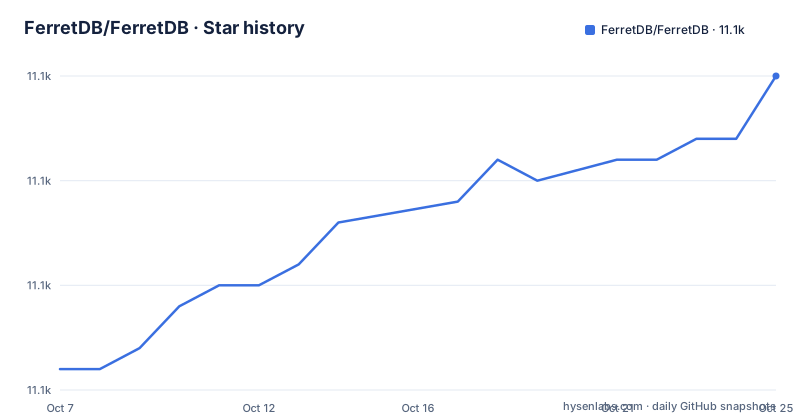
Star history
- FerretDB/FerretDB11,105 ★ · +14
| Repository | 2026-10-07 | 2026-10-25 |
|---|---|---|
| FerretDB/FerretDB | 11.1k | 11.1k |
14 Stars in the last 18 days, measured from the daily GitHub snapshot. Compare with other projects
Editorial analysis
A proxy that speaks BSON in and speaks SQL out
The architecture is one sentence long and everything else follows from it. FerretDB accepts MongoDB 5.0 and later wire protocol connections, converts the queries to SQL, and runs them against PostgreSQL with the DocumentDB extension installed. The README's diagram makes the direction of travel explicit: any application with any MongoDB driver talks MongoDB protocol and BSON to FerretDB, and FerretDB talks PostgreSQL protocol and SQL to the database.
Being a proxy rather than a fork is the key structural decision. Your application does not change. The driver, the connection string and the query language stay the same, and the change happens behind the connection string, where a URI that pointed at a MongoDB replica set now points at FerretDB. That is why the README can claim it functions as a drop-in replacement in many cases rather than describing a migration.
The consequence is that document storage ends up as relational storage. Collections become tables, documents become rows, and the DocumentDB extension is what makes that mapping efficient enough to be practical. The trade is that you inherit both sides of the bargain: you gain PostgreSQL tooling, backups and a permissive licence, and you give up whatever MongoDB does natively that the translation layer cannot express.
The README's own framing is worth repeating because it is the project's argument in one line: most MongoDB users do not require any advanced features offered by MongoDB, they just need an easy-to-use open source document database.
The quickstart container, and why the README tells you not to keep it
The fast path is a single container that bundles FerretDB, a PostgreSQL build with the DocumentDB extension, and the MongoDB shell. You need to supply credentials:
docker run -d --rm --name ferretdb -p 27017:27017 \
  -e POSTGRES_USER=<username> \
  -e POSTGRES_PASSWORD=<password> \
  ghcr.io/ferretdb/ferretdb-eval:2
The image tag ends in `-eval` and the README is explicit that this container is unsuitable for production because it keeps all data inside and loses it on shutdown. It exists so you can try the wire protocol in a minute.
With it running, there are three ways in. Any MongoDB client connects with the URI `mongodb://<username>:<password>@127.0.0.1:27017/`. The MongoDB shell works either by running `mongosh` locally or, if you do not have it installed, through the container with `docker exec -it ferretdb mongosh`. And PostgreSQL is reachable directly for inspection with `docker exec -it ferretdb psql -U <username> postgres`, which is the command that proves the point: the data really is in SQL tables underneath. Shutting it down is `docker stop ferretdb`.
For anything beyond an evaluation, the README points at the installation guides and explicitly advises against building FerretDB yourself, recommending the binaries, Docker images and packages instead. The reason given is that a few generated files and build tags can affect the build. That is an unusually candid admission for a Go project, and it means the Go source is for reading rather than for building in most cases.
Where FerretDB sits in Go and what it depends on
The module path is `github.com/FerretDB/FerretDB/v2` and `go.mod` requires Go 1.25 with toolchain go1.25.7, so this is a recent toolchain requirement rather than something you can build with an older Go.
The dependencies describe the architecture. `go.mongodb.org/mongo-driver/v2` at v2.5.0 is the protocol implementation, which makes sense for a project whose job is speaking MongoDB correctly. `github.com/jackc/pgx/v5` at v5.8.0 is the PostgreSQL driver, and `github.com/jackc/pgerrcode` handles error codes, which is what lets a PostgreSQL error be translated back into something a MongoDB driver understands. `github.com/FerretDB/wire` is the project's own wire protocol package. Prometheus client libraries are there for metrics, and OpenTelemetry is wired for traces.
The module path carries a `/v2` suffix and the README tips v1 users to a `main-v1` branch, so v2 is a deliberate breaking change and the migration is not implicit. The repository tree is organised around this shape: `internal/` holds the translation logic, `ferretdb/` holds the embeddable package, `cmd/` the binaries, `build/` the packaging and dependency images, `integration/` the compatibility tests, and `website/` the documentation source.
There is a Go library package that embeds FerretDB into your own application, published on pkg.go.dev under the v2 path. That is a meaningful option for a Go service that wants the translation layer without a separate deployment.
Compatibility is a list, and the list is the product
The README does not claim full MongoDB compatibility and instead links to two places that carry the detail: a public roadmap, and a list of known differences and supported commands at docs.ferretdb.io.
That link is the single most important thing to read before choosing this project, because it defines the boundary. A proxy that translates a query language has to reject or approximate anything the translation cannot express, and the supported command list is where those gaps are enumerated. If your application uses a feature that is not on that list, it will not work, and no amount of reading the README will tell you.
The repository's own testing reflects how seriously this is taken. The `integration/` directory exists to run compatibility tests, and the docker compose file in the tree sets up two database backends for development: PostgreSQL with the DocumentDB extension, and YugabyteDB configured to run in document mode. The compose file also sets a deliberately awkward timezone, America/St_Johns, with a comment saying it is there to catch timezone problems. That is a good sign about the project's testing attitude and a slightly alarming sign about the bugs it has had.
So the honest way to evaluate FerretDB is to run your own queries against the quickstart container and check them against the supported commands list, rather than to read feature descriptions. The translation layer is the product, and it is only as good as its coverage.
Why the licence is the reason this project exists
The README's second section explains the motivation in terms of history. MongoDB began as an open source technology with easy-to-use, well-documented drivers, and later changed its licence to SSPL, which the README describes as making it unusable for many open source and early-stage commercial projects.
That is the whole reason FerretDB is Apache 2.0 licensed and exists. This is not a performance project or a feature project. It is a licensing escape hatch, and the design follows from that: if the goal is to keep using MongoDB drivers and tools unchanged while owning the storage engine, then a translating proxy is the shortest path, and PostgreSQL is the most widely available engine to translate to.
The licensing comparison is therefore the real comparison. MongoDB Community under SSPL versus Apache 2.0 FerretDB on your own PostgreSQL is a decision your legal team makes, and this repository's contribution is to make the permissive option a drop-in one rather than a rewrite.
FerretDB is Apache 2.0 licensed, with the LICENSE, SECURITY.md and CODE_OF_CONDUCT.md files all present in the tree. It is also available as a managed service through several providers listed in the README, including FerretDB Cloud, Civo, Tembo, Elestio and Cozystack, which is worth knowing if you want the proxy without operating it.
What you give up, and when to pick plain PostgreSQL instead
The costs are concrete and they come in three kinds.
The first is features. Anything MongoDB does that the SQL translation cannot express is unavailable, and the supported command list tells you what that is. Aggregation pipelines are where this bites hardest, since MongoDB's pipeline operators are extensive and each one needs a SQL equivalent.
The second is performance characteristics. A translated query is not a native one. The DocumentDB extension exists to make the mapping efficient, but you are paying for a translation layer on every operation and you lose the native optimisations of either database. For most application workloads that is a reasonable trade; for a workload that is document-database-shaped precisely because of how it queries, it may not be.
The third is operational simplicity in one direction and another in the other. You no longer need to operate MongoDB, which is a real saving. You now need to understand what the translation layer is doing when a query is slow, and you may need to read PostgreSQL execution plans to find out. That is a different skill set from the one you had.
And there is the honest alternative: if you are starting a new application rather than escaping a licence, plain PostgreSQL with JSONB columns may serve you better. You lose the MongoDB driver and query language, but you keep full SQL, you can use real constraints and joins, and there is no translation layer to reason about. FerretDB makes most sense when the driver ecosystem and the existing codebase are already sunk costs you would rather not rewrite.
Editorial conclusion
FerretDB is the right answer for a specific situation: an application written against MongoDB drivers and tools, a team that cannot accept the SSPL licence, and a preference for running PostgreSQL as the system of record. In that situation it removes a licensing problem rather than solving a performance one. It is the wrong answer if you rely on advanced MongoDB features, and the README is direct that most MongoDB users do not need those, which is the entire argument for the project. The repository is Apache 2.0 licensed, the last push was on 2026-06-05, and releases reach v2.7.0 from 2025-11-10. Start with the single-container quickstart, then read the list of known differences and supported commands at docs.ferretdb.io before you migrate anything, because that page, not the README, is where the compatibility boundary lives.
Frequently asked questions
What are the key differences between FerretDB and MongoDB?
FerretDB is a Go proxy that converts MongoDB 5.0+ wire protocol queries to SQL and stores documents in PostgreSQL with the DocumentDB extension, while MongoDB is a native document database with its own storage engine. FerretDB is Apache 2.0 licensed and MongoDB Community uses the SSPL, and FerretDB's command coverage is limited to what the SQL translation supports.
Is MongoDB still relevant in 2026?
That is outside what this repository can answer, since it is a FerretDB project rather than a MongoDB one. What FerretDB's own README argues is that MongoDB remains widely used and that most users do not need its advanced features, and that the SSPL licence change left a gap for an open source document database that FerretDB fills by storing documents in PostgreSQL.
Is Postgres better than MongoDB?
It depends on which of the two problems you are solving. FerretDB is an argument that you can have MongoDB's query surface on PostgreSQL storage, and the README's claim is that most MongoDB users do not need advanced MongoDB features. If you need joins, constraints and real SQL, PostgreSQL is the better tool directly, without a translation layer in between.
Official sources
Add this badge to your README
If you maintain this project, the badge below links readers to this analysis and shows its maintenance status from the daily GitHub snapshot. Paste the markdown into your README; add ?metric=license or ?metric=stars to the image URL for a different field.

[](https://hysenlabs.com/projects/ferretdb-ferretdb)Star history chart for your README
[](https://hysenlabs.com/projects/ferretdb-ferretdb)Was this useful?