fingerprintjs/BotD: Browser-Based Bot Detection for Automation Tools
Free bot detection library that runs in the browser. Detects automation tools and frameworks. No server required, runs 100% on the client. MIT license, no usage restrictions.
At a glance
- What is it?
- fingerprintjs/BotD is a TypeScript library for detecting basic bots and browser automation tools entirely in the browser. It fits applications that need a lightweight client-side signal without a detection server, but it does not cover every bot category.
- Who is it for?
- Adopt fingerprintjs/BotD when your application needs a free, client-side signal for common browser automation tools and can accept incomplete coverage. Do not treat its result as a complete bot-management system, especially for AI agents, search engine crawlers, signed bot identities, or advanced anti-detect browsers.
- Can I use it commercially?
- Yes. MIT is a permissive licence: you can use, modify and sell software built on it, as long as you keep its copyright and licence notices.
- Is it still maintained?
- Yes. The repository last received commits 6 days ago.
- What is it written in?
- Mainly TypeScript, according to GitHub's language statistics.
Answers come from the project's GitHub data, last synced on November 6, 2026, and from our analysis. They are not legal advice.
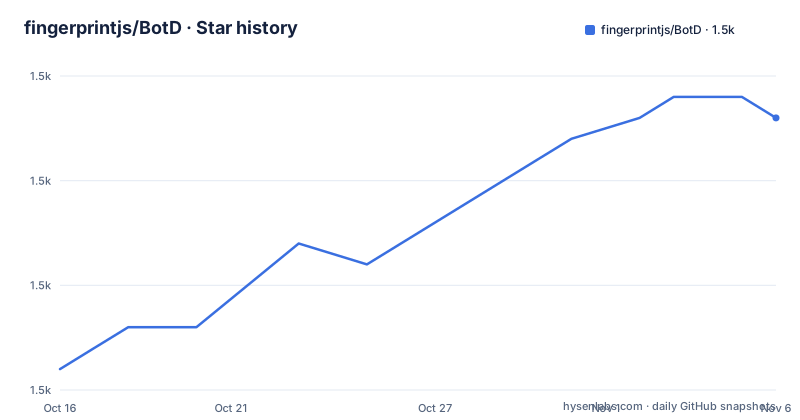
Star history
- fingerprintjs/BotD1,493 ★ · +12
| Repository | 2026-10-16 | 2026-11-06 |
|---|---|---|
| fingerprintjs/BotD | 1.5k | 1.5k |
12 Stars in the last 21 days, measured from the daily GitHub snapshot. Compare with other projects
Editorial analysis
Why fingerprintjs/BotD targets browser automation
fingerprintjs/BotD solves a narrow problem: identifying basic automation inside a web application without sending detection data to a server. It is aimed at developers who want to inspect browser-side evidence from automation frameworks such as Selenium, Playwright, PhantomJS, Nightmare, and Electron. The library is distributed as @fingerprintjs/botd, written primarily in TypeScript, and packaged for browser applications.
The design is useful when the first requirement is a simple client-side classification rather than a complete abuse-prevention service. BotD can run from a CDN or through an NPM dependency, and its public example initializes one agent per page or application before calling detect(). This keeps the integration small. It does not require a BotD server endpoint for the basic library flow.
That boundary matters. The README describes BotD as detection of basic bots, not as a full replacement for a server-side bot decision system. Its comparison table marks browser automation detection as partial coverage, while AI agents, AI assistants, Web Bot Auth, search engines, and anti-detect browsers are listed as unsupported by the open source library. A project that needs those categories should not assume that a BotD result covers them.
The client-side detection path and integration model
The documented flow has two stages. First, the application loads BotD at startup, once per page or app. Second, it calls detect() when a result is needed. With the NPM package, load() returns a promise for the initialized agent. The result is then passed to the next handler. The README's example logs the result to the console and catches errors separately.
This is a browser-side library, so the detection logic is distributed to the user's browser. No server is required for the basic operation, which means the library can be added to a front-end application without first provisioning a remote detection service. The repository contains TypeScript source, browser tests, Rollup configuration, a playground, and API documentation. The package metadata identifies separate CommonJS and ESM build outputs, a declaration file, and a browser target of 96 percent coverage in the United States, excluding Internet Explorer below version 11.
The available documentation does not show the complete result schema or list every detection condition. That means an integrator should not assume that the result is a simple boolean. The API documentation at docs/api.md is the relevant place to verify the returned object, categories, and any available bot kinds before writing a blocking policy.
Installing the NPM package and making the first detection
Install the package with the command documented in the README. The command installs @fingerprintjs/botd for an NPM-based JavaScript or TypeScript application.
npm i @fingerprintjs/botdThe README also provides a Yarn alternative for projects that use Yarn.
yarn add @fingerprintjs/botdImport load, initialize the agent once, and call detect(). The following is the README's JavaScript example. It logs the returned result and sends failures to console.error.
import { load } from '@fingerprintjs/botd'

const botdPromise = load()
botdPromise
  .then((botd) => botd.detect())
  .then((result) => console.log(result))
  .catch((error) => console.error(error))
A real application should decide what to do with the result instead of merely logging it. However, the README does not provide a documented allow, challenge, or deny policy, and it does not state how unknown or unsupported categories should be handled. Those application rules must be defined separately.
CDN loading for pages without a package build step
BotD also supports direct browser loading through a CDN. The README's example uses a dynamic import from the documented v2 endpoint, then calls load() and detect(). This route is appropriate when the page is not built through the NPM package or when the application wants to load the library directly in a script-oriented page.
<script>
  const botdPromise = import('https://openfpcdn.io/botd/v2')
    .then((Botd) => Botd.load())
  botdPromise
    .then((botd) => botd.detect())
    .then((result) => console.log(result))
    .catch((error) => console.error(error))
</script>
The endpoint shown here is versioned as v2. The package metadata independently identifies the NPM release as version 2.0.0. The README says to initialize an agent at application startup, once per page or app, so creating a new agent for every component or event would not follow the documented integration pattern.
The CDN example demonstrates delivery, not a server-side decision. A detection result generated in the browser can be sent by the application to its own backend if needed, but the README does not specify a trusted result-signing mechanism or a recommended server integration.
Coverage limits and appropriate security boundaries
The main limitation is explicit in the README's product comparison. BotD provides partial detection for browser automation tools. It does not cover AI agents such as OpenAI, Manus, and AWS AgentCore, AI assistants such as ChatGPT, Anthropic, and Google Gemini, Web Bot Auth, search engine detection, or anti-detect browsers such as AdsPower, Dolphin Anty, and Kameleo.
The README also says the open source package is not a substitute for the commercial Fingerprint Bot Detection API. That service processes information server-side and adds browser and server-side APIs. According to the documentation, it uses auxiliary data such as network properties and browser overrides, and is intended to distinguish useful bots from malicious traffic. Those capabilities are outside BotD's documented scope.
This is a meaningful boundary rather than a minor feature gap. A BotD result can inform a client-side response, but it should not be interpreted as proof that a request came from a human, nor as proof that an unlisted bot is safe. BotD is also not a CAPTCHA system, an account-farming defense, or a server-side rate limiter. Those uses are not described by the project documentation.
Maintenance, packaging, and upgrade considerations
The repository is not archived, and its last push was on 2026-09-13. The available release history includes v2.0.0 on 2025-11-04, v1.9.1 on 2024-03-29, and v1.9.0 on 2023-12-31. The README states that the near-term roadmap is stability-only and that new features are unlikely to land soon. That is a different maintenance signal from a project promising frequent feature additions.
The NPM package publishes only the dist directory according to package.json. The package includes CommonJS output, ESM output, and TypeScript declarations, while the build scripts use Rollup and TypeScript. The repository also includes lint, browser test, browser stack, declaration, and server-side rendering checks in package.json. These files indicate a conventional build and verification setup, but the README does not document a release policy or upgrade procedure.
The MIT license permits commercial use and places no usage restriction according to the project description. The README says the library will remain free. License users should still read the repository LICENSE file for the actual terms. The last push date and stability-only roadmap should inform upgrade planning, especially for applications that depend on new detection categories that the open source package does not currently cover.
Editorial conclusion
Adopt fingerprintjs/BotD when your application needs a free, client-side signal for common browser automation tools and can accept incomplete coverage. Do not treat its result as a complete bot-management system, especially for AI agents, search engine crawlers, signed bot identities, or advanced anti-detect browsers. Before integration, verify the detection result format in docs/api.md, confirm that the categories you need to block are covered, and decide how the application will respond to uncertain or unsupported traffic.
Frequently asked questions
How do I install and use fingerprintjs/BotD?
Install @fingerprintjs/botd with NPM or Yarn, import load, initialize it once, and call detect(). The README provides both a package example and a CDN example.
Does fingerprintjs/BotD require a server?
No server is required for the documented basic library operation. BotD runs in the browser, although an application may choose to send its own results to a backend for its own policy enforcement.
Can fingerprintjs/BotD detect AI agents and search engine bots?
The README's comparison lists AI agents, AI assistants, and search engine detection as unsupported by the open source library. It presents Fingerprint Bot Detection API as the product that covers those categories.
What is the documented return value of BotD detect()?
The README shows detect() producing a result that is passed to console.log, but the README does not document the complete result schema. Check docs/api.md before relying on specific fields.
Official sources
Add this badge to your README
If you maintain this project, the badge below links readers to this analysis and shows its maintenance status from the daily GitHub snapshot. Paste the markdown into your README; add ?metric=license or ?metric=stars to the image URL for a different field.

[](https://hysenlabs.com/projects/fingerprintjs-botd)Star history chart for your README
[](https://hysenlabs.com/projects/fingerprintjs-botd)Was this useful?