firebase-admin: the privileged Node SDK, and why it is explicitly not a client library
Firebase Admin Node.js SDK
At a glance
- What is it?
- The server-side SDK for Firebase in Node.js, requiring Node 22 or newer and separating CommonJS and ESM entry points per service. Suited to backends that hold admin credentials, and documented as not recommended for client-side environments.
- Who is it for?
- Adopt firebase-admin if you run a Node.js backend that authenticates users, reads the Realtime Database or sends Cloud Messaging on behalf of the project owner. Do not bundle it into client-side code, since the README states the Admin SDK should only be used in server-side and serverless environments controlled by the app developer and is not recommended for client-side use.
- Can I use it commercially?
- Yes. Apache-2.0 is a permissive licence: you can use, modify and sell software built on it, as long as you keep its copyright and licence notices.
- Is it still maintained?
- Yes. The repository last received commits 4 days ago.
- What is it written in?
- Mainly TypeScript, according to GitHub's language statistics.
Answers come from the project's GitHub data, last synced on November 7, 2026, and from our analysis. They are not legal advice.
Star history
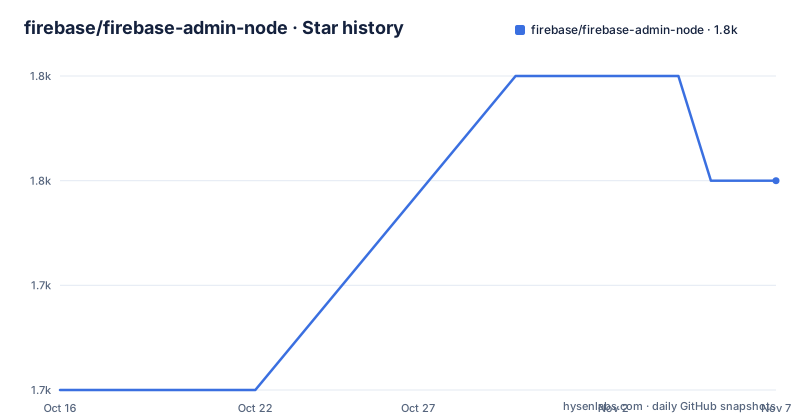
- firebase/firebase-admin-node1,750 ★ · +2
| Repository | 2026-10-16 | 2026-11-07 |
|---|---|---|
| firebase/firebase-admin-node | 1.7k | 1.8k |
2 Stars in the last 22 days, measured from the daily GitHub snapshot. Compare with other projects
Editorial analysis
What the Admin SDK is for, stated plainly
The overview is short and defines the boundary. Firebase provides the tools and infrastructure to develop an app, grow a user base and earn money; the Admin Node.js SDK enables access to Firebase services from privileged environments such as servers or the cloud, in Node.js.
Privileged is the operative word. This is the SDK that bypasses client-side security rules, using a service account credential rather than a user's session. That is exactly why it ships as an npm package with a server-only warning attached.
The README names the services it fronts, through the documentation it links: the Realtime Database guide, the Authentication guide and the Cloud Messaging guide, each with an admin variant, plus the API reference and release notes. So the scope is the data stores and the messaging and identity services rather than everything under the Firebase umbrella.
The npm package name is firebase-admin and the setup guide lives at firebase.google.com/docs/admin/setup.
Installation is one command and two entry styles
The package is published on npm under the name firebase-admin:
$ npm install --save firebase-adminWhat you import afterwards depends on your module system. The CommonJS form pulls initializeApp from the app subpath:
const { initializeApp } = require("firebase-admin/app");

initializeApp();
and the ES2015 form uses import with the same specifier:
import { initializeApp } from "firebase-admin/app";

initializeApp();
Note the subpath. It is firebase-admin/app rather than the package root, which is the visible sign that this SDK is split into per-service entry points. A project importing the SDK touches that shape on every service it uses.
The ESM support is generated, not hand written
The repository layout explains how the dual module support is maintained. There is a generate-esm-wrapper.js script at the root and an esm-wrap npm script that runs it, and the prepare script chains the build and that wrapper step:
"prepare": "npm run build && npm run esm-wrap",
"esm-wrap": "node generate-esm-wrapper.js"
So the ESM entry points are produced from the CommonJS sources at install time rather than being maintained in parallel by hand. That is why prepare runs a build, and it is a detail worth knowing if you vendor the package or use an install path that skips lifecycle scripts.
The declaration of what each entry point exposes is data, not code. entrypoints.json at the root lists them, and api-extractor.json alongside docgen/ drive the published API reference. The documentation pipeline runs api-extractor through generate-reports.js, then api-documenter-fire to produce Markdown, a table of contents pointing at /docs/reference/admin/node, and a post-processing step in docgen/post-process.js.
In other words, the API surface is extracted and checked, which is the mechanism behind a reference that stays in step with the code.
Node 22 is the floor, and the major version tracks the platform
The supported environments section states that the project currently supports Node.js 22 and higher, and package.json encodes the same rule in engines as node >=22. This engine declaration means Node.js 22 or newer is required for the documented version.
Release numbering follows the platform rather than semver independence. The recent releases are v14.3.0 on 2026-08-19, v14.4.0 on 2026-09-10 and v14.5.0 on 2026-09-23, with the last push on 2026-10-15. The version in package.json matches the latest tag.
Testing splits into unit and integration, with different timeouts
The test scripts show two distinct suites with different characteristics. Unit tests run through Mocha with ts-node compiling TypeScript on the fly:
"test:unit": "mocha test/unit/*.spec.ts --require ts-node/register",
"test:integration": "mocha test/integration/*.ts --slow 5000 --timeout 20000 --require ts-node/register"
The integration suite uses a slow threshold of 5000 milliseconds and a 20 second timeout.
The composed scripts matter for contributors. test runs lint then test:unit in sequence, while integration runs a build before test:integration. Coverage is nyc over the src directory with TypeScript extension handling, and lint is split into lint:src and lint:test with separate fix variants.
The build itself is Gulp, via gulp build, and there is a separate build:tests target running gulp compile_test. So the toolchain is TypeScript, Gulp, Mocha, ESLint in flat config through eslint.config.mjs, and nyc.
Licensing has two halves, and only one is Apache 2.0
The README separates them. The SDK code is licensed under the Apache License, version 2.0, with the LICENSE file at the root. Your use of Firebase is governed by the Terms of Service for Firebase Services.
That second clause is not boilerplate. The code being open does not make the service free of terms, and a team that reads only the Apache header misses that. The same split applies to the Firebase services themselves regardless of which Admin SDK language you use.
There is also an ownership history in the acknowledgements: the team at Casetext transferred ownership of the firebase-admin npm module to the Firebase team, and had used and supported the Firebase platform for a long time.
Where firebase-admin is the wrong tool
The clearest wrong case is the client. The README is unambiguous that the Admin SDK should only be used in server-side and back-end environments controlled by the app developer, covering most server and serverless platforms both on premise and in the cloud, and that it is not recommended in client-side environments. If a browser build includes privileged credentials, it can expose access that should remain server-side.
Editorial conclusion
Adopt firebase-admin if you run a Node.js backend that authenticates users, reads the Realtime Database or sends Cloud Messaging on behalf of the project owner. Do not bundle it into client-side code, since the README states the Admin SDK should only be used in server-side and serverless environments controlled by the app developer and is not recommended for client-side use. Verify first that your runtime is Node 22 or newer, since that is the declared engine floor, and remember that the SDK is only half the licensing picture, because use of Firebase itself is governed by the Firebase Services Terms of Service rather than by the Apache 2.0 licence on the code.
Frequently asked questions
How do I install and initialize the Firebase Admin Node.js SDK?
Run npm install --save firebase-admin, then import initializeApp from the firebase-admin/app subpath and call it, using require for CommonJS or import for ES2015.
Which Node.js versions does firebase-admin support?
The README states Node.js 22 and higher are supported, and package.json declares the engines field as node >=22.
Can I use the Firebase Admin SDK in a browser or mobile app?
No. The README states the Admin SDK should only be used in server-side and back-end environments controlled by the app developer, and is not recommended for client-side environments.
Which Firebase services does the Admin Node SDK cover?
The README links admin guides for the Realtime Database, Authentication and Cloud Messaging, plus a setup guide and an API reference.
How is ESM support provided in firebase-admin?
The ESM wrappers are generated rather than hand written. The prepare script runs the build and then esm-wrap, which executes generate-esm-wrapper.js, and entrypoints.json declares what each entry point exposes.
Official sources
Add this badge to your README
If you maintain this project, the badge below links readers to this analysis and shows its maintenance status from the daily GitHub snapshot. Paste the markdown into your README; add ?metric=license or ?metric=stars to the image URL for a different field.

[](https://hysenlabs.com/projects/firebase-firebase-admin-node)Star history chart for your README
[](https://hysenlabs.com/projects/firebase-firebase-admin-node)Was this useful?