ffmpeg-webCLI: a browser video editor that refuses to reverse a batch and routes JPEG thumbnails around a crashing encoder
A browser-based video editor powered by ffmpeg.wasm. No uploads, no servers -- all processing happens locally in your browser using WebAssembly.
At a glance
- What is it?
- A video editor that runs ffmpeg.wasm in the browser, with no uploads and no server, and a paper behind it arguing that client-side processing makes privacy a verifiable property. The interesting parts are the limits it documents: reversing buffers a whole file in memory and is disabled for batches, and JPEG thumbnails are extracted as PNG and converted in the browser because the WebAssembly MJPEG encoder crashes.
- Who is it for?
- This is one of the clearer cases of a client-side tool naming its own failure modes instead of hiding them: the batch restriction on reversing, the 2GB heap ceiling, and the encoder crash are all written down with the reason attached. Two things to weigh before depending on it.
- Can I use it commercially?
- Yes, with conditions. GPL-3.0 is a copyleft licence: if you distribute software that includes it, you must release that software's source code under the same licence. Running it internally without distributing it does not trigger that obligation.
- Is it still maintained?
- Yes. The repository last received commits 19 days ago.
- What is it written in?
- Mainly JavaScript, according to GitHub's language statistics.
Answers come from the project's GitHub data, last synced on November 15, 2026, and from our analysis. They are not legal advice.
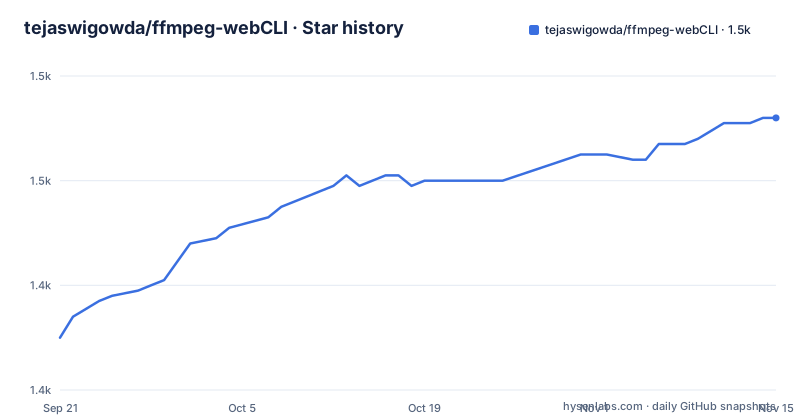
Star history
- tejaswigowda/ffmpeg-webCLI1,472 ★ · +42
| Repository | 2026-09-21 | 2026-11-15 |
|---|---|---|
| tejaswigowda/ffmpeg-webCLI | 1.4k | 1.5k |
42 Stars in the last 55 days, measured from the daily GitHub snapshot. Compare with other projects
Editorial analysis
The root holds server.js and no package manifest
The top-level listing is short: .github/, .serverc.json, .vscode/, LICENSE, README.md, benchmark/, demos/, docs/, paper/ and server.js. There is no package.json, no lockfile and no bundler configuration in that list, so whatever ffmpeg.wasm build the page loads is not recorded at the top of the repository, and the visible text never names a version of it. That matters for a tool whose selling point is that processing never leaves the machine, since the whole argument rests on the code the browser downloads. A server.js sits in the root of a project whose headline says no uploads and no servers, next to a hosting configuration file, and neither one is mentioned anywhere in the file. The application itself is not at the root either: demos/, docs/, benchmark/ and paper/ are, so the editor you open on the live page is served from one of those directories.
Reverse works on one file and refuses a batch
One operation carries an explicit refusal. Reversing uses ffmpeg's reverse filter for video and areverse for audio, and the file states plainly that the reverse filter buffers the entire video into memory for processing, which combined with re-encoding makes the operation memory-intensive. It therefore works in single mode and is not supported in batch mode, with the reason given: to prevent memory exhaustion when several large files are processed at once, with a risk of hitting the 2GB WebAssembly heap limit. That is a limit of the runtime rather than of the operation, and it is stated in the same section that describes the feature, which is rarer than it should be. The batch feature itself is otherwise generous, applying one operation or a whole operation chain to every file with real-time progress, per-file previews, individual downloads, a ZIP-all button and a fallback path. One operation inside that batch model is the exception.
JPEG thumbnails are PNG extractions converted in the browser
The thumbnail extractor lets you pick a timestamp, pre-filled to the midpoint of the loaded clip, and save the frame as JPEG or PNG. What happens underneath is different from the interface. The frame is always extracted as PNG with ffmpeg's -frames:v 1, and the JPEG is then produced in the browser through a canvas. The reason given is a crash in the WebAssembly core's MJPEG encoder, reported as memory access out of bounds, and the file claims this keeps JPEG thumbnails reliable across all clips including high-frame-rate and variable-frame-rate sources. Two flags are quoted verbatim anywhere in the text, and they belong to two different features:
-frames:v 1
-map_metadata -1
The second one strips metadata. Removing GPS coordinates, camera make and model, and creation timestamps before sharing a file is the other privacy feature in the list, and it costs nothing at runtime because it happens during re-encoding. A tool that documents the encoder it had to avoid is more useful to a reader than one that quietly changes format.
Speed changes chain atempo stages outside 0.5 to 2.0
Speed change covers 0.25x to 4x, and the mechanics are spelled out. Both the video presentation timestamps and the audio filter chain are adjusted so pitch and sync survive, and because a single atempo filter only accepts a range of 0.5 to 2.0, the tool chains multiple atempo stages automatically when the multiplier falls outside it. That is the kind of detail that usually lives in an issue thread. The look controls use ffmpeg's eq filter with three sliders whose ranges are given: brightness from -1 to 1, contrast from 0 to 2 and saturation from 0 to 3, plus a grayscale checkbox that pins saturation to zero. Fade in and out take a duration in seconds for each direction independently and are applied after any trim. Compression exposes the CRF slider from 18, described as near-lossless, to 51 for maximum compression, an encoding preset from ultrafast to veryslow for trading speed against size, and a live size estimate that updates as the settings move.
Trimming composes with everything else instead of replacing it
Trim is set with two timeline sliders before any operation runs, and the file is explicit that it is applied on top of every other operation, so a short clip can be extracted, compressed and turned into a GIF in one pass. Resize and compress combine in a single run as well, with a scale filter and CRF-based H.264 encoding, where width and height are filled from the source and left blank means ffmpeg maintains the aspect ratio. Crop behaves the same way, with X and Y offset plus width and height pre-filled from the source dimensions so the numbers are dragged rather than typed. Output sizing is partly automatic elsewhere too: GIF creation takes a frame rate and an output width, height scales itself to preserve the ratio, and the palette is generated in two passes for colour quality. Mute claims something narrower, that the output is the original video with no audio track, and never says whether the video stream is copied or re-encoded, which is the one detail that decides whether it is fast and lossless.
Two-pass palettes, a 45 percent claim, and no source of the number
The format converter offers MP4 as H.264 with AAC for the widest compatibility, WebM as VP9 with Opus for an open format optimised for the web, MKV and MOV as the same H.264 and AAC pair in alternative containers, and AVI for legacy compatibility. WebM carries a parenthetical figure, about 45% smaller than MP4 at similar quality, and no test data, no clip, no encoder settings and no source are attached to it anywhere in the file. That number is the kind of claim that is true in general and useless in particular, because the size difference depends on the clip, the CRF values and the presets on both sides. The README also lists audio output as MP3, AAC, WAV, OGG Vorbis and FLAC, with FLAC as the lossless option, and the accepted input list runs to MP4, WebM, MKV, MOV, AVI, GIF, MP3, AAC, WAV, OGG, FLAC, JPG and PNG. Reading the claims as claims rather than measurements is the only way to use them.
The subtitle muxing section stops mid-word
Subtitle embedding muxes an .srt, .vtt or .ass file into the video and offers two methods. The first is a stream embed of soft subtitles, described as toggleable on or off in any media player such as VLC or a browser without re-encoding, and that line ends in the middle of a word, after the letters t. The second method is not visible. So the feature list above it names subtitle embedding, concatenation, picture-in-picture, audio mixing and raw ffmpeg command access as advanced features, and exactly one of them is described down to the point where you would start using it. The same pattern shows at the top, where the count claimed is 30+ video operations, while the visible use cases number fifteen, from GIF maker through thumbnail extractor and on to subtitles. Offline-first and zero data collection are the other two claims that carry weight, and the PWA behaviour backs the first of them: it works completely offline after first use and installs as a native app.
A paper defines four properties and four implementations
The repository presents itself as a reference implementation of an architecture called Web-CLI, described in a paper by Tejaswi Gowda of Arizona State University, arXiv 2608.28950, titled The Web-CLI: Verifiable Privacy for Tools, Models, and Inference Engines in the Browser. The paper defines four properties, fidelity, progressive disclosure, offline-first and zero egress, presents four reference implementations, and argues that for sensitive data client-side should be the default because it makes privacy a verifiable technical property rather than a policy promise. Two of those four map onto things you can see in the interface: offline-first is the PWA that keeps working with no network, and zero egress is the Web Worker doing the work in the tab. Fidelity is the one you would have to test, and progressive disclosure is not described in the repository at all. The remaining features follow the same argument, with batch processing, background processing in workers and a screen wake lock so the device does not sleep mid-encode.
Editorial conclusion
This is one of the clearer cases of a client-side tool naming its own failure modes instead of hiding them: the batch restriction on reversing, the 2GB heap ceiling, and the encoder crash are all written down with the reason attached. Two things to weigh before depending on it. Privacy here rests on the claim of zero egress rather than on anything you can inspect from the tree, and the root holds server.js and a hosting config that the file never explains. And nothing in the visible root records which ffmpeg.wasm build the page loads, since there is no package manifest at the top level. The licence is GPL-3.0, the last release tag is v2.0.0 from 2026-06-23, and the default branch last moved on 2026-09-06.
Frequently asked questions
Does ffmpeg-webCLI upload my video anywhere?
No. The file states that all video processing happens entirely on the device, in the browser, using WebAssembly, with zero data collection and no uploads and no servers. It also works completely offline after first use as an installable PWA, and the processing runs in Web Workers so the tab stays responsive.
Which output formats does ffmpeg-webCLI produce?
Video: MP4 as H.264 with AAC, WebM as VP9 with Opus, MKV and MOV as H.264 with AAC in alternative containers, and AVI for legacy compatibility. Audio: MP3, AAC, WAV, OGG Vorbis and FLAC. Images: JPEG and PNG for thumbnails, GIF for animation. The accepted input list also includes those formats plus JPG and PNG.
Why can ffmpeg-webCLI not reverse a batch of videos?
Reversing uses ffmpeg's reverse and areverse filters, and the reverse filter buffers the entire video into memory, which with re-encoding makes it memory-intensive. The operation therefore works in single mode only and is not supported in batch mode, to prevent memory exhaustion across several large files, with the stated risk of hitting the 2GB WebAssembly heap limit.
How does ffmpeg-webCLI make JPEG thumbnails if it avoids JPEG encoding?
The frame is always extracted as a PNG using ffmpeg's -frames:v 1, and the JPEG version is then produced in the browser through a canvas. That route works around a crash, reported as memory access out of bounds, in the WebAssembly core's MJPEG encoder, and it is said to keep JPEG thumbnails reliable for high-frame-rate and variable-frame-rate sources.
What is the Web-CLI paper behind ffmpeg-webCLI?
The Web-CLI: Verifiable Privacy for Tools, Models, and Inference Engines in the Browser, by Tejaswi Gowda of Arizona State University, arXiv 2608.28950. It defines four properties, fidelity, progressive disclosure, offline-first and zero egress, presents four reference implementations, and argues client-side processing should be the default for sensitive data because it makes privacy a technical property you can check rather than a promise.
Official sources
Add this badge to your README
If you maintain this project, the badge below links readers to this analysis and shows its maintenance status from the daily GitHub snapshot. Paste the markdown into your README; add ?metric=license or ?metric=stars to the image URL for a different field.

[](https://hysenlabs.com/projects/tejaswigowda-ffmpeg-webcli)Star history chart for your README
[](https://hysenlabs.com/projects/tejaswigowda-ffmpeg-webcli)Was this useful?