Floci UI: A Local Cloud Console That Renders Only Real Runtime Data
Any Cloud. Locally. - The local cloud console for Floci, an AWS-Console-style UI for your local multi-cloud runtime.
At a glance
- What is it?
- Floci UI is an AWS-Console-style web console for local multi-cloud emulators. It renders only real data from local runtimes, with explicit placeholders for unbuilt features, and is currently most complete for AWS.
- Who is it for?
- Adopt Floci UI if you are already running Floci or a compatible local cloud emulator and need a browser-based console for AWS-centric workflows, especially storage, compute, and database operations. Do not adopt it if you need mature Azure or GCP coverage, as many adapters are missing and Azure Serverless is a known 501 gap.
- Can I use it commercially?
- Yes. MIT is a permissive licence: you can use, modify and sell software built on it, as long as you keep its copyright and licence notices.
- Is it still maintained?
- Yes. The repository received new commits within the last day.
- What is it written in?
- Mainly TypeScript, according to GitHub's language statistics.
Answers come from the project's GitHub data, last synced on November 15, 2026, and from our analysis. They are not legal advice.
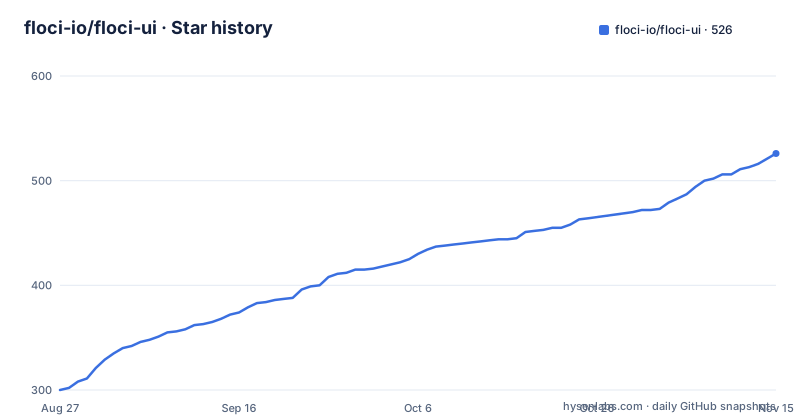
Star history
- floci-io/floci-ui526 ★ · +226
| Repository | 2026-08-27 | 2026-11-15 |
|---|---|---|
| floci-io/floci-ui | 300 | 526 |
226 Stars in the last 80 days, measured from the daily GitHub snapshot. Compare with other projects
Editorial analysis
A Console That Refuses to Fake Data
Floci UI solves a specific annoyance for developers who run local cloud emulators: you get a runtime, but no real console to see what is actually there. The README is blunt about the design rule: no fake resources, no demo rows, and no mock operational data in normal mode. That is a meaningful stance. Most local cloud tools either show a static dashboard or invent placeholder data to make the UI look full. Floci UI instead renders only what the local runtime returns, and where a service is not wired, it shows an explicit placeholder with a server-supplied reason. The target user is someone running Floci or a compatible local multi-cloud runtime and wanting an AWS-Console-style UI to inspect and manage resources without leaving the browser. The project is written in TypeScript and licensed MIT, which matches its local-first, open-source positioning.
How the UI Is Driven by a Service Catalog, Not Hand-Written Menus
The sidebar and Console Home are not maintained by hand. They are rendered from GET /api/clouds/:cloud/services, which is derived from a service catalog and an adapter registry. That means the navigation structure reflects what the runtime actually supports, not what the UI team decided to show. The README includes a table that maps service groups like Compute, Storage, and Databases across AWS, Azure, and GCP. Each cell says whether the service is supported, and if not, why. For example, Azure Serverless is marked as a runtime gap because the Floci-AZ runtime returns 501 NotImplemented for the Azure Functions endpoint. This is a crucial architectural choice: the UI is a thin layer over a defined service contract. Adding a new service is a catalog row in packages/api/src/cloud-spi/serviceCatalog.ts plus an adapter, with no frontend change. That is a clean separation, and it means the UI cannot drift too far from what the runtime can do.
Getting It Running: Two Docker Compose Commands
The quick start is minimal. For an AWS-only stack, you run docker compose up. For a full multi-cloud stack with Azure and GCP, you run docker compose --profile multicloud up. Then open http://localhost:4500. There is also a script to regenerate the service matrix after changing the catalog or adapters: cd packages/api && bun run scripts/service-matrix.ts. That script is useful if you contribute a new adapter or modify a service entry. The project publishes Docker images on Docker Hub under floci/floci-ui, and there are three releases: 0.1.0 in June 2026, 0.2.0 in July, and 0.3.0 in August 2026. The releases are close together, which suggests active iteration, but the README does not document the differences between versions. You will need to check the release notes for specifics.
Storage Is the Most Complete Category, with Clear Gaps
The README calls storage the most complete unified category today. AWS S3 buckets, Azure Blob containers, and GCP Cloud Storage buckets are all normalized as storage resources with types bucket or container. There is a shared resource table, a shared inspector, a runtime status strip, and schema-driven create and delete flows. The object and blob browser supports prefix navigation, and actions include upload, download, delete, copy, and create-folder-prefix. Azure folder markers are hidden and rendered as folders. But there are real gaps: no bulk multi-select actions, no tag, policy, or version management in the unified view, and folder creation is prefix-based, not a real filesystem directory. That last point matters if you expect exact S3 or Blob semantics. The UI is honest about these limitations, which is refreshing, but it also means you cannot use it as a full replacement for cloud provider consoles yet.
Compute and Networking: AWS-Only, with Provider-Specific Panels
Compute is AWS-only, and the README notes that some workflows are too rich for a flat generic form. EC2 instances and AMIs are listed as normalized resources, and you can launch instances, start, stop, reboot, terminate, create AMIs, edit tags, and view console output. But creation still uses an AWS-specific panel because it needs dependent selectors. Networking is similar: VPC list and inspect go through the unified resource table, but creation, deletion, and the VPC wizard, subnets, security groups, internet gateways, NAT gateways, route tables, and Elastic IP workflows live in a separate Networking panel. The README says create and delete are advertised as partial in the unified schema because a flat generic form cannot express dependent selectors. This is a trade-off: the unified model is clean for simple resources, but complex workflows force provider-specific panels. That is a pragmatic choice, but it means the UI is not fully uniform across clouds.
Database: Two Different Models Under One Category
The database category exposes two distinct models. AWS RDS is list and inspect oriented. Azure Cosmos DB NoSQL has full workflows: list, create, and delete databases and containers, plus create, edit, and delete documents, and a SQL query editor. The README is candid that there is no unified cross-provider database contract beyond the shared category shell. GCP has no database adapter yet, and AWS DynamoDB is not rebuilt into the new Cloud Explorer model. This is a limitation if you want a single consistent interface across cloud providers. The UI shows what is possible when a provider implements a rich adapter, but it also shows how far the project is from a true multi-cloud abstraction. For a local development tool, that may be acceptable, but you should not expect to manage DynamoDB or GCP databases here today.
Serverless and API Gateway: Narrow but Functional
Serverless is supported for AWS Lambda and GCP Cloud Functions, with list, create, inspect, and delete. AWS Lambda invoke is wired, including a tailed execution log and handler error display, according to the README. API Gateway is AWS-only and supports list and inspect REST APIs, plus create and delete. Resources, methods, deployments, and stages are not exposed yet. Azure has no API Gateway adapter. The README also mentions that Azure Serverless is a runtime gap because the Floci-AZ runtime returns 501 for the Azure Functions endpoint. That is a concrete example of a failure mode: an adapter exists, but the underlying runtime does not implement the service. The UI renders a disabled sidebar row with a tooltip carrying the server-supplied reason. This is honest, but it also means the UI cannot work around runtime gaps. If your local runtime is incomplete, the UI will show you that incompleteness rather than hide it.
Maintenance and Upgrade Cost, and License Implications
The project is MIT licensed, which means you can use, modify, and distribute it freely, with attribution. There are no obvious legal restrictions beyond the standard MIT terms, but this is not legal advice. Maintenance cost is moderate. The UI is driven by a service catalog and adapter registry, so adding a new service requires a catalog row and an adapter, but no frontend change. That reduces the cost of extending the UI. However, the project is young, with only three releases, and the README shows many gaps: no AKS or GKE adapter, no Azure VM or GCP compute adapter, no Azure VNet or GCP VPC adapter, and no GCP database adapter. The release cadence is monthly, which suggests active development, but it also means you should expect breaking changes between versions. The service matrix script is the key maintenance tool, and you should run it after any catalog or adapter change. The Docker images are published, so deployment is straightforward, but you must verify that the image tag matches your Floci version.
Editorial conclusion
Adopt Floci UI if you are already running Floci or a compatible local cloud emulator and need a browser-based console for AWS-centric workflows, especially storage, compute, and database operations. Do not adopt it if you need mature Azure or GCP coverage, as many adapters are missing and Azure Serverless is a known 501 gap. Before adopting, verify that your local runtime implements the services you need, check the service matrix in packages/api/src/cloud-spi/serviceCatalog.ts, and confirm the Docker image tag matches your Floci version. The project is under active development with three releases in three months, but the UI is honest about what it does not yet support.
Frequently asked questions
What is Floci AWS?
Floci is the local runtime this console drives, and in the compose stack it runs as the image floci/floci:latest-compat with FLOCI_ENDPOINT pointing at http://floci:4566, region us-east-1 and placeholder credentials. Floci UI is the AWS-console-style web console rendered in front of it.
Is Floci a good alternative to LocalStack?
The README never names LocalStack and offers no comparison. The scope it does state is a local-first, cloud-aware runtime console for Floci and compatible local cloud emulators, spanning AWS, Azure, GCP and OCI through one adapter registry.
How to use Floci?
Run `docker compose up` for the AWS-only stack, or `docker compose --profile multicloud up` for all four clouds, then open http://localhost:4500. The Makefile equivalents are `make up` and `make up-multicloud`.
Official sources
Add this badge to your README
If you maintain this project, the badge below links readers to this analysis and shows its maintenance status from the daily GitHub snapshot. Paste the markdown into your README; add ?metric=license or ?metric=stars to the image URL for a different field.

[](https://hysenlabs.com/projects/floci-io-floci-ui)Star history chart for your README
[](https://hysenlabs.com/projects/floci-io-floci-ui)Was this useful?