OpenTasker: a Room and SQLCipher automation engine for Android, with a simulator
A fully open-source, FOSS alternative to Tasker for Android.
At a glance
- What is it?
- A Kotlin and FOSS alternative to Tasker with 78 built-in actions, seven context families, an encrypted Room database, and a review layer that previews, simulates and lints an automation before it is allowed to act. One of its three most recent releases was withdrawn.
- Who is it for?
- Use OpenTasker if you want phone automation that runs entirely on the device, keeps its database encrypted at rest, and lets you rehearse a profile before it touches anything, and you are willing to read the admission and collision rules before enabling it.
- Can I use it commercially?
- Yes. MIT is a permissive licence: you can use, modify and sell software built on it, as long as you keep its copyright and licence notices.
- Is it still maintained?
- Yes. The repository last received commits 23 days ago.
- What is it written in?
- Mainly Kotlin, according to GitHub's language statistics.
Answers come from the project's GitHub data, last synced on October 21, 2026, and from our analysis. They are not legal advice.
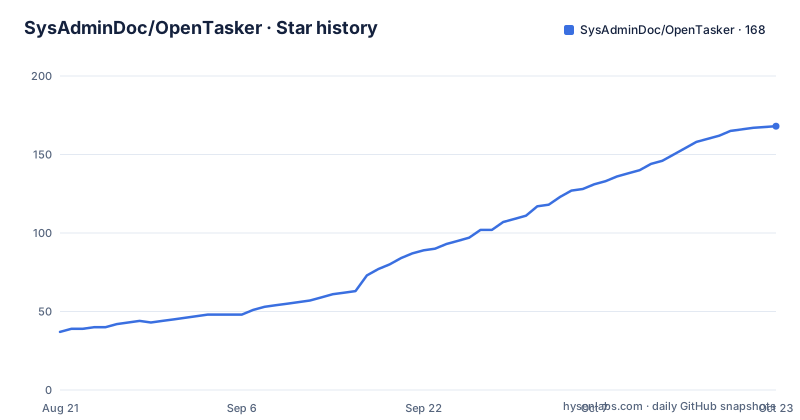
Star history
- SysAdminDoc/OpenTasker167 ★ · +130
| Repository | 2026-08-21 | 2026-10-21 |
|---|---|---|
| SysAdminDoc/OpenTasker | 37 | 167 |
130 Stars in the last 61 days, measured from the daily GitHub snapshot. Compare with other projects
Editorial analysis
SQLCipher encrypts the whole Room file and a wrong key fails closed
The storage decision comes first, because everything else in the app is a row in this database. The complete Room file is encrypted at rest with SQLCipher, using a random key that is itself wrapped by the Android Keystore rather than stored as a plain string. Two details make the design defensible in practice. Existing plaintext databases migrate once, before Room opens, so an upgrade does not leave a window where the file is readable. And a wrong-key open fails closed, which means the application refuses to start on a database it cannot decrypt instead of quietly presenting an empty task list that looks like data loss. The pipeline above it is a Room-backed set of profiles, contexts, tasks and actions, with the interface written in Compose.
78 built-in actions across seven context families, plus flow verbs
The scale is stated as two numbers. There are 78 built-in actions, and on top of them the engine handles flow control itself rather than expecting every action to be a plugin: `task.run`, `if`, `else` and `end if`, `for each` and `end for`, `try`, `catch` and `end try`, and `stop`. Contexts, which is what actually fires a profile, come in seven families: Application, Time, Day, Location, State, Event and Plugin, the last of which is described as carrying a Locale or Tasker condition. Two of the more unusual capabilities sit in there as well. Companion presence triggers use user-confirmed CompanionDeviceManager associations to emit low-power present and absent events with no scanning loop, revocable at setup time, and USB device contexts expose attach and detach pulses with bounded device, vendor, product and class fields. Four smaller mechanisms shape how a profile is written rather than what triggers it. Template expressions expand bounded `{{ ... }}` blocks with scoped variables, arrays, JSON paths, string, math and date functions, a trace facility and a strict regex policy, which is what keeps a template from turning into an arbitrary evaluator. Contexts nest into backward-compatible ALL, ANY and NOT groups, and the Inspector explains the evaluated tree instead of leaving you to guess which branch fired. Profiles collect into named groups with filter chips. And tasks, profiles, scenes and variables can be scoped behind a local project boundary, with deletion inside that boundary requiring explicit reassignment rather than a silent cascade.
Simulation and lint run before anything is allowed to act
The distinguishing feature is a review layer, and it comes in three parts. Preflight reviews are side-effect free: you can preview a task or a whole profile with synthetic event variables, expanded inputs, branch decisions, setup gaps, intended effects and explicit blockers, all before any action runs. Trigger simulation goes further and pins family-specific synthetic events from a profile editor or the Context Inspector, showing each predicate, each context expression, the cooldown and the admission result, without writing a production run-log row and without running the task. Automation lint then runs on profile saves, on imports, in the flow graph and in the Inspector, surfacing missing reversals, repeated state triggers, conflicting writers and inter-profile loops, each with a concrete suggested fix rather than a bare warning.
One redaction boundary, and secrets live in the Keystore
Credential handling is described as a single boundary rather than a set of best efforts. Credential-bearing action arguments, meaning HTTP authorization headers, query and body values, request payloads, script standard input and SMS text, are masked everywhere they are displayed, including the task list, the flow graph and previews, specifically so they cannot leak through a screenshot or through accessibility semantics. Actions that are not registered, and keys the app does not know, fail closed rather than rendering raw. First-class secret variables are stored with AES-256-GCM in the Android Keystore, with a deliberate reveal and re-entry flow instead of a plain text field, and redaction is provenance-based, which is how derived action arguments, log entries, traces and failures inherit the masking of the secret they came from.
Admission bounds, a circuit breaker and a four-way collision policy
Execution is rate-limited by design, in three layers. Profile execution admission optionally bounds active and burst starts per profile, and on overflow you choose between a replayable logged hold and a silent skip, with rejection counts and circuit-breaker state visible in Diagnostics. Profile lifecycle policy assigns deterministic priority, applies a symmetric activation grace, and supports never, date and once lifetimes, with the Inspector explaining expiry and priority suppression while bundles and Tasker mappings preserve safe defaults. On top of that sits a per-profile re-trigger behaviour of single, restart, queued or parallel, followed by one global per-task collision policy of abort-new, abort-existing, run-both or wait, which covers profile, manual, nested, widget, notification and external runs.
MacroDroid imports arrive disabled, with a mapped and lossy review
Migration from another automation app is treated as untrusted input. Full `.mdr` backups and single `.macro` shares are imported into profiles that are disabled by default, with bounded decoding and a review that separates what mapped exactly, what is unsupported and what was lossy, so nothing arrives silently degraded. Offline bundle import works the same way: you paste exported JSON or decoded QR text into the existing review flow, which is also disabled by default, and the input is length-bounded before parsing. That pattern extends to the rest of the editing model. Profile saves and deletions are undoable, with variable and project deletion offering an undo in a snackbar, and Keystore-backed secrets stay readable after a project restore, which is the detail that makes the undo system usable rather than decorative.
Several triggers are written around Android version behaviour
A long trigger list is where the version sensitivity shows. App foreground detection goes through UsageStats with optional exact or glob Activity component matching, connectivity through NetworkCallback, notifications through a listener with package, title and body filters, NFC through tag scans with normalized ID matching and a one-time NDEF write helper, calendars with redacted event metadata, and sunrise and sunset with coordinate, offset and window support. Three entries are explicit about platform limits. An Android 15 or later screen-recording trigger reacts to whether the app is visible during a recording and does not capture screen contents. The SMS trigger exposes sanitized sender and body metadata on standard and F-Droid builds, and the text warns that Android 17 may delay standard one-time-passcode SMS delivery for up to three hours outside exempt apps. The broadcast trigger registers at most the sixteen actions your enabled profiles declare and re-checks the action when the intent arrives.
A Gradle multi-module project, an F-Droid directory and a withdrawn release
The repository is a multi-module Gradle project rather than a single app module, with `app/`, `core/`, `feature/` and `buildSrc/` directories, a `baselineprofile/`, wrapper scripts, a `gradle.properties` and both `build.gradle.kts` and `settings.gradle.kts` at the root. Alongside the code sit the artefacts a real distribution needs: an `fdroid/` directory for F-Droid packaging, a `fastlane/` directory, a `design/` directory with a separate design QA document, a `docs/` directory, a `tools/` directory and a dedicated icon package folder. Governance is plain too, with a licence file, a changelog, a contribution guide and an Obtainium install link for the package id. The project is MIT licensed and not archived, with the last push to master on September 30, 2026, and the three newest tags are v0.2.94, v0.2.93 and v0.2.92, the last of which is marked withdrawn.
Editorial conclusion
Use OpenTasker if you want phone automation that runs entirely on the device, keeps its database encrypted at rest, and lets you rehearse a profile before it touches anything, and you are willing to read the admission and collision rules before enabling it. Do not pick it on feature count alone, since the re-trigger, admission and collision policies are stricter than a tap-to-record workflow implies, and do not rely on a release until you check its tag, as v0.2.92 was withdrawn. Before you import anything from another app, read the mapped, unsupported and lossy review rather than accepting the import, and confirm on your own Android version that the trigger you need behaves as described, particularly the SMS and broadcast paths.
Frequently asked questions
What is OpenTasker and how does it relate to Tasker?
OpenTasker describes itself as a fully open-source, on-device, FOSS alternative to Tasker for Android, written in Kotlin. It has a Room-backed pipeline of profiles, contexts, tasks and actions with a Compose interface, 78 built-in actions, and seven context families covering application, time, day, location, state, event and plugin conditions.
Where does OpenTasker keep its automations, and are they encrypted?
The complete Room file is encrypted at rest with SQLCipher, using a random key wrapped by the Android Keystore. Existing plaintext databases migrate once before Room opens, and opening with the wrong key fails closed instead of starting with an empty task list.
Can I test an automation in OpenTasker before it runs for real?
Yes. Preflight reviews preview a task or profile with synthetic event variables, expanded inputs, branch decisions, setup gaps, intended effects and explicit blockers before any action runs, and trigger simulation shows each predicate, context expression, cooldown and admission result without writing a run-log row or running the task at all.
Official sources
Add this badge to your README
If you maintain this project, the badge below links readers to this analysis and shows its maintenance status from the daily GitHub snapshot. Paste the markdown into your README; add ?metric=license or ?metric=stars to the image URL for a different field.

[](https://hysenlabs.com/projects/sysadmindoc-opentasker)Star history chart for your README
[](https://hysenlabs.com/projects/sysadmindoc-opentasker)Was this useful?