Godot MCP Native counts 155 tools and lists 156
An MCP plugin that supports the open-source Godot engine, enabling common Godot engine operations. It implements the MCP server using Godot's native HTTP, requires no dependency installation, is ready to use out of the box, and supports invocation by various AI tools.
At a glance
- What is it?
- A GDScript plugin that runs an MCP server inside the Godot editor with no Node.js dependency, installable from the Asset Library or copied into a project. Its headline tool count does not add up, its HTTP server listens on port 9080 with authentication optional, and a separate command line tool exists because 155 schemas do not fit in a model context.
- Who is it for?
- Godot MCP Native is a reasonable choice if you want an agent to read and edit a Godot project from inside the editor rather than through a headless toolchain, and the fact that the server is implemented in the engine's own HTTP is what removes the Node.js requirement. Three things to check before you connect it to an agent.
- Can I use it commercially?
- Yes. MIT is a permissive licence: you can use, modify and sell software built on it, as long as you keep its copyright and licence notices.
- Is it still maintained?
- Yes. The repository last received commits 104 days ago.
- What is it written in?
- Mainly GDScript, according to GitHub's language statistics.
Answers come from the project's GitHub data, last synced on November 15, 2026, and from our analysis. They are not legal advice.
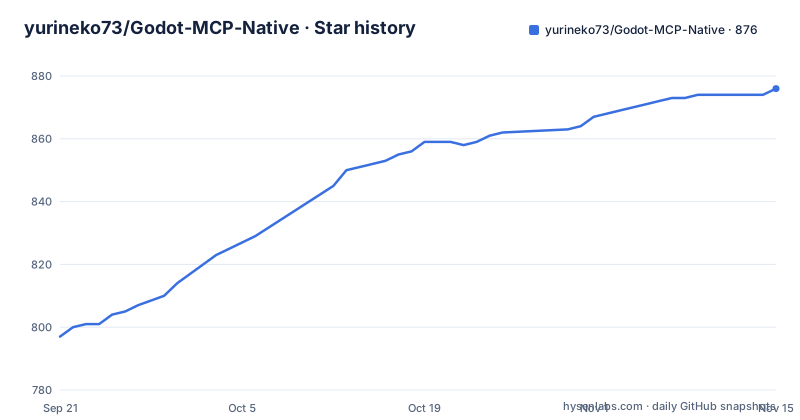
Star history
- yurineko73/Godot-MCP-Native876 ★ · +79
| Repository | 2026-09-21 | 2026-11-15 |
|---|---|---|
| yurineko73/Godot-MCP-Native | 797 | 876 |
79 Stars in the last 55 days, measured from the daily GitHub snapshot. Compare with other projects
Editorial analysis
The headline tool count does not match its own categories
The feature list announces 155 tools, split as 30 core and 125 supplementary. The six category lines then break each group down, and the core numbers add up: 9 node, 7 script, 4 scene, 4 editor, 3 debug and 3 project, which is 30.
The supplementary numbers do not. They are 11 node, 8 script, 4 scene, 12 editor, 68 debug and 23 project. That is 126, one more than the 125 in the headline, so the categories account for 156 tools rather than 155. The CLI section repeats the same 155 when it explains why it does not load every schema into a model context, so the figure is used twice while being one short of its own breakdown.
For a user this is minor and for a reader trying to work out how much surface there is it is the sort of thing that makes the rest of the list harder to trust at a glance. Nothing in the pages suggests which tool was counted twice or whether one of the advanced entries is an alias for another.
Two thirds of the advanced set is debugging
The distribution across the categories is lopsided in a way the flat total hides. Debug tools account for 68 of the supplementary entries: logging, debugger sessions, breakpoints, stack and variable inspection, profilers, a runtime probe, runtime control for animation, audio, shaders and tilemaps, debug execution control and `await_scene_ready`. Project tools add 23, covering project settings, resource listing and creation, running tests, input mappings, autoloads and global classes, plus resource diagnostics.
By comparison, scene manipulation has 4 supplementary tools and script tooling has 8. So the categories that appear first in the list, node and script editing, are not where the volume sits.
That is a defensible shape for a tool that has to support an agent working inside a running editor, where knowing what loaded and what state a node is in matters more than another way to add a node. It is also a reminder that the count is a poor proxy for capability here, since a breakpoint tool and a duplicate-node tool are not comparable units.
gdmcp exists because 155 schemas do not fit in a context
For agents with shell access, the project recommends a command line interface instead of the full tool surface:
gdmcp --json doctor
gdmcp --json scenes tree --depth 4
gdmcp --json scripts read res://player.gd --lines 1:200
gdmcp --json nodes properties set /root/Player --property speed --value 300
The reason given is context budget. Instead of loading every tool schema into the model, the CLI uses progressive discovery: roughly 33 domain commands cover common operations, and supplementary schemas are fetched on demand. Every invocation takes `--json`, and the flags are shaped to limit scope, with a depth on a tree walk, a line range on a file read and an explicit property path on a write.
The CLI comes from the Godot editor itself, through the MCP dock and its CLI Tools tab, or from the repository's releases. There is a separate reference at `docs/current/gdmcp-cli-reference.md`, and a companion skill under `skills/gdmcp/` that is copied to `~/.codex/skills/gdmcp/` to teach an agent the workflow.
The HTTP transport listens on 9080 and auth is optional
The plugin offers two transports. HTTP mode is described as best for network based AI integration, configured by setting `transport_mode` to `http` and an `http_port` that defaults to 9080. A second transport, stdio, is reachable through the `--mcp-transport` flag rather than the panel.
Security is optional in that configuration. `auth_enabled` and `auth_token` exist and are described as optional, and every worked client example connects to `http://localhost:9080/mcp` without credentials. The Cursor and Trae example is a bare URL, the Cline example adds a transport type, a disabled flag and an empty auto-approve list, and the Codex example is a two line TOML block. Only one variant shows an Authorization header carrying a bearer token.
So the default shape is a server on a well known port with no credential, and the documentation's own ordering makes token configuration the exception rather than the rule. On a shared machine that is the detail to decide on before connecting anything to it.
The command line overrides the saved file, and bad values are dropped
Settings changed in the panel persist to `user://mcp_settings.cfg`, and the headless server mode is stated to honour that file, which means the port and transport chosen in the editor UI are respected when the editor runs without a window.
Running several instances at once is handled with per-launch flags, and the command line is stated to take precedence over the persisted configuration:
godot --editor --path /path/to/projectA -- --mcp-server --mcp-port=9080
godot --editor --path /path/to/projectB -- --mcp-server --mcp-port=19081
The two flags are documented as `--mcp-port=N` for a value between 1024 and 65535, overriding `http_port`, and `--mcp-transport=MODE` accepting `http` or `stdio`, overriding `transport_mode`. Both carry the same clause about invalid input: an out-of-range port and an unknown transport are ignored, which means a typo silently leaves the saved setting in place rather than failing the launch.
Five client dialects, one server, and one of them needs npm
The connection examples cover Claude Desktop, Cursor, Trae, Cline, OpenCode and Codex, and each one uses a different config file shape. Claude Desktop needs the `mcp-remote` package installed first and is then launched through `npx`, so its path involves an npm install even though the server itself has no Node.js dependency. Cursor and Trae take a plain URL, with a headers block added when a token is in use. Cline takes the URL plus a streamable HTTP type, a disabled flag and an auto-approve array. OpenCode nests its servers under its own key with a remote type, and adds a note that a WSL install has to point at the host machine's IP rather than localhost. Codex uses TOML.
The example prompts show the resulting surface, including reading the current script through a `godot://` style path and getting the scene tree, and the last example block on the page stops partway through a sentence.
The plugin README also has a Chinese version at `README.zh.md`, which is the front door for the repository's own language.
The plugin repository is itself a Godot project
The root listing makes the repository double as a working project. `project.godot` and `TestScene.tscn` sit beside `README.md` and `addons/`, with `icon.png`, `images/`, `scripts/`, `cli/`, `docs/`, `test/` and `skills/` around them, so opening the repository in the editor is a way to exercise the plugin rather than only to read it.
There is also a `package-lock.json` in a GDScript project, which lines up with the `mcp-remote` install in the Claude Desktop instructions rather than with anything in the plugin. Agent-facing configuration is committed too: an `AGENTS.md`, a `.cursor/` directory, and the `skills/gdmcp/` folder the CLI section tells you to copy elsewhere.
Maintenance is thin on the record. The newest release is v1.0.8 dated 2026-07-26, preceded by v1.0.7 on 2026-07-22 and a v1.0.7-pre1 prerelease on 2026-06-16, and the last commit on the default branch is dated 2026-08-03. With the editor's own API moving between versions, a plugin pinned to one release is the constraint to watch.
Editorial conclusion
Godot MCP Native is a reasonable choice if you want an agent to read and edit a Godot project from inside the editor rather than through a headless toolchain, and the fact that the server is implemented in the engine's own HTTP is what removes the Node.js requirement. Three things to check before you connect it to an agent. The tool inventory is large and its stated total does not match the sum of its own categories, so treat the count as approximate and read the CLI reference instead. The server binds a fixed port and authentication is described as optional, which on a shared machine or a laptop on public wifi is the difference between a local tool and a remote one. And the per-launch flags are how you run two projects at once, so a port collision is not a failure to debug but a flag to pass.
Frequently asked questions
Is there an MCP for Godot?
Yes. Godot MCP Native is a GDScript plugin that implements the MCP server with Godot's own HTTP, so it runs inside the editor with no Node.js dependency. It is installed from the Asset Library by searching for Godot MCP Native, or by copying the addons/godot_mcp folder into a project and enabling it under Project Settings.
Does Godot MCP Native require an access token?
Not by default. HTTP mode uses transport_mode set to http with http_port defaulting to 9080, and auth_enabled with auth_token are described as optional, so the example client configurations connect to http://localhost:9080/mcp with no credentials. Only the authenticated variant shows a bearer token header.
How many tools does Godot MCP Native expose?
The headline figure is 155, split into 30 core and 125 supplementary, and the six core counts do add to 30. The advanced counts listed for node, script, scene, editor, debug and project tools add up to 126 rather than 125, so the categories total 156.
How do I run two Godot projects at once with Godot MCP Native?
Start each editor with its own port, using flags such as --mcp-port=9080 and --mcp-port=19081. The command line takes precedence over the settings saved to user://mcp_settings.cfg, valid ports run from 1024 to 65535, and a value outside that range is ignored rather than rejected.
Official sources
Add this badge to your README
If you maintain this project, the badge below links readers to this analysis and shows its maintenance status from the daily GitHub snapshot. Paste the markdown into your README; add ?metric=license or ?metric=stars to the image URL for a different field.

[](https://hysenlabs.com/projects/yurineko73-godot-mcp-native)Star history chart for your README
[](https://hysenlabs.com/projects/yurineko73-godot-mcp-native)Was this useful?