Context+ is an MCP server that indexes a codebase into a feature graph, and writing goes through propose_commit
Semantic Intelligence for Large-Scale Engineering. Context+ is an MCP server designed for developers who demand 99% accuracy. By combining RAG, Tree-sitter AST, Spectral Clustering, and Obsidian-style linking, Context+ turns a massive codebase into a searchable, hierarchical feature graph.
At a glance
- What is it?
- Context+ exposes semantic search, AST skeletons, blast radius tracing and a memory graph over MCP, with embeddings generated by Ollama. The design choice that shapes everything is that propose_commit is the only tool that writes files, and it creates a shadow restore point first.
- Who is it for?
- Adopt Context+ if your editor's assistant can see the whole repository and you want semantic search, symbol skeletons and call-site ranking without wiring an embedding service of your own, and if you are willing to run Ollama with nomic-embed-text. Verify first what your gitignore excludes, because the README has a section on including paths excluded by the workspace gitignore and an unindexed directory will look like missing code rather than a configuration gap.
- Can I use it commercially?
- Yes. MIT is a permissive licence: you can use, modify and sell software built on it, as long as you keep its copyright and licence notices.
- Is it still maintained?
- Yes. The repository last received commits 118 days ago.
- What is it written in?
- Mainly TypeScript, according to GitHub's language statistics.
Answers come from the project's GitHub data, last synced on November 7, 2026, and from our analysis. They are not legal advice.
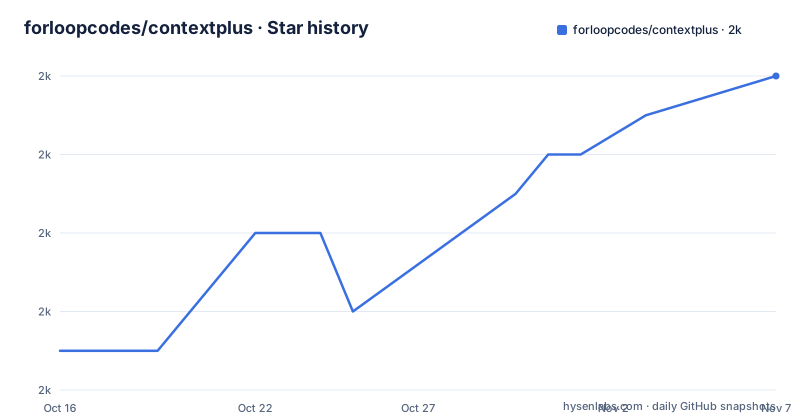
Star history
- forloopcodes/contextplus1,990 ★ · +7
| Repository | 2026-10-16 | 2026-11-07 |
|---|---|---|
| forloopcodes/contextplus | 2k | 2k |
7 Stars in the last 22 days, measured from the daily GitHub snapshot. Compare with other projects
Editorial analysis
Five discovery tools, each answering a different question
The tool surface is grouped into four families, and the discovery family is where the design shows.
get_context_tree returns the structural AST tree of a project with file headers and symbol ranges, meaning line numbers for functions, classes and methods. The README notes that dynamic pruning shrinks output automatically, which is the answer to the obvious objection that a tree over a large repository is unusable in a context window.
get_file_skeleton is the cheaper version: function signatures, class methods and type definitions with line ranges, without reading full bodies, described as showing the API surface.
semantic_code_search searches by meaning rather than exact text. It uses embeddings over file headers and symbols and returns matched symbol definition lines, so a query matches a concept and you get the definition line rather than a pile of hits.
semantic_identifier_search goes one level narrower, doing identifier level semantic retrieval for functions, classes and variables and returning ranked call sites with line numbers. That is the tool for finding where something is used, not where it is defined.
semantic_navigate uses spectral clustering to group semantically related files into labeled clusters. That is the closest thing to a map of a repository you do not yet understand, and the labeled clusters are what an assistant uses to decide which files to read next.
Analysis tools trade the model in for the actual linter
Two tools in the analysis family do work a language model should not.
get_blast_radius traces every file and line where a symbol is imported or used. Its stated purpose is preventing orphaned references, and this is the tool to reach for before a rename, because it answers the question a model tends to guess at.
run_static_analysis runs native linters and compilers to find unused variables, dead code and type errors, and it supports TypeScript, Python, Rust and Go. Running the real toolchain rather than asking a model to notice an unused import is the correct division of labour, and the language list is the boundary of what it covers.
If your repository is in a language outside those four, run_static_analysis will not help you, and the other analysis tool is unaffected by language entirely because it works from the index.
propose_commit is the only write path, and undo is not git
This is the part of the design that decides whether you can trust the server with a repository.
The README describes propose_commit as the only way to write code, validating against strict rules before saving and creating a shadow restore point before writing. So the write path is gated, validated and preceded by a snapshot, rather than being a file write tool the model can call whenever it likes.
The snapshot layer has two tools. list_restore_points lists all shadow restore points created by propose_commit, each capturing file state before the AI change. undo_change restores files to their state before a specific change, using those restore points, and explicitly does not affect git.
That last clause is important and easy to misread. undo_change puts your working tree back without touching history, so it is not a git operation and it does not appear in git status as a revert. The consequence is that your commits stay clean while the working tree can still be moved, which is convenient during an edit session and confusing if you assume everything undoable is recorded somewhere.
get_feature_hub belongs in the same family. It is an Obsidian style navigator where hubs are .md files containing [[wikilinks]] that map features to code files, which is a plain text file you can read, diff and review like anything else in the repository.
The memory graph stores concepts, files, symbols and notes as nodes
Six tools cover the long term memory side, and they describe a graph with typed edges and time decay.
upsert_memory_node creates or updates a node, where a node can be a concept, a file, a symbol or a note, with embeddings generated automatically. create_relation creates typed edges between nodes, and the relation types are listed: relates_to, depends_on, implements, references, similar_to and contains.
search_memory_graph does semantic search with graph traversal. The README describes it as finding direct matches first and then walking first and second degree neighbours, which is what turns a similarity hit into context: the node, plus what it depends on, plus what depends on it.
retrieve_with_traversal goes further out, starting from a node and walking outward to return all reachable neighbours scored by decay and depth. Here decay is a real formula rather than a metaphor: prune_stale_links removes edges whose weight, e^(-λt), falls below a threshold, along with orphan nodes that have low access counts. So the graph prunes itself on a half life you do not have to tune per entry.
add_interlinked_context bulk-adds nodes with automatic similarity linking, where a cosine similarity of 0.72 or above creates an edge. That threshold is a hard number in the README and it is the one setting worth understanding, because it decides what becomes connected.
Setup: an MCP config block and a local Ollama
There is no installation step in the usual sense. The quick start is to add the server to your editor's MCP configuration, run with bunx or npx.
For Claude Code, Cursor and Windsurf the key is mcpServers:
{
  "mcpServers": {
    "contextplus": {
      "command": "bunx",
      "args": ["contextplus"],
      "env": {
        "OLLAMA_EMBED_MODEL": "nomic-embed-text",
        "OLLAMA_CHAT_MODEL": "gemma2:27b",
        "OLLAMA_API_KEY": "YOUR_OLLAMA_API_KEY"
      }
    }
  }
}
VS Code is different, using servers and inputs under.vscode/mcp.json rather than mcpServers:
{
  "servers": {
    "contextplus": {
      "type": "stdio",
      "command": "bunx",
      "args": ["contextplus"],
      "env": {
        "OLLAMA_EMBED_MODEL": "nomic-embed-text",
        "OLLAMA_CHAT_MODEL": "gemma2:27b",
        "OLLAMA_API_KEY": "YOUR_OLLAMA_API_KEY"
      }
    }
  },
  "inputs": []
}
The three environment variables are the operational dependency. Embeddings come from OLLAMA_EMBED_MODEL nomic-embed-text, a chat model is named by OLLAMA_CHAT_MODEL gemma2:27b, and OLLAMA_API_KEY is present. The env block configures Ollama and names an embedding model, a chat model and an API key.
Instead of editing JSON by hand, the CLI can generate it:
npx -y contextplus init claude
bunx contextplus init cursor
npx -y contextplus init opencode
Supported targets are claude, cursor, vscode, windsurf and opencode, writing to.mcp.json,.cursor/mcp.json,.vscode/mcp.json,.windsurf/mcp.json and opencode.json respectively. There are also subcommands for a terminal view, skeleton [path] and tree [path], and the bare [path] form starts the stdio server for a directory, defaulting to the current one.
Dependencies, repository shape and where it is not the answer
package.json shows the stack. It is an ES module package with a contextplus binary pointing at build/index.js, TypeScript compiled with plain tsc, and the Node built-in test runner over test/main/*.test.mjs with a separate test:demo target.
Version is 1.0.9 and the licence is MIT. The repository root holds src/, test/, a landing/ directory for the site, INSTRUCTIONS.md, agent-instructions.md, a.claude/ directory, TODO.md, bun.lock and package-lock.json, and the default branch is main. There are no GitHub releases, so npm is the version record. The last push was on 2026-07-13 and the repository is not archived.
The README's description claims 99% accuracy, which is a marketing number with no test data behind it in the repository, so treat the tool list rather than the headline as the evaluation surface.
Where it is wrong: the indexing cost is real. And the gitignore section is the quiet failure mode: excluded paths are excluded from indexing, so a build output or vendor directory full of generated code may be silently absent rather than reported.
Editorial conclusion
Adopt Context+ if your editor's assistant can see the whole repository and you want semantic search, symbol skeletons and call-site ranking without wiring an embedding service of your own, and if you are willing to run Ollama with nomic-embed-text. Verify first what your gitignore excludes, because the README has a section on including paths excluded by the workspace gitignore and an unindexed directory will look like missing code rather than a configuration gap.
Frequently asked questions
How do I install Context+ as an MCP server?
There is no separate install. Add a mcpServers entry with command bunx and args ["contextplus"] to your editor's MCP config, or run npx -y contextplus init claude to generate the file. VS Code uses a servers key with type stdio under .vscode/mcp.json instead.
Does Context+ need an external embedding API?
It is configured against Ollama. The env block sets OLLAMA_EMBED_MODEL to nomic-embed-text, OLLAMA_CHAT_MODEL to gemma2:27b and OLLAMA_API_KEY, so embeddings are generated through Ollama.
Can Context+ write files in my repository?
Only through propose_commit, which the README describes as the only way to write code. It validates against strict rules before saving and creates a shadow restore point first, which undo_change can use to restore the previous file state without touching git.
What does get_blast_radius do?
It traces every file and line where a symbol is imported or used, which the README frames as a way to prevent orphaned references. It is the tool to use before a rename or an API change.
Which languages does run_static_analysis support?
TypeScript, Python, Rust and Go. The README states that it runs native linters and compilers to find unused variables, dead code and type errors in those four languages.
Official sources
Add this badge to your README
If you maintain this project, the badge below links readers to this analysis and shows its maintenance status from the daily GitHub snapshot. Paste the markdown into your README; add ?metric=license or ?metric=stars to the image URL for a different field.

[](https://hysenlabs.com/projects/forloopcodes-contextplus)Star history chart for your README
[](https://hysenlabs.com/projects/forloopcodes-contextplus)Was this useful?