Forward Email: an email server you run as multiple services
Privacy-focused encrypted email for everyone. All-in-one alternative to Gmail + Mailchimp + Sendgrid.
At a glance
- What is it?
- Forward Email is an open-source mail server whose architecture is visible in its compose file and its ecosystem configs: web, API, CalDAV, CardDAV, SMTP, MX, IMAP and POP3 each get their own port and their own PM2 ecosystem file. The code is BUSL 1.1 and MPL 2.0, not open source in the OSI sense, and the README documents self-hosting rather than installation.
- Who is it for?
- Adopt Forward Email if you run your own domains and want to receive mail for them with IMAP, plus an API for aliases, and you are prepared to operate MongoDB, Redis and eight processes, because the compose file shows redis:7-alpine and mongo:8 as hard dependencies with the application depending on both.
- Can I use it commercially?
- Check first. The repository uses a licence we do not classify automatically, so read its LICENSE file before any commercial use.
- Is it still maintained?
- Yes. The repository last received commits 2 days ago.
- What is it written in?
- Mainly JavaScript, according to GitHub's language statistics.
Answers come from the project's GitHub data, last synced on November 6, 2026, and from our analysis. They are not legal advice.
Star history
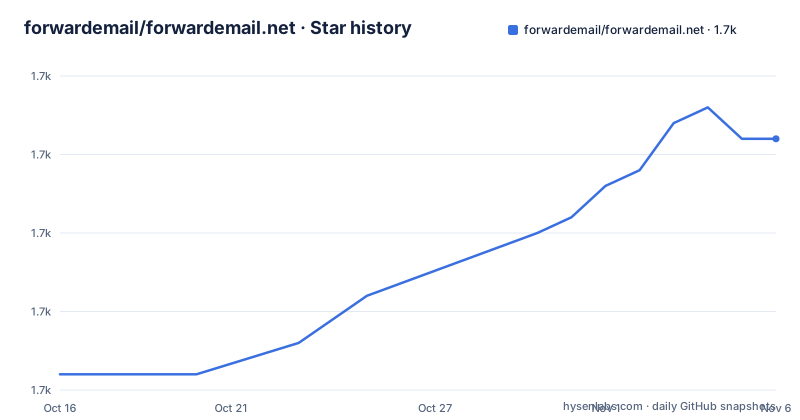
- forwardemail/forwardemail.net1,701 ★ · +15
| Repository | 2026-10-16 | 2026-11-06 |
|---|---|---|
| forwardemail/forwardemail.net | 1.7k | 1.7k |
15 Stars in the last 21 days, measured from the daily GitHub snapshot. Compare with other projects
Editorial analysis
The compose file is the architecture
The most useful document in the repository is `docker-compose.yml`, because it names every process the system runs and every port it occupies.
One application image, `forwardemail/forwardemail`, with `restart: always`, publishes nine mappings:
ports:
    # web
    - "3000:3000"
    # api
    - "4000:4000"
    # caldav
    - "5000:5000"
    # carddav
    - "6000:6000"
    # smtp
    - "2432:2432"
    - "2465:2465"
    - "2587:2587"
    # imap
    - "2993:2993"
    # pop3
    - "2995:2995"
Then the MX port, which is commented out:
    # mx
    #- "25:25"
Either way it is the first thing to resolve.
The storage dependencies are stated plainly. `redis:7-alpine` and `mongo:8`, both with `restart: always`, and the application declares `depends_on` for both. Configuration arrives as command-line arguments rather than environment variables:
environment:
    CMD_ARGS:
        --dbs.mongo=mongodb://mongo:27017/forwardemail
        --dbs.redis=redis://redis:6379/
Mongo holds application state and Redis holds the mail store, which is consistent with the root listing containing a `UPGRADE-MONGO-MONGOOSE.md` file.
The hardening is worth noting too. Every service sets `security_opt: no-new-privileges:true`, the application sets `read_only: true` with a `tmpfs` on `/tmp`, and the Redis and Mongo volumes are declared.
One ecosystem config file per process
The repository root lists eight PM2 ecosystem files, and they map one to one onto the ports in the compose file: `ecosystem-api.json`, `ecosystem-bree.json`, `ecosystem-caldav.json`, `ecosystem-carddav.json`, `ecosystem-imap.json`, `ecosystem-mx.json`, `ecosystem-pop3.json` and `ecosystem-smtp.json`.
That pairing is the whole deployment model. The entrypoint files at the root match them by name: `api-server.js` for the API, `caldav-server.js`, `carddav-server.js`, and `bree.js` for the background job runner. There is also `api.js` and a directory of Pug-based views in `app/`.
So the system is a set of Node processes under a process manager rather than a single server. Bree is the scheduler, and the local development table in the README lists it as a service with no port, which is consistent: it is a worker.
The separate IMAP and POP3 processes are notable because those protocols need long-lived connections and per-connection state, which is exactly the kind of thing you do not want multiplexing into a web process. The same reasoning applies to the MX listener.
There is no single `main.js` in the root listing. The README's development commands reflect the split, giving one command per service:
| Service | Command | Default port | | --- | --- | --- | | Web | `npm start web` | 3000 | | API | `npm start api` | 4000 | | Bree | `npm start bree` | none | | SMTP | `npm start smtp` | 2432 | | MX | `npm start mx` | 2525 | | IMAP | `npm start imap` | 2113 | | POP3 | `npm start pop3` | 2115 |
Note that the development ports for MX, IMAP and POP3, 2525, 2113 and 2115, differ from the compose ports 25, 2993 and 2995. Development runs unprivileged so you need no root; production runs on the real ports.
What the service actually does, and what it does not keep
The repository description positions it as a privacy-focused encrypted email service and an all-in-one alternative to Gmail plus Mailchimp plus Sendgrid, and the package description is more specific about the promise.
The `package.json` description states that it does not keep logs nor store emails and does not track you, and lists unlimited aliases, catch-alls, wildcards, API access and disposable addresses, with built-in support for DKIM, SRS, SPF, ARC and DMARC, and no credit card required.
Read the promise carefully, because it is narrower than the marketing line suggests. This is a forwarding service: mail arrives, is forwarded to a real destination, and is not retained as mailbox content by default. The topic list on the repository includes `forwarder`, `forwarding`, `aes256` and `chacha20`, and the package depends on `@aws-sdk/client-s3` with a `lib-storage` companion, so there is object storage in the stack for attachments rather than a mail store.
The self-hosting model is different from a hosted product. The README's table of contents devotes most of its length to operating the service rather than using it: server infrastructure, naming convention, load balancing, provisioning, deployment advice, bare metal advice, storage mirroring with automated setup via Ansible, environment variables and manual verification. Consumers are told in one line to visit forwardemail.net.
Two documents indicate the project's breadth. `WEBSOCKET_IMPLEMENTATION.md` suggests real-time notification, matching `PUSH_NOTIFICATIONS.md` and the listed `ws` and `wss` handlers for the application. `CALDAV-TESTING.md` suggests the CalDAV and CardDAV side has its own test documentation, which is not what you would expect from a mail forwarder and does widen the surface you have to run.
DNS is the part that decides whether it works
A mail server lives or dies on DNS, and the README gives this more attention than the application.
Email autodiscovery has two documented options. Option A is CNAME records, explicitly labelled recommended. Option B is SRV records. Separately there is CalDAV and CardDAV autodiscovery, which is a distinct set of records for the calendar and contacts protocols.
Domain Connect integration is a separate section with its own subsections: how it works, the template file, template variables, environment variables, generating and publishing the signing key, and references. That is a template-driven way to publish the right records for a domain, and the presence of a signing key step means it is a trust mechanism rather than plain configuration.
The `config/` directory in the root is where the record definitions live, and `.env.defaults` alongside `.env.schema` at the root is the documented environment variable surface. The `.env.schema` file matters more than `.env.defaults` in practice, since a schema is what you validate against.
Beyond DNS, `ansible/` and `ansible-playbook.js` together with `ansible.cfg` implement the storage mirroring section's automated setup, and there is a `SELFHOSTING.md` at the root for the overall path. For a service that must receive mail from strangers on the internet, MX and SPF and DKIM and DMARC records are load-bearing configuration, and this repository treats them as the primary interface rather than an afterthought.
Getting a development instance running
The README's local development path is unusually explicit, which is helpful because this stack has real dependencies.
Node is pinned. Both the macOS and Ubuntu instructions start by installing `n` and Node v18.20.4:
curl -L https://raw.githubusercontent.com/mklement0/n-install/stable/bin/n-install | bash -s -- -y 18.20.4
node --version
v18.20.4
The package manager is pnpm at a pinned version, enabled through corepack:
corepack enable
corepack prepare [email protected] --activate
`pnpm install` follows a fork and clone. On macOS the native dependencies come from Homebrew, with MongoDB and Redis started as services:
brew tap mongodb/brew
brew install mongodb-community redis libtool automake autoconf nasm
brew services start mongodb-community
brew services start redis
The `libtool automake autoconf nasm` set is there for native module compilation, which is the usual reason a Node mail server needs a build toolchain.
Ubuntu adds Microsoft core fonts, including a `debconf-set-selections` line to pre-accept the msttcorefonts licence, which is required because the build otherwise blocks on an interactive prompt. `wkhtmltopdf` is optional and only used for generating PDF receipts, installed from a Debian package URL built with `lsb_release` and `dpkg --print-architecture`.
Scripts are wrapped by `nps`, so the pre-built commands are the ones in that table rather than raw node invocations. The tooling around the code is broad: XO for linting, Prettier for formatting, husky with `.lintstagedrc.js` and `commitlint`, `ava.config.js` for tests, and a `copywrite.hcl` file for licence header management.
The license is the first thing to read
The README badge reads BUSL 1.1 AND MPL 2.0, and the licence file is `LICENSE.md` at the root.
That combination is not open source in the OSI sense. The Business Source License places use restrictions that change over time, and the MPL 2.0 is a file-level copyleft licence. The practical consequence is that you should read `LICENSE.md` before you fork, redistribute or contribute, because the two licences cover different files and the badge only tells you which two are in play.
The rest of the governance files are conventional. `SECURITY.md` is at the root for vulnerability reporting, `AGENTS.md` for the repository's own agent instructions, and `.gitleaksignore` alongside `.gitmodules` and a `.gitattributes` that will matter for a project with this many vendored paths.
There is also `API.md` for the HTTP API, which matters because the package description advertises API access and an aliases model, and `REUSE`-style licence tracking is not present here but the `copywrite.hcl` file plays a comparable role for headers.
One more practical note about upgrading. `UPGRADE-MONGO-MONGOOSE.md` at the root, combined with the compose file pinning `mongo:8`, tells you the Mongo and Mongoose versions are coupled to the application version. An upgrade path therefore exists on paper for the database layer, which is the part of a self-hosted mail deployment most likely to break silently.
Release cadence is fast and worth noting for a service you host yourself. v2.18.4 and v2.18.5 both landed on 2026-10-10, v2.18.6 on 2026-10-13, and the last push was on 2026-10-13. Frequent patches mean you will be rebuilding images often, and each rebuild is a chance to break a working mail server.
Editorial conclusion
Adopt Forward Email if you run your own domains and want to receive mail for them with IMAP, plus an API for aliases, and you are prepared to operate MongoDB, Redis and eight processes, because the compose file shows redis:7-alpine and mongo:8 as hard dependencies with the application depending on both. Do not adopt it expecting a permissively licensed codebase: the license badge reads BUSL 1.1 AND MPL 2.0, which means the source-available licence governs and the Mozilla licence covers specific files, so read LICENSE.md before contributing or redistributing. Verify three things before deploying: the mail-related DNS records, since the README documents two autodiscovery options, CNAME records as recommended and SRV records as the alternative, plus CalDAV and CardDAV autodiscovery; that ports 25 and 465 are reachable from the internet, since the compose file has the MX port mapping commented out and the submission and IMAP ports published on non-standard values `2587:2587` and `2993:2993`, which will not work against unmodified clients; and that `read_only: true` with a `/tmp` tmpfs, which the compose file sets, matches whatever you add. The last push was on 2026-10-13 and v2.18.6 shipped the same day.
Frequently asked questions
How do I run Forward Email with Docker Compose?
Use the repository's docker-compose.yml, which runs the forwardemail/forwardemail image alongside redis:7-alpine and mongo:8, passing configuration as `--dbs.mongo` and `--dbs.redis` arguments. Note that the MX port mapping is commented out and the submission, IMAP and POP3 ports are published on non-standard values.
Which processes does Forward Email run?
Eight PM2 ecosystem files exist at the root, one per process: api, bree, caldav, carddav, imap, mx, pop3 and smtp, alongside the web process. The local development commands are `npm start web`, `npm start api`, `npm start bree`, `npm start smtp`, `npm start mx`, `npm start imap` and `npm start pop3`.
What license is Forward Email released under?
The README badge states BUSL 1.1 AND MPL 2.0, with the full text in LICENSE.md. The Business Source License restricts use, so read the file before forking or redistributing.
What does Forward Email do with the email it receives?
The package description states it does not keep logs nor store emails and does not track you, and advertises unlimited aliases, catch-alls, wildcards, API access and disposable addresses with DKIM, SRS, SPF, ARC and DMARC support. The object storage dependencies in package.json are for attachments rather than mailbox retention.
What DNS records does a Forward Email deployment need?
The README documents two email autodiscovery options, CNAME records as recommended and SRV records as the alternative, plus separate CalDAV and CardDAV autodiscovery. Domain Connect integration provides a template-based way to publish those records, including generating and publishing a signing key.
What does Forward Email require for local development?
Node v18.20.4 installed through `n`, pnpm 9.15.9 enabled through corepack, MongoDB, Redis, and a native build toolchain including libtool, automake, autoconf and nasm. Ubuntu also needs Microsoft core fonts pre-accepted via debconf-set-selections, and wkhtmltopdf optionally for PDF receipts.
Official sources
Add this badge to your README
If you maintain this project, the badge below links readers to this analysis and shows its maintenance status from the daily GitHub snapshot. Paste the markdown into your README; add ?metric=license or ?metric=stars to the image URL for a different field.

[](https://hysenlabs.com/projects/forwardemail-forwardemail-net)Star history chart for your README
[](https://hysenlabs.com/projects/forwardemail-forwardemail-net)Was this useful?