Betterfox's user.js, its manual install, and the four jobs it leaves you
Firefox user.js for optimal privacy and security. Your favorite browser, but better.
At a glance
- What is it?
- Betterfox is a single about:config file for Firefox, not an extension: you copy it into your profile folder yourself, and the ad blocker, DNS resolver, fork files, and install script all sit outside the documented path.
- Who is it for?
- Betterfox suits someone on Firefox who wants a curated set of preferences, wants to stay on stock Firefox rather than a fork, and is willing to read two wiki pages before copying one file. It does not suit anyone expecting one-click setup, bundled content blocking, or DNS filtering, since those three are listed as follow-up work in the README.
- Can I use it commercially?
- Yes. MIT is a permissive licence: you can use, modify and sell software built on it, as long as you keep its copyright and licence notices.
- Is it still maintained?
- Yes. The repository last received commits 68 days ago.
- What is it written in?
- Mainly JavaScript, according to GitHub's language statistics.
Answers come from the project's GitHub data, last synced on November 14, 2026, and from our analysis. They are not legal advice.
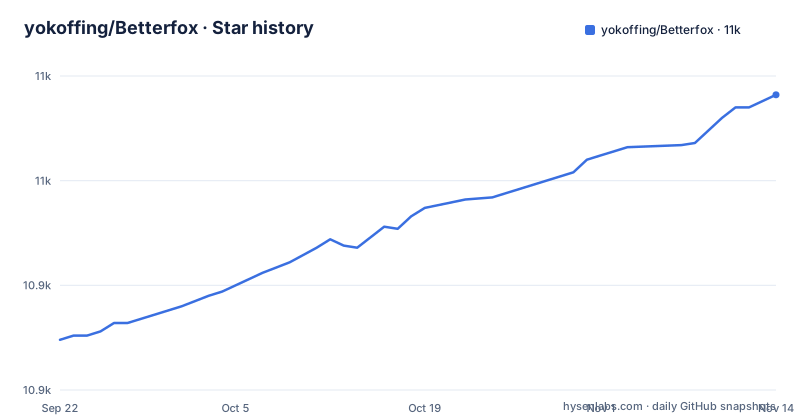
Star history
- yokoffing/Betterfox10,991 ★ · +117
| Repository | 2026-09-22 | 2026-11-14 |
|---|---|---|
| yokoffing/Betterfox | 10.9k | 11k |
117 Stars in the last 53 days, measured from the daily GitHub snapshot. Compare with other projects
Editorial analysis
Installation is one file moved by hand into the profile root
There is no add-on to click and no settings page. The documented procedure is six numbered steps (0 to 5), and step five is the actual installation: move user.js into the profile folder. To find that folder you open Firefox, type `about:profiles` in the URL bar, press Enter, then click `Open Folder` in the `Root Directory` section for the profile you want to use. Step zero is a backup profile, linked from the wiki, which tells you to do this before touching anything. Step one is downloading user.js from the raw file link with `Save Link As…`. Step two is the step most people skim: review both the Common Overrides page and the Optional Hardening page and make any necessary changes. Consequence for readers who skip it: the file goes into the profile as it is, without the overrides the README says may be necessary.
After the restart, an ad blocker and a DNS resolver are still your job
The README separates what the file does from what you have to add, and puts the additions after the restart rather than in the file. Its two follow-up steps are to get an ad blocker like uBlock Origin with the recommended filters from the author's filterlists repository, and to enable DNS-level protection with a provider you choose, which it frames as protection against security threats, ads, and trackers. Betterfox does not bundle either one and does not pick a provider for you. Consequence: a reader who stops after copying user.js and restarts Firefox still has unblocked ads and default resolver behaviour, and the privacy claims in the file's goals are unmet until two separate decisions are made outside the project.
install.py exists in the tree but no step calls it
The top-level entries include install.py alongside user.js, Securefox.js, Peskyfox.js, Smoothfox.js, Fastfox.js, policies.json, personal/, waterfox/, zen/, LICENSE, README.md, and .gitattributes. None of the six required-reading steps names install.py. The documented install is therefore a manual file move, done through the about:profiles page and a file manager. Consequence for readers: a script is present in the repository but the install steps do not use it, so anyone wanting a scripted setup has to open the script and judge it themselves.
Fork integrations are snapshots from 2021 to 2024, and two dates carry question marks
The recognition table lists eight browsers that incorporate Betterfox to some extent, each with a link to the fork's own preference files and a date: Zen in July 2024, FireDragon in January 2024 with a question mark, Midori in December 2023 with a question mark, Mercury in September 2023, Waterfox in September 2023, Floorp in April 2023, Pulse in December 2021, and Ghostery Private Browser in February 2021. Those dates and file links are the integration record, and the newest is well over a year before the last push on 2026-09-07. The callout above the table warns that these browsers often modify Betterfox in ways that reduce its effectiveness, and tells you to apply user.js yourself even when using a fork. Consequence: the built-in integration in any fork is an old snapshot, and applying the current file on top means two pref sources fighting over the same values.
ESR users are sent to a different branch with no version-mapping table
The README announces that Betterfox for Firefox 153 ESR is available, and links to a tree named esr153. Published releases are numbered to match the browser they target: 152.0 from 2026-07-02, 153.0 from 2026-07-24, and 154.0 from 2026-09-06, with the last push to the repository dated 2026-09-07. Consequence: an ESR user should take the esr153 tree rather than the main-branch user.js.
The stated philosophy is diminishing returns, so the file is deliberately short
Betterfox describes itself as an opinionated preference list inspired by the law of diminishing returns and the minimum effective dose, and it states three goals: minimalism to get what is not needed out of the way, efficiency to unleash Firefox's ability to be fast and performant, and privacy without causing site breakage. The configuration table splits that into four files: user.js as the essentials with none of the breakage, Securefox for protecting user data without causing site breakage, Peskyfox for a clean distraction-free experience, and Smoothfox, marked optional, for Edge-like smooth scrolling. Consequence for readers chasing maximum hardening: the project names its own ceiling in these first principles, marks scrolling preferences optional.
Forks keep their own copies, and the repository carries three unlabelled directories
The fork table points at files inside Zen, FireDragon, Midori, Mercury, Waterfox, Floorp, Pulse, and Ghostery Private Browser, yet this repository also holds waterfox/ and zen/ directories of its own, plus personal/. The configuration table does not list those directories, and Fastfox.js, which sits at the top level, also has no row in it. Consequence: a reader who arrives from a fork has three directories the configuration table does not cover in front of them, and the only defensible procedure is the one the README states, copy user.js, and treat everything else as unread.
Editorial conclusion
Betterfox suits someone on Firefox who wants a curated set of preferences, wants to stay on stock Firefox rather than a fork, and is willing to read two wiki pages before copying one file. It does not suit anyone expecting one-click setup, bundled content blocking, or DNS filtering, since those three are listed as follow-up work in the README. Before applying it, create the backup profile the README asks for, check that your Firefox channel matches the file you are about to download, and remember that anything under zen/, waterfox/, or personal/ has to be read before it is trusted.
Frequently asked questions
What is betterfox for Firefox?
It is a curated about:config preference list for Mozilla Firefox, distributed as a single user.js file under the MIT license. The project states that it makes Firefox more private and secure without using third-party code, and that privacy must not come at the cost of site breakage.
how to install betterfox
Create a backup profile, download user.js, review the Common Overrides and Optional Hardening wiki pages, open about:profiles in Firefox, click Open Folder in the Root Directory section, and move user.js into that folder. install.py in the repository is not part of these steps.
how to apply betterfox
The file replaces preferences in the profile folder you opened from about:profiles, and Firefox must be restarted for the changes to take effect. After the restart the README asks for an ad blocker such as uBlock Origin and for DNS-level protection from a provider you choose.
What are the differences between arkenfox and betterfox?
Betterfox's own configuration files are Securefox.js, Peskyfox.js, and Smoothfox.js, and it lists eight Firefox forks that incorporate it.
is betterfox worth it
Judge it on the manual work it still requires: copying a file into your profile folder by hand, reading two wiki pages, restarting Firefox, then adding a content blocker and a DNS provider yourself. The MIT license and the lack of third-party code are the parts that cost you nothing.
Official sources
Add this badge to your README
If you maintain this project, the badge below links readers to this analysis and shows its maintenance status from the daily GitHub snapshot. Paste the markdown into your README; add ?metric=license or ?metric=stars to the image URL for a different field.

[](https://hysenlabs.com/projects/yokoffing-betterfox)Star history chart for your README
[](https://hysenlabs.com/projects/yokoffing-betterfox)Was this useful?