nvidia-all is a driver installer you can configure before you run it
Nvidia driver latest to 396 series AIO installer
At a glance
- What is it?
- nvidia-all builds and installs NVIDIA Linux drivers across several distributions, and what makes it different from the vendor's own installer is the layer of decisions it puts in front of you. You choose a branch, a module flavour and a set of split packages, the script detects the kernels you have and patches for them, and a configuration file holds the build and runtime toggles so the choices survive a reinstall.
- Who is it for?
- nvidia-all suits a Linux user on an NVIDIA card who wants a specific driver series, a specific module flavour and split packages, and who expects the installer to cope with the kernel versions they actually have. It is a poor fit if you want the simplest possible path, since the distribution's own packaged driver does that with less to understand, and it is a poor fit if you cannot install a distribution's own NVIDIA driver, because the revert path depends on it.
- Can I use it commercially?
- Not without permission. GitHub finds no licence file in the repository, and without a licence all rights are reserved by default: you may read the code but not reuse it. Check the README, or ask the authors, before using it.
- Is it still maintained?
- Yes. The repository last received commits 2 days ago.
- What is it written in?
- Mainly Shell, according to GitHub's language statistics.
Answers come from the project's GitHub data, last synced on November 6, 2026, and from our analysis. They are not legal advice.
Star history
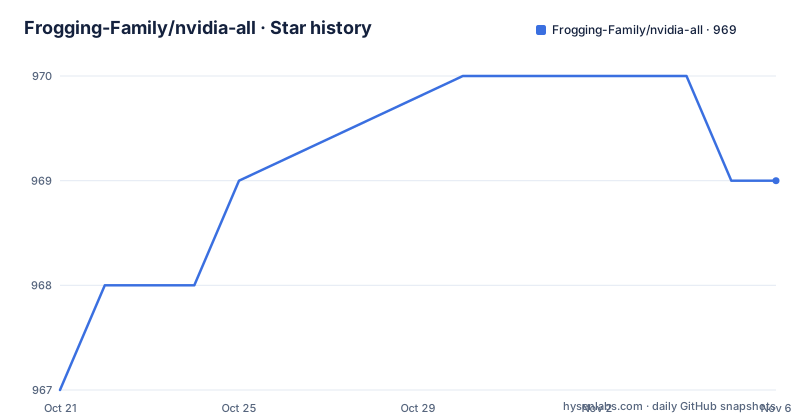
- Frogging-Family/nvidia-all969 ★ · +2
| Repository | 2026-10-21 | 2026-11-06 |
|---|---|---|
| Frogging-Family/nvidia-all | 967 | 969 |
2 Stars in the last 16 days, measured from the daily GitHub snapshot. Compare with other projects
Editorial analysis
The installer is the product
The project describes itself as an all-in-one NVIDIA Linux driver with dynamic branch selection, kernel compatibility patching, optional component split packages and other customization features, and the feature list expands that. It can build current and legacy NVIDIA Linux drivers, it supports both the proprietary kernel modules and the NVIDIA open kernel modules, it detects the installed kernels and applies compatibility patches where they are needed, it offers DKMS and regular package variants, and it supports optional split packages. The Vulkan development drivers and the regular drivers are both sources it can pull from. The interesting part is the last item, that many build and runtime toggles are exposed through a configuration file, so a choice about which components to build is a file you can keep in version control rather than a sequence of prompts you answer again next month.
The version floor is moving, and the legacy path ends at 396
The notes section is where the real constraints are. As of driver 590, NVIDIA no longer develops the proprietary closed source kernel modules, and the project links the announcement. For older GPUs, those pre-Turing cards, the proprietary modules remain available through driver 580 and below. The 470 branch is treated as a legacy branch that may require extra caution on newer kernels, and the recommendation is an LTS kernel, since NVIDIA ended Kepler support updates in September 2024. The 390 series and older are not supported at all. The legacy selection path includes additional older series down to 396, and custom version input is supported for 396 and newer, which is where the interactive prompt comes in. You pick the custom version entry, then a branch group, either stable, a regular beta or the Vulkan development branch, then type the version number, then choose DKMS or regular modules. The version formats differ, with a Vulkan development style version like 415.22.01 and a regular style like 415.25.
Kernel detection, and the compiler rule that catches people out
The compatibility work is the part of the project that earns its keep, since a driver that does not build against your kernel is the normal failure. The script detects the kernels you have installed and applies the relevant compatibility logic, and the troubleshooting section gives the fix for the most common complaint, that the DKMS build stopped working after a kernel update, which is to install the latest linux-headers package for your kernel and rebuild so the script re-detects the installed kernels and reapplies the logic. The second troubleshooting entry is the one to internalise. The NVIDIA modules should be built with the same major GCC or Clang version that was used for the kernel, and mixing compilers between the kernel and the module produces a mismatch warning that the documentation tells you to fix by aligning the toolchain or rebuilding both consistently. On a rolling distribution where the kernel compiler moves faster than your distribution's packages, that is a routine annoyance rather than a rare one.
Installing on Arch, and choosing between DKMS and regular
The supported distributions are listed as Arch, Debian and Ubuntu, Fedora and SUSE, and the install is a clone and a script:
git clone https://github.com/Frogging-Family/nvidia-all.git
cd nvidia-all

# All distributions
./install.sh

# Arch-based
makepkg -si
After that you follow the prompts to select the driver version, the module type, the optional split packages and the other options. The Arch path additionally has a `PKGBUILD` in the root, so the package build is a normal Arch package build rather than a script, and updating is a pull followed by the same two commands. The DKMS decision is the one to think about first, because the documentation recommends DKMS usually, on the grounds that it rebuilds the modules automatically when the kernel is updated, and says to choose the regular packages only if you specifically want prebuilt non-DKMS modules for your workflow. There are also two extra configuration steps the documentation leaves to your distribution, DRM kernel mode setting and early KMS, with links to the Arch wiki pages for both, since both are initramfs and module questions rather than driver questions.
The multi-distro support is new, and the project says so
The announcement at the top of the readme is the newest thing in the repository, and it is careful about how it is framed. Installer support for multiple distributions has been added, but it is still in an early stage, and the project asks for issue reports and suggestions if you hit problems. The two tested configurations are given precisely, Fedora 44 with a 7.x kernel and the NVIDIA 615 series using DKMS or KMOD, and Ubuntu 26.04 with a 7.x kernel and the same 615 series. So the multi-distro path is new, the two most recent distributions are what has been tried, and the driver series that has been tested is the newest one. The warning attached to the announcement is the important part for anybody deciding whether to try it, that if the driver misbehaves you should know how to revert to the distribution's packaged driver, and there is a section below on exactly that.
The revert path is the part to read before you install
A driver installer that replaces the one your distribution ships should be readable in reverse, and this one is. The uninstall procedure has two halves, removing what the installer put in and putting back what the distribution provides. Listing the installed packages is a one liner, and on Arch it looks like this:
pacman -Qq | grep -E 'nvidia.*-tkg$'and the removal is the same match fed to the package manager, with the note that the exact package names vary by branch and by the options you chose, whether open or development modules, series suffixes, DKMS or regular, lib32 and the split components. The second half is reinstalling the distribution's own packages, with separate package lists for the open DKMS path and the proprietary DKMS path, and a reboot at the end. The non-Arch section does the same thing with the tools of each distribution, listing with `dpkg-query` on Debian and Ubuntu, `rpm` on Fedora and SUSE, and removing with `dpkg -r`, `rpm -e` and `zypper remove` respectively.
customization.cfg, user patches and the build logs
The configuration file is the part you keep. The main user-facing configuration lives in `customization.cfg` at the root of the repository, and external options can be placed at `~/.config/frogminer/nvidia-all.cfg` to apply automatically, which is how a machine-specific choice is separated from a shared one. Custom patches have their own documented section in that file, under a USER PATCHES heading, so a local modification to the driver source has a place to live that is not an edit to a downloaded tarball. The build products are also predictable, with prebuilt distribution packages written to `nvidia-all/dist/` so they can be installed from there, and build logs and environment snapshots written under `nvidia-all/logs/`. The repository tree mirrors that structure with an `nvidia-all-config/` directory, an `nvidia-all-patches/` directory, the `PKGBUILD` and the `install.sh`. The last push to the repository was on 2026-10-19, so the multi-distro work is still moving.
Editorial conclusion
nvidia-all suits a Linux user on an NVIDIA card who wants a specific driver series, a specific module flavour and split packages, and who expects the installer to cope with the kernel versions they actually have. It is a poor fit if you want the simplest possible path, since the distribution's own packaged driver does that with less to understand, and it is a poor fit if you cannot install a distribution's own NVIDIA driver, because the revert path depends on it. Before you run it, check three things: which driver series your GPU can use, since the project drops the 390 series and older and treats 470 as a legacy branch that wants an LTS kernel, how you will get back if the driver misbehaves, since the documentation is explicit that you should know how to revert to the packaged driver, and whether Secure Boot is on, since the non-DKMS packages need module signing set up.
Frequently asked questions
What does nvidia-all do that the NVIDIA installer does not?
It is an all-in-one installer with dynamic branch selection, kernel compatibility patching, optional split packages and many build and runtime toggles in a configuration file. It can build current and legacy driver series, supports both proprietary and open kernel modules, and detects the installed kernels and patches for them.
Which NVIDIA driver series does nvidia-all support?
The legacy selection path includes additional older series down to 396, with custom version input supported for 396 and newer, while the 390 series and older are not supported at all. The 470 branch is treated as legacy and may need extra caution on newer kernels, since NVIDIA ended Kepler support updates in September 2024, and driver 590 and later have no proprietary kernel modules from NVIDIA.
Should I use DKMS or regular modules with nvidia-all?
The documentation recommends DKMS usually, because it rebuilds the modules automatically when the kernel is updated, and says to choose the regular packages only if you specifically want prebuilt non-DKMS modules for your workflow. If the DKMS build breaks after a kernel update, the fix is the latest linux-headers package and a rebuild.
How do I remove nvidia-all and get my distribution's driver back?
In two steps. List the packages it installed, for example with `pacman -Qq | grep -E 'nvidia.*-tkg$'` on Arch, `dpkg-query` on Debian and Ubuntu or `rpm` on Fedora and SUSE, remove them with the matching package manager, then reinstall the distribution's own NVIDIA packages and reboot.
Where do nvidia-all options and patches live?
The main configuration is customization.cfg in the repository, external options can be placed at `~/.config/frogminer/nvidia-all.cfg` so they apply automatically, and custom patches are documented under a USER PATCHES section in the same file. Prebuilt packages are written to `nvidia-all/dist/` and build logs and environment snapshots to `nvidia-all/logs/`.
Official sources
Add this badge to your README
If you maintain this project, the badge below links readers to this analysis and shows its maintenance status from the daily GitHub snapshot. Paste the markdown into your README; add ?metric=license or ?metric=stars to the image URL for a different field.

[](https://hysenlabs.com/projects/frogging-family-nvidia-all)Star history chart for your README
[](https://hysenlabs.com/projects/frogging-family-nvidia-all)Was this useful?