enhancd: cd opens a filter over your directory history
:rocket: A next-generation cd command with your interactive filter
At a glance
- What is it?
- enhancd replaces cd with a wrapper that hands your directory history to fzf or any other interactive filter, keeping the argument grammar of the builtin. The interesting part is the precedence rule that decides when the filter appears.
- Who is it for?
- Adopt enhancd if you already use an interactive filter and navigate by history rather than by typing paths, since it works in Bash, Zsh, and fish and costs one sourced script. Do not adopt it if your shell cannot source shell functions or if you dislike an alias shadowing a builtin, and be aware the last tagged release is v2.5.1 from 2023-04-11 even though commits continue.
- Can I use it commercially?
- Not without permission. GitHub finds no licence file in the repository, and without a licence all rights are reserved by default: you may read the code but not reuse it. Check the README, or ask the authors, before using it.
- Is it still maintained?
- Yes. The repository last received commits 13 days ago.
- What is it written in?
- Mainly Shell, according to GitHub's language statistics.
Answers come from the project's GitHub data, last synced on October 23, 2026, and from our analysis. They are not legal advice.
Star history
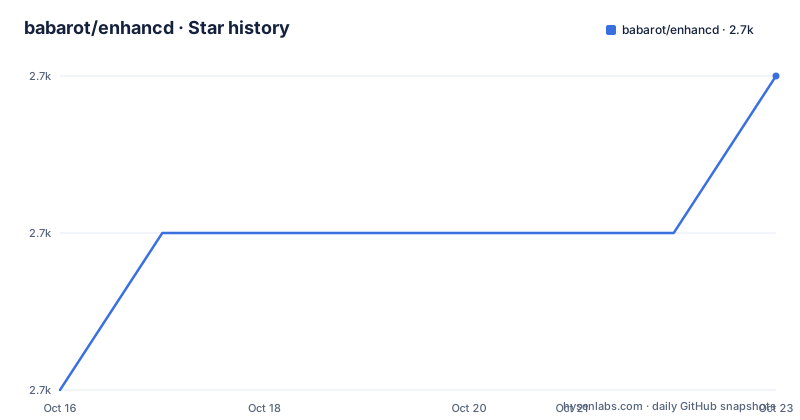
- babarot/enhancd2,723 ★ · +2
| Repository | 2026-10-16 | 2026-10-23 |
|---|---|---|
| babarot/enhancd | 2.7k | 2.7k |
2 Stars in the last 7 days, measured from the daily GitHub snapshot. Compare with other projects
Editorial analysis
One sourced script and cd is aliased away
The integration is deliberately minimal. To try it in a shell you already have open, the README gives a single command:
source ./init.shAfter that, `cd` is aliased to `__enhancd::cd`, so you type `cd` as usual and get the new behaviour. The repository layout explains how that is arranged: an `init.sh` at the root, a `functions/` directory holding the shell functions, a `conf.d/` directory, a `src/` directory, plus `config.ltsv` as the configuration file format and `enhancd.plugin.zsh` for Zsh plugin managers. The presence of `functions/enhancd/lib/` in the example output shows the functions are split rather than being one script.
The reason this works as an extension of cd rather than a replacement is that the alias preserves the original argument grammar. The README gives the whole surface as `cd [-|..|.] <dir>`, which is a small vocabulary you can learn in one sitting.
The filter is picked from a colon-separated list
enhancd does not implement search. It delegates to an interactive filter command that you already have, and the mechanism for choosing one is the `ENHANCD_FILTER` environment variable. It holds a colon-separated list of executables, arguments allowed, and enhancd searches the list from the top and uses the first one that is installed. The default value is `fzy:fzf:peco:sk:zf`.
That default is a useful compatibility statement: fzy, fzf, peco, sk, and zf all work. Reordering the list changes which one is used, and arguments can be included inline:
export ENHANCD_FILTER="fzf --height 40%:fzy"This is also the main silent failure mode. The selection is by presence on PATH, not by success. If your first candidate is not installed, you get the next one without any message explaining the downgrade. If none are installed, the behaviour is not described in the README. Confirm which filter you are actually running before debugging anything else about the tool.
An existing directory skips the filter entirely
The decision rule that explains almost all of enhancd's behaviour is in the argument table. Three cases, and only the third one opens the picker.
With no argument at all, you get the list of directories visited in the past, with `HOME` always shown at the top of the list, matching what builtin cd does. When the argument is a directory that exists in the current directory, enhancd changes to it directly without involving the filter, behaving exactly like builtin cd. Only when the argument does not exist in the current directory does it search the visited history for directories that match or are similar to the name and pass those to the filter.
So the mental model is: enhancd is transparent when you are correct, and helpful when you are not. Typing `cd src` in a directory that has `src/` does what you meant with zero friction. Typing `cd afx` where no such directory exists locally gets you a list of candidates from history instead of an error.
One more behaviour exists outside the argument grammar: standard input is supported, with `echo $HOME | cd` given as acceptable. That is unusual for a navigation wrapper and it means you can drive the directory list from a pipeline rather than only from what you have visited.
Three one-character arguments, three different lists
`cd -`, `cd ..`, and `cd .` are three separate features rather than three syntaxes for one thing.
`cd -` lists the latest 10 directories, which is the small and fast case. The count is configurable through `ENHANCD_HYPHEN_NUM`, which defaults to `10`, and the whole feature can be turned off by setting `ENHANCD_ENABLE_HYPHEN` to `false`. Note that this shadows a real builtin behaviour: in bash and zsh, `cd -` means go to the previous directory. Once enhancd is aliased in, that meaning is gone unless you disable the feature.
`cd ..` lists all parent directories of the current working directory, replacing the need to count `../../..`. The example shows a six-level chain up to `/`, with the nearest parent pre-selected. `ENHANCD_ENABLE_DOUBLE_DOT` set to `false` turns it off.
`cd .` is the one that changes builtin semantics most visibly: builtin cd does nothing when passed a dot, and enhancd uses that to list all subdirectories recursively under the current directory. Internally it uses `find` for that, and the README recommends installing `fd` as well, noting it will be faster and is also more useful generally. The other two have documented disable switches, and the README also carries a Known issues section that is the place to look for the caveats on this one.
Git repositories put the root at the top
One small feature does more practical work than it looks like it would. Inside a git repository, the first element in the list is the git root directory.
Because the interactive filter pre-selects the first entry, this means typing `cd` at a deep point in a repository tree and pressing enter lands you at the repository root rather than at wherever the history happens to rank most recently. That is the default behaviour users notice first, and it is why the tool feels faster than a plain history jump even though nothing was actually skipped.
There is also fuzzy search over similarly named directories, which the README lists among the features and describes as the behaviour you get when the argument you typed matches nothing locally but several history entries resemble it. Combined with standard input support, that covers the three ways a path reference can be approximate: wrong current directory, partial name, or piped value.
Reading the config file and the shell matrix
Configuration lives in `config.ltsv` at the repository root, using an LTSV format rather than the shell environment alone. The `ENHANCD_` environment variables are the documented surface, and everything follows the same pattern: a name, a default, and sometimes a boolean to disable the feature entirely.
The feature list says enhancd works on Bash, Zsh, and fish, which the README calls cross-shell compatibility. That claim is worth taking seriously as a design goal rather than a guarantee, because the mechanism is a shell function plus an alias, and each of those three shells supports them with slightly different semantics. The presence of `enhancd.plugin.zsh` is specifically for Zsh plugin managers, so Zsh users installing through a plugin manager take a different path than the `source ./init.sh` route described for a trial.
The repository also carries `CHANGELOG.md`, a `VERSION` file, a `.tagpr` config for tag-driven releases, and a `.ghalint.yaml`, plus a `docs/` directory. The `VERSION` file alongside automated tagging suggests the version in your checkout is readable rather than something you have to derive from tags.
Compared with autojump, z, and plain cd
The alternatives fall into two groups and enhancd sits at the boundary.
autojump, z, fasd, and zplug all maintain a weighted database of directories and let you jump by a partial match. They are engines: they own the ranking and give you a command such as `j proj` to reach the project. Their weakness is that the ranking is a guess, and when the guess is wrong you are at the wrong directory with a history mismatch to diagnose.
enhancd inverts the relationship. It does not rank anything on its own beyond tracking visits; it defers selection to an interactive filter you already trust. So the cost profile differs. A jump engine adds a database and a command; enhancd adds a sourced script, an alias over cd, and a dependency on a filter you had anyway. The benefit is that you see the candidates and pick, which is what the README means by extending cd rather than replacing it with a new verb.
Against plain cd, there is nothing to gain in a scripted context and a real cost: `cd -` means something different, `cd ..` no longer resolves to the parent directly, and scripts that assume builtin cd semantics may surprise you. Anything non-interactive is the wrong tool for this.
A related shell pattern is zsh-bd, which the README credits for the idea of going back to a specific parent directory; enhancd's `cd ..` generalises that to every ancestor rather than only the immediate one.
Editorial conclusion
Adopt enhancd if you already use an interactive filter and navigate by history rather than by typing paths, since it works in Bash, Zsh, and fish and costs one sourced script. Do not adopt it if your shell cannot source shell functions or if you dislike an alias shadowing a builtin, and be aware the last tagged release is v2.5.1 from 2023-04-11 even though commits continue. Verify first that a filter you listed in ENHANCD_FILTER is actually on your PATH, since the first missing candidate silently moves to the next one in the colon-separated list.
Frequently asked questions
How do I set up enhancd in my shell?
Run `source ./init.sh` from a clone to try it in the current shell, which aliases cd to `__enhancd::cd`. A Zsh plugin file `enhancd.plugin.zsh` also exists for users installing through a Zsh plugin manager.
Which search tool does enhancd use?
It uses the interactive filter named by `ENHANCD_FILTER`, a colon-separated list of executables with optional arguments, and it takes the first one that is installed. The default value is `fzy:fzf:peco:sk:zf`, and a value such as `fzf --height 40%:fzy` passes arguments and sets the preference order.
Can I turn off the cd -, cd .., or cd . behaviour?
Yes. Set `ENHANCD_ENABLE_HYPHEN` or `ENHANCD_ENABLE_DOUBLE_DOT` to `false` to disable the corresponding behaviour. The number of entries shown by `cd -` is set separately with `ENHANCD_HYPHEN_NUM`, which defaults to 10.
Official sources
Add this badge to your README
If you maintain this project, the badge below links readers to this analysis and shows its maintenance status from the daily GitHub snapshot. Paste the markdown into your README; add ?metric=license or ?metric=stars to the image URL for a different field.

[](https://hysenlabs.com/projects/babarot-enhancd)Star history chart for your README
[](https://hysenlabs.com/projects/babarot-enhancd)Was this useful?