CodeWiki: one agent per module, with incremental updates that cost cents
[ACL 2026] Open-source framework for holistic, structured repository-level documentation across multilingual codebases
At a glance
- What is it?
- CodeWiki builds a dependency graph with tree-sitter, clusters it into a module tree, and sends one agent per leaf module to write a page, with parents written from children. Version 2.0 adds artifacts as graph nodes and component-level incremental updates, and the project's own example puts a single-commit refresh at $0.34 against $21.48 for a full rebuild.
- Who is it for?
- Adopt CodeWiki if you own a repository large enough that nobody has read all of it, you already have an LLM endpoint or subscription available, and you want documentation that is regenerated from the code rather than maintained by hand. The incremental update path is the reason: on the project's svelte example, one update after one commit cost $0.34 against $21.48 for a full build, which is the difference between a doc job in every commit and a doc job you run occasionally.
- Can I use it commercially?
- Yes. MIT is a permissive licence: you can use, modify and sell software built on it, as long as you keep its copyright and licence notices.
- Is it still maintained?
- Yes. The repository last received commits 3 days ago.
- What is it written in?
- Mainly Python, according to GitHub's language statistics.
Answers come from the project's GitHub data, last synced on November 7, 2026, and from our analysis. They are not legal advice.
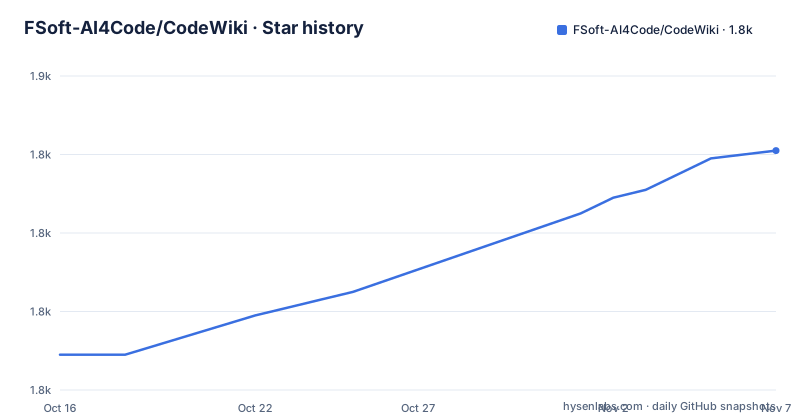
Star history
- FSoft-AI4Code/CodeWiki1,841 ★ · +52
| Repository | 2026-10-16 | 2026-11-07 |
|---|---|---|
| FSoft-AI4Code/CodeWiki | 1.8k | 1.8k |
52 Stars in the last 22 days, measured from the daily GitHub snapshot. Compare with other projects
Editorial analysis
The pipeline: graph, cluster, one agent per module
CodeWiki reads a repository, builds its dependency graph, splits that graph into a hierarchy of modules, and has agents write one page per module plus an overview, with Mermaid diagrams. That four step description is the architecture, and the README states it plainly enough that you can reason about where a given failure would come from.
The decomposition is recursive. The graph is clustered into a module tree, again and again, so a 1.4 million line repository gets the same treatment as a 10,000 line one, with depth and size thresholds that are configurable rather than hardcoded.
Writing is agent-per-module rather than agent-per-file. One agent per leaf module reads the code through tools and writes that module's page; parent pages are then written from the child pages rather than from the source again. That ordering is why an overview can be accurate without a second full pass over the code. Diagrams are validated before they are saved, which is what stops a Mermaid syntax error from landing in your docs directory.
The structural point the README makes about 2.0 is the right one: the documentation an agent can write is bounded by what the dependency graph contains. So graph completeness is not an internal detail here, it is the ceiling on output quality.
Install and pick a provider
Installation is from the GitHub repository rather than PyPI:
pip install git+https://github.com/FSoft-AI4Code/CodeWiki.git
codewiki --version
The stated prerequisites are Python 3.12 or later, Git, and Node.js with npm at install time. The Node requirement at install time is the sort of detail worth confirming in your own environment before you debug it later.
Configuring a provider is a config subcommand. Any OpenAI compatible endpoint works, whether that is OpenAI itself, a LiteLLM proxy or OpenRouter:
codewiki config set \
  --provider openai-compatible \
  --api-key YOUR_API_KEY \
  --base-url https://api.example.com/v1 \
  --main-model claude-sonnet-4 \
  --cluster-model claude-sonnet-4
Note the two separate model fields. --main-model is what writes pages, and --cluster-model is what does the graph clustering, so you can use a cheaper model for the structural work.
The no-key path is the more interesting option, and it runs on an existing subscription rather than an API bill:
codewiki config set --provider claude-code \
  --main-model claude-sonnet-4-6 --cluster-model claude-sonnet-4-6
That requires having run claude login first. Anthropic, Azure OpenAI, AWS Bedrock, Atlas Cloud and Codex are also supported, with a providers guide in the repository. There is a third mode, codewiki mcp, which exposes the analysis toolchain to an IDE agent such as Cursor, Claude Desktop, Claude Code or CodeBuddy, leaving the writing to the IDE's own model.
Generating, scoping and writing the docs in another language
Generation is one command run inside the target repository:
cd /path/to/your/project
codewiki generate                     # writes ./docs/
codewiki generate --github-pages      # also writes an HTML viewer
codewiki generate --update            # later: refresh after code changes
The plain form writes a docs directory. --github-pages additionally emits an HTML viewer, which is how you get something browsable on a static host without wiring up MkDocs or similar. --update is the incremental path discussed below.
Scoping is where most real projects will live, and the flags are specific:
codewiki generate --include "*.cs" --exclude "Tests,Specs,*.test.cs"
codewiki generate --focus "src/core,src/api" --doc-type architecture
codewiki generate --instructions "Focus on public APIs and include usage examples"
codewiki generate --language ja
codewiki config agent --exclude "Tests,Specs"
--include and --exclude take globs and comma separated names, so excluding a test tree is one flag. --focus narrows to directories and --doc-type changes what kind of page is written. --instructions is a free text brief passed to the agents, which is the closest thing to steering the output. --language takes a code or a name such as ja, Japanese, vi or zh, and it governs page text, headings and diagram labels, not just prose. config agent makes an exclusion the default so you stop repeating it.
Artifact handling is on by default in 2.0, and --no-artifacts returns the 1.x behaviour. --with-prose also reads README and docs/ directories, and --artifact-exclude skips generated configuration trees.
Incremental updates and the numbers behind them
The incremental path is the feature that makes this usable in a repository with an active commit history.
With codewiki generate --update, the tool diffs the saved graph against the current code, repairs the module tree, and sends one agent per affected module to patch its page and the pages that describe it. Everything else is left untouched. The project's own figure: on svelte, one update after one commit cost $0.34 against $21.48 for a full build.
That example shows the potential savings from an incremental update, but it does not establish the cost of updates in other repositories.
For CI there is --compare-to <commit>, which sets the base commit for pipelines and squashed merges. And there is a stated fallback: if too much has changed, it goes back to a full build and says so. That behaviour is worth knowing about, because it means the incremental path is not guaranteed, and a CI job that only reports success will not tell you which path ran. If cost predictability matters to you, read that log line.
The artifact-aware generation in 2.0 is the other substantive change. Build files, CI workflows, Dockerfiles, package manifests, packaging scripts, configuration and schemas become graph nodes with edges to the code they reference, clustered and documented like code, with a guaranteed Build, Deployment and Configuration module when clustering would otherwise drop them.
Language coverage, and the limits of what a graph can see
The listed languages are: Python, Java, JavaScript, TypeScript, C, C++, C#, Kotlin, PHP, Ruby, Scala, Rust and Dart, described as Flutter-aware. The dependency list backs that up with a separate tree-sitter grammar package per language, which is the concrete reason the count is credible rather than aspirational.
What 2.0 fixed is instructive. The README says free functions become documentation units in 2.0, so C code and function-centric C++, Java and C# packages are no longer nearly empty. Call resolution in C, C++, Java and C# is now scope-, namespace-, include- and import-aware, and library calls are filtered by an external symbol table. Ruby and Scala analyzers were added, and Kotlin and PHP analyzers came with the same release. That is a list of graph quality problems, each of which translated directly into thin or wrong pages.
The limitation that follows from the architecture is straightforward. A module that nothing references and that references nothing has almost no edges, so it clusters badly and gets a thin page. Dynamically resolved call targets, reflection, dependency injection and runtime configuration are invisible to a static analyzer, and a page covering such code will read as though the module is simpler than it is.
The second limit is language. Grammar support remains limited to the listed languages. A codebase that is mostly shell, SQL, Terraform or build scripts will not be represented well by a graph built from twelve language parsers, though the artifact-aware work in 2.0 partly addresses exactly that by making build and configuration files first class nodes.
How hand-written documentation and code search differ
The alternatives are the two things people already have: documentation people write, and search tools that let a reader navigate code themselves.
Hand written documentation differs in cost model. It stays accurate as long as someone maintains it, it contains the judgement that only a person with context can supply, and it costs that person's attention every time the code changes. In a repository nobody fully owns, it drifts to the point where a wrong page is worse than no page. CodeWiki can regenerate a structured draft after changes, but generated pages still need review for accuracy, omissions and project-specific judgment.
Code search differs in kind rather than in quality. A tool that answers where a symbol is used gives you navigation. CodeWiki gives you a structure: what the modules are, what depends on what, which module owns which responsibility. That structure is what you cannot get by searching, and it is what makes onboarding a new engineer faster. What it cannot give you is why a decision was made, which no amount of agent output will reconstruct.
CodeWiki instead focuses on generating structured, architectural documentation.
So the comparison is: search if you need to find things, doc generators if you need an API reference, CodeWiki if you need an architecture, and people if you need the reasons.
Licence, packaging and what to check first
CodeWiki is MIT licensed, declared in pyproject.toml with a LICENSE file at the repository root and the classifier License:: OSI Approved:: MIT License. This is a licence note rather than legal advice, and MIT licensing is permissive, but legal obligations still apply.
The packaging is worth reading because it shows the shape of the system. The build backend is setuptools with wheel, the project version is 2.0.0, and requires-python is >=3.12. The development status classifier is 5 - Production/Stable, which is a stronger claim than most projects in this space make, and it comes from the project itself rather than from an assessment.
The dependency list explains the architecture better than prose does. click is the CLI, keyring holds credentials, GitPython gives repository access, Jinja2 templates the pages, and tree-sitter with tree-sitter-language-pack and ten individual grammar packages is the analysis layer. networkx is the graph library, pydantic and pydantic-settings are the configuration layer, and mermaid-parser-py with mermaid-py is the diagram validation. litellm and openai are the provider layer, fastapi and uvicorn are the MCP server, and rich handles terminal output.
Before running it on a real repository, check five things. Confirm Python 3.12 or newer and that Git and Node.js with npm are present. Decide between an API key, a subscription provider through the claude and codex CLIs, and the MCP mode where your IDE writes the pages. Scope the first run with --include and --exclude so test trees do not consume your budget. Pick the output location deliberately, since the default writes./docs/ inside the repository you are pointing it at. And decide whether generated pages belong in version control at all, since a full regeneration produces a diff across every module.
Editorial conclusion
Adopt CodeWiki if you own a repository large enough that nobody has read all of it, you already have an LLM endpoint or subscription available, and you want documentation that is regenerated from the code rather than maintained by hand. The incremental update path is the reason: on the project's svelte example, one update after one commit cost $0.34 against $21.48 for a full build, which is the difference between a doc job in every commit and a doc job you run occasionally. Do not adopt it to document a small project, where writing the README by hand is faster than configuring a provider. Verify first which provider you will use, since the CLI stores an API key in a keyring-backed config or can run on a Claude Pro/Max or Codex subscription through the claude and codex CLIs with no key at all, and check that your language is one of the listed languages with a tree-sitter grammar.
Frequently asked questions
How do I install CodeWiki and generate documentation?
Install with pip install git+https://github.com/FSoft-AI4Code/CodeWiki.git and confirm with codewiki --version. Prerequisites are Python 3.12+, Git, and Node.js with npm at install time. Then run codewiki generate in the target repository, which writes ./docs/, or add --github-pages for an HTML viewer.
Which LLM providers can CodeWiki use?
Any OpenAI compatible endpoint including OpenAI, a LiteLLM proxy or OpenRouter, plus Anthropic, Azure OpenAI, AWS Bedrock, Atlas Cloud and Codex. You can also run on a Claude Pro/Max or Codex subscription through the claude and codex CLIs with no API key, or use codewiki mcp to let an IDE agent do the writing.
Which languages does CodeWiki analyze?
The listed languages are: Python, Java, JavaScript, TypeScript, C, C++, C#, Kotlin, PHP, Ruby, Scala, Rust and Dart, with Dart described as Flutter-aware. Each has a tree-sitter grammar package in the dependency list.
How much does an incremental update cost compared to a full build?
The README reports that on svelte, one update after one commit using codewiki generate --update cost $0.34 against $21.48 for a full build. If too much has changed it falls back to a full build and reports that it did so.
How do I write CodeWiki output in another language?
The --language flag takes a code or a name such as ja, Japanese, vi or zh, and it governs page text, headings and Mermaid diagram labels. Scoping is done separately with --include, --exclude, --focus and --doc-type, and defaults can be set with codewiki config agent.
Official sources
Add this badge to your README
If you maintain this project, the badge below links readers to this analysis and shows its maintenance status from the daily GitHub snapshot. Paste the markdown into your README; add ?metric=license or ?metric=stars to the image URL for a different field.

[](https://hysenlabs.com/projects/fsoft-ai4code-codewiki)Star history chart for your README
[](https://hysenlabs.com/projects/fsoft-ai4code-codewiki)Was this useful?