PassiveDNS logs DNS answers, and the value is in what the history shows six months later
A network sniffer that logs all DNS server replies for use in a passive DNS setup
At a glance
- What is it?
- PassiveDNS is a C sniffer that watches an interface or reads a pcap file and writes DNS server answers to a delimited log, with in-memory aggregation of duplicate answers. The log is the product: the correlation work of turning it into incident answers is left to you.
- Who is it for?
- Adopt PassiveDNS when you need a durable local history of what names resolved to on your network and you can afford to run a sniffer near the traffic you care about. Do not adopt it expecting a query interface or a schema, since the output is a log file and the repository ships it as such.
- Can I use it commercially?
- Check first. The repository uses a licence we do not classify automatically, so read its LICENSE file before any commercial use.
- Is it still maintained?
- Yes. The repository last received commits 20 days ago.
- What is it written in?
- Mainly C, according to GitHub's language statistics.
Answers come from the project's GitHub data, last synced on November 6, 2026, and from our analysis. They are not legal advice.
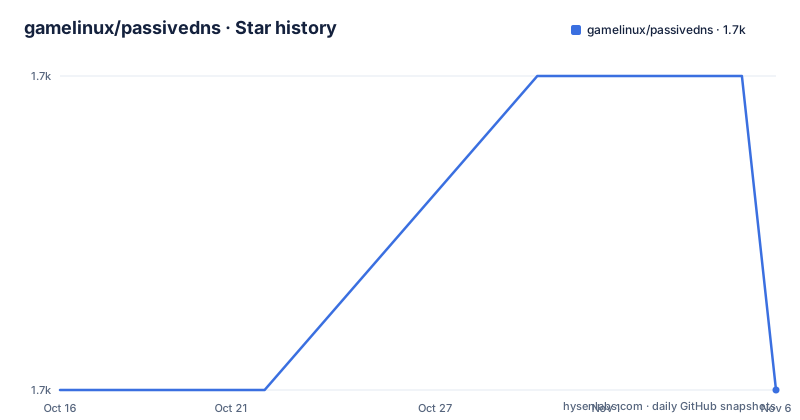
Star history
- gamelinux/passivedns1,736 ★ · +0
| Repository | 2026-10-16 | 2026-11-06 |
|---|---|---|
| gamelinux/passivedns | 1.7k | 1.7k |
0 Stars in the last 21 days, measured from the daily GitHub snapshot. Compare with other projects
Editorial analysis
The output is a flat delimited log, one answer per line
PassiveDNS sniffs traffic from an interface or reads a pcap file and writes the DNS server answers to a log file. The README shows /var/log/passivedns.log as an example log location, and the format is a header line followed by double-pipe separated fields.
The header states the columns: timestamp, dns-client, dns-server, RR class, Query, Query Type, Answer, TTL and Count.
#timestamp||dns-client ||dns-server||RR class||Query||Query Type||Answer||TTL||Count
1322849924.408856||10.1.1.1||8.8.8.8||IN||upload.youtube.com.||A||74.125.43.117||46587||5
1322849924.408858||10.1.1.1||8.8.8.8||IN||www.adobe.com.||CNAME||www.wip4.adobe.com.||43200||8
Two things in that sample matter. The timestamp has sub-second precision as a floating point value, which is what lets you order answers from a burst. And the Count column is not part of the DNS protocol; the README does not define its exact counting semantics.
A CNAME and its A record appear as separate lines, and each carries its own TTL, so a lookup by name has to walk the chain rather than assume one row per name.
Because this is a log rather than a database, the storage cost and the query language are your problem. The repository contains a sql directory, but the README's own framing is that you search the data yourself, and nothing in it promises a schema or an index.
Aggregation trades volume for the first and last time you saw it
The second feature line in the README is the one that decides whether this is usable at line rate. PassiveDNS can cache and aggregate duplicate DNS answers in memory, limiting the amount of data in the log file without losing the essence of the answer.
Without it, a busy resolver re-answering the same A record every sixty seconds produces a log that is mostly repetition, and the interesting signal, a name moving to a new address, is buried. With aggregation, the repeated answer collapses and the Count field records how many times it happened.
The trade is time resolution. Once answers are collapsed, the log may no longer show each repeated occurrence separately. The examples in the README use the log for historical questions rather than per-packet forensics, and that is what the design serves.
Whether that trade is right depends on where you put the sniffer. On a network where most clients talk to a handful of resolvers, the traffic concentrates and aggregation buys a lot. Near a resolver itself, the name resolution is the whole traffic volume and aggregation matters more, not less.
Protocol coverage includes the cases that break naive parsers
The README states the parser handles IPv4 and IPv6, including fragments and IPv6 extension headers, and DNS over both UDP and TCP. HTTPS and SVCB answers are logged by default.
Each of those is a case where a simple parser produces garbage rather than nothing. IPv4 fragments mean the DNS payload is split across packets, so the parser has to reassemble. IPv6 extension headers sit between the fixed header and the payload, so a parser that assumes a fixed offset reads the wrong bytes. TCP DNS carries a two-byte length prefix and can arrive as multiple messages in one segment, so a parser that assumes one message per packet truncates.
HTTPS and SVCB being logged by default is the modern addition and the one that catches people out. An SVCB record advertises alternative endpoints, including aliases to other names, so a log written before SVCB existed and one written now do not describe the same traffic.
The project is written in C, built with autotools: the repository has configure.ac, Makefile.am and a bootstrap script. Build instructions for Ubuntu 26.04 are in doc/INSTALL, and vulnerabilities are reported through SECURITY.md rather than the issue tracker.
The documented use case is retroactive attribution
The README gives three usage scenarios in detail, and all three share the same shape: you learn something later and go back.
The first is domain or IP history during an incident. The worked example is malware talking to a domain that currently resolves to one address. Searching only current flow data finds the clients that talked to that address now. Searching passive DNS for the domain instead yields a FirstSeen, LastSeen, type, TTL, query and answer history showing the name pointed at a different address earlier. Going back to flow data for that earlier address reveals clients that the first pass missed, and in the example those clients downloaded different malware and deleted the first sample, which is why no flows to the current address existed.
The second scenario is the inverse check, and it is the one that shows the value of the negative result. You suspect command and control on an address, search flows, and find many clients talking to it. Searching the passive DNS data for the domain you expect shows nothing for it, and the address turns out to host hundreds of unrelated sites. The absence of a record is the finding.
The third is detection rather than investigation: subdomains of a known-bad domain rotate, so an IDS rule per address wastes resources, and a script matching name patterns against the passive data alerts on the pattern instead. The README extends this to running whois on newly seen top-level domains and correlating registration details such as registrant name, telephone and address against known bad information to produce a score.
That last step is the boundary of the tool. PassiveDNS produces the name; the reputation logic is yours.
Where passive DNS data alone is not enough
The first limitation is placement. A sniffer sees only the traffic that crosses it, and DNS resolution happens where your resolvers are. Miss the traffic and the log is empty for that segment, and an empty log looks identical to a clean network.
The second is encrypted resolution. The README does not mention DNS over TLS or DNS over HTTPS being decrypted, so a network where clients use DoH to a resolver you do not operate produces names the tool never sees. Its HTTPS and SVCB handling covers records inside ordinary DNS responses, not encrypted transports.
The third is that there is no query interface. There is no server, no schema and no alert mechanism in the documented behaviour. Every scenario in the README ends with you searching something, which in practice means loading the log into a database or a search tool, and that ingest is a project.
The alternative approaches differ in what they move to you. A passive DNS service runs the collection and gives you an API and a database, which means a third party and a network dependency in exchange for the query layer. A full network sensor produces DNS data alongside connection and protocol records, so a name is visible next to the flows that used it, at the cost of much more data and a heavier deployment. Doing it yourself with this tool or with your existing sensor pipeline keeps everything local and in your hands, and leaves the correlation work to you.
What you cannot avoid is the licensing question. The repository records a custom licence that GitHub could not classify, so read the LICENSE file at the root before this goes into a product.
Editorial conclusion
Adopt PassiveDNS when you need a durable local history of what names resolved to on your network and you can afford to run a sniffer near the traffic you care about. Do not adopt it expecting a query interface or a schema, since the output is a log file and the repository ships it as such. Before deploying, decide where the sniffing point sits relative to your resolvers, and read the LICENSE file, since GitHub could not classify it.
Frequently asked questions
What does PassiveDNS write to disk?
A delimited log, by default at /var/log/passivedns.log, with one line per DNS answer. The columns are timestamp, dns-client, dns-server, RR class, Query, Query Type, Answer, TTL and Count.
Does PassiveDNS handle IPv6 and TCP DNS?
Yes. The README states it parses IPv4 and IPv6 including fragments and IPv6 extension headers, and DNS over both UDP and TCP. HTTPS and SVCB answers are logged by default.
Can PassiveDNS read a pcap file instead of sniffing live traffic?
Yes. It either sniffs traffic from an interface or reads a pcap file, and in both cases it writes the DNS server answers it observes to the log file.
How do I build PassiveDNS?
The repository uses autotools, with configure.ac, Makefile.am and a bootstrap script. Build instructions for Ubuntu 26.04 are in doc/INSTALL, and vulnerabilities are reported through SECURITY.md rather than the issue tracker.
Official sources
Add this badge to your README
If you maintain this project, the badge below links readers to this analysis and shows its maintenance status from the daily GitHub snapshot. Paste the markdown into your README; add ?metric=license or ?metric=stars to the image URL for a different field.

[](https://hysenlabs.com/projects/gamelinux-passivedns)Star history chart for your README
[](https://hysenlabs.com/projects/gamelinux-passivedns)Was this useful?