GC-STEM/it140-m1-setup-tasks: what IT 140 students install in Module One
IT 140 Module One: Setup Tasks repository. This repo provides step-by-step instructions and commands to install the course IDE needed to complete all subsequent course activities.
At a glance
- What is it?
- The Setup Tasks repository is a routing document, not an installer. It sends IT 140 students through GitHub, then the Codio Virtual Desktop, then optionally a local machine, and it expects each phase to end with a verification check.
- Who is it for?
- This repository is for students enrolled in IT 140 who need a working course IDE before the Module Two assignment, and for faculty who start from .faculty/README.md instead of the student path. It is not for anyone outside the course, and it is not a general Python environment installer.
- Can I use it commercially?
- Not without permission. GitHub finds no licence file in the repository, and without a licence all rights are reserved by default: you may read the code but not reuse it. Check the README, or ask the authors, before using it.
- Is it still maintained?
- Yes. The repository last received commits 48 days ago.
- What is it written in?
- Mainly Shell, according to GitHub's language statistics.
Answers come from the project's GitHub data, last synced on November 15, 2026, and from our analysis. They are not legal advice.
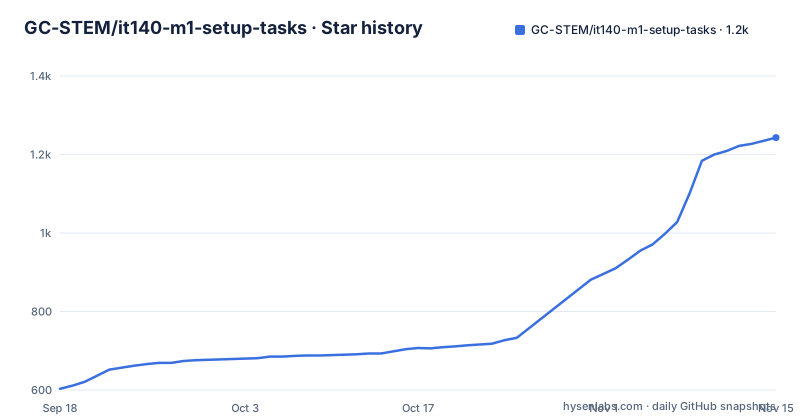
Star history
- GC-STEM/it140-m1-setup-tasks1,243 ★ · +640
| Repository | 2026-09-18 | 2026-11-15 |
|---|---|---|
| GC-STEM/it140-m1-setup-tasks | 603 | 1.2k |
640 Stars in the last 58 days, measured from the daily GitHub snapshot. Compare with other projects
Editorial analysis
A routing document for one course, not a general installer
The problem this repository solves is narrow and administrative. IT 140 is an introduction to scripting course, and from the Module Two assignment onward its instructions assume two things already exist: a GitHub account and a configured course IDE. Module One is where those two assumptions get satisfied. The README states the task is required, non-graded, and has no submission, which tells you the deliverable is a working environment rather than a file you hand in.
The audience is therefore students in that course, plus faculty and staff who need the same environment for demonstration or support. The README sends faculty to .faculty/README.md and students to codio/README.md, so the two groups do not share a single path. Anyone who is not in IT 140 will find little here: the repository is a set of pointers into course-specific guides, and the tooling it describes (VS Code, Python 3.12, Git and GitHub tools, testing tools, course extensions) is chosen because course instructions, examples and automated tests were written against it.
The three-phase path: GitHub, Codio, then optionally your own machine
The README lays out the sequence explicitly as 0 Start Here, then 1 GitHub, then 2 Codio, then 3 Local Computer, then Done, and it asks readers to follow the links rather than browse the repository folders. That instruction matters because the top level holds .dev/, .faculty/, .github/, .vscode/, codio/, github/ and local/ alongside the README, and only some of those are meant for students.
Phase one ends at a GitHub Account Ready Check. Phase two targets the Codio Virtual Desktop, described as the course reference environment used in assignment instructions, screenshots and instructional videos. The README says the CVD already contains the main system software for IT 140 and that setup updates, configures and verifies it, and it recommends configuring the CVD even for students who also plan to work locally. Phase three is optional and branches by operating system into local/windows/README.md, local/macOS/README.md and local/linux/README.md.
The consistency claim is the design rationale: the same core toolset across supported environments so that instructions, examples, automated tests and technical support behave the same way. That is a reasonable goal for a course with automated grading, but it also means the local path is a reproduction of the Codio environment rather than an independent choice, and the README treats it as secondary.
Installing the course IDE: where the commands actually live
There is no install command in the README itself. The repository distributes setup as per-phase guides, and the README's role is to tell you which guide to open and what a successful result looks like. The README gives this example of the student entry point:
# open the GitHub guide first
github/README.md
That link is a file path in the repository, not a shell command you execute. Following it takes you to the GitHub account guide, which is where the actual account setup steps and the GitHub Account Ready Check live. When that check passes, the guide links onward to the Codio guide.
The Codio phase is the one the README describes in the most operational terms. You work through the Codio guide until the CVD Verification Summary reports the successful completion values shown in that guide, and the README says setup scripts save diagnostic logs under this path:
~/it140/logs/On a local computer the corresponding folder is it140/logs inside your user profile. If you are setting up a local machine instead, the README points to local/windows/README.md, local/macOS/README.md or local/linux/README.md depending on the system, and those guides carry their own steps. The first real use of the environment is not in this repository at all: once setup is verified, the README says to return to the IT 140 course in D2L Brightspace and finish any remaining Module One tasks before the end of Week 1.
What the failure handling tells you about the scripts
The most informative part of the README is the section on what to do when things go wrong. It lists the outcomes a setup script can report: FAIL, PARTIAL, NOT COMPLIANT, a nonzero exit code, or another unexpected result. That vocabulary implies the scripts perform checks and classify the result rather than simply running to completion, which is why the guidance is to read the script summary and the README for that step instead of guessing at a repair or continuing to the next phase.
This is a real constraint, not boilerplate. A student who ignores a PARTIAL result and moves on will be debugging a broken environment later, during graded work, with less context about what changed. The README also asks you to save the exact error message and note the step where it occurred before asking for help, and it points to the wiki page Setup Problems and Support for what to collect and where to ask.
One warning in the README is worth repeating in plain terms: never share passwords, authentication or verification codes, recovery codes, personal access tokens or other credentials in screenshots, logs, GitHub posts or support requests. Setup logs and screenshots are exactly the artifacts students are asked to collect, so the two instructions interact, and the credential warning is the one that wins.
Where this approach breaks down
The clearest limitation is the managed-computer case. The README states that if a local computer is managed by an employer, school or another person, you should not bypass security controls or installation restrictions, and should use the CVD while you determine whether you have permission to install software. That is a sensible rule, but it also means the local path is simply unavailable to some students, and the README does not describe an alternative for anyone who cannot access Codio.
A second gap is the licence. The repository does not state a licence, and the README does not discuss terms for the course extensions, the Codio environment or the material itself. Anyone intending to reuse these guides outside the course has no stated permission to rely on.
The repository is also tightly coupled to one course and one term. The README notes that IT 140 now uses GitHub repositories for starter files, development resources and supporting documentation, and the repository version is listed as 1.0.4 with a version DTG of 2026-09-07-14-30. The repository has no published GitHub releases, so the version string in the README is the only version marker a reader gets. Finally, the README does not document rollback. If a setup phase leaves the environment in a bad state, the documented recovery path is troubleshooting and support, not an uninstall or revert procedure.
The alternative: a plain local Python install
The obvious alternative for a student who just wants to write Python is to skip this repository's path and install Python 3.12 with an editor such as VS Code directly, using each project's own installation instructions. The difference in approach is not cosmetic. A plain install gives you a general-purpose environment that you configure yourself, with no verification step and no expectation that automated tests will run against it.
The IT 140 path inverts that. It pins the toolset, routes you through GitHub and then Codio, and ends each phase with a check: the GitHub Account Ready Check, then the CVD Verification Summary. The payoff is that course instructions, screenshots, automated tests and technical support all assume the same environment. The cost is that you inherit the course's version choices and its verification requirements, and if a script reports NOT COMPLIANT you are expected to stop and follow the summary rather than proceed with a working-but-different setup. For someone taking the course, the pinned path is the one the graded work is written against. For anyone else, it is overhead.
Editorial conclusion
This repository is for students enrolled in IT 140 who need a working course IDE before the Module Two assignment, and for faculty who start from .faculty/README.md instead of the student path. It is not for anyone outside the course, and it is not a general Python environment installer. Before you begin, confirm you can sign in to GitHub and that your Codio course grants you a CVD, since the guides tell you to stop rather than guess when a setup script reports FAIL, PARTIAL or NOT COMPLIANT. Keep the diagnostic logs under ~/it140/logs/ or it140/logs in your user profile, because that folder is what the support path asks you to bring.
Frequently asked questions
Do I need a GitHub account to complete the IT 140 Module One setup tasks?
Yes. The README states that course instructions beginning with the Module Two Assignment assume you have a GitHub account, and the setup sequence starts with the GitHub guide and its GitHub Account Ready Check before moving to Codio.
Can I set up the course IDE on my own Windows, macOS or Linux computer instead of Codio?
The README lists local setup as optional and points to separate guides for Windows, macOS and Linux, but it recommends configuring the Codio Virtual Desktop even if you also plan to work on your own computer. If the computer is managed by an employer, school or another person, the README says not to bypass security controls or installation restrictions.
Where does GC-STEM/it140-m1-setup-tasks store setup logs if a script fails?
The README says setup scripts save diagnostic logs under ~/it140/logs/ or the corresponding it140/logs folder in your user profile. It also asks you to save the exact error message and note the step where it occurred before asking for help.
Official sources
Add this badge to your README
If you maintain this project, the badge below links readers to this analysis and shows its maintenance status from the daily GitHub snapshot. Paste the markdown into your README; add ?metric=license or ?metric=stars to the image URL for a different field.

[](https://hysenlabs.com/projects/gc-stem-it140-m1-setup-tasks)Star history chart for your README
[](https://hysenlabs.com/projects/gc-stem-it140-m1-setup-tasks)Was this useful?