WhiteSur Icon Theme: one install.sh, eight flags, and a colour list that contradicts itself
MacOS Big Sur style icon theme for linux desktops
At a glance
- What is it?
- WhiteSur Icon Theme swaps Linux icon files for a macOS Big Sur set through a single shell script, and its eight row option table carries a contradiction worth reading before you install. The colour variants it offers do not include the blue default it names.
- Who is it for?
- Adopt WhiteSur Icon Theme when your Linux desktop already carries a non-macOS shell theme and you want the icon vocabulary to change without touching window decoration, since the two live in separate repositories and separate installs. Leave it alone if you expect one switch to make a desktop read as macOS, or if your work runs on Snap packages, because each snapped application needs its desktop file copied and edited by hand.
- Can I use it commercially?
- Yes, with conditions. GPL-3.0 is a copyleft licence: if you distribute software that includes it, you must release that software's source code under the same licence. Running it internally without distributing it does not trigger that obligation.
- Is it still maintained?
- Yes. The repository last received commits 43 days ago.
- What is it written in?
- Mainly Shell, according to GitHub's language statistics.
Answers come from the project's GitHub data, last synced on October 23, 2026, and from our analysis. They are not legal advice.
Star history
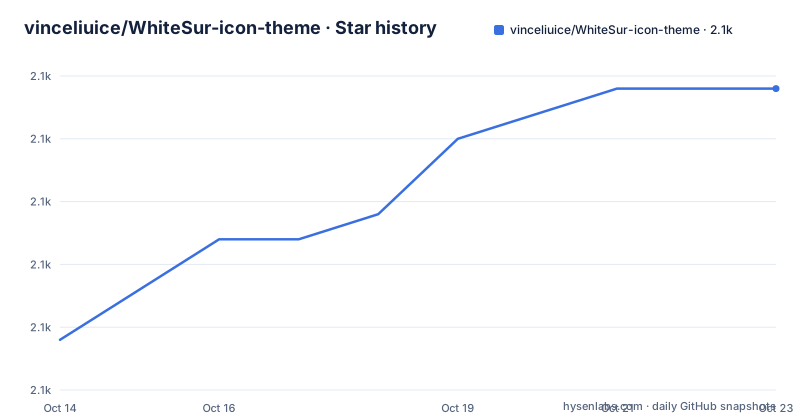
- vinceliuice/WhiteSur-icon-theme2,102 ★ · +10
| Repository | 2026-10-14 | 2026-10-23 |
|---|---|---|
| vinceliuice/WhiteSur-icon-theme | 2.1k | 2.1k |
10 Stars in the last 9 days, measured from the daily GitHub snapshot. Compare with other projects
Editorial analysis
Big Sur icon files for a Linux desktop, one script deep
WhiteSur Icon Theme does exactly one job: it replaces the icon files your Linux desktop draws beside folders, files and applications with a macOS Big Sur set, and nothing more. The repository description names it a MacOS Big Sur style icon theme for linux desktops, and the topics list gnome and kde-plasma, so both desktops are intended targets rather than one being the preferred case.
What the project does not supply is the frame around those icons. Under a Requirement heading the README points at 2 separate repositories, WhiteSur-gtk-theme for GTK and WhiteSur-kde for KDE, and each has to be installed on its own before the pair looks deliberate. Drop the icons onto a stock Linux desktop and you get the macOS icon vocabulary sitting next to squared-off window controls and a shell that belongs to something else entirely.
That split is the practical point for anyone weighing this. The icons form a separable, reversible layer over a shell theme you already run, and the entire documented install path is one shell script with one option table. Nothing else in the project reaches your system: no daemon, no service, no background process left behind to clean up.
install.sh is the whole public interface, eight flags long
The repository root holds one executable, install.sh, with no configuration file or editor beside it, so the script is the product rather than a wrapper around a wider toolkit. Its entire documented interface is 1 usage line and a table of 8 rows.
Usage: `./install.sh` **[OPTIONS...]**Three of those rows decide where the set lands and what it is called:
|  OPTIONS:           | |
|:--------------------|:-------------|
|-d, --dest           | Specify theme destination directory (Default: $HOME/.local/share/icons)|
|-n, --name           | Specify theme name (Default: WhiteSur)|
|-t, --theme          | Specify theme color variant(s) [default/purple/pink/red/orange/yellow/green/grey/all] (Default: blue)|
|-a, --alternative    | Install alternative icons (redesigned MacOS default icons)|
|-b, --bold           | Install bold panel icons version|
| -p, --kde-plasma    | Replace Apple logo with KDE Plasma logo|
|-r,--remove,-u,--uninstall | Uninstall (remove) icon themes|
|-h, --help           | Show this help|
`--dest` moves the destination, and the default keeps the output inside your own account rather than a system path. `--name` sets the theme name, which is what lets a second install sit beside the first instead of replacing it. `--theme` selects the colour variant, and that row is where the documentation contradicts itself.
The remaining 5 entries are value-less switches. One brings in icons described as redesigned MacOS default icons under `--alternative`. Another installs a bold panel icons version under `--bold`, and a third swaps the Apple logo for a KDE Plasma logo under `--kde-plasma`. Running the script with `--help` prints the text the README points to for anything the table leaves out. Uninstall carries 4 spellings and is worth a closer look, because what it clears is the part nobody has written down.
The --theme list omits the default it names
Read that third row twice. The accepted values are bracketed as `default/purple/pink/red/orange/yellow/green/grey/all`, which is 8 colour names plus a catch-all keyword, and the same row then records the default as `blue`. That colour appears nowhere in the list of values. The default the script applies is therefore not one of the choices the table offers, and nothing settles which side is authoritative: no document says whether `blue` is still accepted as an argument, an undocumented alias, or a leftover from an earlier palette.
The plural in the wording sharpens the problem instead of resolving it. The row reads `Specify theme color variant(s)`, a phrase that promises several variants in one run, yet no example anywhere shows two values, a separator or a comma, and no error path is written down for a misspelled or missing variant name. Eight listed names, one unlisted default, zero documented failure messages: the accepted vocabulary is left to be discovered by running the script and reading the destination directory afterwards.
Renaming matters here, because variant and name are independent axes. You can rename an install, choose a colour, or do both, and the README treats the resulting directory name as a consequence of those 2 choices rather than publishing a fixed naming scheme. Convenient when you want a purple set beside a grey one, and also the only lever left for telling the two apart later, since nothing in the interface reports what is already installed.
Uninstall carries four spellings and no target syntax
One row holds 4 names where every other option holds 2, and unlike the rest of the table it is written without spaces after the commas. The action is described in a single line as `Uninstall (remove) icon themes`, which is plural and vague at once. No document says whether the flag clears every variant you installed, only the one named by `--name`, only the colour picked by `--theme`, or everything the script has ever written to `--dest`.
That gap reaches past tidiness. Because the destination default lives under your home directory, a mistyped `--dest` can leave copies of the theme scattered across directories that no single command targets, and the interface offers no list command, no dry-run and no confirmation prompt for inspecting what is there first. The only diagnostic in the table is `--help`, and that prints usage rather than installed state.
Removal is therefore a directory operation you may have to perform yourself if you want certainty. The set is made of SVG files under a path you chose, nothing in the documentation stops you from listing that path before deciding, and 4 interchangeable aliases tell you nothing about which variant any one invocation would clear.
Every snapped application needs its desktop file copied by hand
Snap-packaged applications are the clearest weak spot, and the README meets them with manual instructions rather than support. The note opens by conceding the point: to use these icons with snaps, the best way is to make a copy of the application's desktop file, put that copy in your own applications directory, then open it in a text editor and change one line.
All 3 paths and keys involved are spelled out:
/var/lib/snapd/desktop/applications/name-of-the-snap-application.desktop
$HOME/.local/share/applications/
Icon=name-of-the-icon.svg
The source file sits in a system directory owned by snapd, the copy has to land in your home directory, and the edit swaps the icon key for the name of the SVG you actually want. None of this is a flag, and none of it scales: every snapped application needs its own copy and its own hand-edited line, and the SVG name has to match a file that exists inside the installed set. No mapping table links application names to icon files, so locating the right filename stays manual work.
The result is a per-application loop with no error handling and no undo beyond deleting the copies you made. For a machine running 3 or 4 snapped apps that is tolerable. For one running dozens, this is repetitive editing the project has not automated, and a wrong filename leaves an application with no icon at all rather than the wrong one.
Two bold directories ship together but only one has a flag
The repository root holds 2 directories expressing the same idea at different strengths, `bold/` and `bolder/`, and the option table reaches only one of them. The reachable switch is `-b, --bold`, described as installing a bold panel icons version; no flag, alias or documented step anywhere connects to `bolder/`. If the heavier weight is usable on your copy of the script, the published interface offers no way to ask for it, and no document fills the gap.
The bold version also arrives with hardware advice attached. The README points it at a `High resolution display`, giving a 4k display at 200% scale as the example, which is a concrete claim about legibility you can check against your own monitor rather than take on trust. Watch the scope while you do, because `--bold` covers panel icons only: on a high density display you can end up with a bold panel beside an ordinary file icon set unless the two happen to match.
Two further directories follow the same pattern of shipped but unexplained. The pairing is obvious for `alternative/`, which lines up with `-a, --alternative`. Less obvious is `plasma/`, which sits in the root while the only documented link to it, `-p, --kde-plasma`, is described solely as replacing the Apple logo with a KDE Plasma logo. No document says what `plasma/` holds or whether that flag reads from it, so the Apple logo swap cannot be traced back to a specific file.
Five directories in the root have no documented purpose
Alongside the themed directories sit 5 more: `src/`, `templates/`, `colors/`, `original/` and `links/`, plus a `.github/` folder. The README explains not one of them. Installation is the only procedure it documents, that procedure runs through a single script, and no build step, palette definition, template renderer or packaging job is mentioned anywhere. The generation pipeline behind the icon set is therefore opaque: you can install what the script ships, yet nothing in the documentation lets you regenerate the artwork, recolour it from the source palettes, or tell which directory holds untouched upstream files and which holds build output.
That opacity decides who the project suits. Its 2 working extension points are the rename flag `--name` and the variant selector `--theme`, and both act on shipped output rather than on sources. One root entry is named as though it held an assembled package, yet no document says what such a package would contain or who consumes it, while `original/` hints at untouched upstream artwork without naming whose.
On upkeep, the last push was on 2026-09-10, with releases dated 2026-08-11 and 2026-07-07. On terms, the repository is GPL-3.0 and ships `COPYING` and `AUTHORS` at the root, so redistributed or modified copies carry the GPL-3.0 conditions, and anyone repackaging these icons inside a distribution needs to read that file rather than assume icon artwork is exempt.
Editorial conclusion
Adopt WhiteSur Icon Theme when your Linux desktop already carries a non-macOS shell theme and you want the icon vocabulary to change without touching window decoration, since the two live in separate repositories and separate installs. Leave it alone if you expect one switch to make a desktop read as macOS, or if your work runs on Snap packages, because each snapped application needs its desktop file copied and edited by hand. Before installing anything, run `./install.sh --help` and check whether the `blue` default in the table matches what your copy writes to `$HOME/.local/share/icons`.
Frequently asked questions
Does WhiteSur Icon Theme restyle my whole Linux desktop or only the icons?
Only the icons. The README names 2 companion projects under a Requirement heading, WhiteSur-gtk-theme for GTK and WhiteSur-kde for KDE, and each is a separate repository with its own install. Icons alone will not restyle window decoration or the shell around them.
Which colour variants does the --theme flag accept?
The table lists `default/purple/pink/red/orange/yellow/green/grey/all` while recording the default as `blue`, and `blue` is not among the listed values. No document says whether `blue` is still accepted, an alias, or an error, so inspect the destination directory after a first run.
Can I use WhiteSur icons with Snap applications?
Not automatically. The note tells you to copy the application's desktop file out of `/var/lib/snapd/desktop/applications/`, put the copy in `$HOME/.local/share/applications/`, and change `Icon=` to the SVG filename by hand, once per application.
How do I install WhiteSur icons for every user instead of just myself?
The documented default writes to `$HOME/.local/share/icons`, so a system-wide install means passing `--dest` with the path you want and the permissions to write it. The README gives no system-wide example and no root variant of the script.
What are the src/ and templates/ directories for in WhiteSur Icon Theme?
Undocumented. The README describes installation only, through `install.sh`, and never mentions a build step, a colour palette file or a template renderer, so a root entry such as `release/` cannot be traced to any documented output.
How do I remove WhiteSur icons after installing them?
The script accepts `-r,--remove,-u,--uninstall`, described as uninstall (remove) icon themes. No document says whether removal honours `--name` or `--theme`, so list the destination directory before running it.
Official sources
Add this badge to your README
If you maintain this project, the badge below links readers to this analysis and shows its maintenance status from the daily GitHub snapshot. Paste the markdown into your README; add ?metric=license or ?metric=stars to the image URL for a different field.

[](https://hysenlabs.com/projects/vinceliuice-whitesur-icon-theme)Star history chart for your README
[](https://hysenlabs.com/projects/vinceliuice-whitesur-icon-theme)Was this useful?