GDQuest's Godot PCG demos teach by making you walk the generator
Procedural generation algorithms and demos for the Godot game engine
At a glance
- What is it?
- This repository collects GDQuest's procedural generation demos for Godot: a Spelunky style random walker, a shader driven wrapping world map, a dungeon generator, a modular weapon system and four infinite world demos. It is teaching material, comes with the course's starter projects, and its licence is not a standard one.
- Who is it for?
- Adopt this repository if you learn procedural generation by reading runnable Godot code and you want one algorithm per folder rather than a framework, and read the LICENSE file before reusing any of it since GitHub cannot classify the licence and the project is course material. Do not adopt it as a generation library, because there is no API to import, only scenes to open.
- Can I use it commercially?
- Check first. The repository uses a licence we do not classify automatically, so read its LICENSE file before any commercial use.
- Is it still maintained?
- Yes. The repository last received commits 134 days ago.
- What is it written in?
- Mainly GDScript, according to GitHub's language statistics.
Answers come from the project's GitHub data, last synced on November 7, 2026, and from our analysis. They are not legal advice.
Star history
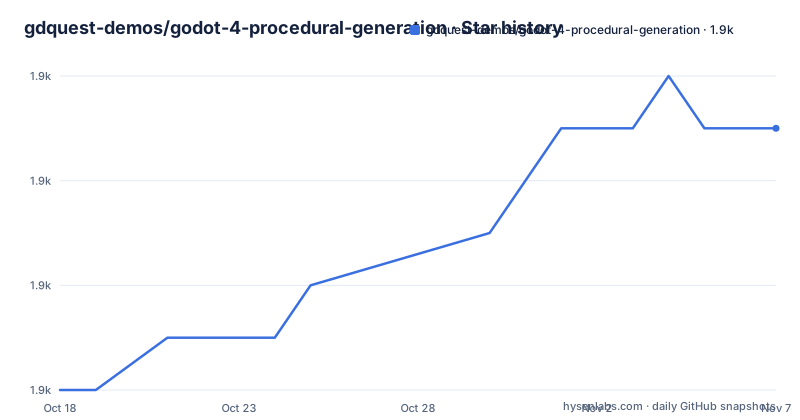
- gdquest-demos/godot-4-procedural-generation1,935 ★ · +5
| Repository | 2026-10-18 | 2026-11-07 |
|---|---|---|
| gdquest-demos/godot-4-procedural-generation | 1.9k | 1.9k |
5 Stars in the last 20 days, measured from the daily GitHub snapshot. Compare with other projects
Editorial analysis
One folder per algorithm, no framework to learn first
The structure of this repository is the pedagogy. There is no shared library, no plugin, no API. Each demo is a self contained sub directory, and the project is built to be read.
The top level tree has four directories that matter. `godot4/` is the current set of demos, `godot3/` is the older engine version, `start-project/` holds starter projects, and `images/` holds the screenshots the README uses. So the repository carries two engine versions side by side, which is the first thing to sort out when you open it.
The demos themselves are named after the algorithm or the idea. `RandomWalker` is described as the algorithm as seen in Spelunky: a node walks randomly on a grid, places hand designed level chunks, and randomises them. That is the classic technique for assembling a level out of authored pieces, and the screenshots in the README show two generated variants of it.
`WorldMap` generates a world map with biomes and rivers and relies heavily on shaders. The README credits a specific inspiration, a procedural wrapping world map article for Unity C#, while noting the Godot implementation is completely different. `BasicDungeonGenerator` is described as a basic generator to get started with: rectangular rooms, rooms with organic shapes, and corridors connecting the rooms.
`ModularWeapons` is the one that is a game design pattern rather than a map algorithm. You stack movement modifiers and different emitters to generate weapons procedurally, and the README names Binding of Isaac and Enter the Gungeon as games that use techniques like it.
Because each demo stands alone, you can lift one folder into your own project and ignore the rest, which is how most people will use this.
Infinite worlds are four demos that build on each other
The `SpaceInfiniteGeneration/` directory holds four demos of increasing complexity, and the README describes them as a progression rather than as separate examples.
The premise is a ship you can fly forever through a world that never ends. The first two demos generate worlds full of asteroids using white noise and blue noise respectively, and both are shipped with screenshots.
Blue noise matters more than it sounds. White noise clumps, and a field of asteroids generated from it looks like static rather than a belt. Blue noise spreads points out evenly at a fixed density, which is why the second demo exists as a separate case: the comparison between the two images is the lesson.
The third demo is the `LayeredWorldGenerator` scene, which shows layered generation building a universe out of planets, moons, trade lanes and asteroid belts. This is the structural idea, that different systems occupy different layers rather than competing in one noise function, and it is what most open world designs are actually made of.
The fourth is `PersistentWorldGenerator`, which the README says builds upon the previous demo and adds the ability to make persistent changes to this infinite universe. That is the step where a procedural world becomes a game world, since nothing the player does matters in a world that regenerates identically every visit.
Reading them in order gives you a progression from noise sampling to world structure to state, and each step is small enough to understand before the next one assumes it.
The demo timer is deliberate, and you must delete it
One implementation detail in the README is easy to miss.
In the demos, where relevant, they use a timer to show the content generation steps, because the final level would otherwise appear instantly. The stated reason is that doing so helps to visualise and debug algorithms. Then: remove that timer code for the algorithm to run at full speed.
That means a demo using the timer is not running at full speed. If you benchmark a generator from this repository without stripping the timer, you are measuring the visualisation delay rather than the algorithm. If you copy a demo into a project, you are shipping an artificial slowdown unless you remove it.
It is an honest trade: the step-by-step display helps explain the algorithm and can slow down an unedited demo. Treat the timer as documentation, not as part of the code.
The README's own contribution guidance is thin in a useful way. It says contributors are welcome, points to an issue tracker for bugs, and links two external documents: the contributor guidelines for GDQuest projects and the GDScript style guide. There is no test suite described and no automated checking mentioned, so a contribution is reviewed by a person against the style guide.
The README tells you to import a directory that is not there
There is a concrete documentation error worth knowing before you follow the instructions.
The How to use section says to clone the repository and import the `godot/` directory as a Godot project, with each demo in a separate sub directory. There is no `godot/` directory. The tree at the root has `godot3/` and `godot4/`, and nothing else that matches.
So the sensible reading is that the instruction is out of date, and that the repository description itself says procedural generation demos for Godot 4. You want `godot4/` as the project to import, and `godot3/` only if you are deliberately working in the older engine version.
The second half of that section is more specific and more useful. The `start-project/` directory contains starters for students of the Godot PCG Secrets course, and it is explicitly not the complete demos. That means the repository carries two parallel sets of scenes: the finished versions under `godot4/`, and deliberately incomplete starting points for course exercises under `start-project/`. If you are following the course, the starters are what you want to edit. If you are reading the algorithms, the finished demos are what you want to diff against them.
The bug report link is also worth noting. It points to the issue tracker of a different repository, `GDQuest/godot-game-harvester`, not to this one. That is a copy and paste leftover, and it means filing a bug here may not reach the right place.
The project has no GitHub releases at all, so there is nothing to pin. The default branch is `master`, the primary language is GDScript, and the last push was on 2026-06-26, about four months before this writing.
Course material with an unclassifiable licence
The licence is the item to resolve before you reuse anything here.
GitHub's own licence field for this repository shows as a custom licence it could not classify, and there is a `LICENSE` file at the root. The README does not name a licence at all. What it does say is that the algorithms come from the GDQuest course called Godot PCG Secrets, and it invites readers to buy a GDQuest game creation course to support their work on free software.
That framing makes the position fairly clear without resolving the legal detail: this is teaching material published alongside a paid course, and the licence text is the thing that decides whether you can paste a demo into a commercial game. Read the LICENSE file, and if it is ambiguous, ask GDQuest directly. This article is describing the file's presence, not interpreting its terms.
The broader context is that the repository is maintained by GDQuest, whose material around it, including the style guide and the contributor guidelines, is hosted on gdquest.com rather than in this repository. The project also points at their Twitter and YouTube channels for tutorials.
There is one more practical point about what these demos are not. They are not a production generator library and they do not claim to be. The dungeon generator is described as basic and intended to get started, the world map is inspired by an article about wrapping maps in a different engine, and the modular weapon system is described as procedural or emergent gameplay. Each is a teaching artefact for one technique, in the Godot editor, with a timer in it. That is exactly what makes them useful to read and exactly what makes them a poor foundation for a shipped game without substantial work.
Editorial conclusion
Adopt this repository if you learn procedural generation by reading runnable Godot code and you want one algorithm per folder rather than a framework, and read the LICENSE file before reusing any of it since GitHub cannot classify the licence and the project is course material. Do not adopt it as a generation library, because there is no API to import, only scenes to open. Verify first that you open the engine version matching the folder you want, since the tree has both godot3/ and godot4/, and remove the step timer the demos use before you judge any algorithm's speed.
Frequently asked questions
Which Godot version does this procedural generation repository target?
The current demos are under godot4/, with an older godot3/ directory alongside. The How to use section says to import a godot/ directory, which does not exist in the repository, so godot4/ is the directory to open.
What does the RandomWalker demo do?
It is the algorithm as seen in Spelunky: a node walks randomly on a grid, places hand designed level chunks, and randomises them to generate unique levels.
What is the difference between the white noise and blue noise asteroid demos?
Both generate infinite asteroid fields for the flyable world in SpaceInfiniteGeneration/. White noise clumps into noisy patches, while blue noise spreads points evenly at a fixed density, and the two are shipped as separate demos so the difference is visible.
Why do the demos run slowly in the editor?
Where relevant the demos insert a timer to show the generation steps, because the finished level would otherwise appear instantly. The README says to remove that timer code for the algorithm to run at full speed.
Can I use these Godot procedural generation demos in a commercial game?
Read the LICENSE file at the repository root first. GitHub classifies the repository licence as a custom one it could not categorise, the README does not name a licence, and the algorithms come from the Godot PCG Secrets course.
Official sources
Add this badge to your README
If you maintain this project, the badge below links readers to this analysis and shows its maintenance status from the daily GitHub snapshot. Paste the markdown into your README; add ?metric=license or ?metric=stars to the image URL for a different field.

[](https://hysenlabs.com/projects/gdquest-demos-godot-4-procedural-generation)Star history chart for your README
[](https://hysenlabs.com/projects/gdquest-demos-godot-4-procedural-generation)Was this useful?