remixicon: a webfont, a sprite, and two version numbers that disagree
Open source neutral style icon system
At a glance
- What is it?
- Remix Icon is a set of 3200+ neutral-style symbols designed on a 24x24 grid in Outlined and Filled variants, consumable as a CSS webfont, an SVG sprite, or React and Vue components. The class naming is the API, and two of its own download links still point at version 2.5.0.
- Who is it for?
- Pick Remix Icon if a consistent, neutral set matters more to you than having every icon on the newest library, and you are willing to treat the class name as your icon API. Skip it if your set needs brand logos, since the project says it is focused on user interface icons and points logo seekers at Simple Icons.
- Can I use it commercially?
- Check first. The repository uses a licence we do not classify automatically, so read its LICENSE file before any commercial use.
- Is it still maintained?
- Activity is slowing. The repository last received commits 6 months ago.
- What is it written in?
- Mainly Less, according to GitHub's language statistics.
Answers come from the project's GitHub data, last synced on November 15, 2026, and from our analysis. They are not legal advice.
Star history
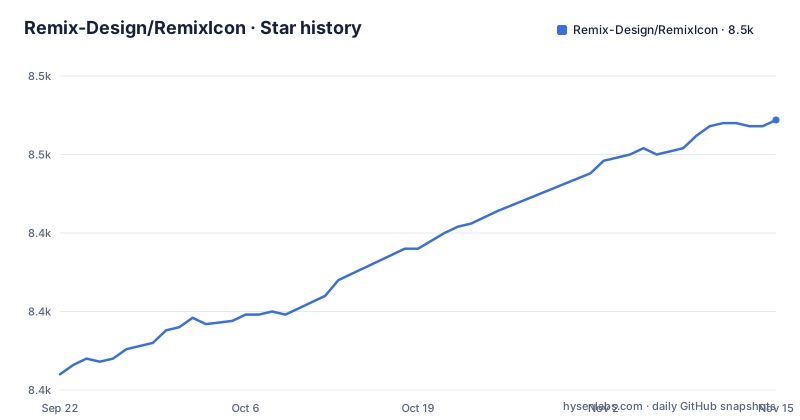
- Remix-Design/RemixIcon8,461 ★ · +81
| Repository | 2026-09-22 | 2026-11-15 |
|---|---|---|
| Remix-Design/RemixIcon | 8.4k | 8.5k |
81 Stars in the last 54 days, measured from the daily GitHub snapshot. Compare with other projects
Editorial analysis
The class name is the API: ri-{name}-{style}, plus ri-fw for width
There is no JavaScript in the webfont route. An icon is an i element with a class, and the class carries both the name and the style:
<i class="ri-admin-line"></i> <i class="ri-admin-fill"></i>The suffix is the style pair the set was designed around, Outlined and Filled on a 24x24 grid, expressed as -line and -fill. Every icon exists in both, so choosing a name does not commit you to one.
Size is CSS. Icons inherit the font-size of their container, and a set of classes moves them relative to that inherited value: ri-xxs at 0.5em, ri-xs at 0.75em, ri-sm at 0.875em, ri-1x at 1em, ri-lg at 1.3333em, ri-xl at 1.5em, then ri-2x and ri-3x continuing in em steps up to ri-10x at 10em. ri-fw is the odd one out, fixing the width so icons align in a column of text.
  <i class="ri-admin-line ri-xxs"></i>
  <!-- 0.5em -->
  <i class="ri-admin-line ri-xs"></i>
  <!-- 0.75em -->
One migration detail catches people upgrading from old code: the class prefixes changed from remixicon- to ri in version 2.0.0. Any markup written against the older prefix needs rewriting, and a stale class renders nothing at all rather than falling back to a different glyph.
The sprite and manual download links still point at 2.5.0
Two of the installation paths in the documentation resolve to a much older release than the current one, and the difference is visible in the URLs.
The CDN snippet uses a recent 4.x version:
<link
  href="https://cdn.jsdelivr.net/npm/[email protected]/fonts/remixicon.css"
  rel="stylesheet"
/>
The note under it says the @4.9.0 can be changed to any published version. The manual download section, further down, links remixicon.css at [email protected], and the SVG sprite section links remixicon.symbol.svg at [email protected] as well.
For a reader following the instructions literally, that means the sprite and the self-hosted stylesheet you copy are several major versions behind the package you would get from npm. The package metadata here is at 4.9.1, so nothing about the two old links reflects a version that is still current.
The practical fix is small: take those two files from the version you have installed rather than from the links in the page. Copy remixicon.css out of node_modules, or build the sprite from the same version, and the version mismatch stops mattering.
Three ways to load it, and the npm route is two lines
Installation from npm is the shortest path, and it is two commands: the package, then its stylesheet.
npm install remixicon --saveimport 'remixicon/fonts/remixicon.css'The second one is imported into your main entry file, which is what makes the class names resolve. A third route skips the package entirely: paste that link tag into the head of your HTML document and the icon set arrives from jsdelivr.
A fourth path skips both, and it is the one the project recommends to designers: click an icon on remixicon.com, press the Copy SVG button, and paste into Sketch, Figma, Adobe XD, Adobe Illustrator, Affinity Designer or Affinity Photo. Download the SVG or PNG of a single icon that way. The stated reasoning for preferring the website over a local folder is that the site's icons are continuously updated.
That advice carries a trade-off worth naming. Icons copied one at a time are exactly what you use and carry no version marker, so nothing tells you later which release a file came from and nothing tells you that a name you were given has been redrawn. The webfont route trades that ambiguity for a version number you can pin, at the cost of shipping a stylesheet and font files for the entire set.
A sprite puts fill in CSS, a webfont puts it in text
The two non-component routes differ in what an icon actually is in your document, and that difference shows up in how you style it.
With the webfont, the icon is a glyph in a font. That is why size is expressed in em and why the set ships a stylesheet with the size classes baked in. With the sprite, you download one file of symbols and reference a symbol by fragment:
<svg class="remix">
  <use xlink:href="your-path/remixicon.symbol.svg#ri-admin-fill"></use>
</svg>
Styling then happens on the svg itself, so a colour is a fill and the dimensions are explicit:
.remix {
  width: 24px;
  height: 24px;
  fill: #333;
}
That 24px matches the grid the icons were designed on, which is the number to keep in mind for either route. The fragment after the # is an icon name, and the same -line and -fill suffix rules apply, so the same naming knowledge carries across both approaches.
The artefact difference is the part that decides it for a project. The webfont route pulls fonts/ from the package and adds one import. The sprite route puts one file in your repository and points at it by path. GitHub reports Less as the primary language here, which is consistent with a project whose shipped artefact is a stylesheet plus font files and an icons/ directory of sources.
No third-party icons are accepted, and brand logos are pointed elsewhere
The contribution rules explain what the set deliberately does not contain.
Third-party drawn icons are not accepted, for the stated reason of keeping quality consistent per icon. If an icon is missing, the route is an issue rather than a pull request of artwork: create an issue titled "Icon request: `<Icon name>`" with a screenshot or a URL to an svg-format file, or email the maintainer directly. That is a real constraint for anyone who wants to extend the set with their own drawings.
Search keywords are maintained in tags.json, which drives the search on the website, and the project admits it has no good automatic method to complete the keywords for each icon. It asks for help with that file through issues, email or a pull request, especially when an icon matches your situation but your keywords did not find it.
The boundary is scope rather than policy. Remix Icon is focused on user interface icons, and for logo and brand marks the project recommends another set, Simple Icons. That is the alternative it names, and it is the honest answer if your need is a company logo rather than a chevron.
package.json declares Remix Icon License v1.0 and ships the file
The licensing story has one wrinkle, and it is in the package metadata rather than in the prose.
The README says all icons are free for both personal and commercial use, and that is the sentence most people stop at. The package.json says something more specific: the licence field reads Remix Icon License v1.0, and the files array ships a file named License alongside the fonts/ and icons/ directories and the two READMEs. The repository's GitHub licence field shows nothing at all, so the page badge tells you less than the package does.
No interpretation of that licence is offered here; read the License file in the version you depend on. What matters practically is that it is a named licence with its own text rather than a stock one, which means upgrading the package is also a licence question, and that redistribution terms are whatever that file says, not whatever the README sentence implies.
The published contents are narrow and worth knowing before you install: fonts/ and icons/ are what ship, together with the licence file and the READMEs. Nothing in the package is a build step, so there is nothing to compile and no runtime dependency to audit.
React and Vue get components, and one component per icon
Two frameworks have wrapper packages, and both are named per framework rather than bundled into the core package.
React installs @remixicon/react, and the usage example shows a component per icon with three props:
import { RiHeartFill } from "@remixicon/react";

const MyComponent = () => {
  return (
    <RiHeartFill
      size={36} // set custom `width` and `height`
      color="red" // set `fill` color
      className="my-icon" // add custom class name
    />
  );
};
Vue 3 installs @remixicon/vue and uses the same component shape with a script setup block and a template. Both packages can be added with npm, yarn or pnpm.
Two observations. First, the import is one component per icon, RiHeartFill for a filled heart, so a page with forty icons imports forty names; nothing in these examples shows a way to load an icon by string at runtime. Second, size arrives in different shapes: a number in React, a string such as "36px" in Vue, and a class in the webfont route. Any code that has to work across all three is writing three call styles.
Beyond those two there is a Figma plugin, and a sub-project called RemixIcon-MCP whose stated purpose is describing what you need in natural language inside an IDE or AI-assisted environment.
Editorial conclusion
Pick Remix Icon if a consistent, neutral set matters more to you than having every icon on the newest library, and you are willing to treat the class name as your icon API. Skip it if your set needs brand logos, since the project says it is focused on user interface icons and points logo seekers at Simple Icons. Before you ship anything, read the License file the package publishes, since the README calls the icons free for personal and commercial use while package.json declares Remix Icon License v1.0, and copy the sprite from your installed version rather than from the 2.5.0 link in the documentation.
Frequently asked questions
Is Remixicon free?
The README states that all icons are free for both personal and commercial use. The package.json is more specific, declaring Remix Icon License v1.0 and shipping a file named License in the published files list, so the terms are in that file rather than in the README sentence.
How do you install Remix Icon?
From npm with npm install remixicon --save, then import 'remixicon/fonts/remixicon.css' into your main entry file. A CDN route pastes a link tag for https://cdn.jsdelivr.net/npm/[email protected]/fonts/remixicon.css into the head, and the version in that URL can be any published version.
How do you install remixicon in React?
Add the wrapper package rather than the webfont: npm install @remixicon/react, or yarn add or pnpm install with the same name. Icons are then imported by name, for example import { RiHeartFill } from "@remixicon/react", and sized with size, colored with color and classed with className.
How do you use remixicon in HTML?
Load the stylesheet, then write an i element whose class follows the rule ri-{name}-{style}, such as <i class="ri-admin-line"></i> or <i class="ri-admin-fill"></i>. Size comes from the font-size the icon inherits plus classes like ri-xs or ri-2x, and ri-fw fixes the width.
What is remix icon?
An open-source set of more than 3200 neutral-style system symbols for designers and developers, each designed in Outlined and Filled styles on a 24x24 grid. You can copy single SVGs from the site, load the set as a webfont or an SVG sprite, or use the React and Vue component packages.
What is an alternative to remixicon for logo icons?
Simple Icons, which the project itself recommends for the cases it does not cover. Remix Icon is described as mainly focused on user interface icons, so brand and logo marks are out of scope for it.
Official sources
Add this badge to your README
If you maintain this project, the badge below links readers to this analysis and shows its maintenance status from the daily GitHub snapshot. Paste the markdown into your README; add ?metric=license or ?metric=stars to the image URL for a different field.

[](https://hysenlabs.com/projects/remix-design-remixicon)Star history chart for your README
[](https://hysenlabs.com/projects/remix-design-remixicon)Was this useful?