react-inlinesvg: loading remote and local SVGs as inline React markup
An SVG loader component for ReactJS
At a glance
- What is it?
- react-inlinesvg is a React component that fetches an SVG and embeds it in the document so your page CSS can style it. It handles caching, ID collisions and async timing, at the cost of CORS and fetch requirements.
- Who is it for?
- react-inlinesvg fits teams that render artwork they do not control at build time, icons pulled from a CDN or files referenced by path, and that need those shapes to answer to the CSS of the page they sit in. It is a poor fit if your assets are already compiled into the bundle, if the remote host refuses CORS requests, or if you need the SVG element ref on the first render.
- Can I use it commercially?
- Yes. MIT is a permissive licence: you can use, modify and sell software built on it, as long as you keep its copyright and licence notices.
- Is it still maintained?
- Yes. The repository last received commits 5 days ago.
- What is it written in?
- Mainly TypeScript, according to GitHub's language statistics.
Answers come from the project's GitHub data, last synced on November 6, 2026, and from our analysis. They are not legal advice.
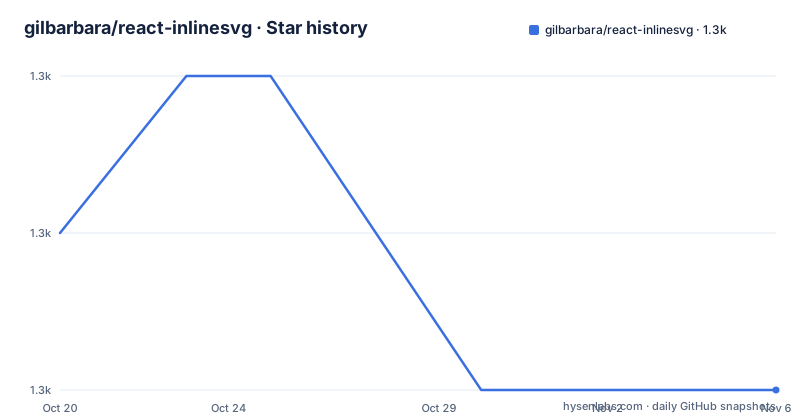
Star history
- gilbarbara/react-inlinesvg1,320 ★ · -1
| Repository | 2026-10-20 | 2026-11-06 |
|---|---|---|
| gilbarbara/react-inlinesvg | 1.3k | 1.3k |
-1 Stars in the last 17 days, measured from the daily GitHub snapshot. Compare with other projects
Editorial analysis
The problem: an SVG file does not inherit the CSS of your page
When an SVG is referenced from an img tag or loaded as a separate document, it does not live in the same tree as your application markup, so the CSS you ship with the app cannot reach it. The project spells out three tempting ways around that, and each one costs something. Embedding the style block inside the SVG file means you cannot use LESS or SASS, and you cannot target parent elements such as a button hover state. Linking to an external stylesheet either duplicates path data between the HTML and the SVG, or forces extra HTTP requests and still leaves the parent element problem open. Pasting the SVG markup into the HTML avoids all of that but bloats the document and stops the browser from caching the artwork between pages. The component takes a fourth route: it issues a GET request for the file and then embeds the response in the document, which is the only one of the four that lets page level CSS reach the shapes.
The src prop accepts a URL, a path, a data URI, or a raw string
The src prop is the only required one, and the props table lists three input shapes rather than one. It accepts a URL or path to an SVG file, absolute or relative, including a path produced by a bundler import. It accepts a data URI, either base64 or URL encoded. It accepts a raw SVG string. That last option matters, because the component is not strictly a network loader: a string you already hold in memory, in a CMS payload, or in a variable, can travel the same pipeline. The same table lists baseURL, description, fetchOptions, innerRef, loader, preProcessor, title and the caching and ID options, and states that any additional props are passed down to the resulting SVG element, so styling hooks attached to the component reach the DOM node. A raw string skips the network but goes through the same parse step, and invalid markup surfaces through onError.
Installing react-inlinesvg and rendering your first remote icon
Installation is a single package. The usage section of the project gives the install command and then a minimal component that imports the default export and passes a remote URL with a width, a height of auto and a title.
npm i react-inlinesvgimport SVG from 'react-inlinesvg';
export default function App() {
return (
<main>
<SVG
src="https://cdn.svglogos.dev/logos/react.svg"
width={128}
height="auto"
title="React"
/>
</main>
);
}After that, the first thing to watch is timing. The SVG arrives asynchronously, so a loader prop is the way to hold the space while the request is in flight, and the docs describe children as the fallback content for a fetch error or an unsupported browser. The onLoad callback receives the src prop and an isCached boolean, which is the cheapest way to confirm the file rendered rather than sitting silently in a failure state.
uniquifyIDs, uniqueHash, and the baseURL requirement
Two inline copies of the same file in one document can define the same identifier twice, and the browser has to pick one. The uniquifyIDs prop, off by default, exists for that case: the docs describe it as creating unique IDs for each icon, and uniqueHash supplies the seed as a random eight character string limited to A-Z, a-z and 0-9. You can set that hash to a fixed value instead of leaving it to chance. A second prop, baseURL, is needed for a subtler reason: it is prepended to url() references inside the SVG, and it is required if your page uses an HTML base tag, because without it those references resolve against the wrong base. The full prop combination looks like this.
<SVG
  baseURL="/home"
  cacheRequests={true}
  description="The React logo"
  loader={<span>Loading...</span>}
  onError={(error) => console.log(error.message)}
  onLoad={(src, isCached) => console.log(src, isCached)}
  preProcessor={(code) => code.replace(/fill=".*?"/g, 'fill="currentColor"')}
  src="https://cdn.svglogos.dev/logos/react.svg"
  title="React"
  uniqueHash="a1f8d1"
  uniquifyIDs={true}
/>
In memory caching by default, browser Cache API through the provider
cacheRequests defaults to true, so remote SVGs are cached in memory for the life of the page. When the same file is requested again, the component serves the stored copy, and the onLoad callback reports the second argument as isCached, which gives you a way to tell a network hit from a memory hit in your own telemetry. For something longer lived, the project ships a CacheProvider, exported from the react-inlinesvg/provider entry point, that wraps your app and persists the requests in the browser cache. The provider takes an optional name prop to customise the storage name.
import { createRoot } from 'react-dom/client';
import CacheProvider from 'react-inlinesvg/provider';
import App from './App';

createRoot(document.getElementById('root')!).render(
  <CacheProvider>
    <App />
  </CacheProvider>
);
The docs point out that the browser Cache API has limitations of its own, and they do not spell out what those are, so the storage layer is worth checking on the browsers you actually support before you depend on it.
Where react-inlinesvg is the wrong tool
There are several specific situations to rule out. Remote files are subject to the same origin rules as any other cross origin request: the docs state that if you are loading remote SVGs you must ensure they have CORS headers, so an asset host you do not control can break the component without any change on your side. Browser support is defined as any browser that supports inlining SVGs and fetch, and for legacy browsers the project tells you to include a polyfill for fetch in your app. The innerRef prop deserves attention because it is not what its name suggests: the SVG is processed and parsed, so the ref is not set on the initial render, and the docs redirect you to the onLoad callback to obtain it. Errors arrive in two shapes, a FetchError carrying message, type, errno and code.
{
  message: string;
  type: string;
  errno: string;
  code: string;
}
A plain Error is used instead for issues like a missing src, an unsupported browser, or invalid SVG content.
The SVG use element as a documented alternative
There is an alternative inside SVG itself, and the project names it. The docs note that the use element can achieve something similar to this component and point to an external article and to the MDN browser compatibility table for the caveats. The two routes differ in what happens at request time. This component performs a GET request and embeds the response, so the artwork becomes part of the document and the CSS in your page applies to it. The use route keeps the artwork as a separate resource referenced from the markup. The project does not give a step by step comparison or a rule for choosing between them, so the decision comes down to whether you need page CSS to reach the shapes, which is the exact problem the component was written to solve. If you do not, and you are comfortable with the browser caveats listed in that compatibility table, the use element keeps the request out of your component code.
Maintenance state, packaging, and the MIT licence
The project is not archived, and the last push was on 2026-06-30, the same day the v4.5.0 tag was published. Two earlier tags sit close behind it, v4.4.1 on 2026-05-08 and v4.4.0 on 2026-05-05, and the package version in the published manifest is 4.5.0. The package is MIT licensed, a permissive licence with no copyleft requirement on code that uses it. It declares a peer dependency on react from 16.8 to 19 and a single runtime dependency, react-from-dom at ^0.7.5, and ships a CommonJS build at ./dist/index.cjs alongside an ES module build at ./dist/index.mjs with matching type declarations, plus a separate ./provider export with its own type entries. The documentation does not describe a changelog policy or a breaking change process, so the upgrade path for a major version is something you have to check in the release notes yourself.
Editorial conclusion
react-inlinesvg fits teams that render artwork they do not control at build time, icons pulled from a CDN or files referenced by path, and that need those shapes to answer to the CSS of the page they sit in. It is a poor fit if your assets are already compiled into the bundle, if the remote host refuses CORS requests, or if you need the SVG element ref on the first render. Before adopting it, check three things in your own setup: whether the remote asset host returns CORS headers, whether the pages that use it carry an HTML base tag, because baseURL becomes mandatory there, and whether the browser support floor in your user data matches the fetch requirement. With those settled, the component is a small MIT licensed package with a single runtime dependency and an active version line.
Frequently asked questions
How do I install react-inlinesvg and use it in a React app?
Install it with npm i react-inlinesvg, then import the default export and pass a src prop. The src can be a URL, a path, a data URI, or a raw SVG string.
Does react-inlinesvg work with server-side rendering?
The project lists server-side rendering as one of its highlights, describing the component as safe for server-side rendering. The cache provider and the browser cache are browser-only features, so the persistent cache is unavailable on the server.
Why does my remote SVG fail to load in react-inlinesvg?
The most common documented cause is missing CORS headers on the remote asset, which the project calls out explicitly. Other failure paths are a missing src, an unsupported browser, or invalid SVG content, and they arrive through the onError callback.
How do I make IDs unique for inline SVGs in react-inlinesvg?
Set uniquifyIDs to true so the component creates unique IDs for each icon, and use uniqueHash to control the seed, either a random eight character string or a fixed value of your own. If your page has an HTML base tag, baseURL becomes required as well.
Official sources
Add this badge to your README
If you maintain this project, the badge below links readers to this analysis and shows its maintenance status from the daily GitHub snapshot. Paste the markdown into your README; add ?metric=license or ?metric=stars to the image URL for a different field.

[](https://hysenlabs.com/projects/gilbarbara-react-inlinesvg)Star history chart for your README
[](https://hysenlabs.com/projects/gilbarbara-react-inlinesvg)Was this useful?