github/gh-skyline: 3D GitHub Contribution Models from the CLI
A GitHub CLI extension to generate a 3D model of your GitHub contribution history
At a glance
- What is it?
- github/gh-skyline is a Go-based GitHub CLI extension that converts contribution history into a printable binary STL file, with terminal ASCII previews and selectable users or year ranges. It fits users who want a physical contribution artifact rather than another GitHub statistics dashboard.
- Who is it for?
- Adopt gh-skyline if you already use the GitHub CLI and want a 3D-printable record of one account or a selected period. Do not choose it for live analytics, private activity reporting, or interchangeable STL formats without first checking its boundaries.
- Can I use it commercially?
- Yes. MIT is a permissive licence: you can use, modify and sell software built on it, as long as you keep its copyright and licence notices.
- Is it still maintained?
- Yes. The repository last received commits 23 days ago.
- What is it written in?
- Mainly Go, according to GitHub's language statistics.
Answers come from the project's GitHub data, last synced on November 7, 2026, and from our analysis. They are not legal advice.
Star history
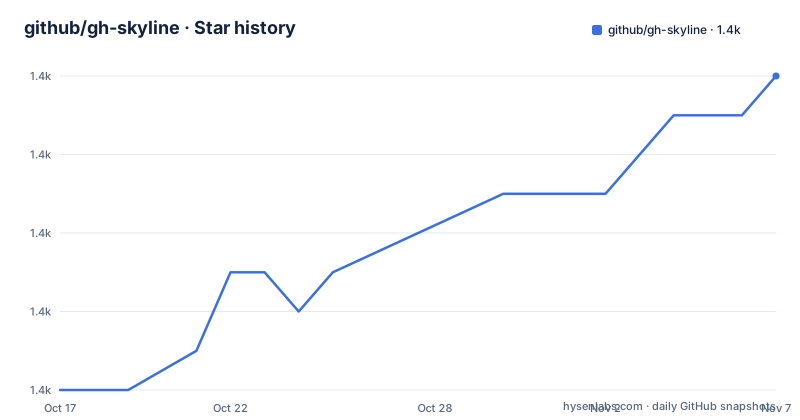
- github/gh-skyline1,372 ★ · +8
| Repository | 2026-10-17 | 2026-11-07 |
|---|---|---|
| github/gh-skyline | 1.4k | 1.4k |
8 Stars in the last 21 days, measured from the daily GitHub snapshot. Compare with other projects
Editorial analysis
Why gh-skyline Turns Contribution History into an STL
github/gh-skyline addresses a narrow output problem: GitHub records contribution activity as a calendar graph, but the extension turns that record into a binary STL model intended for 3D printing. The intended audience is a GitHub CLI user who wants a tangible object based on public contribution data. It is also relevant to engineers and open source maintainers who want to retain a selected account history as a model rather than as a screenshot.
The project is an extension, not a standalone account dashboard. It relies on an existing `gh` installation and authenticated GitHub CLI session. A user can generate data for the authenticated account or name another GitHub account with `--user`. The supported time scope includes the current year by default, a single year, a year range, or the period from the user's join year through the current year with `--full`.
This distinction matters. The generated file is a representation of contribution activity, not a general-purpose visualization editor. The README does not document adjustable model dimensions, selectable STL variants, private contribution data, or a browser-based editing workflow. The result is best understood as a generated artifact from GitHub contribution data, not as a configurable physical-design package.
gh-skyline Data Flow and Repository Structure
The README describes an ASCII preview while contribution data loads, followed by STL generation when the STL output is requested. The `github/` package contains the GitHub API client responsible for fetching contribution data. The `ascii/` package contains the character definitions, generator, and text formatting utilities used to render the terminal preview. The `stl/` package contains the model generator, binary STL implementation, geometry calculations, primitive shapes, and 3D text geometry generation.
The repository layout places the CLI entry point at `main.go`, with shared data structures under `types/` and error handling under `errors/`. The `logger/` package provides thread-safe logging with severity levels, while `cmd/` and `internal/` provide command and application organization. These paths describe a separation between data access, terminal rendering, geometry generation, and output formatting. The README does not expose the GraphQL query, mesh algorithm, physical units, or exact transformation applied to each contribution cell, so those implementation details should not be inferred.
The ASCII representation provides a useful intermediate view of the same underlying data. Each column represents a week. Days are reordered vertically into a building shape, with empty spaces for no contributions and dots for future dates. The documented density symbols progress from light to heavy activity, with `╻┃╽` marking the last contributing block in a week. `--art-only` lets a user inspect that representation without producing an STL.
Installing gh-skyline and Generating the First STL
The README requires the `gh` CLI to be installed, available in `PATH`, and authenticated with `gh auth`. Install the extension through the documented GitHub CLI command. This command registers `github/gh-skyline` as a `gh` extension:
gh extension install github/gh-skylineAfter installation, the first simplest generation targets the authenticated user and the current year. The default output is named `{username}-{year}-github-skyline.stl` in the current directory:
gh skylineA user who wants to inspect the selected account without creating a model can request only the ASCII preview:
gh skyline --art-onlyFor a different user, combine `--user` with a year. The command below selects `mona` and 2023:
gh skyline --user mona --year 2023The `--year` option also accepts a range, which can be useful when the desired object represents a multi-year period:
gh skyline --year 2014-2024To control the output filename, use `--output`:
gh skyline --output my-skyline.stlThe README does not document STL export formats other than binary STL, nor does it provide a separate geometry configuration file. That makes the command-line flags the main documented control surface.
Selecting Accounts, Years, and Full Contribution Histories
The account and time controls solve two common selection problems. By default, `gh skyline` uses the authenticated user, so authentication determines the starting identity. `--user` changes the target to a named GitHub account, while `--web` opens the GitHub profile for either the authenticated or specified user. The web option is navigation, not model generation, so it does not replace an STL export command.
Year selection is explicit and bounded by the command documentation. `--year` accepts one year such as `2023` or a range such as `2014-2024`. Valid years must fall between 2008 and the current year. The `--full` flag changes the scope to the user's join year through the current year. This is a convenience for producing a longer historical object, although the README does not state how the extension behaves when contribution data is unavailable for the join year or when the account has sparse activity.
The output name follows the username and selected year when no filename is supplied. A multi-year run can therefore have a year component that does not correspond to a single calendar year. The exact filename produced by the tool should be checked after running a range command rather than inferred from the default pattern. Users who need a predictable filename should pass `--output`.
ASCII Preview Behavior and Diagnostic Options
The terminal preview is more than decorative output. It gives feedback while the extension waits for contribution data and exposes the weekly structure used by the generator. Space indicates no contributions, `.` indicates future dates, and the density symbols represent low, medium, and high activity. The README specifically says that the last block with contributions in a week is marked with `╻┃╽` at the top level.
`--art-only` is useful when the goal is to inspect the selected period before committing to a physical object. It avoids STL generation, but it does not avoid the GitHub CLI authentication prerequisite. The preview still depends on the selected account and year being resolvable.
For troubleshooting, `-d` or `--debug` enables more detailed output. The help flags are `-h` and `--help`. These options are documented, but the README does not specify the exact log destination, whether debug output changes API behavior, or what diagnostics appear for each failure. In particular, authentication errors, unavailable contribution data, invalid year ranges, and filesystem write failures are not described in the README. The extension can request detailed logging, but the documentation does not provide a complete failure-message reference.
For a profile link without generation, the documented commands are:
gh skyline --webgh skyline --user mona --webGo Dependencies, Licensing, and Maintenance Signals
The repository uses Go and declares `go 1.26.3` in `go.mod`. Direct dependencies include `github.com/cli/go-gh/v2`, `github.com/fogleman/gg`, and `github.com/spf13/cobra`. The module also lists indirect dependencies related to terminal rendering, HTTP response formatting, fonts, graphics, YAML parsing, and operating-system support. The README identifies `golang/freetype` as a dependency and points to its FreeType licensing information. It also states that Mona Sans is licensed under the SIL Open Font License v1.1.
The project itself is licensed under the MIT open source license, with full terms referenced in `LICENSE`. The README also includes a `NOTICE` file and separate notices for third-party components. This means users should review both the repository license and the notices before redistributing generated files, incorporating source code, or distributing the project. This is a license-compliance note rather than legal advice.
The repository is not archived. Its last push was on 2026-08-13, and recent releases include `v0.1.9` on 2026-05-22 and `v0.1.8` on 2026-04-15. Those facts indicate recent repository activity, but the README does not promise a release cadence, compatibility policy for future GitHub API changes, or a migration process for older extension versions.
Limits of gh-skyline Compared with General Statistics Tools
gh-skyline is a different kind of tool from a contribution analytics dashboard. A dashboard commonly presents searchable charts, totals, comparisons, and filters. This project instead produces a terminal ASCII rendering and a binary STL artifact for visualization or printing. The README documents no API for retrieving raw totals, no export to CSV or JSON, no comparison between users, and no interactive filtering beyond the command flags.
It is also narrower than a general 3D modeling program. The repository includes STL and geometry packages, but the documented user workflow exposes generation flags rather than mesh editing controls, material settings, printer profiles, or dimensional scaling. The README says the STL can be opened in 3D modeling or 3D printing software, which leaves downstream inspection and printing configuration to that software.
A real limitation is the dependence on contribution data being available for the requested public account and period. The documentation does not explain handling of deleted days, incomplete records, private activity, API limits, or accounts whose contribution history begins after the requested year. It also does not document a rollback command or an automated upgrade path for the `gh` extension. Users needing continuous reporting, private metrics, or a maintained model editor should choose a different tool rather than treating the generated STL as a substitute.
Editorial conclusion
Adopt gh-skyline if you already use the GitHub CLI and want a 3D-printable record of one account or a selected period. Do not choose it for live analytics, private activity reporting, or interchangeable STL formats without first checking its boundaries. Before installation, verify `gh auth` access for the intended account, then inspect the generated filename and preview the model in 3D software before printing.
Frequently asked questions
How do I install github/gh-skyline?
Install the `gh` CLI, authenticate with `gh auth`, then run `gh extension install github/gh-skyline`. The README requires `gh` to be available in `PATH`.
Can github/gh-skyline generate a model for another GitHub user?
Yes. Use `--user` with the account name, for example `gh skyline --user mona --year 2023`. Without `--user`, the authenticated user is used.
What file does github/gh-skyline create?
It creates a binary STL file. By default, the filename follows `{username}-{year}-github-skyline.stl`; use `--output` to specify another name.
Can I preview github/gh-skyline without creating an STL?
Yes. `gh skyline --art-only` displays the ASCII art preview without generating an STL file. The preview represents contribution data by week and uses density symbols for activity levels.
Does github/gh-skyline support a multi-year contribution history?
Yes. `--year` accepts a range such as `2014-2024`, and `--full` covers the user's join year through the current year. The documented valid year range begins at 2008 and ends at the current year.
Official sources
Add this badge to your README
If you maintain this project, the badge below links readers to this analysis and shows its maintenance status from the daily GitHub snapshot. Paste the markdown into your README; add ?metric=license or ?metric=stars to the image URL for a different field.

[](https://hysenlabs.com/projects/github-gh-skyline)Star history chart for your README
[](https://hysenlabs.com/projects/github-gh-skyline)Was this useful?