Greenlight's offline claim stops at the one command that tests behaviour
Pre-submission compliance scanner for the Apple App Store and Google Play. Scans code, privacy manifests, Android manifests, and IPA/APK/AAB binaries against the review guidelines. Offline, no account.
At a glance
- What is it?
- A pre-submission scanner for the two app stores that reads your source, manifests and binaries and cites the guideline rule behind every finding, gates CI on the top two severities plus any scanner crash, and reserves its only account-requiring command for the flows a static scan cannot prove.
- Who is it for?
- This is a well-built tool for a specific and unglamorous moment: the week you submit, when a rejection costs a week. The rules are traceable to published guideline sections, the exit code refuses to treat a crashed scanner as a pass, and project level facts are reported once instead of once per file.
- Can I use it commercially?
- Yes. MIT is a permissive licence: you can use, modify and sell software built on it, as long as you keep its copyright and licence notices.
- Is it still maintained?
- Yes. The repository last received commits 102 days ago.
- What is it written in?
- Mainly Go, according to GitHub's language statistics.
Answers come from the project's GitHub data, last synced on November 15, 2026, and from our analysis. They are not legal advice.
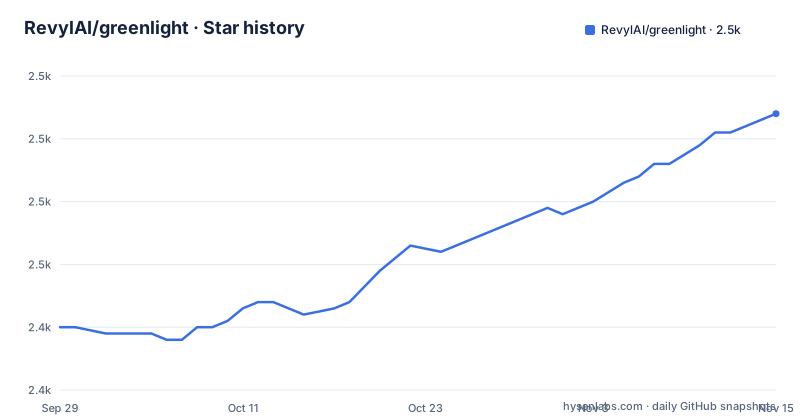
Star history
- RevylAI/greenlight2,474 ★ · +34
| Repository | 2026-09-29 | 2026-11-15 |
|---|---|---|
| RevylAI/greenlight | 2.4k | 2.5k |
34 Stars in the last 47 days, measured from the daily GitHub snapshot. Compare with other projects
Editorial analysis
The offline claim covers the static scanner and nothing else
The pitch is three promises in one line: no account, no uploads, no network. And then the next paragraph qualifies it precisely, which is the most useful thing in the document.
A static scan can only prove a flow exists. The verify command proves it works, by running your account deletion, restore purchases and sign-in-with-apple flows on a cloud device and failing the build if any of them dead-ends. That tier is powered by the vendor's hosted service and needs a free account. Everything else on the page runs offline.
So the offline promise is true of the tool you will use most and false of the tool that finds the bugs worth finding. A missing account deletion path is visible to a static scan. A button that does not actually delete is not.
The example command for the runtime tier is worth reading for a different reason. It takes the account credentials as variable arguments:
greenlight preflight . --verify --build-name "My App" \
  --var [email protected] --var password=secret --exit-code
An email address and a password, in a shell history, in a process listing, and then on somebody else's device. That is inherent to driving a real sign-in flow, and the readme does not warn about it.
A crashed scanner is a failing build, not a passing one
The severity model is four levels and the top two are the ones that stop a pipeline. Critical means rejection or install failure is near-certain. High means a published deadline, a required declaration, or a check that fails at runtime. Warn is likely to draw a reviewer's attention or an information request. Info is best practice.
The detail that makes the design trustworthy is one sentence in the exit-code section: the flag trips on critical and high findings, and on a scanner that crashed, so an incomplete scan never reports as a pass.
That is the failure mode every static analyser has and almost none of them address. A scanner that throws on an unparseable manifest produces no findings, and a pipeline sees zero findings and concludes the app is clean. Tying the crash to the gate means the only way to get a green build is a scan that actually ran.
The other structural decision is traceability. Every finding cites the rule it comes from, with guideline section numbers on the Apple side and a link to the policy page on the Play side. That is what makes the output actionable: a reviewer of your pull request can read the rule and disagree with the finding on the merits, rather than taking the scanner's word for why it matters.
Twenty four rules, and a missing feature is one finding rather than four hundred
The source scanner is twenty four rules and roughly sixty patterns, running over Swift, Objective-C, React Native and Expo. The rules are grouped by severity and each one carries its rule number.
The critical list is the interesting one because it names things that are rejections rather than warnings: private API use, hardcoded secrets and keys, taking external payment for digital goods, dynamic code execution, cryptocurrency mining, and one deprecated web view class that is both removed and a hard rejection.
The high list is where a scanner can be more useful than a human reviewer. Missing sign-in-with-apple alongside social login. Missing restore purchases alongside in-app purchase. Missing tracking consent when an advertising or tracking SDK is present. Account creation with no deletion path. And an exchange or on-ramp SDK, which the readme notes usually needs licensing or a legal opinion.
Then there is the rule that shapes the output volume, and it is the one I would copy into any scanner I wrote: rules that describe a project level fact, such as no account deletion anywhere, report once for the whole project rather than once per file that triggers them.
Without that, a codebase with forty source files and no deletion path produces forty identical critical findings, and the report gets skimmed. With it, the report is one line and the fix is one afternoon.
One Play finding reports that there is no upgrade path from version seven to nine
The Play scanner is the part of this project with dates in it, and the dates are specific.
New apps and updates must target a recent API level from the end of August 2026, and the readme adds the operational consequence: apps below the previous level already lose distribution to new users on newer devices. The Play Billing library has its own deadline on the same day, and beside it is the finding I would put in a release checklist on its own: there is no direct upgrade path from version seven to version nine, so a build stuck on seven has to go via an intermediate state rather than jumping.
It also resolves the version properly. A build that reaches its billing version through a variable or through a catalog reference is followed to the actual value, which is the difference between a rule that works on a real project and one that only works on a sample.
And the form-factor carve-out is the sign of a scanner that has read the policy rather than memorised it. Google Play runs a separate schedule for wearables, television, automotive and extended reality targets. An app declaring one of those form factors gets a warning that names its track instead of a blocking finding computed on the phone schedule, which is the difference between a true positive and an expensive false one.
The restricted-permission list follows the same pattern. Several need an approved use case or a declaration form rather than being forbidden, one needs a declaration and a demo video, and one of them is not written as a permission at all but as an attribute on a component, so a manifest scan that only looks at the permission list will miss it entirely.
The release target builds Linux for an architecture that does not exist
The build file is short and mostly right. It takes its version from a git describe with a dirty suffix, falling back to a literal when it runs outside a repository, and injects it with a linker flag. It has targets for building, installing, cleaning, testing with verbose output, and linting through a Go linter.
Then there are three cross-compile lines, commented as being for release, and one of them has a typo. The two mac ones build for arm and for the 64-bit Intel architecture. The Linux one asks for an architecture string with the letters transposed.
So the release target cannot produce a Linux binary as written, which means the Linux artefact has to come from somewhere else. And there is a release configuration file for a dedicated Go release tool sitting in the repository root at the same time, which is where the Linux artefact has to come from. That is two release mechanisms in one repository, one of them broken, and no way to tell from the repository which is authoritative.
There is no Windows target anywhere in the file, which is consistent with the install instructions: a package manager tap for macOS, and a Go install line that covers the rest. For a tool that scans Android projects, having no prebuilt Windows binary means Windows developers in the store submission window are the ones running the source install.
A token library is a dependency of a scanner that claims to need no account
The dependency list is seven entries and every one of them is there for a reason you can name. A property list parser reads the metadata files out inside a binary archive. A command line library builds the subcommand tree. A colour library and a terminal handling library produce the output. A YAML parser reads the project's own configuration file.
The seventh is a JSON Web Token library, and that one does not belong to the static scanner. Tokens are how the hosted tier authenticates, and the offline tier has nothing to authenticate against.
Seven dependencies is a very good ratio for a binary that reads manifests and source code, and it is a good deal smaller than the parser and highlighting stacks this session has been reading about. The token library is a reminder that the dependency list serves both tiers, so the offline claim is about network behaviour rather than about what is compiled in.
The module targets a recent Go release and has no other requirements worth noting. The build produces a single binary in a build directory, which is what the install instructions promise, and the release notes file at the root suggests the tagging process is written down rather than remembered.
One repository, four distribution shapes, and a badge with campaign parameters
The root of this repository carries the CLI's own manifest and its build file, and then four sets of files that exist to get the same advice into four different tools.
There is a directory for a plugin format used by one assistant, a directory named for a skill format used by another, a skills directory, and a skill manifest at the root beside a JSON metadata file. So the rules this tool encodes are shipped as a command line program, as a plugin, as a skill for two hosts, and as a metadata document, and each is a different reader of the same content.
That is a reasonable way to reach people who live in four different tools, and it is a maintenance cost: every rule change has to land in however many of those surfaces hold a copy of it.
The badge row is the smallest detail and the most telling. One of the badges points at the vendor's commercial site, and the address carries campaign parameters naming the project in the source field and the readme in the medium field. So the readme of an MIT licensed scanner ships a link that identifies which free tool sent the reader to the paid one.
Nothing about that is improper, and it is also not subtle. The project is candid about it in prose: the runtime tier is powered by the same vendor and needs an account, and the rest runs offline. The badge just says the same thing in a URL.
Editorial conclusion
This is a well-built tool for a specific and unglamorous moment: the week you submit, when a rejection costs a week. The rules are traceable to published guideline sections, the exit code refuses to treat a crashed scanner as a pass, and project level facts are reported once instead of once per file. Two things to know. The offline guarantee covers the static scanner and nothing else, and the runtime tier takes credentials on a command line and sends them to a cloud device. And the offline guarantee also covers a pre-built binary you pass in, which means you are handing the tool an artefact you built, so the trust question moves to how you obtained that binary.
Frequently asked questions
Does greenlight need an account or a network connection?
The static scanner does not: the readme states no account, no uploads and no network. The verify tier that runs account deletion, restore purchases and sign-in-with-apple flows on a cloud device does need a free account, and its example command passes the test credentials as command line variables.
What does the greenlight exit code flag fail on?
Critical and high severity findings, and a scanner that crashed. The readme is explicit that the crash case is included so that an incomplete scan never reports as a pass.
How many rules does the greenlight code scanner have?
Twenty four rules and roughly sixty patterns, across Swift, Objective-C, React Native and Expo. Findings are grouped by severity and each one cites the guideline section it comes from, and project level facts are reported once rather than once per file.
What does the greenlight Play scanner check?
Google Play developer policies and published distribution deadlines, with every finding linking the policy page. It covers the target API level deadline, the Play Billing library version, restricted permissions that need a declaration or an approved use case, and manifest and build issues.
How do I install greenlight?
Three ways: a package manager tap for macOS, a Go install line for the command, or a source clone followed by a make build that produces the binary in a build directory. The Play scanner accepts either a built package or an app bundle for manifest inspection.
Official sources
Add this badge to your README
If you maintain this project, the badge below links readers to this analysis and shows its maintenance status from the daily GitHub snapshot. Paste the markdown into your README; add ?metric=license or ?metric=stars to the image URL for a different field.

[](https://hysenlabs.com/projects/revylai-greenlight)Star history chart for your README
[](https://hysenlabs.com/projects/revylai-greenlight)Was this useful?