Pico-CEC: Turning a Raspberry Pi Pico into an HDMI CEC to USB HID Keyboard Bridge
HDMI CEC to USB HID keyboard adapter
At a glance
- What is it?
- Pico-CEC is a C firmware project that turns a Raspberry Pi Pico into an HDMI CEC to USB HID keyboard adapter, aimed at Kodi users on mini PCs without CEC support. It works, but the hardware setup is fiddly and the 4K passthrough is not guaranteed.
- Who is it for?
- Adopt Pico-CEC if you run Kodi on a mini PC that lacks HDMI-CEC and you are comfortable with soldering four wires to an HDMI breakout and a Pico board. Skip it if you need guaranteed 4K video passthrough or if you want a plug-and-play device, since the README warns that HDMI breakout board quality varies and 4K passthrough may fail.
- Can I use it commercially?
- Yes. MIT is a permissive licence: you can use, modify and sell software built on it, as long as you keep its copyright and licence notices.
- Is it still maintained?
- Yes. The repository last received commits 89 days ago.
- What is it written in?
- Mainly C, according to GitHub's language statistics.
Answers come from the project's GitHub data, last synced on October 4, 2026, and from our analysis. They are not legal advice.
Star history
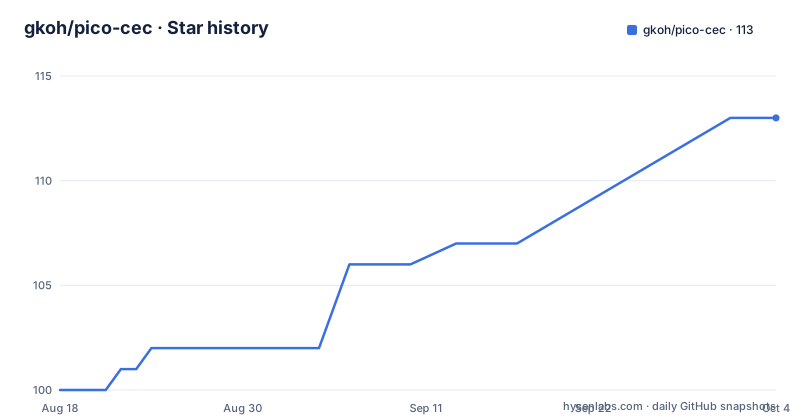
- gkoh/pico-cec113 ★ · +13
| Repository | 2026-08-18 | 2026-10-04 |
|---|---|---|
| gkoh/pico-cec | 100 | 113 |
13 Stars in the last 47 days, measured from the daily GitHub snapshot. Compare with other projects
Editorial analysis
What Pico-CEC Solves and Who It Is For
Many second-hand mini desktops make cheap media players when paired with Kodi, often via LibreELEC. The problem is that these devices frequently lack HDMI-CEC support, so you end up juggling a wireless keyboard or a game controller. Pico-CEC sits between the PC's HDMI output and the TV, reads CEC commands from the TV remote, and converts them into USB HID keyboard events that Kodi understands. The intended user is someone who wants to control a Kodi box with the TV's existing remote without buying a new CEC-capable HDMI adapter or a dedicated remote. The project is not for general-purpose CEC control; it is specifically tuned to Kodi's keyboard shortcuts, mapping navigation arrows, select, back, play, pause, and digits 0-9.
How It Works: CEC Frames to USB Keypresses
The software is built on FreeRTOS and splits the work into four tasks. The cec_task handles the CEC protocol on a GPIO pin, using an edge-interrupt-driven state machine for receiving and an alarm-interrupt-driven state machine for sending. The README notes that these were rewritten from busy-wait loops to meet CEC's real-time timing windows, and that attempts to boost the FreeRTOS tick timer with busy waits failed to consistently hit those windows. Received user control messages go into a queue. The hid_task reads that queue and forwards messages to the usbd_task, which generates HID keyboard reports over USB. The blink_task drives the RGB LED as a status indicator: blue 2Hz for idle and CEC standby, green 2Hz for CEC active, a green flash on button press, and red for a crash. The EDID parsing determines the HDMI physical address, which is how the device knows where it sits in the HDMI tree. The whole data flow is simple and direct, with no buffering or translation layer beyond the CEC message to keyboard key mapping.
Hardware Wiring: Four Wires and a Warning
The hardware side is minimal but not trivial. The README states that both HDMI CEC and the Pico run at 3.3V, so no level shifters are needed. The DDC bus for EDID is I2C at 5V, but the Pico appears to be 5V tolerant. You connect four wires directly: HDMI CEC pin 13 to a GPIO, HDMI ground pin 17 to GND, HDMI DDC clock pin 15 to SCL, and HDMI DDC data pin 16 to SDA. Optionally, you can power the Pico from HDMI's +5V pin 18, but the README says 'if safe.' For the Seeed XIAO RP2350, the mapping is pin 13 to D10, pin 17 to GND, pin 15 to D5, pin 16 to D4, and pin 18 to 5V/VUSB. The project relies on GPIO input/output impedance states to read and drive the CEC bus, which is a clever trick but also means the electrical margin is thin. The README includes a caution: 'The build quality of the HDMI breakout boards is highly variable, thus pass through of 4K video may not function in all circumstances.' That is a genuine risk, especially if you are using a cheap passthrough adapter.
Building and Flashing: CMake and .uf2
Building requires cmake, gcc-arm-none-eabi, and libnewlib-dev. You clone with a filtered submodule command to avoid pulling unnecessary pico-sdk and tinyUSB code: `git -c submodule.active="lib/tinyusb" -c submodule.active=":(exclude,glob){lib,hw}/*" clone --recurse-submodules`. Then you configure with CMake, specifying the board. For the Seeed XIAO RP2350, the current reference hardware, you run `cmake -S . -B build -DPICO_BOARD=seeed_xiao_rp2350 && cmake --build build`. For the legacy Seeed XIAO RP2040, you use `-DPICO_BOARD=seeed_xiao_rp2040`. The README warns that switching boards requires a clean build directory (`rm -rf build`), because RP2040 and RP2350 produce incompatible .uf2 images. Three CMake options exist: PICO_BOARD, CEC_PIN (default GPIO3), and CEC_OSD_NAME (default "Pico-CEC"). For example, you can build for a Raspberry Pi Pico with CEC on GPIO11 and OSD name "Bazzite" using `cmake -DPICO_BOARD=pico -DCEC_PIN=11 -DCEC_OSD_NAME="Bazzite" ..`. The output is `pico-cec.uf2`, which you copy to the Pico's USB mass storage after holding Boot and pressing Reset.
Limitations and Failure Modes
The most obvious limitation is the 4K passthrough risk. The README explicitly warns about variable HDMI breakout board quality, so if you are using a 4K TV or monitor, video may not pass through cleanly. That alone makes this a poor choice for a living room setup where you expect reliable 4K. Another limitation is that the mapping is hardcoded to Kodi shortcuts. If you use a different media player or want to remap keys, you would have to modify the source. The README only lists tested TVs: a Sharp 60" and a Sony 60", both with physical address 0x1000, and a Denon AVR at 0x1100. If your TV sends CEC commands that do not match the expected user control messages, you may get no response or wrong keypresses. The project also depends on the Pico being 5V tolerant on the DDC lines, which the README says 'appears' to be true but is not guaranteed across all Pico variants. Finally, the interrupt-driven state machines are complex, and if the timing is off, CEC frames may be dropped, leading to missed remote presses.
Alternatives: Dedicated CEC Adapters and Software Stacks
The most direct alternative is a commercial HDMI CEC to USB adapter, such as the Pulse-Eight USB-CEC adapter, which is a purpose-built device that handles CEC and presents as a USB HID device. The difference in approach is that Pulse-Eight's adapter is a standalone hardware product with its own firmware, so you do not need to solder or compile anything. It also supports a wider range of CEC commands and is designed for reliable 4K passthrough. On the software side, you could use the Linux CEC framework directly via a kernel driver, but that requires your PC to have a CEC-capable HDMI port, which is exactly what many mini PCs lack. Another alternative is to use a Raspberry Pi with a CEC GPIO hat and run libCEC, but that is a heavier setup and still requires a separate device. Pico-CEC's advantage is cost and form factor, but the trade-off is that you accept the risk of flaky hardware and a narrow feature set.
Maintenance and License
The project is MIT-licensed, which means you can use, modify, and redistribute it freely, including in commercial products, as long as you retain the copyright notice. There is no copyleft obligation, so if you build a closed-source device around it, you can do so without releasing your changes. The repository shows recent activity, with v0.8.0 released on 2026-07-26, and the README states that support for RP2040 builds will continue where possible, even though the reference hardware moved to RP2350. That suggests ongoing maintenance but also a potential split in code paths. The build system is standard CMake, so upgrading the Pico SDK or FreeRTOS kernel should be straightforward, but you will need to rebuild and reflash the .uf2. The dependency list includes crc, FreeRTOS-Kernel, pico-sdk, tinyusb, and tcli, so keeping those in sync is part of the maintenance cost. The enclosure is an OpenSCAD model, so if you print it, you can adjust it, but that is optional.
Editorial conclusion
Adopt Pico-CEC if you run Kodi on a mini PC that lacks HDMI-CEC and you are comfortable with soldering four wires to an HDMI breakout and a Pico board. Skip it if you need guaranteed 4K video passthrough or if you want a plug-and-play device, since the README warns that HDMI breakout board quality varies and 4K passthrough may fail. Before committing, verify your HDMI breakout board's build quality and test whether your TV's CEC implementation sends the expected user control messages, because the project only lists Sharp and Sony TVs as tested. Also confirm your Pico variant, as RP2040 and RP2350 produce incompatible .uf2 images.
Frequently asked questions
What does pico-cec do and what hardware does it need?
It bridges HDMI CEC to USB HID keyboard input so a media PC without CEC support can be driven by a TV or AVR remote. The reference hardware is a Seeed Studio XIAO RP2350, and the project was originally prototyped on a Raspberry Pi Pico board.
How do I build pico-cec for the right board?
Pass the board with -DPICO_BOARD, using seeed_xiao_rp2350 for the current reference hardware or seeed_xiao_rp2040 for the legacy one. The two chips produce incompatible .uf2 images, so switching boards means deleting the build directory with rm -rf build first.
Which HDMI wires do I need to connect to pico-cec?
Four: CEC pin 13 to a GPIO, CEC ground pin 17 to GND, DDC clock pin 15 to SCL and DDC data pin 16 to SDA. Pin 18 for 5V is optional if safe. On the XIAO RP2350 that maps to D10, GND, D5, D4 and 5V/VUSB respectively.
What do the pico-cec LED colours mean?
Blue at 2Hz means idle with CEC in standby, green at 2Hz means CEC is active, a green flash means a user button was pressed, and red means a crash. No lights at all means the firmware heartbeat is not running, which the documentation treats as a fault worth reporting.
Which remote buttons does pico-cec map to Kodi?
Navigation arrows, select, back, play, pause and the digits 0 through 9, sent as ordinary USB HID keyboard input so the media software needs no plugin. The documentation does not enumerate volume or channel control among the mapped messages.
Does pico-cec work with 4K video passthrough?
Not reliably. The documentation carries a caution that the build quality of HDMI breakout boards is highly variable, so pass-through of 4K video may not function in all circumstances. It has been used with a Sharp 60-inch TV, a Sony 60-inch TV and a Denon AVR.
Official sources
Add this badge to your README
If you maintain this project, the badge below links readers to this analysis and shows its maintenance status from the daily GitHub snapshot. Paste the markdown into your README; add ?metric=license or ?metric=stars to the image URL for a different field.

[](https://hysenlabs.com/projects/gkoh-pico-cec)Star history chart for your README
[](https://hysenlabs.com/projects/gkoh-pico-cec)