Ananke Hugo Theme: Installation, Module Changes, and Design Trade-offs
Ananke: A theme for Hugo Sites
At a glance
- What is it?
- Ananke is a Hugo starter theme for teams that want responsive layouts, accessible markup, configurable headers, social links, localized strings, and SEO defaults without designing a theme from scratch. It is a practical choice for conventional Hugo sites, but less suitable when a project needs a highly specialized publishing system.
- Who is it for?
- Adopt Ananke when a Hugo site needs a conventional blog or starter design with accessible defaults and limited customization. Do not choose it without reviewing the layouts if the publication requires unusual content models or a bespoke visual system.
- Can I use it commercially?
- Yes. MIT is a permissive licence: you can use, modify and sell software built on it, as long as you keep its copyright and licence notices.
- Is it still maintained?
- Yes. The repository last received commits 7 days ago.
- What is it written in?
- Mainly CSS, according to GitHub's language statistics.
Answers come from the project's GitHub data, last synced on November 6, 2026, and from our analysis. They are not legal advice.
Star history
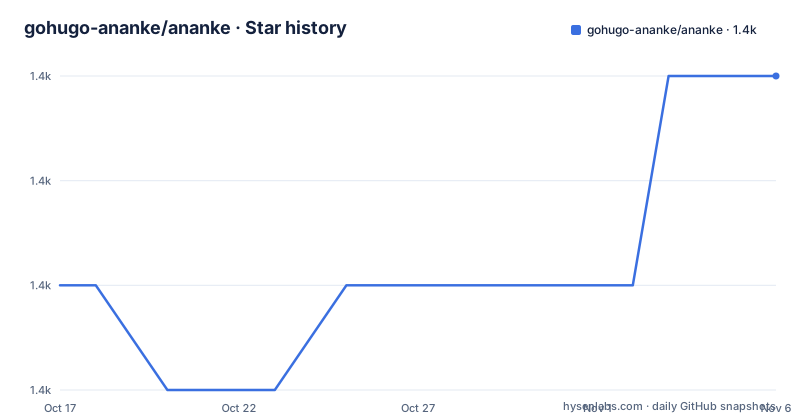
- gohugo-ananke/ananke1,399 ★ · +2
| Repository | 2026-10-17 | 2026-11-06 |
|---|---|---|
| gohugo-ananke/ananke | 1.4k | 1.4k |
2 Stars in the last 20 days, measured from the daily GitHub snapshot. Compare with other projects
Editorial analysis
Ananke's Scope as a Hugo Starting Point
Ananke solves the initial presentation problem faced by teams that have a Hugo site but do not want to build a theme from Hugo templates and static assets. It is aimed at Hugo users creating blogs, documentation-style sites, and conventional content sites that need a complete visual baseline. The repository contains `layouts/`, `assets/`, `config/`, `i18n/`, `static/`, `archetypes/`, and theme metadata, so its value extends beyond a CSS stylesheet. Hugo supplies the build system, while Ananke supplies the templates, styling, defaults, and reusable site structure.
The documented feature set is deliberately practical. Responsive layouts and accessible markup provide the base experience, while the hero or header, social follow links, and sharing links can be configured. An optional contact form shortcode supports a common static-site use case, although the README does not specify a backend or delivery workflow for form submissions. Localized i18n strings are available in many languages, and the theme includes reading time and word count support. Hugo internal templates supply SEO defaults, and robots handling can vary by environment.
This is a starter theme, not a site builder. It reduces the amount of template work required for a normal Hugo publication, but its presets still matter. A team should inspect the theme layouts before committing if its content uses relationships, custom taxonomies, multilingual routing, or page types that differ from Hugo conventions.
Templates, Styles, and Hugo Content Flow
The repository layout indicates a conventional Hugo theme architecture. Page presentation lives under `layouts/`, visual sources under `assets/`, defaults under `config/`, translations under `i18n/`, and directly served files under `static/`. Content written in Hugo passes through the relevant templates and assets to produce the generated site. The package metadata identifies Tachyons as a CSS dependency and also lists PostCSS, `postcss-preset-env`, and `cssnano`, indicating a CSS processing path rather than a standalone application framework.
The theme also carries Hugo-specific integration. Its module path is declared in `go.mod` as `github.com/gohugo-ananke/ananke/v2`, and the topic list includes Hugo modules and components. SEO defaults use Hugo internal templates, which keeps metadata generation inside the static-site build instead of requiring a separate server. The optional contact form is exposed as a shortcode, so adding it to a page remains part of Hugo content composition.
This design gives Hugo the main content model. Ananke cannot own the entire publishing pipeline. Its templates must fit the site's content organization, configuration, and multilingual rules. The README does not document a database, plugin API, authenticated editing interface, or rollback mechanism. Those omissions matter when choosing between a theme and a managed publishing platform.
Installing Ananke and Verifying the Module Move
The README links to separate installation guides for Hugo Modules and Git submodules and recommends the Hugo Module route. It does not include the complete command for a new Module installation. A new user should follow the linked Module installation guide, then use Hugo's official quick start if the local Hugo site has not yet been created.
Existing Module users face a specific migration step because Ananke moved from `github.com/theNewDynamic/gohugo-theme-ananke` to `github.com/gohugo-ananke/ananke` on April 23, 2026. The README says to replace the old Module path with `github.com/gohugo-ananke/ananke/v2` in the site configuration, then update dependencies with:
hugo mod tidyThat command updates the Module dependencies after the configuration references have been changed. The README also says that both old and new URLs continue to work while documentation and links are updated, but it still explicitly asks users to change their references.
For a Git submodule installation, the documented remote update is:
cd path/to/your/repo/themes/ananke # <-- adjust path as needed, keep the 'themes/ananke' part
git remote set-url origin https://github.com/gohugo-ananke/ananke.git
The path shown is a template. The command changes the submodule remote while retaining the documented `themes/ananke` path pattern. Next, edit `.gitmodules` in the repository root and replace `theNewDynamic/gohugo-theme-ananke` with `gohugo-ananke/ananke`, as the README instructs. Synchronize the submodule configuration with:
git submodule syncA first use should therefore include checking the site configuration, the theme remote, and `.gitmodules`. The repository does not provide a one-command acceptance check for those integration points.
What Ananke Configures, and What It Leaves Open
Ananke reduces setup work by supplying defaults rather than asking each site owner to recreate basic site chrome. The README names configurable hero or header behavior and social follow and share links. It also lists localized strings, reading time, word count, SEO defaults, and environment-dependent `robots.txt` handling. Those features target the recurring parts of a content site that usually sit in templates or configuration.
The optional contact form is different from the built-in display features. The README confirms that a contact form shortcode exists, but it does not document an included form processor, email provider, spam control, or deployment-specific configuration. A team should not infer that adding the shortcode makes submissions functional. The external service or build-time integration must be supplied separately, and the documentation does not state which providers are supported.
Customization is present, but the README defers details to separate guides for configuration and customization. The repository contains design documentation and a workspace file, yet the available files do not expose the exact custom template names, parameter names, or override rules. Editors should consult those guides or inspect the theme layouts before promising support for a particular page type. The theme is configurable in principle, but the documented feature list is broader than the level of detail available in the README.
Accessibility, Performance, and the Limits of the Claims
The project describes Ananke as focused on accessibility, performance, and maintainable defaults. The feature list is more specific: responsive layouts and accessible markup are included. It does not publish a performance budget, browser support matrix, accessibility conformance level, or measured page-weight target in the README. Those are meaningful omissions. A claim that a theme is accessible cannot by itself establish compliance for every page produced with custom templates.
The CSS pipeline includes Tachyons, PostCSS processing, and minification through `cssnano`. That supports an explanation for how styles can be built, but it does not prove a particular result for every deployment. Fonts, images, analytics, embeds, custom CSS, and content volume can all affect the generated site. The documentation does not state which image formats are generated or whether responsive images are automatic.
The theme is therefore best judged as a set of defaults that engineers must inspect in their own site. The repository also includes Playwright and accessibility tooling as development dependencies, which shows that the project has automated test support in its development workflow. The README does not describe how to run the complete test suite, so no test command is presented here as a supported user setup instruction.
Maintenance, Licensing, and Upgrade Surface
Ananke is not archived. Its last push was on 2026-09-27, and the repository records recent releases including `v2.19.1` on 2026-09-26, `v2.19.0` on 2026-06-07, and `v2.18.0` on 2026-06-07. The README points maintainers and users to `CHANGELOG.md`, `RELEASES.md`, GitHub Issues, Discussions, and `CONTRIBUTING.md`. It also records the move to a new organization and offers a specific migration path, which is directly relevant to upgrade planning.
The package metadata identifies the license as MIT, and the repository contains `LICENSE.md`. That is the licensing fact to retain when evaluating distribution and modification. This review does not interpret the license or provide legal advice. The theme's own repository license and the licensing of any external services, fonts, or content added to a site should be checked separately.
Upgrades carry a site-level cost because Hugo modules, templates, configuration, and custom overrides interact. The README does not document a rollback procedure, upgrade matrix, or compatibility range for Hugo versions beyond the `go 1.21` declaration in `go.mod`. It also does not explain how to reconcile local template overrides with a new theme release. The move to a new organization is handled concretely, but broader upgrade behavior is not documented in the README.
Editorial conclusion
Adopt Ananke when a Hugo site needs a conventional blog or starter design with accessible defaults and limited customization. Do not choose it without reviewing the layouts if the publication requires unusual content models or a bespoke visual system. Verify the installation path and Hugo Module references first, especially for repositories that still contain the former `github.com/theNewDynamic/gohugo-theme-ananke/v2` address.
Frequently asked questions
How do I install the Ananke Hugo theme?
The README links to installation guides for Hugo Modules and Git submodules. It identifies Hugo Modules as the recommended method and does not provide a complete new-site installation command.
Why should I update Ananke's GitHub references?
Ananke moved to `github.com/gohugo-ananke/ananke` on April 23, 2026. Existing users are instructed to replace the former repository references, then run `hugo mod tidy` for Module installations or synchronize the submodule remote.
Does Ananke include a contact form?
Ananke includes an optional contact form shortcode. The README does not document a form processor or email provider, so the submission backend is not specified.
Official sources
Add this badge to your README
If you maintain this project, the badge below links readers to this analysis and shows its maintenance status from the daily GitHub snapshot. Paste the markdown into your README; add ?metric=license or ?metric=stars to the image URL for a different field.

[](https://hysenlabs.com/projects/gohugo-ananke-ananke)Star history chart for your README
[](https://hysenlabs.com/projects/gohugo-ananke-ananke)Was this useful?