API Anything: teaching an agent to call a site instead of scraping it
Turn any website into an API your agent can call. Learns from the site's own frontend, heals itself when the site changes.
At a glance
- What is it?
- API Anything watches a website's own frontend traffic, learns the request that carries the user's inputs, and saves it as an operation that an agent can call over MCP, the CLI or TypeScript. The learning is mechanical and the model is optional, but every operation has to be taught before it can be used.
- Who is it for?
- API Anything fits teams whose agents need data from sites with no public API and who can afford to teach the site once, using two example inputs and a CSS field map. It does not fit sites that block plain HTTP with no workable fallback, and it does not replace a real API when one exists.
- Can I use it commercially?
- Yes. MIT is a permissive licence: you can use, modify and sell software built on it, as long as you keep its copyright and licence notices.
- Is it still maintained?
- Yes. The repository last received commits 1 day ago.
- What is it written in?
- Mainly TypeScript, according to GitHub's language statistics.
Answers come from the project's GitHub data, last synced on November 7, 2026, and from our analysis. They are not legal advice.
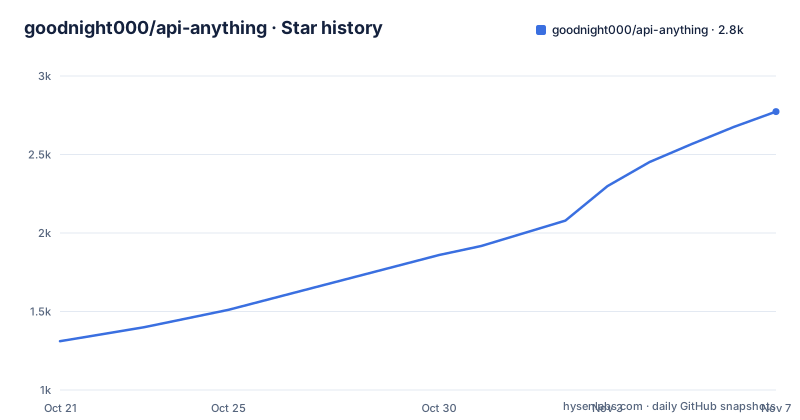
Star history
- goodnight000/api-anything2,773 ★ · +1,462
| Repository | 2026-10-21 | 2026-11-07 |
|---|---|---|
| goodnight000/api-anything | 1.3k | 2.8k |
1,462 Stars in the last 17 days, measured from the daily GitHub snapshot. Compare with other projects
Editorial analysis
Why an agent should call a site rather than drive its browser
API Anything is a TypeScript tool that turns a website into an API an agent can call. The starting point is a comparison the project makes in its own demo: a browser-driving agent has to navigate and read a page on every request, while an agent that calls an operation gets JSON back over plain HTTP. The people this helps are teams running agents that need data from sites without a public API, and the constraint it accepts is that someone has to teach the site to the tool first, with a page URL and two example inputs. The project ships 22 read operations across 9 sites, including google-flights, hacker-news, linkedin and goodreads, and it publishes the timings and costs of its own comparison in bench/. The rest of the design follows from one decision: the tool watches the site's own frontend traffic instead of asking a model to guess an API shape.
Learning a template by diffing two example requests
Teaching a site is a diff, not a guess. The headless browser loads the page once for each of two example inputs and captures the requests the page makes. Whatever part of the request changed with the input becomes a parameter with a slot, and the rest is stored as a template. Cookies and tokens do not stay inside the template, they become references to a local store, so a request can be replayed without embedding session cookies in the operation. The README is explicit that the agent, or a person, picks the request and the fields, and that API Anything builds the template without an LLM. The tool therefore performs a mechanical transformation on observed traffic while the model does the part that needs judgement, namely deciding which request to keep and which DOM fields to extract. That split is what makes a saved call cheap enough to repeat.
Tier 1 over plain HTTP, with the browser as a fallback
Calling an operation fills the slots and sends the request with Node's fetch. If the site blocks that, the tool fetches from inside a browser page instead. As a last resort for reads, it runs the page itself and reads the page's own response. The response envelope makes the tier visible, since a result carries ok, class, tier and data plus a timing field, and tier: 1 means plain HTTP with no browser involved. A failure returns ok: false with a class, a reason and a next step, so an agent can react rather than guess at what went wrong. The tier distinction is the practical gap between a fast API call and a slow scrape, and the example response in the README reports tier 1 with a timing of 111 ms. An agent reading the envelope can tell from the result itself whether the fast path worked.
Installing from a checkout, because the package is not on npm
The install path is unusual, and the reason is the packaging. The package is not on npm yet, and the README warns against installing from a GitHub URL with npm because it fails under npm 11. The by-hand route clones the repository and installs the packed tarball:
git clone https://github.com/goodnight000/api-anything.git && cd api-anything
npm ci && npm install -g "$(npm pack --silent)"
api-anything call hacker-news search query=sqlite
Installing the tarball rather than the checkout means the build output has to exist first, and package.json defines that build as tsc -p tsconfig.build.json, with Node 22.13 or newer required by the engines field. The shorter route is to hand the setup to a coding agent: paste a request that points at INSTALL.md in the repository, and the agent checks the Node version, builds and installs the api-anything command, confirms that a call works, then connects the MCP server and the skill to itself. After a restart, the agent can be asked for something like What does Goodreads rate Piranesi? The MCP server is registered with a command and an mcp argument, either through the codex or claude mcp add commands or through a JSON entry with the same shape.
Teaching a new site with a placeholder and two examples
The teaching command takes a page URL with a placeholder plus two example inputs:
api-anything add hn-demo links \
  --trigger 'https://news.ycombinator.com/from?site={domain}' \
  --example domain=github.com --example2 domain=github.io --match path=/from \
  --html '{"items":"tr.athing","fields":{"title":".titleline > a","url":".titleline > a@href"}}'
Once the operation exists it can be called with new values, and the comment attached to the example call in the README notes that the result is 30 arxiv.org stories at tier 1:
api-anything call hn-demo links domain=arxiv.org # 30 arxiv.org stories, tier 1The flag set is worth reading closely. The trigger names the URL to load and the braces mark the slot, the two example flags supply the inputs whose difference is what gets learned, the match flag pins the path that has to change, and the html flag gives the CSS selectors for the item rows and the fields to pull out. Mapping a whole site from an intent follows a fixed order that the skill drives: ask about whatever the request leaves unclear, propose operations and wait for approval, scout each page with capture --outline so full responses do not have to be read, then build each operation and check it with an input that was not one of the examples.
Repair re-learns a broken request, but the README cuts off
Websites change, and an operation learned today can break tomorrow. The repair step exists for that case: when a request stops working, whether an id was rotated or a field moved, the tool re-learns it and saves the new version only after a replay. That last part is the safeguard, since quietly accepting a re-learned operation would turn a broken call into a confidently wrong answer. The project description summarises the same behaviour as healing itself when the site changes, and the keyword list in package.json uses the term self-healing.
Twenty-two bundled operations, and how they compare to a browser agent
Out of the box the tool covers 22 read operations across 9 sites: search, top flights and a price calendar for google-flights, hacker-news, x and instagram profiles, search on youtube, airbnb and amazon, linkedin profiles, companies and search with your own login, and goodreads search, books, author lists and reviews. The README is careful about what that means. They cover selected features rather than whole sites, and api-anything ops <site> prints the parameters and caveats for each one. The alternative approach is the one the project races against in its own demo, an agent driving headless Chrome through Playwright MCP. In the run recorded on 2026-09-28, both sides used the same model and the same prompt on a Google Flights task, and for one date the browser agent took 12.9 s and $0.166 per task while the operation call took 8.4 s and $0.074, and for five dates 41.6 s against 21.1 s. The project reports that across five runs of each task the agent using the operations answered 1.5 to 2 times sooner and read about half as many tokens, with all 20 answers correct. Those figures are the project's own and are published with method and limits in bench/README.md. The licence is MIT and the last push was on 2026-10-19, with no GitHub release published so far.
Editorial conclusion
API Anything fits teams whose agents need data from sites with no public API and who can afford to teach the site once, using two example inputs and a CSS field map. It does not fit sites that block plain HTTP with no workable fallback, and it does not replace a real API when one exists. Verify three things before adopting it: that the call you need returns at tier 1, that a second input different from your examples produces correct fields, and that the repair step in the project's own documentation covers the site you care about. The last push was on 2026-10-19, the package is still not on npm, and no GitHub release has been published, so the checkout is what you would run.
Frequently asked questions
How do I install API Anything?
The package is not on npm yet, so the documented route is to clone the repository and install the packed tarball with npm ci and npm install -g "$(npm pack --silent)", which needs Node 22.13 or newer. The shorter documented route is to let a coding agent follow the INSTALL.md file in the repository.
Does API Anything need a browser to make calls?
A Chromium browser is needed only for creating operations and for the browser tier. Calls normally run over plain HTTP with Node's fetch, and a result marked tier 1 means no browser was involved, while a blocked request falls back to fetching from inside a browser page.
What happens when a website changes and a saved operation breaks?
The repair step re-learns the request and saves the new version only after a replay, so a broken call does not silently become a wrong answer.
Which sites does API Anything ship operations for?
The package bundles 22 read operations across 9 sites, covering google-flights, hacker-news, x, instagram, youtube, airbnb, amazon, linkedin and goodreads. They cover selected features rather than whole sites, and the command api-anything ops <site> shows the parameters and caveats for each one.
Official sources
Where developers are discussing it
Posts on Hacker News, dev.to and Lobsters that link to this repository, found by our scan of those communities. 1 in the last 30 days; newest first.
- Agent's InternetHacker News · Oct 27, 2026 · 1 points · 0 comments
Add this badge to your README
If you maintain this project, the badge below links readers to this analysis and shows its maintenance status from the daily GitHub snapshot. Paste the markdown into your README; add ?metric=license or ?metric=stars to the image URL for a different field.

[](https://hysenlabs.com/projects/goodnight000-api-anything)Star history chart for your README
[](https://hysenlabs.com/projects/goodnight000-api-anything)Was this useful?