Flue: the agent harness lives in one function, and the repository root is private
The sandbox agent framework.
At a glance
- What is it?
- withastro/flue is a TypeScript framework for agents that receive a task instead of a fixed list of steps, with sandbox, skills and tools composed inside the agent function. Three things to read first: the Node 22 floor, the private workspace root, and a durability claim that stops at accepted work.
- Who is it for?
- Flue fits teams that already write TypeScript and want a single function to own its sandbox, skills and tools, and that can host the same harness on Node.js or Cloudflare Workers. It does not fit a Python stack, and you cannot install it from the repository root, because that root package is marked private and the code imports the scoped @flue packages instead.
- Can I use it commercially?
- Yes. Apache-2.0 is a permissive licence: you can use, modify and sell software built on it, as long as you keep its copyright and licence notices.
- Is it still maintained?
- Yes. The repository last received commits 7 days ago.
- What is it written in?
- Mainly TypeScript, according to GitHub's language statistics.
Answers come from the project's GitHub data, last synced on November 14, 2026, and from our analysis. They are not legal advice.
Star history
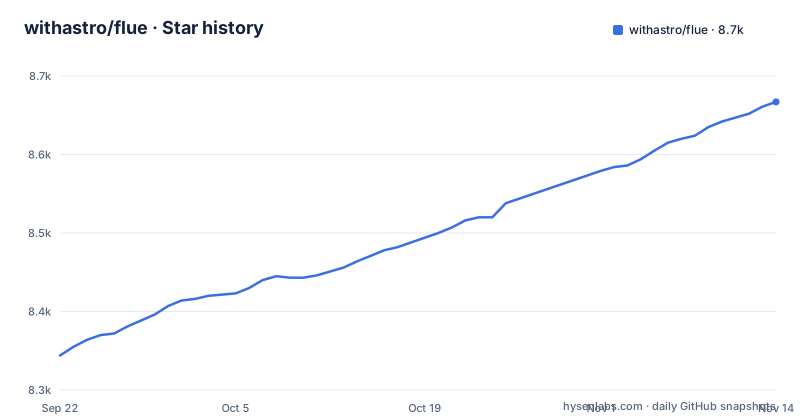
- withastro/flue8,667 ★ · +323
| Repository | 2026-09-22 | 2026-11-14 |
|---|---|---|
| withastro/flue | 8.3k | 8.7k |
323 Stars in the last 53 days, measured from the daily GitHub snapshot. Compare with other projects
Editorial analysis
The agent is an exported function and the harness calls sit in its body
Flue puts the whole agent in one function. The README opens with "Not another SDK", and the file it shows is agents/triage.ts, which starts with a 'use agent' directive, imports its harness hooks from @flue/runtime, and composes everything inside the function body.
// agents/triage.ts
'use agent';
import { useModel, useSandbox, useSkill, useTool } from '@flue/runtime';
import { local } from '@flue/runtime/node';
import triage from '../skills/triage/SKILL.md';
import verify from '../skills/verify/SKILL.md';
import { openIssue, searchCode } from '../tools/github.ts';
Reading Triage() from the top, useModel('anthropic/claude-sonnet-4-6') names the model, useSandbox(local()) picks the environment, and each useSkill call attaches a markdown file from the skills directory. Your own actions arrive as normal imports, so openIssue and searchCode are TypeScript functions from ../tools/github.ts rather than a schema declared in a separate config. Skills are imported as .md, so the reusable expertise sits next to the agent that loads it. The README states the intent plainly: the agent IS the function. The framing throughout is agents that get a task rather than a pre-defined series of steps, with Claude Code and Codex named as the precedent it is imitating.
local() answers where tools run, and the deploy list answers where the agent is hosted
The code comment calls the sandbox choice virtual, local, or remote container. It is one call inside the agent function rather than a deployment setting, so the same agent file can point at a local process during development and at a container somewhere else.
Hosting afterwards is a separate axis, and the README names six targets: Node.js, Cloudflare Workers, GitHub Actions, GitLab CI/CD, Daytona and Render. In the link paths Daytona sits under the sandbox section of the ecosystem docs while the other five sit under deploy, which matches what the code is doing: a Daytona target is a different sandbox rather than a different host for the same one.
What the README does not give you is a matrix of which sandbox implementation supports which tool.
Node 22 and pnpm 11 are enforced in engines, and the root package is private
The root package.json holds the constraints that stop you before any code runs.
"engines": {
	"node": ">=22",
	"pnpm": ">=11 <12"
}
packageManager pins [email protected] exactly, and the same file declares the root as "private": true with "type": "module". Private is the part that surprises people: there is no root package to install. This file describes a workspace, not a library, so adding the repository to a project will not give you the framework. You depend on the scoped packages, and agent code imports from '@flue/runtime' with a second entry point at '@flue/runtime/node' for the local sandbox. An older host has to be upgraded before the install succeeds, and the engine range is narrow enough that pnpm 12 will not satisfy it.
Six published packages, but the newest releases are all @flue/zendesk
The package split shows where each concern lives. @flue/runtime holds the harness, sessions, tools and sandbox. @flue/vite is a Vite plugin covering vite dev and vite build for Node and Cloudflare. @flue/cli provides the flue binary for local runs, blueprints and offline docs. @flue/sdk consumes conversations from deployed agents, @flue/opentelemetry is a tracing adapter, and @flue/postgres is a persistence adapter.
The release feed does not mirror that table. The three most recent releases are @flue/cli, @flue/zendesk and @flue/whatsapp, all at 2.2.2 and all published on 2026-09-28, and neither zendesk nor whatsapp appears in the README table. The last push was on 2026-10-17. Releases are tagged per package, so check the tag for the package you actually depend on instead of the newest release on the repository.
check runs four tools before any test executes, and two formatters share the tree
Local verification fans out through Turbo, and the scripts show what that fan-out covers.
"scripts": {
	"dev": "turbo dev",
	"build": "turbo build",
	"check": "turbo run build check:lint check:types && turbo run test",
	"check:lint": "biome lint . && knip",
	"test:integration": "pnpm --dir packages/vite run test:integration:cloudflare"
}
Biome handles lint, knip looks for unused exports, and the type check runs with --filter=!apps-www so the documentation site stays out of it. Prettier sits next to Biome for formatting, which means two formatters have opinions about the same tree, and the lint setup is not uniform either: the root carries biome.jsonc while demo/ carries its own .oxlintrc.json. Integration tests point at Cloudflare specifically, through packages/vite, so the package that spans both runtimes carries the cross runtime check.
Durability claims recovery for accepted work and stops there
Durability carries the narrowest claim in the feature list. The guide entry says agents preserve progress through failures and restarts with durable recovery for accepted work. That qualifier does real work, because the README never says what happens to a tool call that was in flight when the process died.
If an agent spends minutes inside a sandbox rewriting files, the line between accepted and in flight is exactly where you would want the framework to answer. You get sessions that keep context across conversations and events, and subagents that act as specialized roles an agent can delegate to, but nothing in the README describes cancellation behaviour or partial results from a subagent that died mid-task. Plan on treating the return from a long tool call as unverified until something else confirms it.
Channels verify incoming events but say nothing about outgoing authority
Channels and MCP servers are where an agent leaves your process. Channels receive verified events from Slack, Teams, Discord and GitHub, which tells you an event is checked before the agent receives it. MCP servers connect agents to authenticated tools and services through the Model Context Protocol ecosystem, and the observability guide points at OpenTelemetry, Braintrust, Sentry or your own observer for tracing what happened.
The intake is documented and the boundary is not. The README does not describe per channel permission scoping, token lifetime, or what an agent may attempt when a tool it was handed starts failing mid run. Telemetry answers the question after the fact. If your agent can open issues in a repository or post to a channel, the scope of that authority comes from the credentials you wire in and the review you put in front of it, not from the framework.
Editorial conclusion
Flue fits teams that already write TypeScript and want a single function to own its sandbox, skills and tools, and that can host the same harness on Node.js or Cloudflare Workers. It does not fit a Python stack, and you cannot install it from the repository root, because that root package is marked private and the code imports the scoped @flue packages instead. Before you commit to it, find out whether a tool call that was in flight survives a restart, because the durability guide only claims recovery for accepted work.
Frequently asked questions
What is the Flue Framework?
Flue is a TypeScript framework for building agents that are given a task rather than a fixed sequence of steps. The agent is an exported function, and the sandbox, skills and tools it needs are composed inside that function with hooks from @flue/runtime.
What is flue AI?
Flue is the agent harness framework maintained under the withastro organisation, with its documentation at flueframework.com. It runs agents locally through the flue CLI binary or deploys them to a hosted runtime of your choice.
How do I install the Flue framework?
The repository root is a private pnpm workspace, so you do not install it from there: packageManager pins [email protected] and engines requires node >=22 with pnpm >=11 <12. You depend on the scoped packages instead, such as @flue/runtime, @flue/vite, @flue/cli, @flue/sdk, @flue/opentelemetry and @flue/postgres.
Can a Flue agent run on Cloudflare Workers?
Yes. Cloudflare Workers is one of six named deployment targets alongside Node.js, GitHub Actions, GitLab CI/CD, Daytona and Render, and the @flue/vite plugin covers vite dev and vite build for Node and Cloudflare. Integration tests run against Cloudflare through packages/vite.
Official sources
Add this badge to your README
If you maintain this project, the badge below links readers to this analysis and shows its maintenance status from the daily GitHub snapshot. Paste the markdown into your README; add ?metric=license or ?metric=stars to the image URL for a different field.

[](https://hysenlabs.com/projects/withastro-flue)Star history chart for your README
[](https://hysenlabs.com/projects/withastro-flue)Was this useful?