Google Cloud SQL Auth Proxy: setup, connections and limits
A utility for connecting securely to your Cloud SQL instances
At a glance
- What is it?
- Cloud SQL Auth Proxy gives applications IAM-authorized, TLS 1.3 connections to Cloud SQL without database certificate management. It is useful as a standalone proxy, but it does not configure network access and remains subject to database-specific compatibility limits.
- Who is it for?
- Adopt Cloud SQL Auth Proxy when a service needs certificate-free Cloud SQL access, IAM authorization and a standalone connection endpoint. Do not adopt it when an in-process language connector is a better fit, the host lacks Private IP or Public IP reachability, or the deployment requires MySQL 8.4 Unix sockets.
- Can I use it commercially?
- Yes. Apache-2.0 is a permissive licence: you can use, modify and sell software built on it, as long as you keep its copyright and licence notices.
- Is it still maintained?
- Yes. The repository last received commits 3 days ago.
- What is it written in?
- Mainly Go, according to GitHub's language statistics.
Answers come from the project's GitHub data, last synced on November 7, 2026, and from our analysis. They are not legal advice.
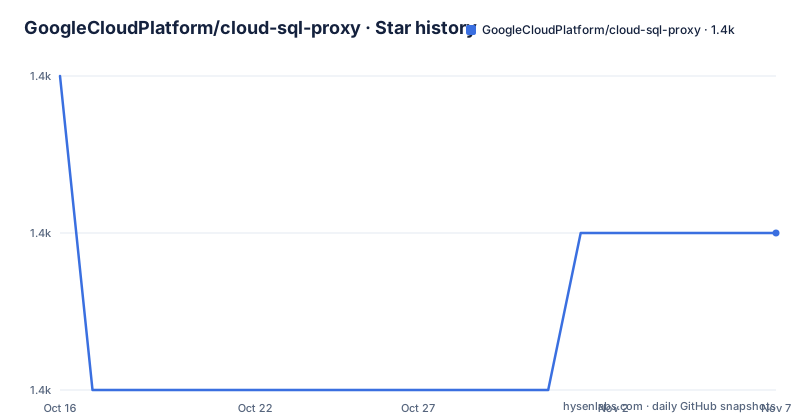
Star history
- GoogleCloudPlatform/cloud-sql-proxy1,438 ★ · -1
| Repository | 2026-10-16 | 2026-11-07 |
|---|---|---|
| GoogleCloudPlatform/cloud-sql-proxy | 1.4k | 1.4k |
-1 Stars in the last 22 days, measured from the daily GitHub snapshot. Compare with other projects
Editorial analysis
Why Cloud SQL Auth Proxy Exists
Cloud SQL Auth Proxy solves the connection problem between a database client and a Cloud SQL instance that needs authenticated, encrypted access. According to the README, it provides IAM authorization, so operators can control who reaches an instance through Cloud IAM permissions. It also provides TLS 1.3 encryption without requiring the deployment team to distribute and manage database certificates.
The target users include applications, developers and operators that connect from workstations, virtual machines or containers. Those users still need the Cloud SQL instance connection name, a value in the form `myproject:myregion:myinstance`. They also need Application Default Credentials because the proxy uses a Cloud IAM principal to authorize the connection.
Authorization remains an explicit requirement. The README prefers the Cloud SQL Client role and also lists Cloud SQL Editor and Cloud SQL Admin. For narrower assignments, it identifies `cloudsql.instances.connect` and `cloudsql.instances.get`. The proxy is therefore not an anonymous local tunnel. The local client may use a simple proxy address, but the proxy still needs an IAM principal allowed to connect to the named instance.
This model is most useful where an existing database driver does not directly integrate with Cloud SQL. The README also directs Go, Java, Python and Node.js users toward language-specific Cloud SQL connectors that perform the same connection work in process. That is a meaningful architectural choice: the standalone proxy remains running as a separate process, while an in-process connector becomes part of the application.
Cloud SQL Auth Proxy Connection Flow
The proxy sits between an application and a Cloud SQL instance. An application connects to the proxy's local endpoint. The proxy reads the selected instance configuration and uses Application Default Credentials to identify the caller, checks that the IAM principal has permission to connect, and establishes a TLS 1.3 connection to Cloud SQL.
The Go module confirms that connection work is built around `cloud.google.com/go/cloudsqlconn`. It also includes MySQL, PostgreSQL and SQL Server drivers through `github.com/go-sql-driver/mysql`, `github.com/jackc/pgx/v5` and `github.com/microsoft/go-mssqldb`. These dependencies support several database client paths, although the README excerpt does not provide a complete command or connection string for each one.
Beyond basic connection forwarding, the README lists Cloud Monitoring, Cloud Trace, Prometheus metrics, HTTP healthchecks, service account impersonation, environment-variable configuration and POSIX-compliant flags. Repository examples cover Kubernetes health checks, sidecars, service deployment, disaster recovery and multi-container use. Those directories show that the proxy is intended for both local administration and orchestrated production workloads.
The first boundary appears before the proxy can reach Cloud SQL. It does not configure the network between its host and the database. The README says the deployment must run in a VPC with access to a Private IP instance or configure Public IP. IAM authorization, encrypted transport and credentials cannot compensate for a missing route or firewall configuration.
Installing Cloud SQL Auth Proxy
The README directs users to the releases page for the latest version and publishes binaries for Linux amd64, 386, arm64 and arm, Intel and Apple Silicon macOS, and Windows x64 and x86. For Linux amd64, the documented v2.26.2 sequence is:
URL="https://storage.googleapis.com/cloud-sql-connectors/cloud-sql-proxy/v2.26.2"

curl "$URL/cloud-sql-proxy.linux.amd64" -o cloud-sql-proxy

chmod +x cloud-sql-proxy
After these commands, the directory contains an executable named `cloud-sql-proxy`. Windows users should select the documented `.exe` asset for their architecture instead of copying the Linux command unchanged.
The README also provides a source installation command:
go install github.com/GoogleCloudPlatform/cloud-sql-proxy/v2@latestThe resulting binary is placed in `$GOPATH/bin` or `$HOME/go/bin`. Go selection requires care. The repository's `go.mod` declares Go `1.26.0`, while the README says Go `1.25.2` and `1.24.8` are incompatible because their SAN verification rejects the trailing-dot DNS name found in the Cloud SQL certificate.
The repository `Dockerfile` provides another build route. It compiles the project with `CGO_ENABLED=0`, copies the binary into a distroless nonroot image and sets `/cloud-sql-proxy` as the entrypoint. The file does not name a published container image, so a deployment should not infer an image reference from this Dockerfile alone.
Finding the Instance for a First Connection
The README documents `gcloud` as a way to retrieve the connection name required by the proxy:
gcloud sql instances describe <INSTANCE_NAME> --format='value(connectionName)'The command should print the instance's connection name, such as `myproject:myregion:myinstance`. The README also says this value appears on the Cloud SQL instance detail page. It identifies which instance the proxy should authorize and connect to.
Before starting the proxy, the operator must confirm that Application Default Credentials identify a principal with an accepted Cloud SQL role or the two documented instance permissions. The principal is not created or granted access by the proxy. This separation makes permission changes manageable through IAM, but it also means a valid binary can still fail when credentials or authorization are wrong.
The README section shown here does not include the complete proxy startup command, listener flags or database-client connection string. It would be misleading to invent those values. The documented prerequisite sequence is narrower: install the binary, retrieve the connection name, configure credentials, grant IAM access and verify that the host can reach the instance through Private IP or Public IP.
Compatibility Boundaries in Cloud SQL Auth Proxy
The most prominent database-specific limitation concerns MySQL 8.4 Unix domain sockets. The README states that Cloud SQL Auth Proxy does not currently support them because of a known issue involving MySQL 8.4's default `caching_sha2_password` authentication plugin. This limitation is narrower than saying that every MySQL connection is broken, but it still rules out that particular access path for the affected version.
Go compatibility is another hard boundary. The README warns specifically about Go `1.25.2` and `1.24.8`. Those versions reject the certificate's Subject Alternative Name DNS entry because it contains a trailing dot. The repository's current `go.mod` requires Go `1.26.0`, so source builds should follow the module declaration and the warning rather than selecting a Go release casually.
Network reachability remains a common deployment failure. A host may have valid Application Default Credentials and a principal with `cloudsql.instances.connect`, yet still be unable to open a connection if it is outside a VPC that reaches the Private IP address and Public IP is not configured. The proxy does not add a route or change the Cloud SQL network policy.
The standalone process also creates lifecycle work. It has to be started before clients connect, stopped or replaced during deployment, and monitored through supported health and metrics facilities. The README names HTTP healthchecks, Cloud Monitoring, Cloud Trace and Prometheus support, but the displayed text does not provide the exact health endpoint or startup flags.
Container Deployment and Platform-Specific Constraints
The repository includes `Dockerfile`, `Dockerfile.alpine` and a `tests/` directory, while `examples/` contains Kubernetes manifests for sidecars, services and health checks. These files indicate container and Kubernetes use paths. The standard Dockerfile compiles the binary in a Go builder image, disables CGO and copies the executable into `gcr.io/distroless/static:nonroot` with a fixed digest. It then runs as UID `65532` and uses `/cloud-sql-proxy` as the entrypoint.
That image choice reduces the files present in the runtime layer, but it does not make the workload self-contained. Google Cloud credentials still have to reach the container, the instance still needs an accessible network path, and IAM still has to permit the selected principal. Kubernetes healthcheck examples do not by themselves prove that the database path is reachable.
Windows deployments have additional documented details. The README says Windows binaries on the releases page are signed with Google LLC certificates starting with version `v2.17.1`. It supplies separate x64 and x86 assets. Windows service installation and removal scripts also appear in the repository, while `windows-service-guide.md` is present. The README excerpt does not describe those service-management steps, so their exact commands should be taken from that project file rather than inferred here.
The repository supports cross-platform binaries, but operational support is not identical by definition. Go source users must manage toolchain compatibility, Windows users must select the right signed artifact, and Linux container users must arrange credentials and ingress to Cloud SQL.
Licensing, Releases and Upgrade Work
The repository identifies Apache-2.0 as its license. Its root files include `LICENSE`, `NOTICE` entries in source headers where applicable, `CHANGELOG.md`, `CONTRIBUTING.md` and `SECURITY.md`. Apache-2.0 describes the project's licensing choice, but an organization still needs to review the actual license text and its own distribution obligations.
The repository is not archived. The last push was on 2026-10-14. Releases include `v2.26.2` and `v2.26.1` on 2026-10-14, plus `v1.38.4` on 2026-10-08. These records show recent project and release activity. They do not remove the upgrade work associated with a standalone binary, including checking v1 versus v2 documentation and selecting the correct operating-system artifact.
The README links a migration guide for users moving from v1 and retains a separate v1 README. Operators should therefore avoid carrying a v1 command into a v2 deployment without checking that migration document. The module path also carries the `/v2` suffix, which matters for source installation and Go imports.
Upgrade planning should also account for credential and network continuity. The proxy may change while Application Default Credentials, IAM roles and Cloud SQL network policy remain external dependencies. A release upgrade should not be treated as proof that the new binary can reach the same instance from the same host.
Editorial conclusion
Adopt Cloud SQL Auth Proxy when a service needs certificate-free Cloud SQL access, IAM authorization and a standalone connection endpoint. Do not adopt it when an in-process language connector is a better fit, the host lacks Private IP or Public IP reachability, or the deployment requires MySQL 8.4 Unix sockets. Verify the instance network route, IAM permissions, selected artifact version and Go toolchain compatibility first.
Frequently asked questions
How do I install Cloud SQL Auth Proxy on Linux?
The README documents downloading the release binary, such as the v2.26.2 amd64 asset, and running `chmod +x`. It also documents `go install github.com/GoogleCloudPlatform/cloud-sql-proxy/v2@latest` when installing from source with a compatible Go version.
Does Cloud SQL Auth Proxy configure Private IP or Public IP access?
No. The README says the proxy does not configure the network between the host and Cloud SQL. The deployment must be able to reach the instance through a suitable VPC and Private IP arrangement or have Public IP configured.
What IAM permissions are needed to use Cloud SQL Auth Proxy?
The README lists Cloud SQL Client as the preferred role and also lists Cloud SQL Editor and Cloud SQL Admin. An administrator can instead assign `cloudsql.instances.connect` and `cloudsql.instances.get` directly.
Does Cloud SQL Auth Proxy support MySQL 8.4 Unix domain sockets?
No. The README states that Unix domain socket connections to MySQL 8.4 instances are not currently supported because of a known issue involving the default `caching_sha2_password` plugin.
Official sources
Add this badge to your README
If you maintain this project, the badge below links readers to this analysis and shows its maintenance status from the daily GitHub snapshot. Paste the markdown into your README; add ?metric=license or ?metric=stars to the image URL for a different field.

[](https://hysenlabs.com/projects/googlecloudplatform-cloud-sql-proxy)Star history chart for your README
[](https://hysenlabs.com/projects/googlecloudplatform-cloud-sql-proxy)Was this useful?