Vapor UI: A React Component Library Built Around Accessibility and Design System Adoption
An open-source component library for building high-quality, accessible web applications. Features easy customization and AI-friendly components. Maintained by @goorm-dev.
At a glance
- What is it?
- Vapor UI is an open-source React component library from goorm-dev that emphasizes accessibility, customization, and a set of companion tools for theming and migration. It suits teams building a design system from scratch or gradually introducing components into an existing codebase.
- Who is it for?
- Adopt Vapor UI if you are building a React design system and want a foundation that is accessible, customizable, and backed by tooling like color and CSS generators. Skip it if you need a full-featured component suite with built-in theming or if you prefer a framework-agnostic approach.
- Can I use it commercially?
- Yes. MIT is a permissive licence: you can use, modify and sell software built on it, as long as you keep its copyright and licence notices.
- Is it still maintained?
- Yes. The repository received new commits within the last day.
- What is it written in?
- Mainly TypeScript, according to GitHub's language statistics.
Answers come from the project's GitHub data, last synced on October 23, 2026, and from our analysis. They are not legal advice.
Star history
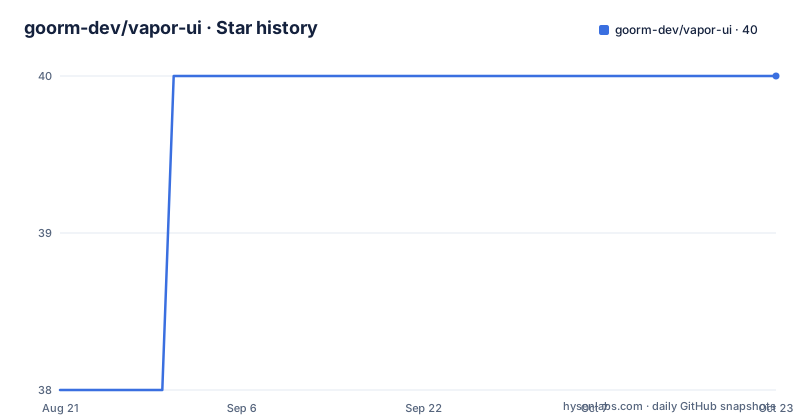
- goorm-dev/vapor-ui40 ★ · +2
| Repository | 2026-08-21 | 2026-10-23 |
|---|---|---|
| goorm-dev/vapor-ui | 38 | 40 |
2 Stars in the last 63 days, measured from the daily GitHub snapshot. Compare with other projects
Editorial analysis
What Vapor UI Solves and Who It Targets
Vapor UI addresses a common problem for React teams: building a component library that is both accessible and customizable without starting from zero. The README positions it as a foundation layer for design systems, which means it is not just a set of ready-made widgets but a base you can extend. The target user is a development team that wants to enforce accessibility standards and maintain a consistent design language across an application. The library is maintained by goorm-dev, the development arm of the South Korean education company goorm, so it carries the weight of an internal tool that has been released publicly. The focus on accessibility is explicit in the description, which is a differentiator compared to many open-source component libraries that treat it as an afterthought.
The Package Structure and What Each Piece Does
Vapor UI is not a single package but a set of coordinated packages. The core package, @vapor-ui/core, contains 34+ accessible components, which is a modest but solid number. The hooks package, @vapor-ui/hooks, provides reusable React hooks for state and UI management, which can be used independently of the components. The icons package offers SVG icon React components, a common need for design systems. Two packages stand out: @vapor-ui/color-generator and @vapor-ui/css-generator. The color generator is built on Adobe Leonardo and produces WCAG-compliant color palettes, directly tying accessibility to the theming process. The CSS generator turns those palettes into CSS variables for Vapor UI themes. This package structure means you can adopt components alone, or bring in the theming tools to create a consistent visual language.
Getting Started: Installation and Initial Commands
The README gives a single command to start: npm i @vapor-ui/core @vapor-ui/icons @vapor-ui/hooks. This installs the three primary packages at once. There is no configuration snippet in the README beyond that, so the next step is to consult the official documentation at https://vapor-ui.goorm.io/docs/getting-started/installation. The presence of a codemod package, @vapor-ui/codemod, suggests that the project expects version upgrades to be frequent enough that automated migration tools are necessary. That is a practical touch. For a team evaluating the library, the installation is straightforward, but the real effort lies in understanding how to customize components and generate themes, which the documentation covers.
The Theming Pipeline: Color Generator and CSS Variables
A notable feature is the theming workflow enabled by @vapor-ui/color-generator and @vapor-ui/css-generator. The color generator uses Adobe Leonardo, a known tool for creating accessible color palettes, and it is explicitly WCAG-compliant. That means you can generate a palette that meets contrast ratios, then feed it into the CSS generator to produce CSS variables for your theme. This is a concrete mechanism for maintaining accessibility while allowing visual customization. The README does not show the exact API for these generators, so you would need to read the documentation to see how they are invoked. The trade-off is that theming is not a simple prop on a component; it requires a separate build step. That is a cost, but it also gives you a repeatable process for theme generation, which is valuable for design systems that need to scale across multiple products.
Limitations and Cases Where It Is the Wrong Tool
Vapor UI is a React-only library, so it is not suitable for projects using Vue, Angular, or vanilla JavaScript. The component count, 34+, is smaller than mature libraries like MUI or Ant Design, which offer hundreds of components. That means you may need to build additional components yourself, which contradicts the goal of saving time if you need a wide range of widgets. The theming process is also not trivial: it requires using the color and CSS generators, which adds complexity compared to libraries that support CSS variables out of the box. The README does not mention server-side rendering or testing utilities, so if your application relies on SSR or you need built-in test helpers, you will need to verify those aspects in the documentation. Finally, the project is maintained by a single company, goorm-dev, which could be a risk if the company's priorities shift, although the recent release activity suggests ongoing commitment.
A Real Alternative: Headless UI Libraries
An alternative to Vapor UI is a headless component library like Radix UI or React Aria. These libraries provide unstyled, accessible components that you fully style yourself. The difference in approach is significant: Vapor UI gives you components with a default look that you can customize, while headless libraries give you the behavior and accessibility logic but no visual styling, forcing you to write your own CSS. If your team has a strong design system and prefers to own all styling, a headless library offers more control and avoids the need to override Vapor's defaults. On the other hand, Vapor UI's generators for color and CSS variables provide a theming pipeline that headless libraries do not offer, so you would need to build that yourself. The choice depends on whether you want a starting point with some styling or a totally bare foundation.
Maintenance and Upgrade Considerations
The repository shows active maintenance with recent releases: @vapor-ui/[email protected] in August 2026, @vapor-ui/[email protected], and [email protected]. The existence of @vapor-ui/codemod indicates that breaking changes are anticipated and that the project provides tools to automate migrations. That is a positive signal for long-term maintenance. The license is MIT, which is permissive and allows commercial use without restriction, though you should always review the license terms yourself for legal advice. The project is not archived, and the default branch is main, so it is being actively developed. However, the README does not mention a contribution guide beyond a link, so the governance model is not fully transparent. For an adopter, the key is to track the changelog and use the codemod when upgrading to avoid manual migration work.
Editorial conclusion
Adopt Vapor UI if you are building a React design system and want a foundation that is accessible, customizable, and backed by tooling like color and CSS generators. Skip it if you need a full-featured component suite with built-in theming or if you prefer a framework-agnostic approach. Before adopting, verify that the components cover your specific needs, check the documentation for customization patterns, and review the changelog for breaking changes, especially since the project is actively maintained with recent releases.
Frequently asked questions
What is the vapor app?
This repository is not an application store item. It is a React component library published to npm as scoped packages: a core package of more than thirty four accessible components, a hooks package, an icons package, a codemod for migrating component code, and two generators for colour palettes and CSS variables.
What is vapor software?
Here the name belongs to a design system rather than to a deployment platform. The project describes itself as an open source component library for building accessible web applications and design systems, written in TypeScript, released under the MIT licence by goorm, and published as several independently versioned npm packages from a single monorepo.
Is vapor a gas or a liquid?
The repository contains nothing about the substance. The name is a product name for a user interface library, and the closest thing to an explanation of the name is the mascot image committed at the repository root beside the configuration files.
Official sources
Add this badge to your README
If you maintain this project, the badge below links readers to this analysis and shows its maintenance status from the daily GitHub snapshot. Paste the markdown into your README; add ?metric=license or ?metric=stars to the image URL for a different field.

[](https://hysenlabs.com/projects/goorm-dev-vapor-ui)Star history chart for your README
[](https://hysenlabs.com/projects/goorm-dev-vapor-ui)Was this useful?