tinyauth works with Traefik, Nginx or Caddy to put an OpenID Certified login in front of your apps
The tiniest OpenID Certified™ authorization and authentication server you have ever seen.
At a glance
- What is it?
- Tinyauth is a small Go authentication server that works two ways: as middleware in front of an app, or as the standalone login provider for a whole network of them. It has an OpenID certification behind its name and an unusually blunt warning about its own configuration churn attached to it.
- Who is it for?
- Choose tinyauth for a homelab or an internal network where Traefik already fronts every service and you want one OpenID provider in front of all of them, and go in with your own database and your own hashed user list rather than the demo defaults. Do not choose it if your organisation needs a support contract, a stable configuration surface across quarters, or an enterprise directory the LDAP binding cannot reach.
- Can I use it commercially?
- Yes, with strict conditions. AGPL-3.0 is a network copyleft licence: if people use a modified version over a network, for example as a hosted service, you must offer them its source code under the same licence.
- Is it still maintained?
- Yes. The repository last received commits 1 day ago.
- What is it written in?
- Mainly Go, according to GitHub's language statistics.
Answers come from the project's GitHub data, last synced on November 15, 2026, and from our analysis. They are not legal advice.
Star history
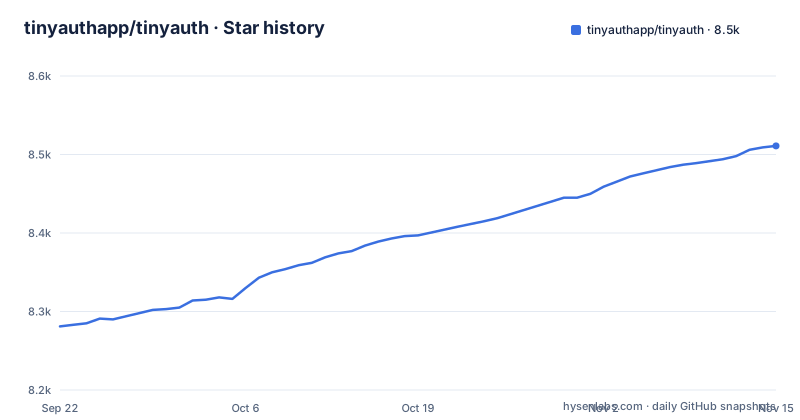
- tinyauthapp/tinyauth8,511 ★ · +230
| Repository | 2026-09-22 | 2026-11-15 |
|---|---|---|
| tinyauthapp/tinyauth | 8.3k | 8.5k |
230 Stars in the last 54 days, measured from the daily GitHub snapshot. Compare with other projects
Editorial analysis
One Go binary that your proxy asks before it forwards
The deployment shape is the whole idea. Tinyauth is a single Go binary that works as authentication middleware with the proxy you already run, Traefik, Nginx or Caddy. It can be that middleware in front of your own apps, or it can be the standalone authentication server that everything else authenticates against. Alongside OpenID it does OAuth, LDAP and access controls, so the same process can be the identity provider and the front door.
The dependency list in go.mod shows how little this leans on anything. Gin is the HTTP layer, golang-jwt/jwt/v5 and go-jose do tokens, go-ldap/ldap/v3 does the directory bind, pquerna/otp does one-time passwords, and modernc.org/sqlite keeps SQLite in pure Go so the binary can be built with CGO_ENABLED=0. pgx covers Postgres, and the k8s.io/client-go entries exist because one of the label providers is Kubernetes.
Certification is the credential that matters if you have to answer a security questionnaire. As of 2026-06-25 the project states that v5.1.0 is OpenID Certified for Basic OP, and it links both the certification details and a public test suite plan. Basic OP is the OpenID provider profile, not a full certification of the product, and it names one version rather than the codebase you are about to run.
docker-compose.example.yml is a demonstration, not a recipe
There is no install command in the README. The instruction is to follow the getting-started guide on the documentation site, and the one file you can run without reading anything else is a compose example that puts Traefik, Whoami and Tinyauth together:
docker compose -f docker-compose.example.yml up -dWhoami is the app being protected, which is what makes the example useful: you get something to authenticate against in the same breath. The README attaches a warning to that file, and it is the most important line in it. The compose file lives on the development branch, so it can contain updates that are not in a release yet. That is fine for evaluating the project and wrong for anything you intend to keep.
For building it yourself there are three Dockerfiles rather than one. Dockerfile is the standard multi-stage build, Dockerfile.dev exists for development, and Dockerfile.distroless is there for a smaller base. The image exposes 3000, declares VOLUME ["/data"], and runs a health check every 30 seconds with a 5 second timeout and 3 retries through a healthcheck subcommand.
.env.example is generated, so editing it in place is a losing move
The first line of .env.example reads that the file is automatically generated by gen/gen_env.go and should not be edited manually. Every key in it therefore has a generator behind it, and a hand-edited copy will be replaced the next time somebody runs make generate. Copy what you need into a real .env or point TINYAUTH_CONFIGFILE at a file of your own.
The interesting keys are the ones that decide behaviour rather than cosmetics:
TINYAUTH_LABELPROVIDER="auto"
TINYAUTH_DATABASE_DRIVER="sqlite"
TINYAUTH_DATABASE_PATH="./tinyauth.db"
TINYAUTH_SERVER_PORT=3000
TINYAUTH_LABELPROVIDER takes auto, docker, kubernetes or none, and auto detects the environment. That value is what feeds access control: in a compose deployment labels arrive from Docker, on a cluster they arrive from Kubernetes, and none turns the mechanism off, so an ACL that silently stops matching after a deployment move is a label provider change rather than a policy change. TINYAUTH_DATABASE_DRIVER accepts sqlite, postgres or memory, and TINYAUTH_DATABASE_PATH doubles as the SQLite file path or the Postgres connection URL depending on which you picked.
TINYAUTH_AUTH_IP_BYPASS skips authentication, so the empty default is the point
Three separate lists govern who reaches the login screen at all. TINYAUTH_AUTH_IP_ALLOW and TINYAUTH_AUTH_IP_BLOCK take IPs or CIDR ranges, and TINYAUTH_AUTH_IP_BYPASS takes a third list whose comment is unambiguous: those addresses bypass authentication entirely. All three ship empty, which is the correct default, and the failure mode is a deployment that fills bypass with the office LAN to quiet down a support ticket and leaves it there.
Users come from TINYAUTH_AUTH_USERS, a comma-separated list in username:hashed_password form. Two consequences follow. You are supplying hashes, not plaintext, so somewhere in your provisioning you need a hashing step, and the README does not document which hash format it expects or give you a command to generate one. And the demo publishes a working username and password pair, which tells you the shape of the entry but nothing about the digest.
The rest of the auth block is about identity shape rather than access. TINYAUTH_AUTH_SUBDOMAINSENABLED is true by default. Then come the user attribute keys, one per claim, for name, given name, family name, middle name and more beyond that: TINYAUTH_AUTH_USERATTRIBUTES_name_NAME and its siblings decide what a token carries about the person.
The public demo runs open on user and password
The README offers a demo at demo.tinyauth.app and gives the credentials outright: the default username is user and the default password is password. That is a sensible way to let people click through a login flow, and it is also the first thing to check on your own instance, because a configuration copied from a demo walkthrough can carry those defaults into a deployment that is reachable from the internet.
State lives under /data. The Dockerfile creates /data/resources, /data/oidc and /data/tailscale, chowns them to a non-root tinyauth user it adds at build time, and declares /data as a volume; the Dockerfile has no USER line, so the process is not switched to that user. Two settings control what fills it. TINYAUTH_RESOURCES_ENABLED is true by default with TINYAUTH_RESOURCES_PATH pointing at ./resources, which is the resources server on by default, and TINYAUTH_ANALYTICS_ENABLED is also true by default and described as periodic version information collection. If your policy says no outbound calls from an identity provider, that second default is the one to turn off first, and the README does not say when it runs or what it sends.
The README warns you that configuration may change often
The warning box at the top of the README is unusual and worth taking at face value: Tinyauth is in active development and configuration may change often, so read the release notes before updating. A second note says the repository you are reading is the main development branch, and that the latest stable release lives behind the stable tag.
The release list shows both halves of that. There is a nightly tag from 2026-11-03, v5.2.0 from 2026-09-07, and v5.2.0-rc.1 from the day before it. The last push was on 2026-11-02 and the repository is not archived, so the churn is real rather than a stale banner.
Here is the detail that should decide your pinning strategy. The certification statement names v5.1.0, the newest listed release is v5.2.0, and a nightly tag is newer than both. Whatever conformance evidence you collect points at a version one minor release behind the tag a fresh install pulls, so an audit trail built from the certification page and a running container are not describing the same build.
AGPL-3.0 follows your modified server out onto the network
The licence is GNU Affero General Public License v3.0, and the README paraphrases its own obligations in plain text. You may copy, distribute and modify the software as long as you track changes and dates in source files. Anything that modifies, or that includes AGPL-licensed code, has to be made available under the AGPL together with build and install instructions. The part that distinguishes Affero from the ordinary GPL is the last clause: if you run a modified version over a network, you must also make the source available to the users of that service.
For the intended homelab case that is usually a non-event, because you are not distributing anything. It becomes a real constraint in two places: if you publish a customised image or a patched binary to other people, and if you run a modified build as a service that other people log into. The LICENSE file sits at the top of the tree, and FUNDING.yml and CONTRIBUTING.md are next to it.
What the README does not do is tell you how a modified deployment is expected to satisfy that clause in practice, so if your modification is real, that question belongs to whoever owns your legal review rather than to this page.
make binary stamps version, commit hash and timestamp into the executable
The Makefile is where the build story is legible. TAG_NAME comes from git describe with --exact-match and falls back to the string main, COMMIT_HASH comes from git rev-parse HEAD, and BUILD_TIMESTAMP is a date format string, so an untagged build identifies itself as main rather than pretending to be a release. LDFLAGS is set to -s -w, and a comment explains the one build tag: GIN_BUILD_TAGS is nomsgpack, described as whatever 6MB serialization lib Gin is using.
Dependencies come from two ecosystems, which is the surprise in a Go project:
cd frontend && pnpm ci
go mod download
The frontend is a separate application built with pnpm and copied into internal/assets before the Go build, and the Dockerfile does the same in a node stage before handing the dist directory to the golang stage. The binary then gets its identity injected at link time through ldflags into internal/model.Version, internal/model.CommitHash and internal/model.BuildTimestamp, which is why a self-built binary can answer a version question at all.
The rest of the tree is a normal working repository rather than a release artifact: air.toml for reload during development, e2e/ for end-to-end tests, sql/ with sqlc.yml for schema and queries, gen/ for the generator behind .env.example, and frontend/ holding the UI sources.
Editorial conclusion
Choose tinyauth for a homelab or an internal network where Traefik already fronts every service and you want one OpenID provider in front of all of them, and go in with your own database and your own hashed user list rather than the demo defaults. Do not choose it if your organisation needs a support contract, a stable configuration surface across quarters, or an enterprise directory the LDAP binding cannot reach. Verify two things before deploying: which tag you are pinning, since the newest release v5.2.0 from 2026-09-07 is not the version the OpenID certification names, and what TINYAUTH_AUTH_IP_BYPASS contains, because anything in that list skips authentication outright.
Frequently asked questions
what is tinyauth
Tinyauth is a Go authentication and authorization server that works as middleware in front of your apps or as a standalone server, with support for OAuth, LDAP and access controls. It runs behind the popular reverse proxies, naming Traefik, Nginx and Caddy.
how to use tinyauth
The README sends you to the getting-started guide on its documentation site, and the runnable example is a compose file that includes Traefik, Whoami and Tinyauth. Configuration is environment variables, with .env.example generated by gen/gen_env.go and not meant to be edited by hand.
is tinyauth secure
As of 2026-06-25 the project states that v5.1.0 is OpenID Certified for Basic OP, and it links the certification details and a public test suite. The same README warns that Tinyauth is in active development and configuration may change often, so read the release notes before updating.
is tinyauth safe
The public demo at demo.tinyauth.app is open with the default username user and the default password password, so treat it as a place to look rather than a place to put anything real. On your own instance, check TINYAUTH_AUTH_IP_BYPASS first, because the addresses in that list bypass authentication entirely.
Official sources
Add this badge to your README
If you maintain this project, the badge below links readers to this analysis and shows its maintenance status from the daily GitHub snapshot. Paste the markdown into your README; add ?metric=license or ?metric=stars to the image URL for a different field.

[](https://hysenlabs.com/projects/tinyauthapp-tinyauth)Star history chart for your README
[](https://hysenlabs.com/projects/tinyauthapp-tinyauth)Was this useful?