GPGPU-Sim: a cycle level GPU simulator validated against real hardware
GPGPU-Sim provides a detailed simulation model of contemporary NVIDIA GPUs running CUDA and/or OpenCL workloads. It includes support for features such as TensorCores and CUDA Dynamic Parallelism as well as a performance visualization tool, AerialVisoin, and an integrated energy model, GPUWattch.
At a glance
- What is it?
- GPGPU-Sim models a contemporary NVIDIA GPU at cycle level for CUDA and OpenCL workloads, with a performance visualizer, a power model and compatibility with the Accel-Sim trace driven framework. It is a research instrument, and the README says so about support.
- Who is it for?
- Adopt GPGPU-Sim if you are doing architecture research, teaching GPU scheduling, or need to inspect memory behaviour that hardware counters cannot expose, since cycle level modelling is exactly what the tool is for.
- Can I use it commercially?
- Check first. The repository uses a licence we do not classify automatically, so read its LICENSE file before any commercial use.
- Is it still maintained?
- Yes. The repository last received commits 36 days ago.
- What is it written in?
- Mainly C++, according to GitHub's language statistics.
Answers come from the project's GitHub data, last synced on November 7, 2026, and from our analysis. They are not legal advice.
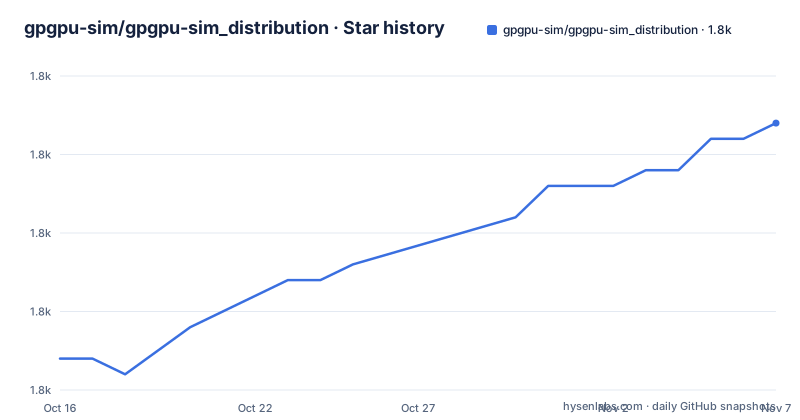
Star history
- gpgpu-sim/gpgpu-sim_distribution1,767 ★ · +15
| Repository | 2026-10-16 | 2026-11-07 |
|---|---|---|
| gpgpu-sim/gpgpu-sim_distribution | 1.8k | 1.8k |
15 Stars in the last 22 days, measured from the daily GitHub snapshot. Compare with other projects
Editorial analysis
Cycle level, validated, and slow by construction
GPGPU-Sim is described as a cycle level simulator modelling contemporary graphics processing units running GPU computing workloads written in CUDA or OpenCL. Cycle level is the operative word. It does not approximate a GPU with a throughput model; it simulates the pipeline, the schedulers and the memory system cycle by cycle, which is why it can produce per cycle traces of what the hardware would be doing.
The package includes two companions. AerialVision is a performance visualization tool for the simulation output, and AccelWattch is described as a configurable and extensible power model. The README states that both have been rigorously validated with performance and power measurements of real hardware GPUs, and specifically that AccelWattch supports modern GPUs and is validated against an NVIDIA Volta QV100.
The history explains why the model looks the way it does. GPGPU-Sim was created by Tor Aamodt's research group at the University of British Columbia, and the first version was used in a MICRO 07 paper with a follow on ACM TACO paper on dynamic warp formation. That original version used the SimpleScalar PISA instruction set for functional simulation, with configuration files indicating which loops to spawn as kernels and where reconvergence points were needed for SIMT execution. The README is candid that building benchmarks for that original simulator was very time consuming.
That history is still visible. The repository contains configs/ for architecture descriptions, cuobjdump_to_ptxplus/ for the disassembly path, libcuda/ and libopencl/ as the API surfaces the simulator intercepts, and regress/ for the regression suite.
The tool is for people who need the detail.
CUDA coverage is broad, and the README asks you to cite six papers
The supported CUDA versions are listed explicitly: a subset of 4.2, 5.0, 5.5, 6.0, 7.5, 8.0, 9.0, 9.1, 10, 11 and 12. That is a wide range, and it is the kind of claim that has to be read as tested on a subset of each rather than complete support.
Feature coverage includes CUDA dynamic parallelism, characterised in a 2014 workshop paper by Jin Wang and Sudhakar Yalamanchili, and a Tensor Core model, described in a paper by Raihan, Goli and Aamodt on modeling deep learning accelerator enabled GPUs. The repository description also names CUTLASS library support and CuDNN or PyTorch support for execution driven simulation.
What stands out is how much citation instruction the README contains. Six separate papers are attached to six separate features, each with a condition: use Accel-Sim and cite the ISCA 2020 framework paper, use the CuDNN or PyTorch path or checkpointing or the debugging tool and cite the arXiv paper on analyzing machine learning workloads with a detailed simulator, use the Tensor Core model or CUTLASS and cite the accelerator modelling paper, use AccelWattch and cite MICRO 21, use dynamic parallelism and cite IISWC 2014, and use AerialVision figures and cite the ISPASS 2010 paper.
That is normal for academic software and it tells you something about the audience. People who take the modelling seriously enough to publish with it are the intended users, and the citation map is effectively a feature index.
Version 4.0 is also compatible with the Accel-Sim simulation framework, which means it can run NVIDIA SASS traces generated by NVBit, the dynamic binary instrumentation tool, for trace based rather than execution driven simulation.
Building means picking an architecture and an inter-simulator layout
The README lays out installation in three steps with two build systems, and it offers a Linux machine setup, a docker image and a devcontainer as the three dependency routes.
The repository layout backs that up. There is a CMakeLists.txt alongside a Makefile, and a set of CMake modules with descriptive names: gpgpusim_install.cmake, gpgpusim_gen_build_string.cmake, gpgpusim_gen_setup_environment.cmake, gpgpusim_check.cmake and gpgpusim_unset_cuda.cmake. There is also a setup_environment script at the root, a version file and version.in, and version_detection.mk, which together suggest the build stamps a version string into the binary.
The Makefile exposes the knobs directly. Near the top it has a commented OpenGL support line, export OPENGL_SUPPORT=1, with a note that commenting it out disables OpenGL support. It also defines INTERSIM with a default of i and a comment explaining that it names a folder located at $GPGPUSIM_ROOT/src/$INTERSIM, which is the inter-simulator interface used to model the interaction between GPUs.
The test entry points are scripts at the root rather than a test framework: short-tests.sh, functional-tests.sh, short-tests-cmake.sh and short-tests-accelsim.sh, plus the regress/ directory. Running the same suite through both build systems is a deliberate consistency check.
The specific cmake and make command lines are not reproduced in the README text available here, so take them from the build sections rather than from a summary.
Debugging tools are treated as a feature, not an afterthought
Two root level files point at a project that expects simulation to be hard to debug.
checkpoint.md documents the checkpointing support, and debug_tools/ is a directory rather than a single file. The README's citation instructions also single out the debugging tool for functional simulation errors as something to cite, which is a hint that it has been used in published work rather than being an afterthought.
The distinction the tooling draws is between a kernel that produces wrong results and a kernel that produces right results too slowly. Execution driven simulation reproduces the actual behaviour of the application, so a mismatch between the simulator and the hardware shows up as a functional difference. Finding that difference needs per instruction visibility, which is what the debug directory and .gdbinit at the repository root are for.
There is a gpgpusim_unset_cuda.cmake module, which reads as a guard against the host CUDA toolkit leaking into a simulation run. That is the sort of detail that matters: a simulator that silently picks up the real driver is worse than no simulator.
There is also .clang-format at the root with run-clang-format.py and format-code.sh, which is a small signal about the level of contributor discipline expected in a codebase of this size.
GPUWattch is gone, and the migration path is documented
If you have used this project before, one thing has changed and the README is explicit about it.
Previous versions, from 3.2.0 to 4.1.0, included the GPUWattch energy model. In GPGPU-Sim 4.2.0 it was replaced by AccelWattch version 1.0, which supports modern GPUs and is validated against an NVIDIA Volta QV100. Documentation moved with it, to the Accel-Sim framework repository, which carries an AccelWattch overview and an artifact manual for MICRO 21.
That is a real breaking change for anyone with energy numbers in a pipeline, and the migration is a swap of the model rather than a retune of a coefficient.
The release history explains the cadence. v4.2.0 and v4.2.1 were both released on 2025-02-11 and 2025-02-12, one day apart, while the version before them is v4.0.1 from 2020-10-21. The repository is not archived and the last push was on 2026-10-03, so development continues on the dev branch, which is the default, without a new tagged release in the list.
The version file at the repository root and the CHANGES file referenced in the README are where you would look for what actually changed since the last tag.
The licence and the support policy are the two things to read first
GitHub could not classify the licence, and the README points at the copyright notice in a file named COPYRIGHT, distributed in the same directory as the README.
That is the first thing to check. The Makefile header carries a three clause BSD style grant from the University of British Columbia with a list of copyright holders, but the Makefile is a source file rather than the licence of the project, and this article does not interpret what COPYRIGHT actually says. If you intend to build on GPGPU-Sim in a commercial or institutional product, read that file.
The second thing is the support statement, which is unusually blunt for a project of this maturity. The README says to sign up for the Google group for questions, and then adds that use of the simulator does not imply any level of support, with questions answered on a best effort basis. Bug reports go to a separate site at gpgpu-sim.org/bugs rather than to the repository's issue tracker.
The CI badge points at a workflow called main.yml and there is a Codespaces badge offering a one click environment, which is a reasonable level of automation. But combined with the support statement, the picture is clear: this is academic software with a community and a documentation site at gpgpu-sim.org, whose manual covers what is modelled and how to configure it, rather than a product with a response time.
For research use that is exactly the right arrangement. For anything time critical, plan on reading the manual and the source instead of asking.
Editorial conclusion
Adopt GPGPU-Sim if you are doing architecture research, teaching GPU scheduling, or need to inspect memory behaviour that hardware counters cannot expose, since cycle level modelling is exactly what the tool is for. Before starting, read the copyright notice in the COPYRIGHT file since the licence is a custom University of British Columbia grant rather than a standard open source licence, cite the papers the README requires, and expect to pick your configuration from the configs/ directory to match the specific GPU you are modelling.
Frequently asked questions
Which CUDA versions does GPGPU-Sim support?
The README lists a subset of CUDA 4.2, 5.0, 5.5, 6.0, 7.5, 8.0, 9.0, 9.1, 10, 11 and 12 as tested, along with features such as Tensor Cores, CUTLASS and CUDA dynamic parallelism.
How do I build GPGPU-Sim?
The README describes a Linux machine setup, a docker image and a devcontainer for dependencies, then a build step with either CMake or make. The repository ships both a CMakeLists.txt and a Makefile, with modules such as gpgpusim_install.cmake and scripts such as short-tests.sh and functional-tests.sh.
What replaced the GPUWattch energy model?
AccelWattch version 1.0 replaced GPUWattch in GPGPU-Sim 4.2.0. AccelWattch supports modern GPUs and is validated against an NVIDIA Volta QV100, with documentation moved to the Accel-Sim framework repository.
Can GPGPU-Sim run SASS traces instead of real CUDA binaries?
Yes. GPGPU-Sim 4.0 is compatible with the Accel-Sim simulation framework and can run NVIDIA SASS traces generated by NVBit, NVIDIA's dynamic binary instrumentation tool, for trace based simulation.
What support does the GPGPU-Sim project provide?
The README states that use of the simulator does not imply any level of support, that questions on the Google group are answered on a best effort basis, and that bug reports go to gpgpu-sim.org/bugs rather than the repository issue tracker.
Official sources
Add this badge to your README
If you maintain this project, the badge below links readers to this analysis and shows its maintenance status from the daily GitHub snapshot. Paste the markdown into your README; add ?metric=license or ?metric=stars to the image URL for a different field.

[](https://hysenlabs.com/projects/gpgpu-sim-gpgpu-sim-distribution)Star history chart for your README
[](https://hysenlabs.com/projects/gpgpu-sim-gpgpu-sim-distribution)Was this useful?