gptme puts a shell-capable agent behind one CLI entry point
Your agent in your terminal, equipped with local tools: writes code, uses the terminal, browses the web. Make your own persistent autonomous agent on top!
At a glance
- What is it?
- gptme is a Python agent that runs inside the terminal you already have, driving shell, Python, file editing and web tools rather than living in a separate IDE. It also ships a Textual TUI, a desktop app and a self-hosted server, which is both its strength and its surface area.
- Who is it for?
- Adopt gptme if you want an agent that runs over ssh, in tmux or in a CI job and can reach your shell and filesystem directly, and if you are willing to own the sandbox yourself. Do not adopt it if you need a vendor-run assistant that is sandboxed by default, or if four overlapping extension points are more than you want to track.
- Can I use it commercially?
- Yes. MIT is a permissive licence: you can use, modify and sell software built on it, as long as you keep its copyright and licence notices.
- Is it still maintained?
- Yes. The repository last received commits 1 day ago.
- What is it written in?
- Mainly Python, according to GitHub's language statistics.
Answers come from the project's GitHub data, last synced on November 13, 2026, and from our analysis. They are not legal advice.
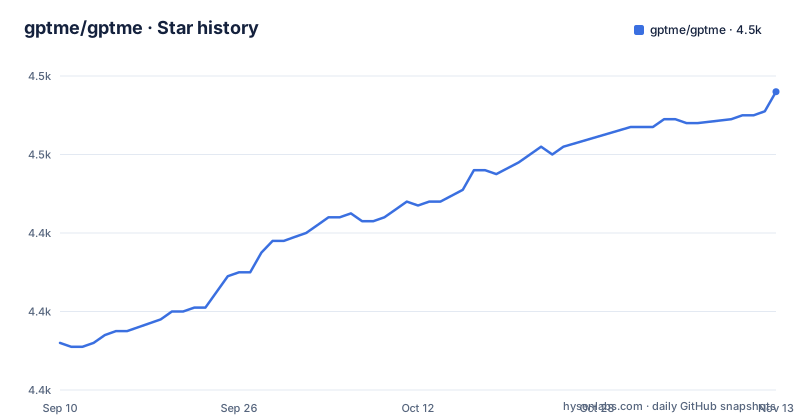
Star history
- gptme/gptme4,476 ★ · +64
| Repository | 2026-09-10 | 2026-11-13 |
|---|---|---|
| gptme/gptme | 4.4k | 4.5k |
64 Stars in the last 64 days, measured from the daily GitHub snapshot. Compare with other projects
Editorial analysis
The agent runs where your shell already is, not inside an editor
gptme takes the position that an agent needs the terminal, not an IDE, to be useful. The project's own framing is a personal agent that runs anywhere a terminal runs: a laptop, an ssh session, a tmux window, a headless server, a CI pipeline. That choice decides everything downstream. There is no language server to configure and no workspace protocol; the agent edits files because it can open them, and it runs tests because it can invoke a subprocess.
The audience is a developer who already lives in a terminal and wants model access without a hosted chat window. The package description is blunt about scope: shell, code execution, file editing, web browsing, vision and computer use. Python is the primary language, and pyproject.toml sets requires-python = ">=3.11,<3.16".
One command resolves to one module, and the module tree shows the real architecture
The repository holds the gptme package directory, alongside webui/, tauri/, packages/, docs/ and site/.
The tauri and webui directories are what a 2023 terminal program does not usually carry. They exist for the desktop app that now ships as an AppImage for Linux alongside macOS and Windows builds, with auto-updates handled by the app itself. The same body of work brought ACP support, an MCP server and the Textual TUI. So the architecture is layered: a CLI core, a web UI that talks to gptme-server over HTTP, a desktop shell wrapping it, and protocol adapters on both sides.
The 2026-11-02 push date, and the v0.36.0 release and v0.36.1.dev20261102 tag from the same day, show the tree is still moving fast. gptme-agent-template and gptme-plugin-registry live in separate repositories, so plugin and agent work is versioned apart from the core.
Tools arrive through plugins, MCP and ACP rather than a fixed set
Tool registration is where gptme differs from a single-purpose coding assistant. The plugin system arrived alongside context compression and a subagent planner mode. A central registry, gptme-plugin-registry, followed in 2026-05 so plugins can be discovered rather than hand-copied.
MCP support came with discovery and dynamic loading of servers, and a lessons system added contextual guidance plus token awareness. On the other side, ACP support exposes the agent through the Agent Client Protocol, so it can be driven by a host editor rather than a human typing at a prompt.
More recently, skills became slash commands, gptme-util memory introduced cross-harness memory shared with Claude Code and Codex, and gptme service init sets up a headless agent. Skills, plugins, lessons and MCP servers are four overlapping extension points. That is the extensibility story, and it is also four ways for behaviour to change without a version bump.
pipx for the TUI, poetry for the source tree, compose for the server
The README points installs at gptme.org/downloads and the Getting Started docs, and the repository itself is developed with uv. For a quick local install with the terminal interface, the README gives:
pipx install 'gptme[tui]'That pulls the Textual interface as an extra. Working from a clone instead, the Makefile build target runs:
uv sync --all-extrasFor the self-hosted server, copy .env.example to .env, fill in at least one provider key such as OPENAI_API_KEY or ANTHROPIC_API_KEY, then:
docker compose up --buildThe compose file publishes the server on port 5700 by default and mounts two volumes, gptme-config and gptme-data, so config, credentials and conversation logs survive a restart. A second service, computer-use, adds a sandboxed desktop with VNC streaming on 6080 for the computer-use tasks tracked as issue #216. One more detail worth knowing before you start: gptme-server enables auth by default when bound to 0.0.0.0, and if GPTME_SERVER_TOKEN is left blank the server generates one at startup, printed in docker compose logs.
Docker and Wasmtime sandboxing arrived late, which tells you what the default was
Sandboxed Python and shell execution, using Docker and Wasmtime, is a comparatively recent addition. Before it, the ordinary path was unsandboxed execution of whatever the model wrote. The order of that history is the honest signal here: the guardrails came after a long stretch without them, so a long-lived gptme install is exactly the kind of setup whose defaults predate the current safety story.
The practical consequence is about blast radius. An agent that runs shell commands with your user's permissions can read your SSH keys, your shell history and every file you can read, and the same process holds provider API keys. The README's table of contents lists a Guardrails section; check it for how sandboxing is enabled before relying on it.
Two other boundaries are worth stating plainly. Provider-agnostic support is broad, including local models through Ollama and any OpenAI-compatible server. And the project now runs scheduled dev pre-releases, so pinning to a named tag such as v0.36.0 rather than tracking master is the conservative choice.
Where Claude Code differs: ownership of the loop and of the model call
The README names Claude Code, Codex and Grok Bot as alternatives, and it also points at self-hosted agents including OpenClaw and Hermes Agent. The real difference is not feature count but who owns the process.
A hosted coding assistant assumes a managed sandbox, a managed model endpoint and a managed update path. gptme assumes you already have a machine and a shell, and it hands both to the model. If you want the model pointed at a local Ollama server, at an OpenAI-compatible endpoint you host, or at a ChatGPT or SuperGrok subscription you already pay for, that is a configuration choice gptme supports directly rather than a workaround.
The cost is symmetric. Because the agent runs unconstrained by default, the operator owns process isolation, credential placement and audit. Because everything is Python and pip-installable, the operator also owns upgrades. The durable difference is the location of the agent relative to your terminal. Choose on that basis.
gptme.toml at the repo root is the file that decides what the agent may do
The repository root carries a gptme.toml, and the server persists config and credentials under a mounted volume, /home/gptme/.config/gptme, paired with conversation logs in /home/gptme/.local/share/gptme. Those two paths are worth knowing because they are what a restart preserves and what a container rebuild destroys if the volumes are dropped.
The env layer is separate and easier to audit. .env.example asks for one or more provider keys plus three operational values: GPTME_SERVER_TOKEN for request auth, CORS_ORIGIN for the origin allowed to call the server, and GPTME_SERVER_PORT for the host port, with the container always listening on 5700 inside. Anything set there overrides the defaults at container start.
One file worth reading before you change anything is AGENTS.md, which sits beside gptme.toml at the top level, along with SECURITY.md and DOMAIN.md. On this repository the agent's own instruction file is part of the layout, which says something about how much of the behaviour is text you can edit rather than code you cannot.
Editorial conclusion
Adopt gptme if you want an agent that runs over ssh, in tmux or in a CI job and can reach your shell and filesystem directly, and if you are willing to own the sandbox yourself. Do not adopt it if you need a vendor-run assistant that is sandboxed by default, or if four overlapping extension points are more than you want to track. Verify first that the tool permissions you enable match what the agent can reach: the whole design assumes it already has your shell, your environment variables and your provider keys.
Frequently asked questions
What is the gptme agent?
gptme is a personal AI agent that runs anywhere a terminal runs, with tools for shell commands, Python execution, file editing, web browsing and vision. It is provider-agnostic and works with Anthropic, OpenAI, Google, DeepSeek, OpenRouter or local models through Ollama and any OpenAI-compatible server.
How do I install gptme and run the terminal interface?
The README shows pipx install 'gptme[tui]' for the Textual interface, and the repository Makefile uses uv sync --all-extras when working from a source clone. The self-hosted server path is docker compose up --build after copying .env.example to .env and filling in at least one provider key.
Can gptme run on a local model instead of a hosted API?
Yes. The README states that gptme works fully local via Ollama and any OpenAI-compatible server, as well as against hosted providers and existing ChatGPT or SuperGrok subscriptions.
Official sources
Add this badge to your README
If you maintain this project, the badge below links readers to this analysis and shows its maintenance status from the daily GitHub snapshot. Paste the markdown into your README; add ?metric=license or ?metric=stars to the image URL for a different field.

[](https://hysenlabs.com/projects/gptme-gptme)Star history chart for your README
[](https://hysenlabs.com/projects/gptme-gptme)Was this useful?