easy-dotnet.nvim: running, testing and debugging .NET from Neovim
A plug-and-play Neovim plugin for .NET development. Roslyn LSP with Roslynator, bundled netcoredbg debugging, and a Rider-like test runner with neotest support. Smooth build, test, and run for C#, F#, Razor, and .NET Aspire. The last .NET plugin you'll ever need.
At a glance
- What is it?
- easy-dotnet.nvim bundles Roslyn language server support, netcoredbg debugging, a test runner, package management and solution handling into a single Lua plugin for Neovim. It suits .NET developers who want Rider-style actions without leaving the editor, and it depends on a separate EasyDotnet tool for the heavier lifting.
- Who is it for?
- easy-dotnet.nvim is a good fit for a .NET developer who has moved from Rider to Neovim and misses running, testing and debugging as a single action, and it is the kind of plugin that pays for itself in a solution with many projects. It is the wrong choice for a team that has not settled on Neovim 0.11 with LuaJIT, for a .NET Framework only repository, or for anyone unwilling to keep a separate global tool updated alongside the plugin.
- Can I use it commercially?
- Yes. MIT is a permissive licence: you can use, modify and sell software built on it, as long as you keep its copyright and licence notices.
- Is it still maintained?
- Yes. The repository last received commits 1 day ago.
- What is it written in?
- Mainly Lua, according to GitHub's language statistics.
Answers come from the project's GitHub data, last synced on November 7, 2026, and from our analysis. They are not legal advice.
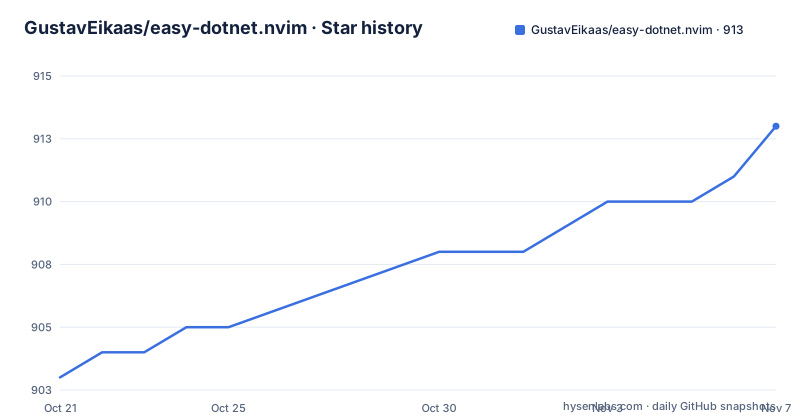
Star history
- GustavEikaas/easy-dotnet.nvim913 ★ · +10
| Repository | 2026-10-21 | 2026-11-07 |
|---|---|---|
| GustavEikaas/easy-dotnet.nvim | 903 | 913 |
10 Stars in the last 17 days, measured from the daily GitHub snapshot. Compare with other projects
Editorial analysis
A companion server does the work the plugin cannot
The first thing to understand is that this is no longer a pure Lua plugin. The documentation carries an important note saying the plugin now uses easy-dotnet-server to enable more advanced functionality, and that as a result the server may require more frequent updates. The update path is given in two equivalent forms, an in-editor command and a global tool install:
dotnet tool install -g EasyDotnetThe plugin is also documented as attempting to detect when the server is outdated and notifying you when it does. That is an unusual admission for a plugin README to make up front, and it is the most important operational fact here. A plugin whose features depend on an external binary that can drift out of step with the plugin itself is a different maintenance proposition from a self-contained one, and the plugin is honest about it rather than hiding it. The requirements section lists the EasyDotnet package from NuGet as a requirement alongside Neovim, so the tool is not optional. The upside of the split is equally real: the server can do work that a Lua plugin should not attempt, such as resolving a solution across many projects, and it can be updated independently of the editor side.
-- lazy.nvim
{
  "GustavEikaas/easy-dotnet.nvim",
  dependencies = { "nvim-lua/plenary.nvim", 'folke/snacks.nvim', },
  config = function()
    require("easy-dotnet").setup()
  end
}
Roslyn and netcoredbg arrive without configuration
Two of the headline features are about tooling you would otherwise wire up by hand. The first is Roslyn language server support out of the box, powered by the official .NET Roslyn language server, with the details in a separate LSP document in the repository. The second is a debugger configured out of the box, powered by netcoredbg, the debugger from Samsung. The value of both is not the capability, since the underlying tools are available to install manually, it is the configuration, because a Roslyn language server for a solution with several projects needs to be pointed at the right solution file, and a debugger needs a launch configuration for each project type. The plugin also lists Nvim-dap configuration in its table of contents, which tells you the debugger story is built on the standard debug adapter protocol client rather than a bespoke debugging interface, and the lazy.nvim snippet with options lists mfusegger/nvim-dap as an optional dependency in the same line as plenary and snacks. In other words, the plugin is an opinionated layer over tools you can already use, and it will still cooperate with your own dap configuration.
-- lazy.nvim
{
  "GustavEikaas/easy-dotnet.nvim",
  -- 'nvim-telescope/telescope.nvim' or 'ibhagwan/fzf-lua' or 'folke/snacks.nvim'
  -- are highly recommended for a better experience
  dependencies = { "nvim-lua/plenary.nvim", 'mfussenegger/nvim-dap', 'folke/snacks.nvim', },
  config = function()
    local dotnet = require("easy-dotnet")
  end
}
Solutions, project files and the csproj buffer experience
The scope is wider than debugging and completion. The plugin lists support for solution, slnx, csproj and fsproj files, with the explicit claim that whether it is a single project or a solution containing multiple projects, the plugin has you covered. It also states that keymappings for csproj and fsproj files are automatically available, which is the part that changes daily behaviour: open a project file and the file becomes a surface for actions rather than a wall of XML. The feature list includes action commands to build, run, test, clean and restore, and the creation of dotnet templates like with dotnet new, with the new project automatically added to the current solution. That last detail is a small one that saves a step every time you start a project. There is a New section for project creation, including a configuration file and integrations with nvim-tree, neo-tree, mini files and snacks explorer, so the plugin can push new projects into whichever file tree you already run. There is also a New section that covers templates and solutions, an Outdated command that checks for outdated packages using virtual text, and package autocomplete inside csproj and fsproj files.
A test runner built to look like the Rider one
The test experience is called out separately in the documentation, with a test runner described as similar to the one you find in Rider, and with a keymap table of its own plus sections on debugging tests and running tests from a buffer. The neotest section is separate again, with its own requirements and setup, which tells you the plugin works with the neotest ecosystem rather than replacing it. The distinction matters for teams already running neotest for other languages, because the neotest adapter approach means the same runner interface drives .NET tests alongside everything else. There is also a workspace diagnostics feature that pulls diagnostic errors and warnings from your entire solution or from individual projects, which is a genuine time saver on a large solution where you would otherwise have to open every project to find out what is broken. The debugging of tests specifically is called out as its own topic, which suggests a test that fails under the debugger is a first class path rather than something you have to set up yourself.
User secrets and language injections for mixed content files
Two smaller features are worth a mention because they solve specific irritations. User secrets management lets you edit, create and preview .NET user secrets directly within Neovim, and the motivation section names managing user secrets as one of the terminal commands the author was tired of typing. The other is language injections, described as Rider-like syntax highlighting for injected languages, sql, json and xml, based on comments. The mechanism is that a comment marker in a C# file tells the plugin which language is embedded in the following block, and the plugin then applies the right highlighting. There is a support matrix for it in the documentation. This is a small feature that makes a mixed-content file readable, and it is a good example of a plugin absorbing a specific IDE behaviour rather than trying to be a general IDE. Entity Framework has its own section too, with requirements and subsections for the database and for migrations, which tells you the plugin knows about that workflow specifically rather than only about the compiler.
Managed terminals with their own tab mappings
The configuration surface shown in the documentation is where the plugin gets opinionated about how output should appear. The options block includes a managed_terminal table with an auto_hide flag that hides the terminal if the exit code is 0, an auto_hide_delay of 1000 milliseconds where 0 means instant, and a mappings table giving each terminal action a key and a description, covering next tab, previous tab, new user terminal, close current terminal tab and hide terminal panel. The auto hide on success rule is a design decision worth understanding rather than copying blindly, because in a workflow where a failing build is common, a terminal that vanishes on success and stays on failure is a different mental model from one that always stays. The descriptions on the mappings are also what make the panel discoverable, since a status line can render them. The plugin is written in Lua with a stylua.toml at the root, so the formatting is standardised, and the setup can be called with no arguments at all, which is what the first lazy.nvim snippet shows.
Neovim 0.11, LuaJIT and a .NET Framework caveat
The requirements are short and the version floor is not low. The plugin needs Neovim 0.11 or newer built with LuaJIT, plus the EasyDotnet tool installed globally. A picker plugin is not required, but the documentation marks telescope.nvim, fzf-lua and snacks.nvim as highly recommended, and in practice the plugin is used with one of them to drive the solution and package pickers. The lazy.nvim snippets list plenary.nvim and snacks.nvim as dependencies, so snacks is in practice part of the standard install even though it is listed as optional. There is a separate .NET Framework section with its own requirements subsection, which is the clearest signal of where the plugin's coverage ends. A plugin that supports both modern .NET and the old Framework stack carries the weight of both, and the Framework path is the one most likely to need the .NET Framework developer pack installed on the machine. The plugin is MIT licensed, the repository publishes no GitHub releases, so there is no version history to pin to, and the last push was on 2026-10-10. The documentation also points at a news.md file in the repository for announcements of major updates and new features, with a recommendation to read it periodically.
Editorial conclusion
easy-dotnet.nvim is a good fit for a .NET developer who has moved from Rider to Neovim and misses running, testing and debugging as a single action, and it is the kind of plugin that pays for itself in a solution with many projects. It is the wrong choice for a team that has not settled on Neovim 0.11 with LuaJIT, for a .NET Framework only repository, or for anyone unwilling to keep a separate global tool updated alongside the plugin. Before adopting it, read the important note at the top of the documentation about the easy-dotnet-server dependency and the need to run :Dotnet _server update, because the plugin deliberately detects an outdated server and the more advanced features depend on it. The plugin is MIT licensed, publishes no GitHub releases, and the last push was on 2026-10-10.
Frequently asked questions
What does easy-dotnet.nvim require to work?
Neovim 0.11 or newer built with LuaJIT, and the EasyDotnet tool installed globally with dotnet tool install -g EasyDotnet. A picker such as telescope.nvim, fzf-lua or snacks.nvim is not required but is highly recommended, and plenary.nvim and snacks.nvim appear as dependencies in the lazy.nvim setup snippets.
How do I keep the easy-dotnet server up to date?
The plugin uses a separate easy-dotnet-server for more advanced functionality, and the documentation notes the server may require more frequent updates. You can run :Dotnet _server update or dotnet tool install -g EasyDotnet, and the plugin attempts to detect an outdated server and notify you.
Does easy-dotnet.nvim support debugging?
Yes. The plugin ships a debugger configured out of the box, powered by netcoredbg, and it is built on the nvim-dap debug adapter client, with a separate configuration topic and its own section covering debugging of tests. The lazy.nvim snippet with options lists mfusegger/nvim-dap among the dependencies.
Which project types does easy-dotnet.nvim handle?
The feature list names solution, slnx, csproj and fsproj support, covering a single project or a solution with many projects. Keymappings for csproj and fsproj files are automatically available when you open those files, and there is a New section covering project creation, a configuration file and integrations with nvim-tree, neo-tree, mini files and snacks explorer.
Can I run tests from easy-dotnet.nvim and see them in neotest?
The plugin includes a test runner described as similar to the one in Rider, with keymaps, a section on debugging tests and a section on running tests from a buffer. There is a separate neotest section with its own requirements and setup, and a workspace diagnostics feature that collects errors and warnings for the whole solution or for individual projects.
Official sources
Add this badge to your README
If you maintain this project, the badge below links readers to this analysis and shows its maintenance status from the daily GitHub snapshot. Paste the markdown into your README; add ?metric=license or ?metric=stars to the image URL for a different field.

[](https://hysenlabs.com/projects/gustaveikaas-easy-dotnet-nvim)Star history chart for your README
[](https://hysenlabs.com/projects/gustaveikaas-easy-dotnet-nvim)Was this useful?