Unity-Programming-Patterns: 23 design patterns from the Game Programming Patterns book, translated to C# and Unity
Implementations of programming design patterns in Unity with examples in C# when to use them.
At a glance
- What is it?
- Habrador's Unity-Programming-Patterns is a cloneable Unity project with working C# examples of 23 game programming patterns, each paired with a Markdown explanation in _text/. The repository is not a package; you open it in Unity Editor and step through each pattern's scene alongside its documentation.
- Who is it for?
- Unity-Programming-Patterns suits developers who want each pattern from the Game Programming Patterns book shown in working C# alongside a Markdown explanation. It does not work as an importable library: the repository has no package manifest and no build instructions in the README.
- Can I use it commercially?
- Yes. MIT is a permissive licence: you can use, modify and sell software built on it, as long as you keep its copyright and licence notices.
- Is it still maintained?
- Activity is slowing. The repository last received commits 6 months ago.
- What is it written in?
- Mainly C#, according to GitHub's language statistics.
Answers come from the project's GitHub data, last synced on November 7, 2026, and from our analysis. They are not legal advice.
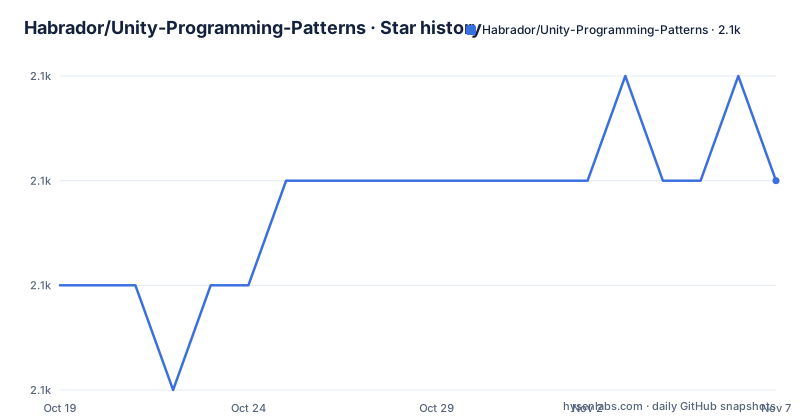
Star history
- Habrador/Unity-Programming-Patterns2,107 ★ · +1
| Repository | 2026-10-19 | 2026-11-07 |
|---|---|---|
| Habrador/Unity-Programming-Patterns | 2.1k | 2.1k |
1 Stars in the last 19 days, measured from the daily GitHub snapshot. Compare with other projects
Editorial analysis
The collection translates 19 patterns from Game Programming Patterns into working C# scenes
Robert Nystrom's Game Programming Patterns is the primary source for 19 of the 23 patterns in this repository. That book explains pattern concepts in pseudocode aimed at C++ and language-agnostic understanding, and the gap it leaves for Unity developers is the question of how each pattern looks in C# with an engine already handling the game loop, object hierarchy and component attachment. This repository fills that gap by giving each pattern a working scene in Assets/ and a companion Markdown file in _text/ that addresses the same question in prose.
Developers who know Unity but find pattern books abstract are the clearest match. Someone who has read the book and wants to verify a C# translation of a specific pattern also has something to check here. Beginners who have not yet read the book can use the individual pattern files as entry points to the underlying concepts, though the repository does not include introductory explanations of why patterns exist or how to recognize when one is needed.
The README defines three pattern groups, but only two appear in the numbered list
Opening the README, the first substantive paragraph divides programming patterns into three groups: architectural patterns, with MVC as the example; design patterns, with Singleton as the example; and anti-patterns, described as solutions programmers use when they should not. Anti-patterns get the most specific explanation there. The example is the God Object usually named GameController, and the README details its failure mode: a class that grows without limit and collects code that does not belong together, making it difficult to maintain and to debug.
That third category then disappears from the numbered list. Nineteen patterns from the book and four additional ones are listed by name with links to their _text/ files, but none of the 23 entries carries a label of architectural, design or anti-pattern. The God Object does not appear anywhere in the 23-item list. Whether anti-patterns are discussed inside the individual _text/ files is not visible from the top-level README alone. A reader who sees three groups defined at the top and assumes all three are represented in the collection will find the expectation unmet.
Update, Game Loop and Component are already inside Unity regardless of this repository
Three patterns in the list have a specific status the README flags directly: Update, Game Loop and Component are already built into Unity. Every MonoBehaviour script has an Update() method that the engine calls once per frame, and that is the Game Loop pattern at work. Every time you attach a Rigidbody, AudioSource or custom script to a GameObject, you are assembling the Component pattern. Unity's own architecture was designed around those patterns from the start.
This has a practical effect when working through the repository. Those three can be studied through Unity's own documentation without opening any scene here. Including them keeps the collection complete against the book's chapter list, but if your goal is to introduce a pattern you are not already using, Update, Game Loop and Component are not where to start. Patterns most distant from Unity's defaults, such as Bytecode, Subclass Sandbox, Type Object and Data Locality, are the ones that introduce genuinely new decisions to a codebase.
Cloning gives you a Unity project, not a package or a library
Top-level entries in the repository make clear that this is a Unity project rather than a standalone library: Assets/, Packages/ and ProjectSettings/ directories sit alongside the README, LICENSE and the _text/ and _images/ directories. Those first three are the standard directories Unity Editor creates for any new project. To use the repository, you clone or download it and open the containing folder in Unity Editor.
No opening instructions appear in the README, no minimum Unity version is listed and no warning about version compatibility is included. A homepage at habrador.com/tutorials/programming-patterns/ is listed on the repository, but the repository itself does not specify a minimum Unity editor version or list known-compatible builds. There is no package.json, no .unitypackage file and no package manifest that would let Unity's Package Manager import just the patterns without the rest of the project structure.
Each pattern is documented twice: once in _text/ and once as a Unity scene in Assets/
Documentation for each pattern is split across two locations. A numbered Markdown file under _text/ carries the written explanation, running from _text/1-command.md through _text/23-template.md. Its companion scene sits in Assets/, though the README does not give the directory structure or naming convention for finding a specific pattern's Unity scene.
Reading a _text/ file alongside its scene is the implied learning flow, even though the README does not describe a sequence. Numbering keeps the connection clear between the written file and the list in the README. An _images/ directory at the repository root holds diagrams referenced from within the _text/ files, though their content is not visible from the top-level listing alone.
Three external contributors are credited: masoudarvishian implemented the Event Queue and Service Locator patterns and contributed bug fixes, JayadevHaddadi fixed event code and VladimirMirMir made additional fixes.
Four patterns beyond the book's 19, without a stated reason for the selection
Beyond the 19 patterns from Game Programming Patterns, the repository adds four more under the heading 'Other patterns': Decorator (number 20), Factory (21), Facade (22) and Template (23). No explanation in the README covers why those four were selected or how they relate specifically to game development. They are common general-purpose design patterns that appear in non-game software as well, so their inclusion extends the repository's usefulness slightly beyond the book's explicit scope.
A Sources and Read More section at the end of the README names eight external resources: Game Programming Patterns, Game Development Patterns with Unity 2021, Head First Design Patterns, Game Programming Gems volumes 1 and 2, Refactoring Guru, Design Patterns in C# With Real-Time Examples, and Unity's own Level up your code with game programming patterns. These are sources for understanding the patterns themselves, not for troubleshooting the Unity implementation in the repository.
How to check compatibility when the README names no minimum Unity version
No minimum Unity version is specified in the README, no list of engine packages it requires is included and no notes appear about which Unity Long Term Support build the scenes target. The engine API changes substantially between major versions: APIs deprecate, component workflows shift and built-in functionality moves. Opening the project in an outdated editor can silently succeed, while opening it in a newer one can produce errors that were not present when the scenes were written.
Checking compatibility is straightforward: open the project in a Unity Long Term Support version, watch the console for deprecation warnings and missing component errors, then compare what you see against what each _text/ file describes. Where there is a mismatch, the _text/ explanation describes what the author intended, while the scene shows what the current editor produces. That comparison is more informative than reading the pattern file alone. The repository carries no tagged releases, and the MIT licence and last push date of 2026-04-28 are in the metadata at the repository root.
Editorial conclusion
Unity-Programming-Patterns suits developers who want each pattern from the Game Programming Patterns book shown in working C# alongside a Markdown explanation. It does not work as an importable library: the repository has no package manifest and no build instructions in the README. Before you rely on any scene as a reference for current API usage, open the project in Unity and check the console for deprecation errors, because the README names no target editor and the engine API changes significantly.
Frequently asked questions
What is Unity-Programming-Patterns?
It is a Unity project containing working C# implementations of 23 game programming patterns, each with a companion Markdown explanation file. Most of the 23 patterns come from Robert Nystrom's Game Programming Patterns book.
Can I import Unity-Programming-Patterns as a Unity package?
No. The repository is a full Unity project containing Assets/, Packages/ and ProjectSettings/ directories. There is no .unitypackage file, no package manifest and no Package Manager entry.
Which patterns does Unity-Programming-Patterns include?
Nineteen patterns from the Game Programming Patterns book, including Command, Flyweight, Observer, Singleton, State, Object Pool and Spatial Partition, plus four additional ones: Decorator, Factory, Facade and Template.
Does Unity-Programming-Patterns cover anti-patterns?
The README introduces anti-patterns as a category and names the God Object as an example, but none of the 23 items in the numbered pattern list is labeled as an anti-pattern. The God Object does not appear in the list.
Which game programming patterns are already built into Unity?
The README names Update, Game Loop and Component as patterns already built into Unity. Using MonoBehaviour and attaching components to GameObjects means those patterns are in use without any additional setup.
Official sources
Add this badge to your README
If you maintain this project, the badge below links readers to this analysis and shows its maintenance status from the daily GitHub snapshot. Paste the markdown into your README; add ?metric=license or ?metric=stars to the image URL for a different field.

[](https://hysenlabs.com/projects/habrador-unity-programming-patterns)Star history chart for your README
[](https://hysenlabs.com/projects/habrador-unity-programming-patterns)Was this useful?