Tablecn's bootstrap runs on one command, and its components arrive through a registry
Data table and data grid components built with shadcn/ui, featuring sorting, filtering, pagination, infinite scrolling, and real-time collaboration.
At a glance
- What is it?
- tablecn packages a data table and data grid on Next.js, shadcn/ui, TanStack Table, Drizzle and PartyServer. The local setup is unusually honest about its steps, and the parts it leaves open are the database path and the second deployment.
- Who is it for?
- Take tablecn when you want a data table and grid that already have server-side sorting, filtering and pagination wired to Drizzle, and you are comfortable pasting generated components into your own project. Pass on it if you need a published package to depend on, since the package is private with no releases, or if your deployment cannot host a separate PartyServer worker on Cloudflare and set NEXT_PUBLIC_PARTYKIT_HOST.
- Can I use it commercially?
- Yes. MIT is a permissive licence: you can use, modify and sell software built on it, as long as you keep its copyright and licence notices.
- Is it still maintained?
- Yes. The repository last received commits 9 days ago.
- What is it written in?
- Mainly TypeScript, according to GitHub's language statistics.
Answers come from the project's GitHub data, last synced on November 21, 2026, and from our analysis. They are not legal advice.
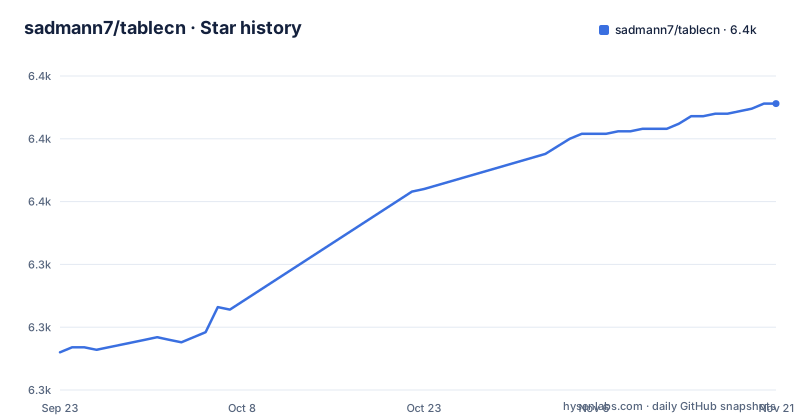
Star history
- sadmann7/tablecn6,389 ★ · +99
| Repository | 2026-09-23 | 2026-11-21 |
|---|---|---|
| sadmann7/tablecn | 6.3k | 6.4k |
99 Stars in the last 59 days, measured from the daily GitHub snapshot. Compare with other projects
Editorial analysis
pnpm ollie runs install, container, schema push and seed in one shot
The quick setup is three commands, and the third one does all the work:
git clone https://github.com/sadmann7/tablecn
cd tablecncp .env.example .envpnpm ollieThat script is a chain: it installs dependencies, starts the Docker PostgreSQL instance, pushes the schema and seeds sample data. The manual path spells the same stages out one at a time, which is what you want when a step fails or when you are not using Docker:
pnpm db:start   # start the PostgreSQL container
pnpm db:setup   # push schema and seed data
pnpm dev        # start the Next.js dev server
db:start is docker compose up -d, db:setup is db:push followed by db:seed, and dev is next dev.
db:setup pushes the schema, db:migrate is the separate path
Seeding and schema application are bundled into db:setup, and that bundle has a consequence worth knowing before you touch a real database. The push step runs drizzle-kit push, which applies the schema directly. The versioned alternative is a different script: db:generate produces migrations with drizzle-kit generate and db:migrate runs src/db/migrate.ts through tsx. db:drop-migration exists too.
So the setup you get by default is the one intended for a throwaway container, not the one you would want for a database with rows in it. Nothing in the README explains when to switch between the push path and the migration path, and the pairing is easy to miss because both scripts sit under the same db: prefix.
Docker Postgres 17.4, or a hosted DATABASE_URL and five dead variables
docker-compose.yml defines one service and nothing else. The image is pinned, the port comes from your environment, and the data lives in a bind mount:
image: postgres:17.4
restart: alwaystest: ["CMD-SHELL", "pg_isready -U ${DATABASE_USER} -d ${DATABASE_NAME}"]The health check polls every 10 seconds with a 5 second timeout and 5 retries. The environment file carries both shapes of configuration. DATABASE_URL holds a full postgresql URL with a tablecn user, while DATABASE_HOST, DATABASE_PORT, DATABASE_USER, DATABASE_PASSWORD and DATABASE_NAME are the individual pieces docker compose interpolates:
DATABASE_URL="postgresql://tablecn:securepassword@localhost:5432/tablecn"Its comment says that if you are not using Docker you should set DATABASE_URL to a hosted Postgres URL and ignore the other five. That leaves them in the file, set but unused.
Multiplayer is a second process and a second deployment
Real-time collaboration does not run inside the Next.js process. The dev script starts both servers concurrently, and the deploy script publishes only the PartyServer worker:
pnpm dev:multiplayer
pnpm deploy:multiplayer
Those map to concurrently "next dev" "wrangler dev --port 1999" and wrangler deploy. A party/ directory and wrangler.jsonc sit at the top level, and the deployment section is explicit that the multiplayer demo is a separate deployment from the app itself. After deploying it you still have one manual step: set NEXT_PUBLIC_PARTYKIT_HOST in the deployment environment variables.
The client reads that variable to know where to connect. Locally it is localhost:1999, the port pnpm dev:multiplayer runs wrangler dev on; in production the expected shape is tablecn.<your-subdomain>.workers.dev or your custom domain. Miss the variable and the frontend has no host to dial.
Components leave through a registry build, not a dependency
The build script is two stages, and the first one has nothing to do with Next.js:
"build": "pnpm build:registry && next build","build:registry": "tsx --tsconfig ./tsconfig.scripts.json scripts/build-registry.ts",
"clean:registry": "tsx --tsconfig ./tsconfig.scripts.json scripts/clean-registry.ts",
"shadcn": "pnpm dlx shadcn@latest"A registry/ directory, registry.json and components.json at the top level say what kind of distribution this is: the shadcn model, where components are generated into your own project through the CLI rather than imported from a package. There is a matching clean script for the generated output.
That matters when you plan an install. package.json names the package tablecn, but it is marked private and sits at version 0.1.0, and the repository has no GitHub releases. Nothing here is waiting to be added as an npm dependency.
The clean script also deletes pnpm-lock.yaml
Housekeeping is one glob, and the lockfile is inside it:
"clean": "rimraf --glob **/node_modules **/dist **/.next pnpm-lock.yaml **/.tsbuildinfo",Alongside node_modules, dist, .next and TypeScript build info, this removes the lockfile that pins the dependency graph for a workspace declared in pnpm-workspace.yaml. Reinstalling afterwards resolves fresh versions instead of the set the project recorded, which is a strange thing for a clean step to do in a repository that commits its lockfile.
The quality gate is narrower than that and worth copying: check runs oxlint, then oxfmt in check mode, then tsc --noEmit. Unit tests are vitest run, end to end tests are playwright test, and a separate playwright.record.config.ts backs the table:record script. renovate.json handles dependency updates.
Documentation sits on a different domain than the project site
The homepage is tablecn.com, but the getting started link points at diceui.com/docs/components/base/data-table, so the component documentation lives on another product's domain.
The feature list is a set of eight checkboxes: server-side pagination, sorting and filtering, customizable columns, filters generated from column definitions, a Notion and Airtable style advanced filter, a Linear style filter menu for command palette filtering, an action bar on row selection, infinite scrolling with virtualization, and real-time collaboration. No row counts, no bundle sizes, no accessibility notes, and no statement of which grid each feature belongs to.
The environment file does hint at the split: UPLOADTHING_TOKEN is marked optional for data-grid-multiplayer, the Upstash Redis variables are an optional rate limiter for the same grid, and NEXT_PUBLIC_PARTYKIT_HOST is optional for data-grid-multiplayer.
Editorial conclusion
Take tablecn when you want a data table and grid that already have server-side sorting, filtering and pagination wired to Drizzle, and you are comfortable pasting generated components into your own project. Pass on it if you need a published package to depend on, since the package is private with no releases, or if your deployment cannot host a separate PartyServer worker on Cloudflare and set NEXT_PUBLIC_PARTYKIT_HOST. Before running db:setup against anything but a container, decide between drizzle-kit push and the db:migrate path, and check what the clean script does to your lockfile first.
Frequently asked questions
How do you use a shadcn data table with Tablecn?
tablecn builds its table on shadcn/ui with TanStack Table for the table logic, and it credits shadcn/ui for the initial implementation. Components reach your project through the shadcn registry rather than a package: the repository ships a shadcn script running pnpm dlx shadcn@latest and a build:registry script that produces the registry output.
Can you give me an example of a data table from Tablecn?
The README contains no example code. It links the documentation at diceui.com/docs/components/base/data-table instead, and credits the shadcn/ui tasks example for the initial implementation of the data table. Locally, pnpm ollie seeds sample rows so the table has data to page, sort and filter.
How do you use tabs in Shadcn when working with Tablecn?
Nothing in this repository covers tabs. The scope is data table and data grid components, and the feature list is limited to sorting, filtering, pagination, infinite scrolling with virtualization and real-time collaboration. For anything outside the table itself, the entry point the project gives you is the documentation site.
How do you use the Shadcn Select component with Tablecn?
A Select component is not documented here either. What the project describes for input is generated from column definitions: filters are auto generated from those definitions, with a Notion and Airtable style advanced filter and a Linear style filter menu for command palette filtering. Columns themselves are customizable.
Official sources
Add this badge to your README
If you maintain this project, the badge below links readers to this analysis and shows its maintenance status from the daily GitHub snapshot. Paste the markdown into your README; add ?metric=license or ?metric=stars to the image URL for a different field.

[](https://hysenlabs.com/projects/sadmann7-tablecn)Star history chart for your README
[](https://hysenlabs.com/projects/sadmann7-tablecn)Was this useful?