Seerr's compose file is a dev mount, and its version lives in a build arg
Open-source media request and discovery manager for Jellyfin, Plex, and Emby.
At a glance
- What is it?
- Seerr is a TypeScript media request manager for Jellyfin, Plex and Emby that talks to Sonarr and Radarr. Its README carries no install command, its root compose file bind-mounts your source tree for development, and the version string reaches the image through a COMMIT_TAG build argument rather than from the source.
- Who is it for?
- Seerr fits a Jellyfin, Plex or Emby home whose library is fed by Sonarr or Radarr, since that pair is the automation the project names. Walk away if you need a third-party acquisition adapter, and read the migration guide before replacing an existing Overseerr or Jellyseerr.
- Can I use it commercially?
- Yes. MIT is a permissive licence: you can use, modify and sell software built on it, as long as you keep its copyright and licence notices.
- Is it still maintained?
- Yes. The repository received new commits within the last day.
- What is it written in?
- Mainly TypeScript, according to GitHub's language statistics.
Answers come from the project's GitHub data, last synced on November 15, 2026, and from our analysis. They are not legal advice.
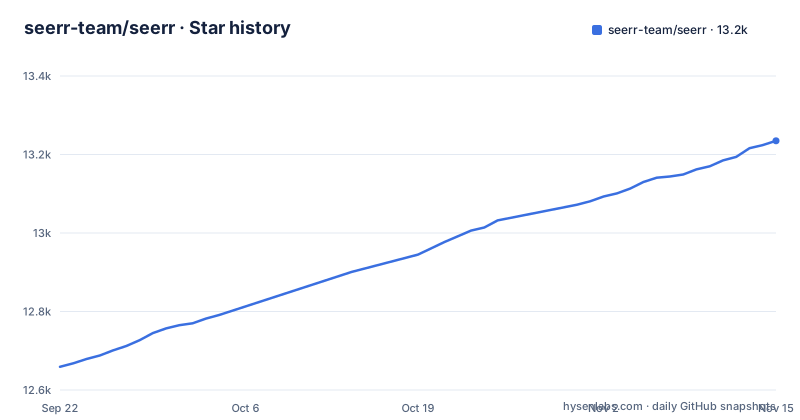
Star history
- seerr-team/seerr13,235 ★ · +576
| Repository | 2026-09-22 | 2026-11-15 |
|---|---|---|
| seerr-team/seerr | 12.7k | 13.2k |
576 Stars in the last 54 days, measured from the daily GitHub snapshot. Compare with other projects
Editorial analysis
The README contains no install command, only a link to a docs site
There is no shell command anywhere in this file for getting Seerr running. The Getting Started section is one sentence telling you to check the documentation for instructions on how to install and run Seerr, followed by the URL https://docs.seerr.dev/getting-started/. Everything else is a feature list, two migration links, and support channels.
That gap has a practical consequence. The repository does contain deployment material, two Dockerfile files, compose.yaml and compose.postgres.yaml, but nothing in the README says which one is the supported path or what the configuration surface looks like. Anyone evaluating Seerr has to leave the repository to learn how to run it, and the documentation site is the only destination the project names.
The feature list is specific enough to judge compatibility against. It covers full Jellyfin, Emby and Plex integration including authentication with user import and management, Movies, Shows and Mixed Libraries, a library scan whose stated job is tracking the titles already available, PostgreSQL and SQLite, a granular permission system, various notification agents, watchlisting and blocklisting, and a mobile-friendly design for approving requests on the go.
package.json reads 0.1.0 while the newest tag is v3.5.0
The version field in the server's package.json is 0.1.0, and the package is marked private, so it is not a distributed library and that field is not a release marker. The versions that matter are the GitHub tags: v3.5.1 dated 2026-10-21, v3.5.0 dated 2026-09-28, and v3.4.1 dated 2026-07-30. The default branch is develop, and the last push to the repository was on 2026-11-02, after the newest tag.
The version a running instance reports is injected at image build time instead. The Dockerfile declares ARG COMMIT_TAG and exports it as COMMIT_TAG in both the build stage and the final stage, so the string a build carries is whatever you pass to the build rather than something read out of the source tree.
For a reader that is one specific trap to avoid. Do not try to identify which Seerr you are running by reading a version out of the checkout. Look at the image tag or the release you deployed. A container you build yourself without passing COMMIT_TAG has no meaningful version attached to it, which makes a later support thread or bug report harder to trace back to a specific state of the code.
preinstall runs only-allow pnpm, so npm and yarn are turned away
The repository declares its package manager and then enforces it. packageManager is set to [email protected], and the preinstall script runs npx only-allow pnpm, which fails the install outright if npm or yarn invoked it. The postinstall script runs next telemetry disable, so Next.js telemetry is off by default for anyone installing from source.
This lands on whoever sets up a shared environment. The pnpm store, the lockfile at the repository root, and the build stages in the Dockerfile all assume one tool, and the refusal is deliberate rather than incidental. If your onboarding documentation says npm install, this repository will not work with it.
The remaining scripts show the shape of the development loop. dev runs nodemon watching ts, json and yml files, watching the server directory and seerr-api.yml, then execs ts-node with server/tsconfig.json against server/index.ts. Notice that the OpenAPI description is inside the watcher list, so edits to the API spec trigger an automatic restart. The test script runs node server/test/index.mts, and production start runs NODE_ENV=production node dist/index.js.
compose.yaml bind-mounts your source and names no image, so it is the dev file
The compose file in the repository root is short enough to read in full, and it is built for editing rather than for running unattended:
services:
  seerr:
    build:
      context: .
      dockerfile: Dockerfile.local
    ports:
      - 5055:5055
    volumes:
      - .:/app:rw,cached
      - /app/node_modules
      - /app/.next
Three details decide what it is. The build points at Dockerfile.local rather than the multi-stage Dockerfile. The source tree is bind-mounted into /app read-write, so host edits are live in the container. Two anonymous volumes sit over /app/node_modules and /app/.next, the standard way to keep container-installed dependencies and build output from being shadowed by whatever your host has.
What it lacks is what a long-running deployment needs: no image line, so nothing is named or tagged, no restart policy, and no environment block. Following this file verbatim gives you a container that stops when it stops, with your working tree wired in read-write.
The port is the one thing it pins, 5055 on both sides, matching the address the README gives for API documentation at http://localhost:5055/api-docs. That documentation is served by your own instance, not from a public site.
PostgreSQL lives in a second compose file, so it is a deliberate choice
Database choice is a first-class feature line, with support for both PostgreSQL and SQLite, yet the deployment material is split across two files. compose.yaml is the one in the root, and it carries no database configuration at all: no image, no environment, nothing that names a database. compose.postgres.yaml sits beside it as a separate file.
The consequence is that the default path is the simpler one and switching to PostgreSQL is an extra step rather than a setting. Someone who copies compose.yaml expecting a Postgres deployment gets an instance backed by whatever the default is, which is not what the feature line implies is happening.
Two more files matter for the same reason. The API description lives at seerr-api.yml, watched by the dev script and paired with a gen-docs directory. The TypeORM datasource is server/datasource.ts, and it is the argument every migration script passes through a datasource flag: migration:generate, migration:create and migration:run all run ts-node against that datasource through the typeorm cli. The database story is real and tooled, and it is also spread across files the README does not walk through.
Alpine drops the glibc native modules by hand and only builds on ARM
The Dockerfile starts from node:22.23.4-alpine3.23 pinned by sha256 digest, in the base stage and again as the final image. Pinning by digest is what makes the build reproducible and choosing Alpine is what makes the image small, but both have a visible cost that the file handles in plain sight.
Production dependencies install with pnpm install --prod --frozen-lockfile, then a cleanup line greps the pnpm virtual store for directories matching linux-x64-gnu and deletes them. The comment above it explains why: the image is musl-based Alpine and those glibc-built modules are not supported there. A second pass removes editor sources and unused icon subpaths, including ace-builds source directories, several country-flag-icons subpaths, and @heroicons/react/16.
The build-stage toolchain is conditional. For linux/arm64 and linux/arm/v7 the file installs python3, make, g++, gcc, libc6-compat and bash, then installs node-gyp globally. Everywhere else no compiler is added at all. That one case statement is why an ARM NAS takes a different install path from an x86 server, and it lines up with TARGETPLATFORM defaulting to linux/amd64.
Sonarr and Radarr are the only named services on the automation side
Seerr integrates with your existing services, and the list names two of them: Sonarr and Radarr, with More to come after it. The media servers are named separately, Jellyfin, Plex and Emby, with full integration including authentication with user import and management, plus a library scan whose stated purpose is to keep track of the titles which are already available.
Those two lists do different jobs. The media server side is about knowing what you already have, so the request form can tell a user that a title is present. Sonarr and Radarr are about what happens after a request is approved. If your library is not fed by either of those two, no other acquisition path is named anywhere, and an approved request has nowhere recorded to go.
That boundary is the thing to check against your own setup before adopting Seerr. The user-facing side is broad: a customizable request system where people can ask for individual seasons or movies, a simple management interface for approving recent requests, a granular permission system, notification agents, watchlisting and blocklisting. The automation side is described in two names rather than a list of adapters, and that is where a different downloader stack will run out of road.
The rename from Overseerr and Jellyseerr has a guide, not a compatibility promise
Seerr carries a migration section headed Migrating from Overseerr/Jellyseerr to Seerr. It points to two documents: a release announcement at docs.seerr.dev/blog/seerr-release that explains what Seerr means for Jellyseerr and Overseerr users, and a migration guide at docs.seerr.dev/migration-guide with detailed instructions.
What the README does not do is answer the compatibility question directly. It does not state whether an existing Overseerr or Jellyseerr database can be pointed at a new Seerr instance in place, whether users and settings carry across, or whether the two can run side by side during a transition. All of that is inside the linked documents.
For a reader this matters most if you already run one of the predecessors, because then the migration is the first task rather than a later concern. Read the guide before assuming an in-place upgrade works. One related detail: the default branch here is develop rather than a release branch, so cloning the repository gives you development state while the tags are where releases live.
Editorial conclusion
Seerr fits a Jellyfin, Plex or Emby home whose library is fed by Sonarr or Radarr, since that pair is the automation the project names. Walk away if you need a third-party acquisition adapter, and read the migration guide before replacing an existing Overseerr or Jellyseerr. Track versions by image tag rather than by the version field in the repository.
Frequently asked questions
What is Seerr?
Seerr is a free and open source application for managing requests for your media library. It integrates with Jellyfin, Plex and Emby for authentication, user import and library scans, and it integrates with Sonarr and Radarr for the services side.
Is Seerr the same as Jellyseerr?
It is the successor, and the project treats them as separate projects with a migration path between them. There is a release announcement explaining what Seerr means for Jellyseerr and Overseerr users, plus a dedicated migration guide, and the README does not state whether an existing install can be upgraded in place.
how to install seerr
The project points you to its documentation site rather than giving a command: https://docs.seerr.dev/getting-started/ is the address given for instructions on how to install and run Seerr. The repository itself supplies Dockerfile, Dockerfile.local, compose.yaml and compose.postgres.yaml, but the README does not say which path is supported.
how to install seerr on docker
The repository ships compose.yaml, which builds from Dockerfile.local and publishes 5055:5055, plus a separate compose.postgres.yaml. Install instructions live at https://docs.seerr.dev/getting-started/, and API documentation for your own instance is served at http://localhost:5055/api-docs.
Official sources
Add this badge to your README
If you maintain this project, the badge below links readers to this analysis and shows its maintenance status from the daily GitHub snapshot. Paste the markdown into your README; add ?metric=license or ?metric=stars to the image URL for a different field.

[](https://hysenlabs.com/projects/seerr-team-seerr)Star history chart for your README
[](https://hysenlabs.com/projects/seerr-team-seerr)Was this useful?