System Monitoring Center watches the machine without asking for root
Multi-featured system monitor
At a glance
- What is it?
- System Monitoring Center is a Python and Tk desktop monitor for GNU/Linux that covers CPU, RAM, disk, network and GPU usage, processes, systemd services, users and sensors, and that uses PolicyKit for the privileged operations so it never needs to run as root. Three generations of it live in three branches, and the current one is a Tk rewrite.
- Who is it for?
- System Monitoring Center fits a Linux desktop user who wants a single window that answers what is eating the machine, which disk is filling and which service is misbehaving, without running a monitoring daemon or handing the whole application root.
- Can I use it commercially?
- Yes, with conditions. GPL-3.0 is a copyleft licence: if you distribute software that includes it, you must release that software's source code under the same licence. Running it internally without distributing it does not trigger that obligation.
- Is it still maintained?
- Yes. The repository last received commits 167 days ago.
- What is it written in?
- Mainly Python, according to GitHub's language statistics.
Answers come from the project's GitHub data, last synced on November 6, 2026, and from our analysis. They are not legal advice.
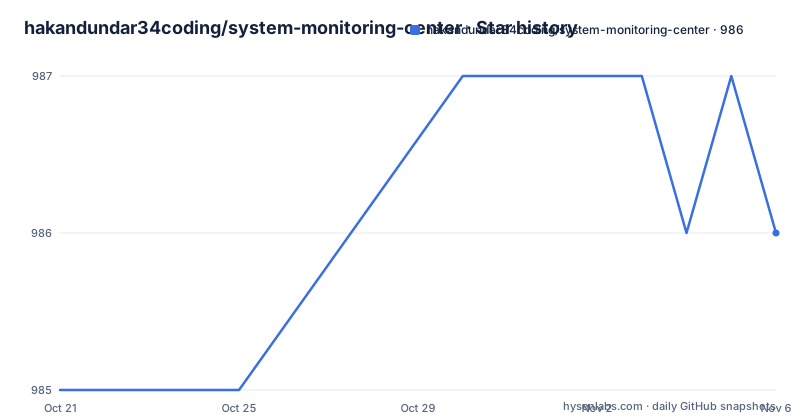
Star history
- hakandundar34coding/system-monitoring-center986 ★ · +1
| Repository | 2026-10-21 | 2026-11-06 |
|---|---|---|
| hakandundar34coding/system-monitoring-center | 985 | 986 |
1 Stars in the last 16 days, measured from the daily GitHub snapshot. Compare with other projects
Editorial analysis
A tabbed view of what the machine is doing
The feature list reads like an inventory of what a desktop task manager should show, and the design choices inside it are worth noting. The monitor covers CPU, RAM, disk, network and GPU hardware and usage information, and it also monitors and manages processes and systemd services, plus users, sensors and general system information. Beyond the readouts, there are hardware selection options, so you can choose which CPU cores, disks, network cards and GPUs are being plotted, and the plotting of performance data for several devices at the same time is a deliberate feature rather than a side effect. Interactive charts let you query the performance data at any point, processes can be shown as a tree or as a list depending on what you are looking for, and the application says it is optimized for low CPU usage. The last point deserves attention from anyone planning to leave it open on a laptop, because a monitor that consumes the resources it is reporting on is self-defeating.
PolicyKit replaces the sudo reflex
The line that stands out most in the feature list is that the application supports PolicyKit and that there is no need to run it with sudo. That is not a small implementation detail. A monitor that has to enumerate processes, read hardware sensors, query systemd services and inspect disk usage needs privileged access to some of that, and the usual answer in a desktop tool is to ask the user to launch the whole program as root, which is both unpleasant and unnecessary, since it grants far more than the individual operations require. PolicyKit lets the application request the specific actions it needs through the system's authorisation dialog, so the privilege is scoped to the operation and the user sees a prompt that says what is being asked for. The consequence for an evaluator is that the tool is safe to leave running as a normal user, and the consequence for a packager is that a policykit policy file has to be shipped and installed alongside the application.
Three generations in three branches
The project carries more than one application and the README links them explicitly. The current tree is SMC v3, built with Tk, and it is the branch this repository points at. A branch named smc_v1 holds SMC v1.43.12, a GTK3 version, and a branch named smc_v2 holds SMC v2.26.0, which works with GTK3 and GTK4. That is an unusual arrangement for an application, and it is worth understanding before you pick a source. The older branches are maintained as separate lines with their own version numbers, so a distribution that still ships the GTK version is not lagging behind the Tk rewrite, it is on a different branch. The Tk choice for v3 is the substantive change rather than a detail. Moving away from a desktop toolkit that follows the platform theme towards one that draws its own widgets is a big shift, and it is visible in the project, which ships a Sun Valley ttk theme rather than inheriting the system look. The older GTK lines remain the sensible choice for a system whose Python and GTK stack is already established.
Running it from source needs Tk and Cairo
The quickest way to look at the application is to run it from the source tree, and the instruction is short. In the src/ folder you run:
python3 ./run_from_source.pyBefore that works on a non-flatpak system, the dependencies for the v3 line are these:
dmidecode, hwdata, iproute2, python3 (>=3.6), python3-cairo, python3-tk, python3-pil, python3-pil.imagetk, util-linux (>=2.31)Two of these are the interesting ones for a packager. python3-tk and python3-cairo pull in the widget and drawing stack that the v3 rewrite depends on, and python3-pil with python3-pil.imagetk covers the image handling, which is what the charts and the icons need. The util-linux floor of 2.31 is the oldest version the code will run against. Two more packages may be needed on particular systems, libcairo2-dev for systems with deb packages and polkit for Arch Linux. The optional dependencies are worth knowing about, because they change what you see. The vcgencmd tool provides the physical RAM size, GPU frequency and video memory information on Raspberry Pi devices, and xorg-xrandr gives more accurate screen resolution and refresh rate detection. Neither is required, but the application reports different things without them.
Flatpak, distribution repositories and app stores
There are four installation routes, and the README is clear that a flatpak install needs none of the dependency work, since the runtime is already contained. The other routes are the Pardus Application Center, the Pi-Apps Store, the repositories of distributions, and running from source. The distribution coverage is wide, with badges for Flathub, the Pardus Software Center, Pi-Apps and a packaging status badge from Repology, which tracks how the project is packaged across repositories. The project is also on PyPI, and the top level of the repository reflects a proper packaging setup rather than a loose script: a debian/ directory for Debian packaging, a flatpak/ directory with its own manifest, a meson.build at the root, a po/ directory holding the translation files, and a data/ directory carrying the application icon and other assets. A Changes.md file tracks the release history alongside the version tags.
What the monitor cannot tell you
The limitations section is short and specific, which is a good sign. GPU usage information availability depends on the vendor and the driver, so the GPU tab can be empty or partial depending on the graphics stack. GPU load is not tracked at all if the GPU tab is switched off, which is the mechanism the application uses to lower CPU usage, so a user who turns the tab off for performance also loses the data. Virtual machines may not provide CPU minimum and maximum frequencies, sensors and RAM hardware information, which is a property of the hypervisor rather than of the application, and it means several tabs will be emptier inside a guest than on bare metal. There is also a performance difference between installation types, with non-flatpak versions of the application having higher performance in start speed, CPU and RAM usage, which is the usual trade-off between a containerised runtime and a native install. The known issues section currently says that nothing has been detected so far, which is a claim about the bug tracker rather than a promise about the code.
A translated application with a Raspberry Pi angle
The localisation effort is one of the more substantial parts of the project, with fourteen listed languages, including English and Simplified and Traditional Chinese, Czech, German, French, Hungarian, Persian, Polish, Brazilian and European Portuguese, Russian, Spanish and Turkish, and a separate document with notes for translators. The application is packaged for Raspberry Pi through the Pi-Apps store, and the optional vcgencmd dependency exists specifically to read the extra hardware information those devices expose. The ARM architecture is supported, and the project advertises itself as free and open source under the GPL-3.0 licence. The release cadence is regular and the versions are honest about the rewrite, with v3.4.0 on 2026-05-02, v3.3.0 on 2026-04-04 and v3.4.1 on 2026-05-25, and the last push on 2026-05-25. The pattern of the listed releases suggests a project in steady maintenance rather than one in decline.
Editorial conclusion
System Monitoring Center fits a Linux desktop user who wants a single window that answers what is eating the machine, which disk is filling and which service is misbehaving, without running a monitoring daemon or handing the whole application root. It does not fit a server administrator who wants metrics over time, since this is a live desktop view rather than a collection pipeline, and it does not fit a virtual machine or an unusual GPU, since the documentation is candid about the frequency, sensor and RAM data that virtual machines do not expose and about GPU figures that depend on the vendor driver. Before you install it, read the limitation list in the README, note that GPU load is not tracked when the GPU tab is switched off to save CPU, and check that a non-flatpak install has the dependencies for your distribution, since the v3 line needs python3-tk, python3-cairo, python3-pil and util-linux at version 2.31 or later, with the newest release being v3.4.1 from 2026-05-25.
Frequently asked questions
What is System Monitoring Center?
It is a multi-featured system monitor for GNU/Linux written in Python with a Tk interface, covering CPU, RAM, disk, network and GPU usage, processes, systemd services, users, sensors and general system information, with hardware selection and interactive charts.
Do I need to run System Monitoring Center as root?
No. The project supports PolicyKit, so the privileged operations go through the system authorisation dialog instead of the whole application running under sudo.
How do I run System Monitoring Center from source?
In the src/ folder, run python3 ./run_from_source.py. On a non-flatpak system you also need the dependencies listed for the v3 line, including python3-tk, python3-cairo, python3-pil, python3-pil.imagetk and util-linux 2.31 or later.
What are the differences between SMC v1, v2 and v3?
The v3 tree is the current Tk based rewrite, while the smc_v1 branch holds SMC v1.43.12 on GTK3 and the smc_v2 branch holds SMC v2.26.0 on GTK3 and GTK4. Each is maintained as its own line with its own version numbers.
Is System Monitoring Center still updated?
The repository is not archived and the last push was on 2026-05-25, with v3.4.1 released the same day, after v3.4.0 in May 2026 and v3.3.0 in April 2026.
Official sources
Add this badge to your README
If you maintain this project, the badge below links readers to this analysis and shows its maintenance status from the daily GitHub snapshot. Paste the markdown into your README; add ?metric=license or ?metric=stars to the image URL for a different field.

[](https://hysenlabs.com/projects/hakandundar34coding-system-monitoring-center)Star history chart for your README
[](https://hysenlabs.com/projects/hakandundar34coding-system-monitoring-center)Was this useful?