PS4Linux Documentation: A Practical Field Guide for Running Linux on a PlayStation 4
Documentation for Linux on the PlayStation 4
At a glance
- What is it?
- This repository collects kernels, initramfs images, and distro builds for running Linux on a PS4, but it is a manual, not a polished product. It serves hobbyists who accept a fragile setup process and a narrow set of supported models.
- Who is it for?
- Adopt this documentation if you own a compatible PS4 (Aeolia, Belize, or Baikal southbridge) and are comfortable with manual kernel selection, USB formatting, and rescue shell commands. Do not use it if you expect a one-command installer or broad hardware support; the documentation explicitly warns about USB size, driver availability, and the need to rename files.
- Can I use it commercially?
- Not without permission. GitHub finds no licence file in the repository, and without a licence all rights are reserved by default: you may read the code but not reuse it. Check the README, or ask the authors, before using it.
- Is it still maintained?
- Probably not. The repository last received commits 57 months ago, on January 26, 2022.
- What is it written in?
- GitHub does not report a main language for this repository.
Answers come from the project's GitHub data, last synced on October 22, 2026, and from our analysis. They are not legal advice.
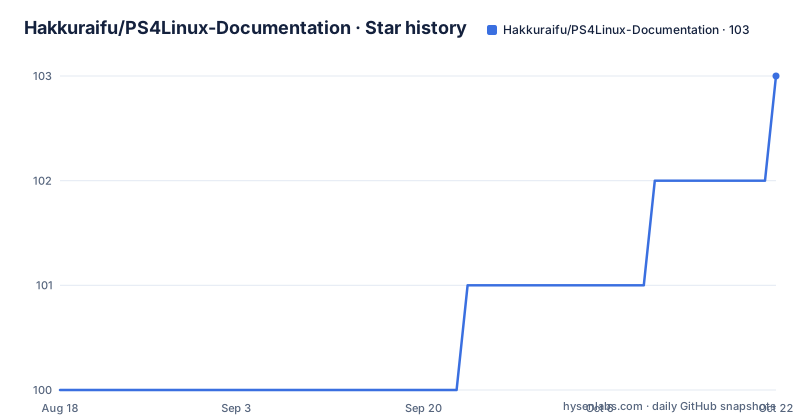
Star history
- Hakkuraifu/PS4Linux-Documentation103 ★ · +3
| Repository | 2026-08-18 | 2026-10-22 |
|---|---|---|
| Hakkuraifu/PS4Linux-Documentation | 100 | 103 |
3 Stars in the last 65 days, measured from the daily GitHub snapshot. Compare with other projects
Editorial analysis
What This Repository Actually Provides
The PS4Linux-Documentation repository is not a Linux distribution or a kernel source tree. It is a curated set of links and instructions for getting Linux to boot on a PlayStation 4. The README lists prebuilt kernels for three PS4 southbridge revisions (Aeolia, Belize, Baikal), several initramfs.cpio.gz files from different authors, and ready-made distro images such as Psxitarch, Gentoo, and Fedora 32. It also explains how to build your own OS image from a compatible distro. The intended user is someone who already owns a PS4, is willing to run a payload to enter a rescue shell, and wants to replace or dual-boot the console's native OS with Linux. This is a hobbyist-level guide, not an enterprise solution. The tone is informal, with phrases like 'It's update :D' and 'A brain :p', which signals that the audience is the modding and homebrew community rather than professional sysadmins.
The Core Mechanism: Kernels, Initramfs, and Payloads
The process hinges on three components: a kernel (bzImage), an initramfs archive, and a Linux payload that runs on the PS4 to give access to a rescue shell. The kernel must match the PS4's southbridge revision: Aeolia, Belize, or Baikal. The README links to a PSDevWiki page that explains how to identify your model. The initramfs contains the minimal userspace needed to mount and install the OS image. The payload, launched from a trusted host, starts a rescue shell where you run commands like 'exec install-psxitarch.sh' to unpack the distro onto the USB drive or HDD. The data flow is: USB drive with kernel, initramfs, and OS tarball, then payload execution, then installation script, then boot. The kernel versions listed range from 4.14.93 (marked 'Most Stable') to 5.15.15 (marked 'BETA' with Vulkan support). The choice of kernel affects stability and GPU features. For example, the 4.14.93 kernel for Aeolia supports HDD, while the Baikal version does not. That distinction is critical: not every kernel works on every model, and HDD support is not universal.
Installation Steps: Commands and Constraints
The README provides concrete commands for both USB and HDD installation. For a USB install, you format a USB 3.0 device (at least 16GB) as FAT32, place the bzImage, initramfs.cpio.gz, and OS tarball in the root, rename the OS to 'psxitarch.tar.xz' (or 'arch.tar.xz' if using Nazky's initramfs), launch a payload, and run 'exec install-psxitarch.sh' (or 'exec install-arch.sh'). After installation, if the OS does not boot, you run 'exec start-psxitarch.sh' or 'exec start-arch.sh'. For HDD installation, you transfer files to /usr/system/boot via FTP, run a payload, and execute 'exec install-HDD.sh', which prompts for the amount of space to allocate. Uninstalling from USB is just reformatting the drive; for HDD, you delete the Arch.img file in /usr/home. These commands are specific and actionable, but they assume the user has already obtained a payload host. The README lists a few trusted hosts, but warns the list can change. The installation scripts are not part of the repository, so you must trust the initramfs author's script behavior. The maximum OS image size is stated as 3.2GB, which is a hard constraint for custom builds.
Building Your Own OS: Driver Repo and Pacman
For users who want to create a custom distro, the README points to the PS4Linux-ArchDrivers repository and explains how to add a Pacman repository. The command is: 'sudo echo -e "\n[ps4xploit-repo-arch]\nSigLevel = Optional TrustAll\nServer = https://PS4Xploit.zd.lu/Linux/Repo/x86_64" >> /etc/pacman.conf'. Then you update with 'sudo pacman -Syyu' and install the driver packages: 'mesa-ps4', 'lib32-libdrm-ps4', 'lib32-mesa-ps4', 'libdrm-ps4', and 'xf86-video-amdgpu-ps4'. This is a real mechanism, but it is Arch-specific. The README states that 'theoriclly all linux distrubution can be run on the PS4 if you have the drivers, since we only have the drivers for arch you need a arch based distro'. That is a significant limitation: if you want a non-Arch distro, you must either wait for drivers or compile them yourself, with a link to a separate repo. The command uses 'SigLevel = Optional TrustAll', which is a security trade-off: it disables signature verification for that repository. That is worth noting for anyone who cares about package integrity. The backup command uses 'tar' with 'xz -9' compression and excludes /var/cache, and the size limit is 3.2GB, which forces you to strip your OS to essentials.
Limitations and Failure Modes
The documentation is honest about several failure points. First, not all PS4 models are supported equally: the Baikal southbridge lacks HDD support in the stable kernel, so you are stuck with USB boot. Second, the USB device must be at least 16GB and USB 3.0, with a warning in all caps: 'USE A >=16GB USB 3.0 DEVICE'. That is a hard requirement, not a suggestion. Third, the installation process requires running a payload from a trusted host, which implies the PS4 must be on a firmware that supports such payloads, though the README does not specify firmware versions. Fourth, the initramfs scripts are not versioned or documented beyond their names, so if a script fails, you have no source to debug. Fifth, the README mentions that for Nazky's initramfs, you must run 'exec start-arch.sh' twice every reboot, which is an odd quirk that could confuse new users. Finally, the repository has no license information, which is a legal ambiguity if you plan to redistribute any part of it. These are not hypothetical issues; they are stated in the README. For a user expecting a polished installer, this will be a frustrating experience.
Alternative Approaches and Comparison
The main alternative to this documentation is the Psxitarch project itself, which provides a prebuilt distro and its own how-to guide, linked in the README (https://github.com/hippie68/psxitarch-how-to). That guide focuses on updating Psxitarch, whereas this repository aggregates multiple distros and kernels. Another alternative is using a generic ARM Linux distribution on a different device, but that is not a direct comparison. Within the PS4 Linux scene, the difference is in the level of abstraction: this repository is a link aggregator, while the Psxitarch how-to is a step-by-step tutorial for a specific distro. If you want a single, tested path, the Psxitarch guide is more focused. If you want to experiment with different kernels or distros, this repository gives you a menu. The trade-off is that you get more options but less hand-holding. The README also links to a Gentoo build and Fedora 32 builds, which are not covered by the Psxitarch how-to, so this repository fills a gap for users who want non-Arch systems, though the driver installation is still Arch-centric.
Maintenance and Upgrade Costs
The repository has no release history or last push date in the provided material, which makes it hard to assess freshness. The README lists kernels that are several years old (4.14.93, 5.3.18, 5.15.15), and the distro images are also dated (Fedora 32, for example, is from 2020). Updating the OS once installed is possible: for Psxitarch, there is a tutorial; for Fedora, a YouTube link; for CuteFish OS, you run 'sudo pacman -Syyu' or use Pamac. However, updating the kernel is not covered in the README. You would need to manually download a new bzImage and replace it on the USB or HDD, which is a non-trivial task. The repository itself is a documentation page, so maintaining it means keeping links alive and updating kernel tables, but there is no evidence of active maintenance. The license is listed as unknown, which is a red flag for anyone wanting to fork or reuse the documentation. The driver repository (PS4Linux-ArchDrivers) is separate and has its own maintenance, but the README does not indicate how often it is updated. In practice, expect to do your own research to find the latest kernels and distro builds, because this documentation may lag behind.
Editorial conclusion
Adopt this documentation if you own a compatible PS4 (Aeolia, Belize, or Baikal southbridge) and are comfortable with manual kernel selection, USB formatting, and rescue shell commands. Do not use it if you expect a one-command installer or broad hardware support; the documentation explicitly warns about USB size, driver availability, and the need to rename files. Before starting, verify your PS4 model against the linked southbridge page, check the last push date of the repository (not provided here) to ensure the links are still alive, and confirm that your chosen kernel and initramfs combination matches your distro. The project is a community effort, so expect to troubleshoot with the linked tutorials and forum posts, not with official support.
Frequently asked questions
Can a PS4 run Linux?
Yes, according to this document, and it walks through the three files needed: a kernel chosen for your console model, an initramfs image, and a Linux distribution to put on either a USB stick or the console's own drive. It covers three console models, named Aeolia, Belize and Baikal after their southbridge revisions.
What is the best Linux distro for PS4?
The document does not recommend one distribution so much as constrain the choice: drivers exist only for Arch, so an Arch-based distribution is required, and Manjaro is what it suggests. Five prebuilt images are linked, including Psxitarch, Gentoo, Fedora 32 and CuteFish OS.
Is the PS4 OS based on Linux?
The repository does not discuss the console's own operating system. What it documents is installing a separate Linux system onto the hardware using a payload launched from a recovery shell, which is a different question from what the console's native system is built on.
What is the best PS4 emulator for Linux?
There is nothing about emulation in this repository, because it targets real hardware. Its steps involve physical media, formatting a USB stick as fat32, transferring files by FTP to the console's boot directory, and driving the console from a recovery shell.
Official sources
Add this badge to your README
If you maintain this project, the badge below links readers to this analysis and shows its maintenance status from the daily GitHub snapshot. Paste the markdown into your README; add ?metric=license or ?metric=stars to the image URL for a different field.

[](https://hysenlabs.com/projects/hakkuraifu-ps4linux-documentation)Star history chart for your README
[](https://hysenlabs.com/projects/hakkuraifu-ps4linux-documentation)