weapp-tailwindcss has two Vite entry points and only one of them means mini programs
Bring Tailwind CSS to every platform!
At a glance
- What is it?
- A Tailwind CSS v4 toolchain that targets web, mini programs, React Native and Lynx from one input, where the CSS-only profile silently excludes transpilation, the CLI's weapp target touches no markup, and the repository's Dockerfile deploys two packages nobody publishes.
- Who is it for?
- This is a good fit for a team that already writes Tailwind and needs the same class names to survive on WeChat, Alipay, uni-app or a React Native target, and the two things that decide whether it works are both stated plainly in the documentation. Register one generator and only one, since a second PostCSS pipeline silently produces different output, and make sure the CSS entry is actually imported, because the cssEntries option does not do that for you.
- Can I use it commercially?
- Yes. MIT is a permissive licence: you can use, modify and sell software built on it, as long as you keep its copyright and licence notices.
- Is it still maintained?
- Yes. The repository received new commits within the last day.
- What is it written in?
- Mainly TypeScript, according to GitHub's language statistics.
Answers come from the project's GitHub data, last synced on October 22, 2026, and from our analysis. They are not legal advice.
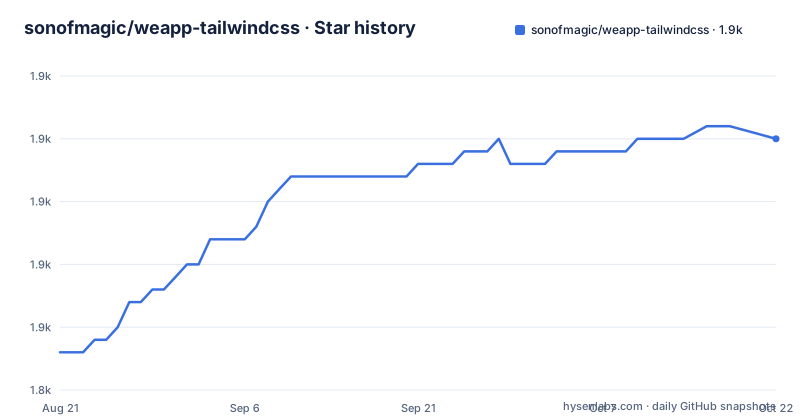
Star history
- sonofmagic/weapp-tailwindcss1,865 ★ · +17
| Repository | 2026-08-21 | 2026-10-22 |
|---|---|---|
| sonofmagic/weapp-tailwindcss | 1.8k | 1.9k |
17 Stars in the last 62 days, measured from the daily GitHub snapshot. Compare with other projects
Editorial analysis
The CSS-only Vite entry deliberately leaves four jobs undone
The Vite integration has two entry points and the difference between them is the most important thing in the readme. The web entry is called with no arguments:
import { defineConfig } from 'vite'
import { WeappTailwindcssWeb } from 'weapp-tailwindcss/vite/web'

export default defineConfig({
  plugins: [
    WeappTailwindcssWeb(),
  ],
})
That profile does exactly four things: Tailwind CSS generation, CSS transformation, CSS hot module replacement, and the finishing pass for web CSS. It does not register JavaScript or template transpilation, framework extensions, code splitting, or the mini program finalizer. The style injector is off by default and only comes into play if you configure it explicitly.
Everything a normal Vite project relies on stays with Vite: server side rendering, library mode, dependency pre-bundling, CSS minification and source maps. So the CSS-only entry is a plugin that generates and hands over CSS, not a mini program integration wearing a friendlier name.
The main entry, `weapp-tailwindcss/vite`, is the one you want when you also need mini programs, framework extensions, or several entry points at once, and it expects you to say which by setting a generator target or a platform explicitly. A generic Vite project with no marker gets the CSS-only profile automatically once Vite has parsed the config, which means an unmarked project that was meant to build mini programs will build web CSS and say nothing.
cssEntries does not import your CSS for you
Tailwind v4 is configured CSS first, and the entry file is three lines of directives:
@import "tailwindcss";

@source "./**/*.{html,js,ts,jsx,tsx,vue}";
@source not "../node_modules";
@source not "../dist";
The scan glob covers the file types people actually write templates in, and the two negative sources keep the generator out of dependencies and build output. What the readme insists on next is the part that trips people up: the entry file must actually be imported by the project.
The configuration option called `cssEntries` exists to make the generator recognise the Tailwind entry reliably, and it does not replace the bundler's module graph. In other words it tells the scanner where the entry is; it does not put the entry into your build. Set it, forget the import, and you get a build that resolves nothing.
That distinction is worth internalising because it is the difference between a scanner hint and an actual dependency. The plugin reads your module graph through the bundler's lifecycle hooks, which is also how it maintains the relationship between source, styles, dependencies and watch mode, rather than scanning the project directory after the fact and guessing at state.
The CLI's weapp target converts CSS and nothing else
There is a standalone command line tool for when you want the CSS on its own, with watch, or a canonicalised output. Installing it means three dev dependencies:
pnpm add -D @weapp-tailwindcss/cli weapp-tailwindcss tailwindcss

# 默认生成 Web CSS
pnpm exec weapp-tw -i src/app.css -o dist/output.css

# 显式生成小程序兼容 CSS
pnpm exec weapp-tw -i src/app.css -o dist/app.wxss --target weapp
The default target is `web`, and the tool supports reading from standard input and writing to standard output, watch mode with a native watcher, polling, minification, optimisation, source maps and a canonicalise step.
The important sentence is the one about what the `weapp` target does not do. It is a CSS-only transformation: it does not scan or rewrite WXML, JavaScript, TypeScript, JSX or TSX, and it does not stand in for the builder integration. That is the same word, weapp, meaning a full pipeline in one place and a file conversion in the other.
So a project that needs its templates rewritten uses the builder plugin, and a project that only needs a stylesheet for a build step uses the command. Running the command over a mini program project and expecting class names in the markup to be fixed will produce perfectly valid CSS and an unchanged template.
Register one generator, because a second one produces different output
The boundaries section is where the readme stops being a guide and starts being a set of prohibitions. Tailwind v4 generation is taken over by this toolchain, and in a mini program build you must not also register `tailwindcss`, `@tailwindcss/postcss` or `@tailwindcss/vite` as a second generator. Two generators over the same entry file do not merge; they compete, and the smaller one wins for whatever it happens to rewrite.
The same rule is repeated for the canonical templates, which are installable projects of their own: uni-app with Vue 3, Taro with Vite and React, and a native weapp-vite mini program. Each of them uses `weapp-tailwindcss` to generate the CSS and explicitly does not stack `@tailwindcss/postcss` or `@tailwindcss/vite` on top. A template that violates its own instruction would be worse than no template, so the templates are the reference for how to wire this up.
The second boundary is about how class names get rewritten in templates. Only the exact candidate set the Tailwind generator has confirmed gets converted in JavaScript and WXML, and ordinary business strings are never rewritten on a guess. That is the right trade for a mini program, where a string that looks like a class is far more likely to be your own text than a missed utility.
Three environment flags switch the host framework's build off
The monorepo root is named `weapp-tailwindcss-monorepo`, is private, sits at version 0.0.0 and declares pnpm 12.6.0 as its package manager. Its build script is a turbo run wrapped in three environment flags:
"build": "cross-env WEAPP_TW_SKIP_AUTO_BUILD=1 WEAPP_TW_SKIP_INTERACTIVE_TARO_BUILD=1 WEAPP_TW_SKIP_INTERACTIVE_UNI_BUILD=1 turbo run build",Each flag disables one thing the plugin would otherwise trigger in the host framework: the automatic build, and the interactive build prompts for Taro and for uni-app. In a library repository being built forty times, an interactive prompt is a hang and a nested framework build is a duplicate. Setting them at the root is how the plugin family makes itself buildable in bulk.
Around that sit the cache controls people reach for when a turbo cache goes stale. One script deletes the turbo cache and the cache directory inside node_modules, another forces a run with the turbo force flag while setting the same three skip variables, and the docs run through turbo as well.
The declared node requirement is a window rather than a range: caret on 22 from 22.18.0, or anything at least 24.11.0. Node 23 is excluded by construction, and early 22 releases are below the floor. Tailwind itself has to be 4.0.0 or newer, since this branch is the v4 line.
The Dockerfile deploys two package names that appear nowhere else
The repository ships a Dockerfile, and it reads like a leftover from a demo project. The builder stage installs with a frozen lockfile and then deploys exactly two filtered packages:
RUN pnpm run -r build \
&& pnpm deploy --filter=@icebreakers/foo --prod /prod/foo \
&& pnpm deploy --filter=@icebreakers/bar --prod /prod/bar
Those two names, `@icebreakers/foo` and `@icebreakers/bar`, appear nowhere else in the visible material. The packages the documentation asks you to install are `weapp-tailwindcss` and everything under the `@weapp-tailwindcss` scope, plus a separate runtime group. Two comments at the bottom show the intended usage, building one target or the other by name, and each runtime stage exposes its own port, 8000 and 8001, and starts the application with pnpm.
The rest of the file is sensible: a node 22 Alpine base, a pnpm home directory added to the path, corepack enabled so the declared package manager is the one that runs, and a cache mount on the pnpm store so the dependency download survives the layer. If those two package names do not exist in the workspace, the deploy step has nothing to match and the build cannot succeed as written.
The base image tracks a floating `node:22-alpine` tag, while the manifest declares a floor of 22.18.0. That is fine as long as the tag resolves to a recent 22, and it is the kind of line that silently stops being fine on a rebuild.
Three homepages, two repositories and a demo folder named after issues
Identity is the messiest part of the project. The repository records one homepage, its own manifest records a second, and the documentation list includes a third as a fallback address: the documentation site, the author domain `tw.icebreaker.top`, and a Netlify deployment called `ice-tw`. Meanwhile every link in the readme and the repository field in the manifest point at a different account than the one hosting the code, the `weapp-tailwindcss` organisation, and the author field names a person with a QQ mail address.
The demo directory is the part worth borrowing. Among its twenty five entries are directories named for reported issues, one for a uni-app x web problem, one for Taro with Vite and React, one for a third party component library and the CSS entries option, alongside per framework style injector demos for a mini program framework, for Taro with both Vite and Webpack, and for uni-app, plus subpackage demos and standalone scripts for dark mode, benchmarking, theme variants and postcss parity. Compatibility with a framework is demonstrated by a directory per framework and per bug, which is a far better answer than a sentence in a support table.
The rest of the root is unusually well equipped for an agent. There is a check script and a test script for the repository's own instruction files, a set of tool specific directories for several assistants, an instruction file at the root, and a published skill suite: one coordinating entry plus seven workflows covering setup, migration, troubleshooting, runtime, custom builds, React Native and Lynx, installed through a single command, with the older one-skill form still supported.
Editorial conclusion
This is a good fit for a team that already writes Tailwind and needs the same class names to survive on WeChat, Alipay, uni-app or a React Native target, and the two things that decide whether it works are both stated plainly in the documentation. Register one generator and only one, since a second PostCSS pipeline silently produces different output, and make sure the CSS entry is actually imported, because the cssEntries option does not do that for you. Before committing, check the node floor, which is a narrow window rather than a range, and check the support matrix rather than the platform table, since platform support and runtime capability are different claims. The AI skill suite and the agent instruction files are the fastest way into this codebase, but the framework demos named after issue numbers are where the real compatibility detail lives.
Frequently asked questions
What is the difference between weapp-tailwindcss/vite and weapp-tailwindcss/vite/web?
The web entry is CSS only: it generates Tailwind CSS, transforms CSS, handles CSS hot reload and finishes web CSS, while leaving JavaScript and template transpilation, framework extensions, code splitting and mini program finalizers out. The main entry is for mini programs, framework extensions and multiple entry points, and expects an explicit generator target or platform.
What does the cssEntries option do in weapp-tailwindcss?
It makes the generator recognise the Tailwind CSS entry reliably. It does not import the entry for you: the entry file must actually be imported by the project, because the bundler's module graph, not the plugin, is what pulls a file into the build.
Can the weapp-tw CLI rewrite WXML or template files?
No. Its weapp target is a CSS-only transformation that does not scan or rewrite WXML, JavaScript, TypeScript, JSX or TSX, and does not replace the builder integration. The command line tool is for standalone CSS builds, watch mode and canonicalising.
Can I use @tailwindcss/postcss alongside weapp-tailwindcss?
Not in a mini program build. Tailwind v4 generation is taken over by weapp-tailwindcss, and registering tailwindcss, @tailwindcss/postcss or @tailwindcss/vite as a second generator is excluded. The bundled templates follow the same rule.
What are the environment requirements for weapp-tailwindcss?
Node.js 22.18.0 or newer in the 22 line, or 24.11.0 and above, and Tailwind CSS 4.0.0 or newer. Projects using uni-app or uni-app x through HBuilderX need HBuilderX 5.11 or later.
Official sources
Add this badge to your README
If you maintain this project, the badge below links readers to this analysis and shows its maintenance status from the daily GitHub snapshot. Paste the markdown into your README; add ?metric=license or ?metric=stars to the image URL for a different field.

[](https://hysenlabs.com/projects/sonofmagic-weapp-tailwindcss)Star history chart for your README
[](https://hysenlabs.com/projects/sonofmagic-weapp-tailwindcss)