Beautiful Hugo, a feature heavy theme for a Hugo site
Theme for the Hugo static website generator
At a glance
- What is it?
- Beautiful Hugo is a Hugo theme adapted from Dean Attali's Beautiful Jekyll, with years of community updates behind it, and it can be installed as a git submodule or as a Hugo module with a major version suffix. The example site doubles as the configuration reference, and the theme ships dark mode, client side search, galleries and nineteen languages.
- Who is it for?
- Beautiful Hugo fits a team that wants a complete looking site without assembling a theme from shortcodes, and it fits an existing Hugo project that needs search, comments, multilingual support and a dark mode without writing the plumbing.
- Can I use it commercially?
- Check first. The repository uses a licence we do not classify automatically, so read its LICENSE file before any commercial use.
- Is it still maintained?
- Yes. The repository last received commits 31 days ago.
- What is it written in?
- Mainly HTML, according to GitHub's language statistics.
Answers come from the project's GitHub data, last synced on November 7, 2026, and from our analysis. They are not legal advice.
Star history
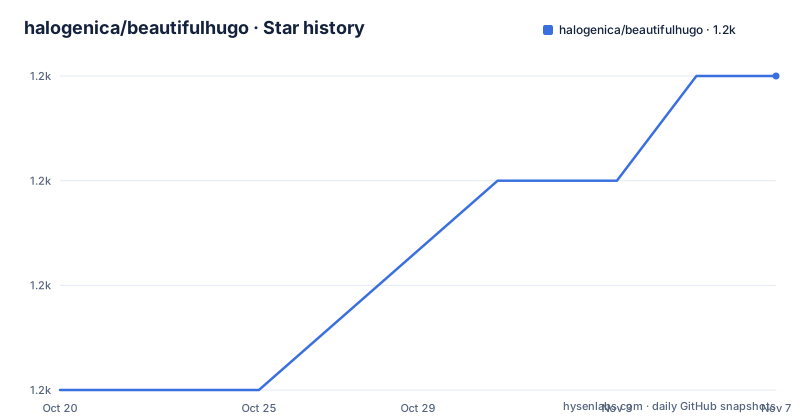
- halogenica/beautifulhugo1,238 ★ · +3
| Repository | 2026-10-20 | 2026-11-07 |
|---|---|---|
| halogenica/beautifulhugo | 1.2k | 1.2k |
3 Stars in the last 18 days, measured from the daily GitHub snapshot. Compare with other projects
Editorial analysis
A Jekyll theme that moved to Hugo
Beautiful Hugo is an adaptation of the Beautiful Jekyll theme by Dean Attali, and the README is explicit that it carries years of community updates and many new features on top of that starting point. That lineage is the fastest way to understand what you are installing, because the theme builds on that starting point rather than replacing it. A theme like that is a reasonable default for a blog, a small company site or a course landing page, and a poor fit for a documentation set or a custom design that needs a layout of its own. The theme is published for Hugo, the static site generator, and the repository is written mostly in HTML and Hugo templates with a small Go module file, since a Hugo module needs one. The project publishes a live demo, with the current one and a legacy deployment, and the example site in the tree carries detailed feature pages with working examples.
Two ways to install, and the version trap in both
The theme can be installed two ways, and each has a version detail that catches people out. With a git submodule you add the repository into the themes directory.
git submodule add https://github.com/halogenica/beautifulhugo.git themes/beautifulhugoA submodule points at a commit rather than a tag, so to use a specific release you check the tag out inside the submodule and commit the result, and the README shows the tag v5.0.0 in the example.
git -C themes/beautifulhugo checkout v5.0.0
git add themes/beautifulhugo
With Hugo modules the path carries the major version of the theme, and that /v5 suffix is the whole point, since it is how Go style module versioning keeps a major version from breaking the consumers who are still on the previous one.
hugo mod init github.com/USERNAME/SITENAME
hugo mod get github.com/halogenica/beautifulhugo/v5
Pinning an exact release is the same command with a version appended, and hugo mod get -u updates to the newest version. The module route also needs an import declared in the site configuration.
[[module.imports]]
  path = "github.com/halogenica/beautifulhugo/v5"
The example site is the preview and the manual
The quickest way to see what the theme does is to copy the example site into your own project and run the development server, and the command uses cp with the interactive and verbose flags so you can see what is being copied and decline anything you do not want.
cp -riv themes/beautifulhugo/exampleSite/* .
hugo serve
The example site is also the documentation. The README links to a set of feature pages on the demo site covering every parameter in hugo.toml, the shortcodes, the code block options, the markdown extensions, figures and galleries, math and diagrams, layout options, comments and social, and SEO and internationalisation. A theme that documents itself through a running site rather than through a separate documentation repository is a reasonable pattern, and it means the examples you read are the examples the theme ships. It also means the reference is only as complete as the example site happens to be, so a feature that is not demonstrated there is a feature whose behaviour you will have to read in the templates to confirm.
The feature list, and what it implies about the theme's shape
The features table is long and it is a good map of the theme. Layout and appearance come first, with a responsive design, a light, dark or auto colour scheme with a navbar toggle that persists in localStorage, and full width hero image headers with a fade cycling between them. Content features include Chroma server side syntax highlighting or Highlight.js on the client, KaTeX math with inline //(...// and display $$...$$ that needs no configuration, Mermaid diagrams for flowcharts, sequence diagrams and Gantt charts through a shortcode, PhotoSwipe lightbox galleries through the beautifulfigure and gallery shortcodes, and a set of shortcodes covering details, columns, tabs, video and icons. Markdown extensions add callout boxes in note, warning, error and success flavours. The site services are the familiar set, with Disqus, Giscus, Utterances, Cusdis and Staticman for comments, Schema.org JSON-LD, Open Graph and Twitter Cards for SEO, nineteen languages with a navbar switcher, forty two social platforms rendered in the footer from the author parameters, share buttons, GitHub star and fork badges, Fuse.js for client side search, and RSS switched on with a single parameter. The theme also carries a selfHosted option for assets, which the README frames as support for GDPR and EU-DSGVO compliance by serving fonts and scripts from your own domain.
Configuration is a hugo.toml block
The quick start configuration shows how much of the theme is driven from one file. The parameters live under a Params table, with the subtitle, the mainSections list, the logo and favicon paths, a date format, the colorScheme setting, and booleans for reading time, social sharing, related posts and RSS.
[Params]
  subtitle = "Build a beautiful and simple website in minutes"
  mainSections = ["post", "posts"]
  colorScheme = "auto"
  readingTime = true
  rss = true

  [Params.search]
    provider = "fuse"
Two notes in the configuration are worth more than the rest. The author block is required, and the old top level author key is deprecated and will produce a build error, which is the kind of breakage that saves you from a silently wrong site. The second is the markup section, where the highlight settings keep classes on the output and the Goldmark parser is told to accept block attributes and the renderer to allow unsafe content, which is what lets a page use raw HTML in Markdown. That last flag is a deliberate trade, since it is what makes embedding third party markup in a post possible, and it is also the setting that decides whether untrusted content can inject HTML into your pages.
What a Hugo theme repository actually contains
The top level listing is a good map of the theme. layouts/ holds the templates, assets/ the SCSS and JavaScript that the templates reference, static/ the files copied verbatim, i18n/ the translation strings for the nineteen languages, data/ the data files the templates read, images/ the artwork, archetypes/ the content templates that hugo new uses, and exampleSite/ the demo site. theme.toml is the file the Hugo theme listing expects, hugo.toml holds the theme's own defaults, and netlify.toml covers the deployment of the demo. There is a go.mod with the module path github.com/halogenica/beautifulhugo/v5 and a go 1.20 directive, which is what makes the Hugo module import work, and it is a minimal file because the theme has no Go code of its own. The .github/ directory holds the workflows, and two entries stand out for anyone thinking about how the project is developed, an AGENTS.md at the root and an .agents/ directory, which together describe the conventions an automated agent is expected to follow when changing the theme.
Version cadence and the licence file
The release history is dense and recent, with v5.0.1 and v5.1.0 both published on 2026-09-11 and v5.2.0 on 2026-09-19, and the last push to the master branch on 2026-10-07. The project is not archived, and the cadence suggests a theme that ships in small increments rather than in occasional large drops. The version number matters more here than in most projects, because the major version is embedded in the module path, so a site that has not yet moved to the v5 line cannot simply pull the newest release. The licence position is stated in the README as MIT with a link to the LICENSE file, while the project licence field on the hosting side is recorded as a custom licence that GitHub could not classify, so the file in the tree is the one to read before you redistribute the theme or a site built on it. The practical upgrade advice is the one the README already gives, pin the module to an exact release and move it deliberately rather than tracking the branch.
Editorial conclusion
Beautiful Hugo fits a team that wants a complete looking site without assembling a theme from shortcodes, and it fits an existing Hugo project that needs search, comments, multilingual support and a dark mode without writing the plumbing. It does not fit a project that wants a minimal theme, since the feature set is deliberately broad, and it does not fit a team that treats theme configuration as a security surface it does not control, because the recommended markup settings enable raw HTML in Markdown. Verify three things first: that the major version suffix matches the theme line your site uses, since the module path ends in /v5, that the example site's feature pages match what you actually need, since that is where the configuration reference lives, and whether the markdown renderer settings your content requires are compatible with the unsafe flag the quick start sets.
Frequently asked questions
What is Beautiful Hugo?
It is a theme for the Hugo static site generator, adapted from Dean Attali's Beautiful Jekyll theme, with years of community updates and many added features. It includes dark mode, syntax highlighting, KaTeX math, Mermaid diagrams, galleries, comments, search, multilingual support and SEO metadata.
How do I install Beautiful Hugo with Hugo modules?
Run hugo mod init github.com/USERNAME/SITENAME and then hugo mod get github.com/halogenica/beautifulhugo/v5, and add the import to hugo.toml under [[module.imports]] with the path github.com/halogenica/beautifulhugo/v5. The /v5 suffix is the major version of the theme.
How do I preview the Beautiful Hugo theme locally?
Copy the example site content into your project with cp -riv themes/beautifulhugo/exampleSite/* . and start the development server with hugo serve. The example site also serves as the feature and configuration reference.
Is the author configuration block required in Beautiful Hugo?
Yes. The README states that [Params.author] is required and that the old top level [author] key is deprecated and will produce a build error.
Official sources
Add this badge to your README
If you maintain this project, the badge below links readers to this analysis and shows its maintenance status from the daily GitHub snapshot. Paste the markdown into your README; add ?metric=license or ?metric=stars to the image URL for a different field.

[](https://hysenlabs.com/projects/halogenica-beautifulhugo)Star history chart for your README
[](https://hysenlabs.com/projects/halogenica-beautifulhugo)Was this useful?