HandyControl: a WPF control library whose NuGet releases trail its commit history
Contains some simple and commonly used WPF controls
At a glance
- What is it?
- HandyControl is an MIT-licensed C# collection of simple, commonly used WPF controls installed from NuGet and wired in through App.xaml. The code keeps moving, but the last tagged release is v3.5.0 from February 2024, and that gap is the first thing to plan around.
- Who is it for?
- HandyControl fits WPF developers who want a ready set of styled controls registered once in App.xaml and who are comfortable pinning to v3.5.0 from February 2024 or evaluating the MyGet feed for newer code. It does not fit anyone who needs a published release cadence, an Avalonia target, or English-first documentation.
- Can I use it commercially?
- Yes. MIT is a permissive licence: you can use, modify and sell software built on it, as long as you keep its copyright and licence notices.
- Is it still maintained?
- Yes. The repository last received commits 40 days ago.
- What is it written in?
- Mainly C#, according to GitHub's language statistics.
Answers come from the project's GitHub data, last synced on November 23, 2026, and from our analysis. They are not legal advice.
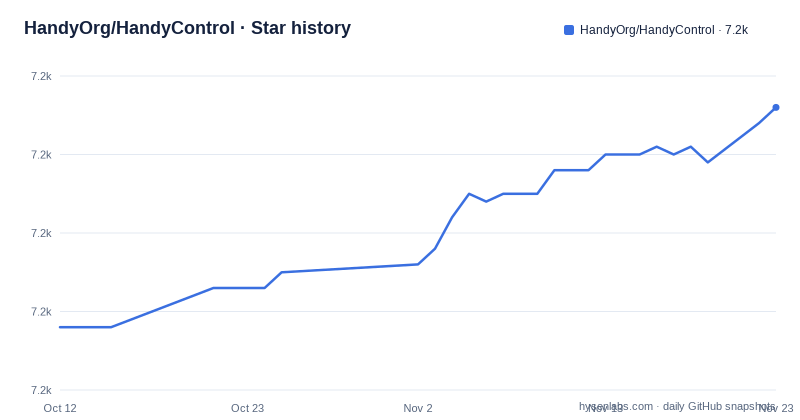
Star history
- HandyOrg/HandyControl7,236 ★ · +28
| Repository | 2026-10-12 | 2026-11-23 |
|---|---|---|
| HandyOrg/HandyControl | 7.2k | 7.2k |
28 Stars in the last 42 days, measured from the daily GitHub snapshot. Compare with other projects
Editorial analysis
One NuGet package plus a resource dictionary in App.xaml
HandyControl ships as a single NuGet package named HandyControl. Step 1 of the README usage is to add a reference to it, either by searching for HandyControl in the NuGet package manager or from the Package Manager Console:
Install-Package HandyControlStep 2 is to add markup to App.xaml inside Application.Resources, in a ResourceDictionary block. That placement matters. Resources declared in Application.Resources are registered for the whole application rather than for a single window or user control, so HandyControl's dictionaries become part of every view in the app from the moment the project starts. There is no per-window opt-in in that setup step; adding the library is a decision about the look of the entire application.
App-wide registration collides with styles you already have
Because the dictionaries are merged at the application level, an existing WPF project that already defines its own implicit styles or theme dictionaries has two sources competing for the same controls. The consequence for a team adding HandyControl to a mature codebase is a review job: every screen needs to be checked after the App.xaml change, since a button, list or tab that looked fine yesterday can pick up different templates today. Greenfield projects avoid most of this cost, which is why HandyControl suits new WPF applications better than a late retrofit into a large one with a hand-built theme.
The newest tagged release is from February 2024 while commits continue
The release history is sparse: v3.3.0 on 9 December 2021, v3.4.0 on 16 November 2022, and v3.5.0 on 7 February 2024. The repository is not archived, and its last push landed on 15 October 2026. Those two facts pull in different directions. Commits are still arriving on the master branch, yet anyone installing from NuGet gets whatever went into a tagged release, and no tag has followed v3.5.0 in the listed releases. The practical effect is that a fix you can see merged on GitHub is not necessarily in the package your build restores. The README badges link both the nuget.org package and a MyGet feed at myget.org/feed/handycontrol, so teams that need newer code should look at what that feed publishes and decide whether a non-NuGet.org source is acceptable in their build pipeline.
It targets WPF, so Avalonia users are looking at the wrong repository
People search for HandyControl together with Avalonia, but the repository describes itself as some simple and commonly used WPF controls, and its usage steps are written around a WPF App.xaml. Nothing in the repository description or the top-level layout points to an Avalonia build. If your application runs on Avalonia, this package does not slot into it as published, and adopting HandyControl means committing to WPF. That is a real cost for teams weighing a later move to another UI framework: styles and templates built around these controls stay tied to WPF.
Documentation and community channels lean toward Chinese readers
The project homepage is https://handyorg.github.io/, and the Chinese documentation sits at https://handyorg.github.io/handycontrol/. The repository carries both README.md and README-cn.md, and a section of the README titled for Chinese users lists a Gitee mirror at https://gitee.com/handyorg/HandyControl/, the Chinese docs, and sponsorship options. For technical discussion the README points to a Slack workspace invite rather than Discord. English-speaking developers should expect to rely on the docs site and the source under src/ more than on prose in the main README when working out how a specific control behaves, and those looking for a Discord server will not find one linked there.
Repository layout: src, doc, extension and build
The top level contains src/ for the library code, doc/ for documentation sources, extension/, build/, and a .github/ directory. Build status is reported through a GitHub Actions workflow named build, linked from the README badges, and the README thanks Cake (cakebuild.net) alongside Visual Studio and JetBrains. The repository also includes CODE_OF_CONDUCT.md, SECURITY.md, an .editorconfig and a .vscode/ folder. For someone evaluating whether a particular control such as a TabControl or DataGrid style exists, src/ and the docs site are the places to check, since the usage section of the README covers setup rather than a control catalog.
Who is behind it and who ships it
HandyControl is released under the MIT license. The README lists more than thirty contributors and a longer list of individual backers. Contributor DingpingZhang also maintains two projects linked in the README blogroll: SimpleFactoryGenerator, a source generator for the simple factory pattern, and WpfExtensions, described as syntactic sugar for WPF development. Three applications are named as users: Quicker at getquicker.net, phpEnv at phpenv.cn, and AutumnBox on GitHub. That list is short, so treat it as a sign the library runs in shipped desktop software rather than as evidence of broad production use.
Editorial conclusion
HandyControl fits WPF developers who want a ready set of styled controls registered once in App.xaml and who are comfortable pinning to v3.5.0 from February 2024 or evaluating the MyGet feed for newer code. It does not fit anyone who needs a published release cadence, an Avalonia target, or English-first documentation. Before adopting it, confirm that the controls you need exist in the package version you will ship and check how its application-wide resources interact with your existing styles.
Frequently asked questions
How do I add HandyControl to a WPF project?
Install the HandyControl NuGet package, for example with Install-Package HandyControl, then add the HandyControl resource dictionaries inside Application.Resources in App.xaml.
What is the latest HandyControl release?
The most recent tagged release is v3.5.0, published on 7 February 2024. The repository has received pushes since then, most recently on 15 October 2026.
Does HandyControl have a Discord server?
The README links a Slack workspace invite for technical discussion, not a Discord server. Chinese users are also pointed to a Gitee mirror and Chinese documentation.
Official sources
Add this badge to your README
If you maintain this project, the badge below links readers to this analysis and shows its maintenance status from the daily GitHub snapshot. Paste the markdown into your README; add ?metric=license or ?metric=stars to the image URL for a different field.

[](https://hysenlabs.com/projects/handyorg-handycontrol)Star history chart for your README
[](https://hysenlabs.com/projects/handyorg-handycontrol)Was this useful?