codeAgent: a terminal coding agent you can read line by line
CodeAgent is an open-source coding agent that lives in your terminal. It understands your repository, plans multi-step changes, writes and edits files, runs commands and tests, and iterates until the task is done — all with a transparent, extensible tool loop.
At a glance
- What is it?
- CodeAgent is a Python coding agent that lives in the terminal, plans multi-step edits, runs commands and asks for approval before anything destructive. Its selling point is not capability but legibility: the main loop, the tool registry, the compression stages and the security checks are all plain Python you can open and change.
- Who is it for?
- codeAgent suits a developer on Windows or Linux who wants an agent loop whose every stage is readable Python, who accepts supplying an API key, and who is willing to patch the source when the tool registry or the compression policy does not fit the job. It does not suit a team that needs a signed release, macOS support that has been validated, or a product that can be adopted without reading code.
- Can I use it commercially?
- Yes. MIT is a permissive licence: you can use, modify and sell software built on it, as long as you keep its copyright and licence notices.
- Is it still maintained?
- Yes. The repository last received commits 25 days ago.
- What is it written in?
- Mainly Python, according to GitHub's language statistics.
Answers come from the project's GitHub data, last synced on November 7, 2026, and from our analysis. They are not legal advice.
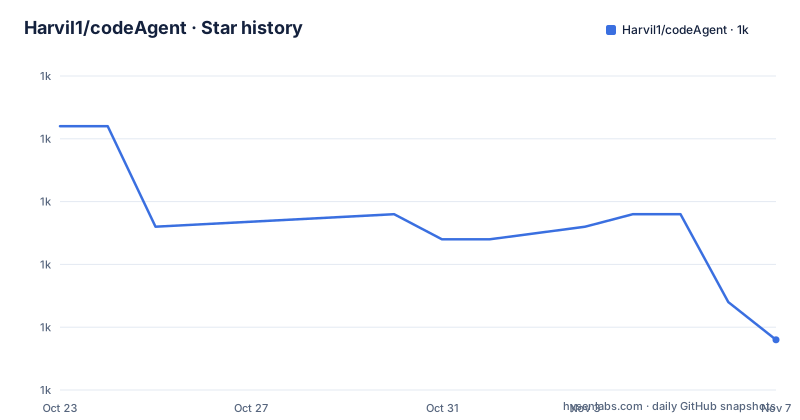
Star history
- Harvil1/codeAgent1,009 ★ · -17
| Repository | 2026-10-23 | 2026-11-07 |
|---|---|---|
| Harvil1/codeAgent | 1k | 1k |
-17 Stars in the last 15 days, measured from the daily GitHub snapshot. Compare with other projects
Editorial analysis
An agent loop written in Python rather than wrapped around a black box
CodeAgent runs a coding agent inside a terminal. You give it a natural language instruction and it reads code, edits files, runs commands and checks results, iterating until the task is done. The repository describes itself as a hand written reimplementation of the claude code experience rather than a shell around someone else's product, and the difference that matters to a reader is inspectability.
Every layer is a Python module in the repository root and its subpackages. cli.py, cli_commands.py, cli_ui.py, cli_stream.py and cli_live.py handle the console. agent/ holds the loop and the team mode. tools/ holds the tool implementations. config.py, constants.py, model_tools.py and toolsets.py hold configuration and tool selection. The source is commented in Chinese, which means a reader working in English is reading a tutorial in a language they may not read, and that is a real cost of this particular implementation.
The main loop turns on five steps and stops when the model stops asking
The call chain is described in one line and it is worth knowing by heart. main.py handles console encoding and terminal bootstrap, then cli.main takes over, then run_interactive sets up the REPL, the slash commands and the RuntimeContext, and then AIAgent.run_conversation is the heart of the thing.
Each turn of that loop does five things in order. It assembles the message list, injecting any temporary messages coming from background agents, scheduled jobs, the team mode or a plan. It compresses the context. It refreshes the toolset. It calls the model. It dispatches whatever tool calls came back, and the turn ends when the model no longer requests a tool.
That last point is what makes it an agent rather than a chatbot with file access. Completion is defined by the model declining to ask for more tools, which is also why the failure mode of the whole design is a model that keeps calling tools, and why the compression stage and the cost cap on workflows matter as much as the tool implementations themselves.
Tools register on import and toolsets decide what the model ever sees
The tool layer is built on a self registration pattern. A module under tools/ registers itself as soon as it is imported, and toolsets.py groups those registrations into named packages that control which tools are sent to the model for a given turn.
The practical effect is that adding a capability does not mean editing a dispatch table somewhere. You drop a module in tools/ and it exists. The cost of the pattern is that the set of tools the model sees becomes a runtime decision rather than something you can read off a signature, so understanding why a particular model call happened often means reading the toolset configuration and not just the tool code.
Alongside the built-in tools there is Model Context Protocol support. An MCP server is declared in a project level .mcp.json file, and the first connection to it requires approval. The built-in set covers file read and write, terminal execution, search, code retrieval, web fetching, background tasks and subagent dispatch, which is a wide surface area and the reason the approval layer exists at all.
The approval panel answers itself out of the transcript
Destructive shell commands and writes outside the whitelist do not run directly. A panel appears offering three choices: allow once, always allow, or deny. The detail that sets this implementation apart is that the panel erases itself once answered, so the interaction does not pollute the conversation context that later gets compressed and cached.
That design has a knock on effect. Because the panel leaves no trace in the message list, a later turn cannot look back and see that a command was approved. Approval decisions live in the permission subsystem instead, in the cross session whitelist, keyed by command or by prefix rule, and reachable in the session through the slash commands /permission, /sandbox and /approved.
Keyboard handling is also deliberate. Ctrl+C during a turn interrupts that turn, a second press forces a quit, and Ctrl+C while the approval panel is open cancels and interrupts the whole round. For a tool that runs shell commands on your behalf, these are the details that decide whether an interruption leaves the workspace in a sane state.
Four levels of compression and a second, cheaper model for the chores
Context handling is the part of an agent loop that decides whether it keeps working after an hour of conversation. CodeAgent compresses in graded stages, from a light trim at L1 to a deep summary at L4, with summaries of tool output generated between turns and old results cleaned up against a time baseline. There is also attention to cache prefix behaviour, since temporary messages are injected and stripped at chosen moments so the cached prefix is not broken.
The heavy lifting is delegated. The model configuration supports a main model plus an auxiliary small model, and the auxiliary route handles the unglamorous work of compression, retrieval and memory extraction. Any OpenAI compatible endpoint or Anthropic protocol endpoint can be used, and the default is DeepSeek.
What is not documented is the policy behind the levels. There is no written description of when L2 gives way to L3, so tuning compression for a particular workload means reading context_compressor.py and context_pipeline.py and then adjusting the thresholds yourself.
Long term memory, path triggered skills and a self learning pipeline
Three separate mechanisms sit behind the phrase self learning, and they are worth keeping apart. The first is long term memory: an index file named MEMORY.md, a JSONL store behind it, and retrieval results that are injected temporarily so they do not pollute the formal session history.
The second is the skill system. User skills live in ~/.codeAgent/skills/, and a plugin market can be managed through the /plugin command, with the plugins directory including the official market named claude-plugins-official. A skill can be conditioned on the file paths it touches, so it activates when the work moves into the area it covers rather than on every prompt.
The third is the learning pipeline, which watches conversation traces and distills a new skill from them, using either heuristics or the auxiliary model. This is the most interesting mechanism in the project and also the least predictable, since a pipeline that writes new skills from your own transcripts can create a rule you never wrote. The /skills and /memory commands are how you inspect what it has learned.
Installing with uv and pointing the agent at a model
The quick start assumes Python 3.11 or later and uv as the package manager, and the run command needs an API key from one of several providers. Cloning and installing the dependencies takes three commands:
git clone https://github.com/Harvil1/codeAgent.git
cd codeAgent
uv sync
The project metadata defines the entry point and the Python floor:
[project]
name = "codeagent"
version = "0.1.0"
requires-python = ">=3.11"[project.scripts]
codeagent = "main:main"The API key is picked up from the environment, and the program detects which provider variable is set. The accepted names are DEEPSEEK_API_KEY, OPENAI_API_KEY, ANTHROPIC_API_KEY, OPENROUTER_API_KEY and ZHIPUAI_API_KEY, with BIGMODEL_API_KEY accepted as well. The alternative is to put the key in the settings file at ~/.codeAgent/settings.json under models.<name>.api_key, and the first run generates a default configuration with DeepSeek as the default model.
Starting the agent is the last step, and the second form restores the most recent session automatically:
uv run python main.py
uv run python main.py -c
Inside the session, 40 plus slash commands are available, among them /model to switch provider and endpoint, /plan to approve a plan before any edit is made, /doctor for a health check of configuration, network and components, and /rewind to return to an earlier checkpoint.
Where the edges show, and how this differs from a hosted agent
The version in pyproject.toml is 0.1.0 and the project has no GitHub releases at all, so there is no upgrade path beyond cloning the default branch, and the last push was on 2026-10-14. Platform support is uneven by design: development and validation are Windows first, Linux runs and supports the bwrap sandbox, and macOS is described as theoretically usable but not fully verified. The README does not document an offline mode, so every run depends on a reachable model endpoint, and background subagents are fail closed when nobody is there to approve them.
The alternative worth naming is claude code, which the README repeatedly positions itself against, along with the option of driving an OpenAI compatible endpoint yourself with a short script. The difference in approach is not the model. It is that CodeAgent is a source tree you can read: the tool registry, the compression levels, the secret scanner, the SSRF guard and the sandbox runner are all editable Python under an MIT licence, the security modules are named in the architecture table rather than hidden behind a service, and the skills directory can be extended by hand or by the plugin market. A hosted agent gives you a finished tool loop you configure but cannot reshape, and a hand written script gives you a model call you fully control but none of the guard rails. CodeAgent sits in between, which is also why it is a repository to fork rather than a dependency to install.
One operational note for anyone evaluating it. The runtime directory ~/.codeAgent/ holds the settings, the session database, the memory files, the skills, the plugins and the rolling logs, and the environment variable CODEAGENT_HOME can redirect it, which is the way to run a clean instance for tests. Deleting that directory resets the agent completely, including the skills the learning pipeline has written.
Editorial conclusion
codeAgent suits a developer on Windows or Linux who wants an agent loop whose every stage is readable Python, who accepts supplying an API key, and who is willing to patch the source when the tool registry or the compression policy does not fit the job. It does not suit a team that needs a signed release, macOS support that has been validated, or a product that can be adopted without reading code. Before adopting it, check three things: that your platform matches the stated support matrix, that a full run fits inside your token and time budget given the L1 to L4 compression path, and that the approval policy in settings.json matches how much autonomy you actually want to hand over.
Frequently asked questions
Does codeAgent work on macOS and Linux?
Development and validation are Windows first. Linux runs and supports the bwrap sandbox, and macOS is described as theoretically usable but not fully verified.
What do I need to install codeAgent?
Python 3.11 or later and uv. You clone the repository, run uv sync in the project directory, and start it with uv run python main.py.
Can codeAgent use a model other than DeepSeek?
Yes. Any OpenAI compatible endpoint or an Anthropic protocol endpoint can be configured, through the /model command or by editing ~/.codeAgent/settings.json, and the key can come from an environment variable or from the config file.
Where does codeAgent store sessions and memory?
Everything lives under ~/.codeAgent/, including settings.json, the sessions.db directory, MEMORY.md with the memory store, skills, plugins and rolling logs. Removing that directory resets the agent entirely.
How does codeAgent handle dangerous commands?
Destructive commands and writes outside the whitelist raise an approval panel offering allow once, always allow or deny, and the panel is removed from the context once answered. A cross session whitelist stores approvals by command or prefix rule.
Official sources
Add this badge to your README
If you maintain this project, the badge below links readers to this analysis and shows its maintenance status from the daily GitHub snapshot. Paste the markdown into your README; add ?metric=license or ?metric=stars to the image URL for a different field.

[](https://hysenlabs.com/projects/harvil1-codeagent)Star history chart for your README
[](https://hysenlabs.com/projects/harvil1-codeagent)Was this useful?