Terraform Core: Declarative Infrastructure with a Graph Engine and a Source-Available License
GitHub describes it as Terraform enables you to safely and predictably create, change, and improve infrastructure. It is a source-available tool that codifies APIs into declarative configuration files that can be shared amongst team members, treated as code, edited, reviewed, and versioned.. The repository metadata lists Go as its primary language. The metadata lists the NOASSERTION license. This article stays within the project description and details documented in the GitHub repository README.
At a glance
- What is it?
- HashiCorp Terraform is a source-available tool that turns infrastructure APIs into declarative configuration, plans changes, and applies them via a dependency graph. This review covers its mechanism, setup, limitations, and the Business Source License implications.
- Who is it for?
- Adopt Terraform if you manage multi-provider infrastructure and want a declarative, plan-based workflow with a mature graph engine. Avoid it if you need a permissive open-source license or if your team cannot handle the operational overhead of state and provider versioning.
- Can I use it commercially?
- Check first. The repository uses a licence we do not classify automatically, so read its LICENSE file before any commercial use.
- Is it still maintained?
- Yes. The repository received new commits within the last day.
- What is it written in?
- Mainly Go, according to GitHub's language statistics.
Answers come from the project's GitHub data, last synced on November 13, 2026, and from our analysis. They are not legal advice.
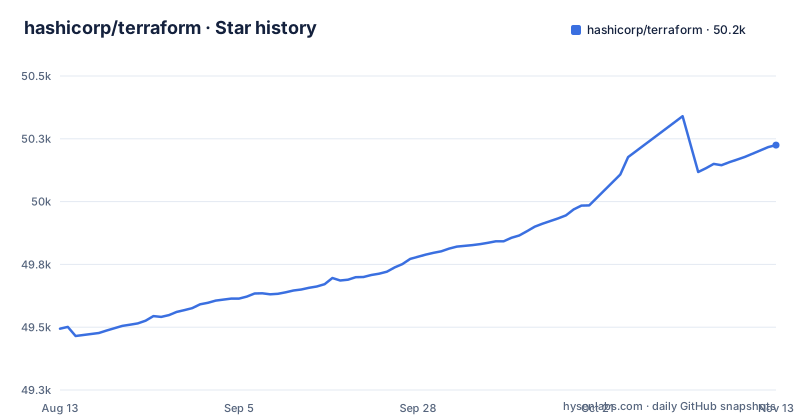
Star history
- hashicorp/terraform50,225 ★ · +731
| Repository | 2026-08-13 | 2026-11-13 |
|---|---|---|
| hashicorp/terraform | 49.5k | 50.2k |
731 Stars in the last 92 days, measured from the daily GitHub snapshot. Compare with other projects
Editorial analysis
What Terraform Actually Solves
Terraform solves the problem of infrastructure drift and manual change. Instead of clicking through a cloud console or running imperative scripts, you describe your desired infrastructure in configuration files. The tool then compares that desired state with the current state, produces a plan, and applies only the necessary changes. This is for teams that treat infrastructure as code: versioned, reviewed, and shared. It is not for someone who wants a GUI or a one-off script. The README is explicit: Terraform codifies APIs into declarative configuration files that can be shared, edited, reviewed, and versioned. That is the core value proposition, and it is a specific one.
The Plan, the Graph, and the Apply Loop
Terraform's mechanism rests on three pillars described in the README: execution plans, a resource graph, and change automation. When you run a plan, Terraform generates an execution plan that shows exactly what will happen when you apply. This is not a dry run; it is a derived set of actions based on the difference between configuration and state. The resource graph is the engine underneath. Terraform builds a graph of all resources and parallelizes creation and modification of non-dependent resources. That means if you have two independent virtual machines, they are created at the same time. Dependencies are respected, so a subnet is created before the instance that uses it. The graph also gives operators insight into dependency structure, which is a side benefit. The apply step then executes the plan, with minimal human interaction. The whole loop is designed to avoid surprises, as the README says.
Getting Started: Commands and Configuration
The README points to the official website for getting started guides, but the repository itself is the core CLI and graph engine. You compile Terraform from source if you are developing it, but most users download a binary from the website. The typical workflow is: write a configuration file in HashiCorp Configuration Language (HCL), run terraform init to download providers, run terraform plan to see the changes, then terraform apply to execute. The README does not list these commands directly, but it references the documentation and the registry. Providers are plugins, not part of the core. Terraform automatically downloads providers from the Terraform Registry when you run init. That is a key detail: the core repository alone is useless without providers. You must have a provider for your target infrastructure, whether it is AWS, Azure, or a custom in-house solution.
Where Terraform Is the Wrong Tool
Terraform is not a fit for every scenario. If you have a small, static infrastructure that changes rarely, the overhead of state management and plan cycles is overkill. The graph engine is powerful, but it requires a learning curve. More importantly, the README mentions that Terraform manages existing service providers, but that assumes your provider is available in the registry or you can write your own plugin. Writing a custom provider is a serious development effort in Go. Also, Terraform's declarative model is a poor fit for infrastructure that is highly dynamic or depends on runtime data that cannot be known at plan time. The plan is only as good as the state you have, and state can go stale or get corrupted. The README does not discuss these failure modes, but they are inherent to the design. If you need real-time reconciliation or a continuous loop, a controller-based tool might be better.
Alternatives: Pulumi and CloudFormation
A real alternative is Pulumi, which also does infrastructure as code but uses general-purpose programming languages like TypeScript or Python instead of a declarative DSL. The difference is in the approach: Terraform's HCL is declarative and limited, while Pulumi lets you use loops, conditionals, and functions from a full language. That is a trade-off. Terraform's DSL is simpler and more readable for pure infrastructure, but it becomes awkward for complex logic. Another alternative is AWS CloudFormation, which is native to AWS and uses JSON or YAML templates. CloudFormation is tied to AWS, so it is not a general solution. Terraform's advantage is provider-agnosticism, but you pay for it with a separate language and a state file. The choice depends on whether you want a constrained DSL or a general language.
Maintenance and Upgrade Costs
Terraform is actively maintained, with the latest release v1.17.1 (2026-10-28), alongside a v1.16.7 patch release. Upgrades are a real cost. Each major version can introduce changes to configuration syntax or state format. The README does not detail upgrade procedures, but the release cadence suggests a steady stream of changes. Providers are updated independently, so you must track provider versions as well. The graph engine is stable, but the ecosystem moves. The repository is Go, which compiles to a single binary, so deployment is simple. However, you need to manage the state file, which is a single source of truth. If you lose it, you lose track of your infrastructure. That is a maintenance burden. The license is Business Source License 1.1, which is source-available, not open-source. This has implications for how you can use and distribute the tool. You should read the license terms before adopting it for commercial products. The README links to the license, but it does not summarize the restrictions.
License and Community Implications
The license field in the repository metadata is NOASSERTION, but the README states the license is Business Source License 1.1. This is a source-available license, not an OSI-approved open-source license. That means you can read and modify the source, but there are restrictions on production use, typically a time limit or a usage cap. The exact terms are in the LICENSE file, which is linked but not reproduced. This is a significant factor for adoption. If your organization requires a permissive license like Apache 2.0 or MIT, Terraform is not it. The community is large, with forums and certification, but the license is a boundary. The README mentions a certification exam, which indicates a professional ecosystem, but that does not change the licensing. You should also note that the core repository is separate from providers, and the registry is a central point of failure. If the registry is down, you cannot download providers, though you can vendor them.
Editorial conclusion
Adopt Terraform if you manage multi-provider infrastructure and want a declarative, plan-based workflow with a mature graph engine. Avoid it if you need a permissive open-source license or if your team cannot handle the operational overhead of state and provider versioning. Before adopting, verify your target providers are available in the Terraform Registry and review the Business Source License terms to confirm your use case is permitted. The core repository is Go-based and actively maintained, but the license is the real boundary.
Frequently asked questions
What is Terraform used for?
For building, changing, and versioning infrastructure safely, using a high level configuration syntax that can manage existing and popular service providers as well as custom in house solutions. The four features named are infrastructure as code, execution plans, a resource graph that parallelises independent work, and change automation built on the first two.
how to install terraform
This page gives you no install command to copy. It links the developer website, the documentation, the Learn platform's getting started guides, and a certification exam page, and the Dockerfile notes that the official container images come from a closed source release process rather than from the build in this repository.
how to use terraform modules
Modules are not mentioned in this README, which covers infrastructure as code, execution plans, the resource graph, and change automation, plus provider plugin development. For anything about provider plugins the page points at the developer documentation for plugin development.
Is Terraform like GitHub?
The analogy is about workflow rather than tooling. The description says infrastructure is codified into declarative configuration files that are shared among team members, treated as code, edited, reviewed, and versioned, which is a review and commit discipline, not a hosting product.
What is Kubernetes vs Terraform?
This repository does not make that comparison. It describes Terraform as codifying APIs into declarative configuration files, and it is the core CLI and graph engine, with every service integration arriving as a provider plugin from the registry.
Official sources
Add this badge to your README
If you maintain this project, the badge below links readers to this analysis and shows its maintenance status from the daily GitHub snapshot. Paste the markdown into your README; add ?metric=license or ?metric=stars to the image URL for a different field.

[](https://hysenlabs.com/projects/hashicorp-terraform)Star history chart for your README
[](https://hysenlabs.com/projects/hashicorp-terraform)Community discussions
Was this useful?