pre-commit-hooks: the hook set worth enabling, and the flags that surprise people
Some out-of-the-box hooks for pre-commit
At a glance
- What is it?
- pre-commit-hooks is the standard collection of ready made hooks for the pre-commit framework, pinned by a rev and enabled one id at a time. Several of its checks have options that change what they guarantee, and two of those options are the difference between a working setup and a false sense of safety.
- Who is it for?
- pre-commit-hooks fits any repository that has already adopted the pre-commit framework and wants the unglamorous checks written once and maintained elsewhere: trailing whitespace, end of file newlines, syntax checks across five file formats, private key detection, debug statements.
- Can I use it commercially?
- Yes. MIT is a permissive licence: you can use, modify and sell software built on it, as long as you keep its copyright and licence notices.
- Is it still maintained?
- Yes. The repository last received commits 18 days ago.
- What is it written in?
- Mainly Python, according to GitHub's language statistics.
Answers come from the project's GitHub data, last synced on November 22, 2026, and from our analysis. They are not legal advice.
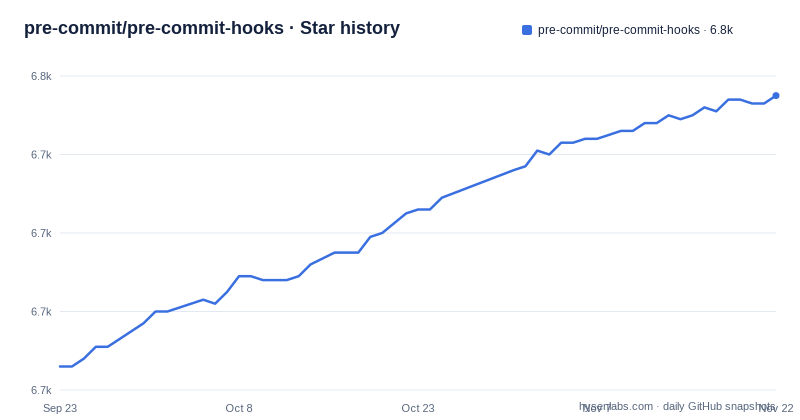
Star history
- pre-commit/pre-commit-hooks6,755 ★ · +69
| Repository | 2026-09-23 | 2026-11-22 |
|---|---|---|
| pre-commit/pre-commit-hooks | 6.7k | 6.8k |
69 Stars in the last 60 days, measured from the daily GitHub snapshot. Compare with other projects
Editorial analysis
One config block pulls the whole hook set, or one hook at a time
The integration is three keys and nothing else. You add a repository entry to .pre-commit-config.yaml, pin a rev, and list the hook ids you want under a hooks key.
-   repo: https://github.com/pre-commit/pre-commit-hooks
    rev: v6.0.0  # Use the ref you want to point at
    hooks:
    -   id: trailing-whitespace
    # -   id: ...
The rev is a tag, and the comment makes clear that you choose which one. That matters more than it looks: the framework caches the environment per rev, so moving the number is how you move every hook in the block at once, and pinning is how a team keeps a green build green on every machine.
There is no install step to document here and no package to add to your requirements. The framework clones the repository and builds its environment from the repo's own configuration, which is why a hook collection can add a linter without appearing in your dependency manifest. The top level of this repository is a Python package with a setup.py that does nothing but call setup, so its real configuration lives in setup.cfg alongside a .pre-commit-hooks.yaml that defines which ids exist and what files they match.
check-added-large-files only looks at staged additions unless told otherwise
The large file guard is narrower than its name suggests, which is a design choice rather than a bug. By default it limits itself to files that git has staged for addition, so a repository with a large file already in history is not blocked from further work on unrelated files.
The threshold is set with an args entry, where --maxkb=123 gives the example and the default is 500 kB. Files tracked by git-lfs are skipped when git-lfs is installed, with a stated requirement of git-lfs 2.2.1 or newer, which is what stops the hook from fighting your LFS setup on every commit.
There is an --enforce-all flag that widens the check to every listed file rather than only additions. That is the flag to reach for in a repository where a large file has already slipped in through a merge or a rebase, because the default scope will never find it again.
The rest of the collection follows the same pattern of small, single-purpose checks with narrow, documented escape hatches: check-ast only asks whether Python parses, check-json, check-toml, check-xml and check-yaml only ask whether those files parse.
check-yaml in unsafe mode parses without loading and drops portability
By default the YAML hook loads the files, which means it rejects anything a general purpose parser would consider unsafe. Two flags change that behaviour, and the second one is the one people regret.
--allow-multiple-documents permits files using the multi-document syntax, which is what a directory of Kubernetes manifests normally contains. Without it, a perfectly valid multi-document file fails the check.
--unsafe is different in kind. Instead of loading the files it only parses them for syntax, which enables extensions and unsafe constructs that would otherwise be forbidden. The stated cost is precise: using the option removes all guarantees of portability to other YAML implementations. It also implies --allow-multiple-documents.
So the hook in unsafe mode is not checking the same property as the hook in default mode. Default mode tells you your files mean something a parser agrees on. Unsafe mode tells you they are shaped like YAML. For a configuration file you control and everyone reads with the same library, that trade may be fine. For a file a downstream consumer will parse with a different implementation, it is a portability bug you have opted into.
mixed-line-ending cannot win against git configured to check out CRLF
The line ending hook takes one argument with four values, and the documentation calls out one combination that cannot work.
auto is the default and replaces the most frequent line ending found in the file. crlf and lf force the replacement to that ending regardless of what is there. no checks for mixed line endings without modifying anything, which makes it the reporting-only mode.
The trap is spelled out in the documentation: forcing crlf or lf is not compatible with a git setup that checks in LF and checks out CRLF, because git smudges the line endings after the hook has already run.
The fix is to configure git's line ending handling to match, or to leave the hook on auto. If your team has already settled the core.autocrlf question, this hook should be configured to agree with that answer rather than to override it.
no-commit-to-branch ignores your file filters while always_run is set
The branch protection hook is configured by default to always_run, and that has a consequence that surprises people who add file filters later. Because it always runs, it ignores any setting of files, exclude, types or exclude_types in your configuration. The hook fires on every commit regardless of which files were touched.
The protection itself is configurable. Use args with repeated --branch flags, as in --branch staging --branch main, to name branches to protect, and both main and master are protected by default when no branch argument is set. A -p or --pattern flag protects branches matching a supplied regular expression, for example --pattern release/.*, and it can be repeated.
Setting always_run to false is what makes your file filters apply to this hook. The documented caveat for that configuration is that empty commits created with git commit --allow-empty would always be allowed through. So the trade is explicit: filters that respect file scope in exchange for a path that bypasses the protection entirely.
If you want branch protection that respects scope, that caveat is the thing to test in your own workflow rather than assume.
destroyed-symlinks catches the Windows clone that cannot make symlinks
Two hooks deal with symlinks and they solve different problems. check-symlinks looks for links that point to nothing, which is a broken repository state you want to catch before committing it.
destroyed-symlinks catches the subtler case: a symlink that has been replaced by a regular file whose content is the path the symlink used to point at. The documentation attributes this to Windows, and the mechanism is specific. A user clones a repository containing symlinks on a system where they lack permission to create symlinks, and the clone produces plain text files containing the target paths instead. The result looks like ordinary content, so it gets committed, and now the repository is wrong for everyone.
That is a Windows specific failure mode, and it is the reason to enable both hooks rather than one. check-shebang-scripts-are-executable and check-executables-have-shebangs cover the neighbouring territory from the other direction: one verifies that scripts carrying a shebang are executable, the other that non-binary executables carry a proper shebang.
file-contents-sorter will drop blank lines and ignore comments
The sorting hook has three behaviours stated plainly, and one of them is destructive enough to read twice.
It sorts the lines in specified files, defaulting to alphabetical order. Unlike most hooks here, it does not infer its targets: you must provide the target files as input, which in pre-commit terms means passing the files configuration yourself rather than relying on the hook's own file matching.
It WILL remove blank lines and does NOT respect comments. Every blank line in the file goes, and a comment sitting between two lines of a config listing is treated as a line to be sorted into the middle of the list. All newlines are converted to line feeds.
Two arguments modify it. --ignore-case folds lowercase to uppercase for comparison purposes, and --unique ensures each line is unique.
On a changelog, an AUTHORS file or a sorted dependency list this is exactly what you want. Pointed at a file where blank lines separate logical sections, or where comments carry explanation, it will destroy both.
detect-aws-credentials and detect-private-key are the ones with teeth
Among the checks, two exist to stop something irreversible, and they are configured differently from the rest.
detect-private-key checks for the existence of private keys in files, which is the hook that saves you from pushing a key that is already in a public repository.
detect-aws-credentials checks for AWS secrets configured through the AWS CLI, which is a different problem: the credentials exist on a developer machine and would be read from the CLI configuration. It takes --credentials-file to name additional AWS CLI style configuration files in non-standard locations, and that flag can be repeated. It also takes --allow-missing-credentials, which makes the hook pass when no credentials are detected rather than treating their absence as suspicious.
The debug and formatting hooks are the quieter majority. debug-statements looks for debugger imports and Python 3.7 and later breakpoint() calls. double-quote-string-fixer rewrites double quoted strings to single quoted ones. end-of-file-fixer ensures files end in a newline and only a newline. fix-byte-order-marker removes a UTF-8 byte order marker. check-builtin-literals requires literal syntax when initialising empty builtin types, with --ignore to exempt specific types and --no-allow-dict-kwargs to forbid the dict keyword form.
Editorial conclusion
pre-commit-hooks fits any repository that has already adopted the pre-commit framework and wants the unglamorous checks written once and maintained elsewhere: trailing whitespace, end of file newlines, syntax checks across five file formats, private key detection, debug statements. It does not fit a project that needs language-aware linting, since check-ast only checks that Python parses, and it does not fit a Windows-heavy team that clones repositories with symlinks without reading the destroyed-symlinks hook first. Before enabling hooks wholesale, verify three things in your own config: whether check-yaml is running in unsafe mode, which would trade portability for tolerance; whether no-commit-to-branch is still always_run, because that setting makes it ignore your own file filters; and whether file-contents-sorter is pointed at a file whose blank lines and comments you can afford to lose.
Frequently asked questions
how to add pre commit hooks
Add a repository entry to .pre-commit-config.yaml with the repo URL, a rev such as v6.0.0, and a hooks list containing the hook ids you want, for example trailing-whitespace.
Can you provide an example of a git pre-commit hook?
The example in the README is a YAML block with repo set to https://github.com/pre-commit/pre-commit-hooks, rev set to v6.0.0, and a hooks list containing the id trailing-whitespace, with further ids commented out.
how to use pre commit hooks
Each hook is enabled by its id in the hooks list of a repository entry. Some take args, such as check-added-large-files with --maxkb, check-yaml with --allow-multiple-documents or --unsafe, and no-commit-to-branch with repeated --branch or --pattern flags.
Official sources
Add this badge to your README
If you maintain this project, the badge below links readers to this analysis and shows its maintenance status from the daily GitHub snapshot. Paste the markdown into your README; add ?metric=license or ?metric=stars to the image URL for a different field.

[](https://hysenlabs.com/projects/pre-commit-pre-commit-hooks)Star history chart for your README
[](https://hysenlabs.com/projects/pre-commit-pre-commit-hooks)Was this useful?