node-pg-migrate: PostgreSQL Migrations with JavaScript and Optional SQL
Node.js database migration management for PostgreSQL
At a glance
- What is it?
- node-pg-migrate is a Node.js migration tool for PostgreSQL, with documented testing against CockroachDB. It suits teams that prefer programmatic migration files and direct access to raw SQL, although the current v10 release is an alpha.
- Who is it for?
- Adopt node-pg-migrate when a Node.js service uses PostgreSQL 14 or newer and the team prefers programmatic migration files with optional raw SQL. Do not choose it when support for multiple database engines, older PostgreSQL versions, or stable major releases is mandatory.
- Can I use it commercially?
- Yes. MIT is a permissive licence: you can use, modify and sell software built on it, as long as you keep its copyright and licence notices.
- Is it still maintained?
- Yes. The repository last received commits 1 day ago.
- What is it written in?
- Mainly TypeScript, according to GitHub's language statistics.
Answers come from the project's GitHub data, last synced on November 6, 2026, and from our analysis. They are not legal advice.
Star history
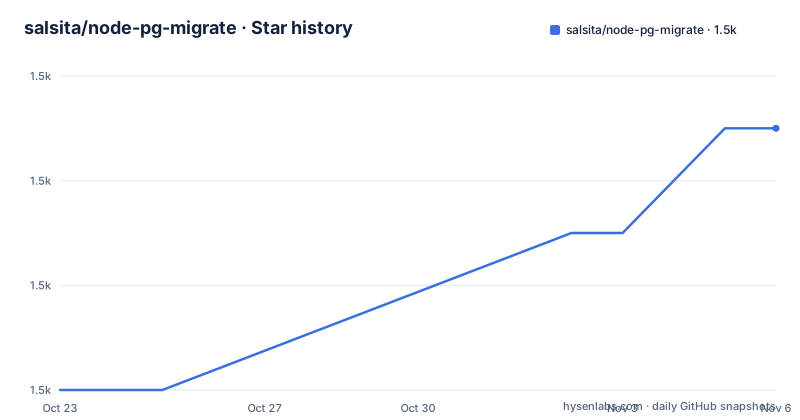
- salsita/node-pg-migrate1,495 ★ · +5
| Repository | 2026-10-23 | 2026-11-06 |
|---|---|---|
| salsita/node-pg-migrate | 1.5k | 1.5k |
5 Stars in the last 14 days, measured from the daily GitHub snapshot. Compare with other projects
Editorial analysis
Why node-pg-migrate stays focused on PostgreSQL
node-pg-migrate solves schema and data migration work for Node.js applications backed by PostgreSQL. It is aimed at developers who want ordered, reusable migration files managed from the same runtime and package ecosystem as their application. The project is useful when a service needs to create tables, alter columns, add indexes, or run SQL against an existing PostgreSQL database.
The project does not try to conceal PostgreSQL differences behind a portable database abstraction. According to the README, focusing on one database permits a smaller and more complete interface. The documented requirements are Node.js 22.12.0 or higher and PostgreSQL 14 or higher. The README says older PostgreSQL versions may work, but they are not officially supported.
CockroachDB is also mentioned as tested, so the tool is not limited to examples using PostgreSQL itself. However, that does not make it a general-purpose multi-database migration system. The package keywords include `cockroachdb`, while the primary project description remains PostgreSQL migration management. Teams expecting identical migration definitions across PostgreSQL, MySQL, SQLite, and other engines should select a tool whose documentation explicitly supports those databases.
The package also expects the `pg` client library as either a direct or development dependency. This makes node-pg-migrate a plausible fit for a TypeScript or JavaScript service already using node-postgres. It is less appropriate for a non-Node.js application, an unsupported database engine, or an environment restricted to older Node.js and PostgreSQL versions.
How pgm turns JavaScript operations into SQL
A migration file exports an `up` function that receives a `pgm` object. Calls such as `pgm.createTable`, `pgm.createIndex`, `pgm.addColumns`, and `pgm.alterColumn` add migration operations. The tool then generates PostgreSQL SQL from that operation stack. Developers can therefore express many schema changes through a JavaScript API instead of writing every `CREATE TABLE` or `ALTER TABLE` statement manually.
The API is intentionally thin. PostgreSQL types such as `varchar(1000)` and `timestamp` are written as strings rather than selected from a fixed set of project-specific constants. Expressions can use `pgm.func`, as shown by the default `current_timestamp` in the README example. This favors PostgreSQL syntax that developers already know, but it also means malformed type strings or expressions remain the migration author's responsibility.
Direct SQL remains available through `pgm.sql`. That is important for data transformations that do not fit a schema helper. It also makes generated SQL less uniformly abstract: a migration can begin with structured operations and then contain a handwritten statement such as `UPDATE posts SET lead = left(body, 200)`.
The README states that node-pg-migrate can sometimes infer down migrations from the operation stack. That word sets the boundary. A simple schema change may have an inferred reverse operation, while custom SQL or a complex data transformation may not. The README excerpt does not show an explicit `down` function or explain how an irreversible migration should be documented. The version-specific documentation should be checked before assuming rollback support.
The project also treats a migration as a SQL-generation layer rather than a large control-flow framework. All work is asynchronous at the Node.js level, but a migration can still contain several operations in one exported function. That design keeps ordinary migrations direct. Projects needing orchestration, retries, or deployment coordination may require controls outside this package.
Installing node-pg-migrate and its pg client
Before installation, confirm that the environment has Node.js 22.12.0 or higher and PostgreSQL 14 or higher. The `pg` package must also be installed. The README gives this command for adding the PostgreSQL client when it is not already present:
npm add pgInstall node-pg-migrate as a development dependency in an ordinary application workspace:
npm add --save-dev node-pg-migrateA local installation adds a runnable file to `node_modules/.bin`. The README says the command can be invoked as `./node_modules/.bin/node-pg-migrate`. A global installation makes `node-pg-migrate` available directly, although the tutorial uses an npm script instead.
Development dependency placement works when migrations are executed in development, CI, or a deployment image that retains development packages. It does not work in an image built with `npm ci --omit=dev`. For that case, the README says to add both `node-pg-migrate` and `pg` to regular `dependencies`.
The distinction is an operational packaging decision, not merely a style preference. If the application container is responsible for applying migrations during startup or deployment, omitting the CLI from the production package removes the command. If migrations are applied only before packaging, a development dependency may be sufficient.
The README does not document a global installation command, an exact npm version, or a Docker image for the tool. Those details should be taken from the project documentation rather than inferred from the package layout.
Creating and applying the first users migration
Add a `migrate` entry to the `scripts` object in `package.json`:
{
  "scripts": {
    "migrate": "node-pg-migrate"
  }
}
Create the first migration with:
npm run migrate create my-first-migrationThe README says this generates `xxx_my-first-migration.js` in the `migrations` directory. The `xxx` prefix is generated by the tool. Open the file and define an `up` function. This shortened version preserves the important relationships in the documented example:
export const up = (pgm) => {
  pgm.createTable('users', {
    id: 'id',
    name: { type: 'varchar(1000)', notNull: true },
  });
  pgm.createTable('posts', {
    id: 'id',
    userId: {
      type: 'integer',
      notNull: true,
      references: '"users"',
      onDelete: 'CASCADE',
    },
    body: { type: 'text', notNull: true },
  });
  pgm.createIndex('posts', 'userId');
};
The `posts.userId` reference creates the database relationship to `users`, and `onDelete: 'CASCADE'` records the documented delete behavior. The index targets `posts.userId`, which supports queries that locate posts by user, though the README does not provide query plans or performance measurements.
Set the connection string in `DATABASE_URL` and run the migration command:
DATABASE_URL=postgres://test:test@localhost:5432/test npm run migrate upThe connection string is a local example. Replace its database, account, password, host, and port with values appropriate to the target PostgreSQL instance. According to the README, the migration creates the `users` and `posts` tables.
The tutorial does not show the migration-status command, generated SQL, transaction handling, or recovery procedure. Those behaviors belong in the deployment runbook rather than being assumed from the successful `up` example.
Adding a posts column when rows already exist
Adding a required column to a populated table requires more care than adding it to an empty table. The README gives two approaches. If an empty string is suitable for both existing and future rows, add `lead` as non-null and supply an empty-string default:
export const up = (pgm) => {
  pgm.addColumns('posts', {
    lead: { type: 'text', notNull: true, default: '' },
  });
};
If the new value should come from existing content, the README first adds a nullable column, updates it, and then enforces `notNull`:
export const up = (pgm) => {
  pgm.addColumns('posts', { lead: { type: 'text' } });
  pgm.sql(`UPDATE posts SET lead = left(body, 200)`);
  pgm.alterColumn('posts', 'lead', { notNull: true });
};
This sequence separates compatibility from constraint enforcement. The nullable addition can be applied while rows lack a `lead` value. The SQL update then derives a value from `body`. The final alteration prevents missing values after existing data has been populated.
The approach still requires schema-specific review. `left(body, 200)` is PostgreSQL syntax, and the choice to truncate at 200 characters is a product decision rather than behavior provided by node-pg-migrate. A team may instead backfill from another source or reject rows that cannot be converted automatically.
The README does not document transaction boundaries for these operations. It therefore does not establish whether a failed update leaves the nullable column in place or how node-pg-migrate records a failed migration. Teams should inspect the generated SQL and the migration table after failure before retrying production changes.
node-pg-migrate versus explicit SQL migration runners
The most direct alternative is a minimal runner that executes explicit `.sql` files in order. Such a runner can keep every statement visible during code review and avoids a separate API vocabulary for tables, columns, and indexes. It also avoids deciding whether an operation stack can infer a correct reverse migration. The cost is that developers must write SQL for each change and manage more of the syntax themselves.
node-pg-migrate takes a different approach. Its structured operations make common schema changes more compact, while its design passes user values toward SQL instead of requiring a fixed abstraction for PostgreSQL types. The `pgm.sql` escape hatch also means a team can use explicit SQL when a helper is inconvenient. A custom runner is therefore not automatically safer or simpler. The real difference is whether the team wants the CLI to provide migration-file conventions and helper operations, or wants full control over SQL files.
There is also a release-quality trade-off. The package metadata identifies `10.0.0-alpha.5`, and the release list includes `v10.0.0-alpha.5`, `v10.0.0-alpha.4`, and `v10.0.0-alpha.3`. A team that requires a stable, supported major version should treat these alpha builds as candidates for evaluation rather than equivalent to a mature major release. An explicit SQL runner may be easier to avoid during such an upgrade, although its surrounding tooling still needs review.
Another alternative is a multi-database migration framework. That choice makes sense when one schema definition must target several database engines. node-pg-migrate deliberately does not offer that portability. Its advantage is closer alignment with PostgreSQL syntax; its boundary is equally clear.
The MIT license covers use and modification under its conditions, but it does not guarantee compatibility, support, or safe rollback. License review and operational verification are separate steps.
Maintenance signals and v10 upgrade checks
The repository is not archived, and the last push was on 2026-10-15. The README names active maintainers, while the repository records recent v10 alpha releases on 2026-09-27, 2026-10-05, and 2026-10-15. Those facts show ongoing repository activity, but they do not remove the need to evaluate the current alpha line.
The README points users to an upgrading guide for changes between major versions. It does not summarize those changes here, so an existing project should check the guide before replacing a stable package with `10.0.0-alpha.5`. Relevant questions include whether CLI options changed, whether generated SQL changed, whether migration metadata changed, and whether Node.js minimums differ from the previous line.
The upgrade cost is not limited to editing package.json. Existing migration files should remain under review because helper output can depend on package version. A team should compare generated SQL for representative migrations, inspect how the tool records applied versions, and confirm that its Node.js version matches the service runtime. The repository includes `CHANGELOG.md`, `docs/`, and an upgrading guide linked by the README, making those the appropriate places to verify release-specific behavior.
The README also does not document dry-run output, advisory locks, deployment coordination, automatic retry, or complete failure recovery. Their absence from the tutorial is not proof that the project has no behavior related to them. It means a production adoption decision needs the full documentation and generated SQL, not only the quick example.
Editorial conclusion
Adopt node-pg-migrate when a Node.js service uses PostgreSQL 14 or newer and the team prefers programmatic migration files with optional raw SQL. Do not choose it when support for multiple database engines, older PostgreSQL versions, or stable major releases is mandatory. Before standardizing the package, verify the v10 upgrading guide, migration execution behavior, and generated SQL for the exact release your deployment will install.
Frequently asked questions
What are the Node.js and PostgreSQL requirements for node-pg-migrate?
The README requires Node.js 22.12.0 or higher and PostgreSQL 14 or higher. It says lower PostgreSQL versions may work but are not officially supported.
How do I install node-pg-migrate and connect to PostgreSQL?
Install `pg` and install `node-pg-migrate` as a development dependency. If production installation omits development dependencies, put both packages in regular dependencies, set `DATABASE_URL`, and run `npm run migrate up`.
Can node-pg-migrate run against CockroachDB?
The README says node-pg-migrate is also tested with CockroachDB. Its documented target remains PostgreSQL, and it does not present a uniform migration API for unrelated database engines.
How does node-pg-migrate handle raw SQL and existing table data?
Migration files can use `pgm.sql` for direct SQL. The README demonstrates adding a nullable column, populating it from existing data, and then changing the column to `notNull`.
Official sources
Add this badge to your README
If you maintain this project, the badge below links readers to this analysis and shows its maintenance status from the daily GitHub snapshot. Paste the markdown into your README; add ?metric=license or ?metric=stars to the image URL for a different field.

[](https://hysenlabs.com/projects/salsita-node-pg-migrate)Star history chart for your README
[](https://hysenlabs.com/projects/salsita-node-pg-migrate)Was this useful?