ThunderKittens: tile primitives for CUDA kernels, and who should compile one
Tile primitives for speedy kernels
At a glance
- What is it?
- ThunderKittens is a CUDA framework from the Hazy Research Lab built around 16x16 tiles and a Load-Store-Compute-Finish template. It suits engineers already comfortable writing device code, and it is now a collection of individually built kernels rather than a Python package.
- Who is it for?
- Adopt ThunderKittens if you already write CUDA and want tile abstractions plus asynchronous tensor core calls without giving up control of the kernel body. Do not adopt it if you want a Python-level kernel language or you are targeting AMD hardware, where the README points to HipKittens instead.
- Can I use it commercially?
- Yes. MIT is a permissive licence: you can use, modify and sell software built on it, as long as you keep its copyright and licence notices.
- Is it still maintained?
- Yes. The repository last received commits 64 days ago.
- What is it written in?
- Mainly Cuda, according to GitHub's language statistics.
Answers come from the project's GitHub data, last synced on November 15, 2026, and from our analysis. They are not legal advice.
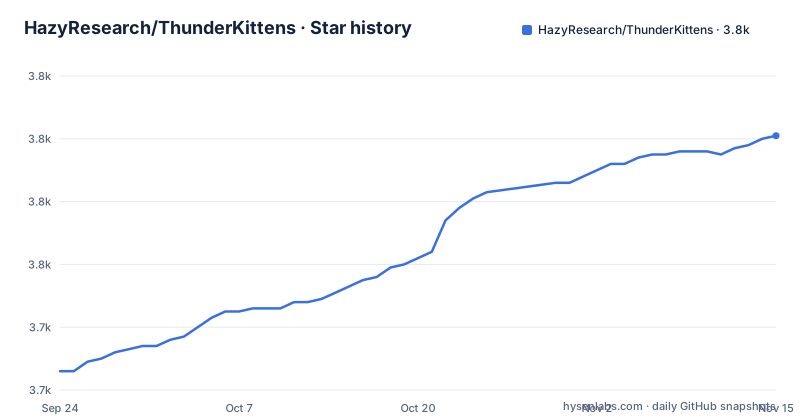
Star history
- HazyResearch/ThunderKittens3,801 ★ · +75
| Repository | 2026-09-24 | 2026-11-15 |
|---|---|---|
| HazyResearch/ThunderKittens | 3.7k | 3.8k |
75 Stars in the last 52 days, measured from the daily GitHub snapshot. Compare with other projects
Editorial analysis
The problem ThunderKittens addresses on NVIDIA silicon
A modern GPU is not a single large matrix multiply machine. The README states the design premise directly: each core can efficiently run roughly 16x16 matrix multiplies, so ThunderKittens is built around manipulating tiles no smaller than 16x16 values. That framing decides everything else in the library. If your mental model of a kernel is elementwise indexing over a flat array, the tile abstraction will feel like an extra layer. If your mental model is already a grid of blocks each holding a small patch of a matrix, it matches how the hardware behaves.
The intended user is someone writing CUDA by hand and hitting the usual ceilings: bank conflicts in shared memory, latency on global loads, and the difficulty of keeping tensor cores fed. The README lists six areas the framework tries to make easy, among them tensor core calls (including asynchronous WGMMA on H100 and TCGEN05 on B200), shared memory access without bank conflicts, asynchronous copies and TMA address generation, distributed shared memory, the Load-Store-Compute-Finish template for overlapping work and I/O, and data transfer over NVLink with NVSwitch acceleration.
This is not a tool for someone who wants to describe a kernel in Python and have it generated. ThunderKittens is natively embedded into CUDA, and the README frames that as extensibility: when the framework does not cover something, it does not stand in the way of writing it yourself.
How the tile model and the Load-Store-Compute-Finish template fit together
The clearest view of the mechanism is the matrix multiplication example in the README. A layout struct declares a base tile type, a global layout over that tile, and the per-stage data structures: an input block holding tiles of A and B, a finish block holding tiles of C, a common state, and a consumer state holding the accumulator. The template then declares block sizes, the number of consumer warps, the input pipe stages, and the producer barrier arrivals. Those constants are where the scheduling policy lives, not in the kernel body.
The kernel is split into roles. A producer warps group loads tiles and signals arrival through a barrier; consumers accumulate into a register tile. The example shows the producer reducing its register allocation with warpgroup::decrease_registers<40>(), which is the kind of trade a hand-written kernel would make anyway but here is expressed as one call. Address generation for the loads goes through tma::load_async with an explicit expect on the barrier, so the copy is asynchronous and the completion is tracked rather than polled.
The grid logic is worth reading closely because it shows the intended production shape. The example computes a persistent grid of 132 blocks by default, then maps a task id onto a coordinate that walks super-rows of SUPER_M blocks before handling a remainder. Work that exceeds the available tiles sets num_iters to -1, which is the termination path. That structure is a persistent kernel with a software scheduler, and it is the reason the README can claim overlap between I/O and compute rather than just promising it.
Building a ThunderKittens kernel after the 2.0 repository change
The most important practical fact is in the release notes for ThunderKittens 2.0, dated Jan 11, 2026: the repository is no longer supported as a Python package, meaning there is no top-level setup.py. Kernels under /kernels must now be compiled individually, and the Makefiles, tests and benchmarks sit alongside their corresponding kernel source files. Anyone following an older tutorial that begins with a pip install will be working from a layout that no longer exists.
The repository layout confirms the split: include/, kernels/, prototype/, tests/, and demos/ are separate top-level entries. So the first step is to choose a kernel directory and read the Makefile next to it.
git clone https://github.com/HazyResearch/ThunderKittens
cd ThunderKittens/kernels
ls
That listing shows the individual kernel directories. Each one carries its own build file, which is what the 2.0 notes mean by compiling individually. Change into the kernel you want and build it from there rather than from the repository root.
cd <kernel_directory>
make
The README does not document a universal build target, a required CUDA toolkit version, or a supported compiler matrix, so treat the Makefile in that directory as the authority. The same applies to running tests and benchmarks: they live beside the kernel source, not in a central test runner.
For a first real use, the most direct path is the matrix multiplication example reproduced in the README. It is written for an H100 and includes kittens.cuh and prototype.cuh, then declares a matmul_layout with st_bf<64, 64> base tiles and a bf16 global layout.
#include "kittens.cuh"
#include "prototype.cuh"

using namespace kittens;
using namespace kittens::prototype;
using namespace kittens::prototype::lcf;

template<int M_BLOCK, int N_BLOCK>
struct matmul_layout {
    using  base_tile      = st_bf<64, 64>;
    using  global_layout  = gl<bf16, 1, 1, -1, -1, base_tile>;
    struct globals        { global_layout A, B, C; };
    struct input_block    { base_tile a[M_BLOCK], b[N_BLOCK]; };
    struct finish_block   { base_tile c[M_BLOCK][N_BLOCK]; };
    struct common_state   { int2 coord; };
    struct consumer_state { rt_fl<16, N_BLOCK*base_tile::cols> accum; };
};
What you should see, once the kernel compiles and runs against matrices of your choosing, is a result matrix C whose values match a reference matmul. The README gives the tile sizes and the namespace imports but not a host-side launcher, so the harness that allocates A, B and C and checks the output is something you supply. Budget for that: the framework covers the device-side tile machinery, not the surrounding test scaffolding.
Where ThunderKittens is the wrong tool
The support boundary is the first constraint. The 2.0 notes state that Ampere GPUs are no longer actively supported, and while ThunderKittens should still work there, no further support is planned. If your fleet is A100-based and you need a fix for a tile-level bug on that architecture, you are on your own or on an older tag.
The second constraint is hardware vendor. ThunderKittens is built for NVIDIA GPUs, and the README directs AMD users to HipKittens as a separate project. That is a fork in the road, not a build flag.
The third is the nature of the abstraction. Because ThunderKittens is embedded in CUDA rather than layered on top of it, you still own compilation, launch configuration, and the host side of your program. The README gives no install instructions, no package manager entry, and no supported toolchain list. A team that wants a Python front end with an autotuner and a managed runtime is looking at a different category of tool, and the 2.0 change removed the Python package path that once existed here.
Finally, the maintenance picture is worth stating plainly rather than assuming. The repository is not archived, and the last push was on 2026-09-12. The README describes the project as having begun as an internal art project maintained by graduate students at the Hazy Research Lab. That is the actual shape of the project: research-lab maintenance with production users, not a vendor-backed product with a support contract.
ThunderKittens compared with Triton, and with writing raw CUDA
The comparison people search for is ThunderKittens versus Triton, and the difference is where the abstraction boundary sits. Triton takes a kernel expressed in a Python-embedded language and compiles it, which means the compiler owns scheduling decisions. ThunderKittens keeps you in CUDA and hands you tile primitives, so scheduling decisions such as the number of pipe stages, the consumer warp count, and the persistent grid size stay in your source file. The README's own example makes this concrete: INPUT_PIPE_STAGES, NUM_CONSUMER_WARPS and PRODUCER_BARRIER_ARRIVALS are constants you set.
That has a cost. With Triton you inherit whatever the compiler does well and accept its limits. With ThunderKittens you can express things the compiler would not choose, such as asynchronous WGMMA on H100 or TCGEN05 on B200, but you also carry the responsibility for getting the pipeline right. A wrong barrier arrival count is a hang, not a slow kernel.
The comparison with raw CUDA is narrower than it looks. The README argues that kernels written in ThunderKittens should be at least as fast as those written from scratch, and points to the FlashAttention-3 implementation as evidence. That claim is the project's, not an independent measurement. What is verifiable from the source is the mechanism: the framework handles shared memory layout to avoid bank conflicts and uses TMA for address generation, two things that are tedious and error-prone to write by hand. The trade is that you learn ThunderKittens' tile types and barrier conventions instead of writing your own, and you inherit its support matrix.
Licence, upgrades and what a version bump costs
ThunderKittens is MIT licensed, per the LICENSE file in the repository root. In practical terms that is a permissive licence, and the repository ships the full text. This is a description of what the repository contains, not legal advice; if your organisation has policies about contributor terms or patent grants, read the file rather than this paragraph.
The upgrade cost is the part to plan for. The 2.0 release changed the repository structure in a way that breaks the previous workflow: no top-level setup.py, kernels compiled individually, build files relocated next to their sources. Any internal tooling that assumed the old layout needs rewriting. The same release added Blackwell support along with MXFP8 and NVFP4 precision, and the Sept 10, 2026 update added Vera Rubin support with new PTX instructions and GEMM kernels. Each of those is a reason to upgrade and a reason to re-check your kernels, because a change in supported architectures can quietly move your target out of the tested set.
Because the repository has no published releases, pinning means pinning a commit rather than a version tag. If you need reproducibility, record the commit hash you built against and keep the Makefile from that commit alongside it, since the build files are per-kernel and can change independently of the headers in include/.
Frequently asked questions about ThunderKittens
The questions below cover what the repository does and does not state. Where the README is silent, the answer says so rather than filling the gap.
Editorial conclusion
Adopt ThunderKittens if you already write CUDA and want tile abstractions plus asynchronous tensor core calls without giving up control of the kernel body. Do not adopt it if you want a Python-level kernel language or you are targeting AMD hardware, where the README points to HipKittens instead. Before committing, verify that your GPU generation is one the project still supports, since the 2.0 notes say Ampere is no longer actively supported, and read the Makefile next to the kernel you intend to build, because the 2.0 notes state that kernels under /kernels must now be compiled individually.
Frequently asked questions
What are ThunderKittens?
ThunderKittens is a CUDA framework for writing fast deep learning kernels, built around manipulating tiles of data no smaller than 16x16 values. It is maintained by graduate students at the Hazy Research Lab and is built for NVIDIA GPUs.
What is ThunderKittens used for?
The README describes it as a framework for writing fast deep learning kernels in CUDA, with the FlashAttention-3 implementation cited as an example. It also states that several AI companies use it for production-scale training and inference.
Can I install ThunderKittens with pip?
No. The ThunderKittens 2.0 notes state that the repository is no longer supported as a Python package and that there is no top-level setup.py. Kernels under /kernels must be compiled individually, with Makefiles sitting alongside their kernel source files.
Does ThunderKittens support AMD GPUs?
Not this repository. The README states that ThunderKittens is built for NVIDIA GPUs and points AMD users to HipKittens as a separate project.
Which GPU generations does ThunderKittens support?
The 2.0 notes state full support for Blackwell GPUs, and a Sept 10, 2026 update added Vera Rubin support with new PTX instructions and GEMM kernels. The same notes say Ampere is no longer actively supported, though ThunderKittens should still work there.
Official sources
Add this badge to your README
If you maintain this project, the badge below links readers to this analysis and shows its maintenance status from the daily GitHub snapshot. Paste the markdown into your README; add ?metric=license or ?metric=stars to the image URL for a different field.

[](https://hysenlabs.com/projects/hazyresearch-thunderkittens)Star history chart for your README
[](https://hysenlabs.com/projects/hazyresearch-thunderkittens)Was this useful?