LouisShark/chatgpt_system_prompt: A Leaked-Prompt Archive You Browse, Not Deploy
A collection of GPT system prompts and various prompt injection/leaking knowledge.
At a glance
- What is it?
- A curated collection of GPT system prompts and custom GPT instructions, plus notes on prompt injection and leaking. It is a reference library for prompt writers and security-minded builders, not a runtime tool.
- Who is it for?
- Adopt this repository if you write system prompts or review custom GPT security and want a corpus of real instructions to study; skip it if you need a runtime prompt manager or an API. Before relying on it, open TOC.md and confirm the entries you care about are present, then check SECURITY.md for the hardening guidance it offers.
- Can I use it commercially?
- Yes. MIT is a permissive licence: you can use, modify and sell software built on it, as long as you keep its copyright and licence notices.
- Is it still maintained?
- Yes. The repository last received commits 5 days ago.
- What is it written in?
- Mainly HTML, according to GitHub's language statistics.
Answers come from the project's GitHub data, last synced on November 14, 2026, and from our analysis. They are not legal advice.
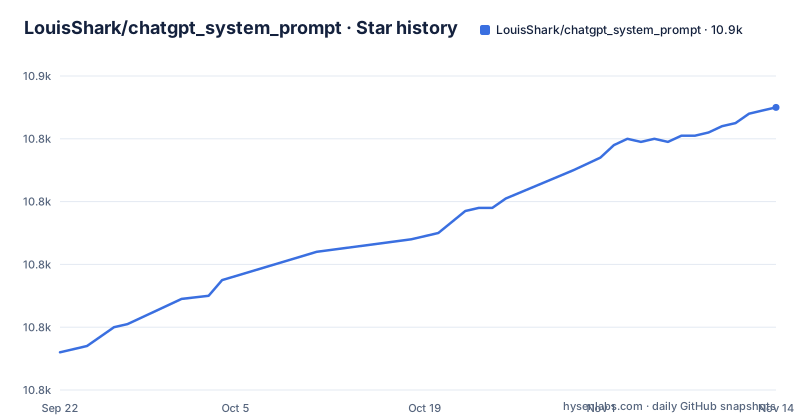
Star history
- LouisShark/chatgpt_system_prompt10,850 ★ · +78
| Repository | 2026-09-22 | 2026-11-14 |
|---|---|---|
| LouisShark/chatgpt_system_prompt | 10.8k | 10.9k |
78 Stars in the last 53 days, measured from the daily GitHub snapshot. Compare with other projects
Editorial analysis
What LouisShark/chatgpt_system_prompt Is Actually For
The repository describes itself as a collection of system prompts for ChatGPT, other AI products, and custom GPTs, sharing them for reference and to raise awareness about prompt injection security. Two audiences follow from that. The first is prompt engineers who want to see how other people structure instructions: role framing, refusal rules, tool descriptions, tone constraints. The second is anyone building a custom GPT who wants to know what an attacker will try, because the same archive that teaches you to write instructions also shows how instructions leak.
The README is explicit that sharing is for knowledge and that many GPT authors have improved their security after seeing these breakdowns. That framing matters. This is not a tool you install to protect a prompt, and it is not a service. It is a corpus. If you arrive expecting an SDK, you will be disappointed; if you arrive wanting examples to read, the shape of the repository makes sense.
How the Prompt Archive Is Organized
The top level holds a small number of Markdown files and a prompts directory. TOC.md is the index, GETTING_STARTED.md explains how to obtain system prompts and knowledge files, SECURITY.md covers protecting GPT instructions, CONTRIBUTING.md describes how to add entries, and RESOURCES.md lists tools and learning material. The prompts folder is where the actual instructions live.
The README's own navigation instructions are three steps: open TOC.md, use Ctrl + F to search for the GPT name you want, and, if you cloned the repository, use the idxtool script described in scripts/README.md. That last point is the only piece of tooling in the project. The README carries a badge for a build-toc.yaml GitHub Actions workflow, which suggests the table of contents is built by automation.
Finding a Prompt in the Repository
There is no package to install and no release to download. The README points at TOC.md as the entry point, so the first real use is to open that file and search it.
A match in TOC.md gives you the path into prompts/, where the instruction text sits. What you should end up with is a plain file of instructions you can read, compare against another entry, or use as a starting point for your own prompt. The README does not document the idxtool script's flags or usage, so read scripts/README.md before running it.
The Security Guide Is the Part Worth Reading Twice
SECURITY.md is listed as the place to learn how to protect GPT instructions, and that is the most consequential file in the repository for anyone shipping a custom GPT. The README states the project's purpose includes raising awareness about prompt injection security and notes that authors have improved their defenses after these breakdowns appeared. Read plainly, the archive is a record of defenses that failed.
Read SECURITY.md alongside the prompts, and treat every leaked prompt in prompts/ as evidence that a determined user can often get the text out.
Where This Repository Stops Being Useful
The most obvious failure mode is expecting operational support. Nothing here runs a model, proxies a request, or stores prompts for you. There is no API, no CLI beyond the idxtool script, and no configuration file the README documents. If your problem is that your team has prompts scattered across notebooks and you want them versioned and served, this repository does not address it.
A second limit is provenance. The collection is assembled from prompts that were extracted or shared, and the README does not describe how each entry was obtained or verified. For studying structure that is fine. For anything resembling compliance work, where you need to know whether a given instruction is current or was superseded, the archive cannot tell you. A third limit is staleness: prompts change as products change, and the README does not date or version individual entries. If you need the prompt a specific product is running today, this is the wrong source.
Compared With Writing Prompts From Scratch
The alternative most people actually weigh is not another repository but their own drafting process: write a system prompt, test it, revise it. That approach gives you full control and a prompt tuned to your product, and it costs you the blind spots you cannot see because you have only ever written prompts in your own style.
This repository takes the opposite route. It gives you breadth, a large set of instructions written by other people for other products, and lets you infer patterns from the differences between them. The trade is that none of it is tailored to you, and you have to do the reading to extract anything useful. A practical middle path is to draft your prompt first, then open TOC.md and compare your refusal rules and tool descriptions against two or three entries in prompts/ that solve a similar problem. That is where the archive earns its place: as a comparison set, not a template.
Licence and the Cost of Keeping Up
The repository is MIT licensed, with a LICENSE file at the top level. That permits reuse with attribution and without a copyleft obligation on your own work. It does not settle the question of the individual prompts inside prompts/, which were authored by third parties and collected here; the repository does not document per-entry licensing, so if you plan to republish an entry verbatim rather than learn from it, that is a question the project leaves open.
Maintenance is light by design. The last push was on 2026-10-13, and the repository is not archived. The only recurring maintenance visible is the build-toc.yaml workflow behind the README's build badge, which suggests the index is built by automation. Upgrading means pulling the branch again; there are no published GitHub releases and no versioned artifacts, so there is no migration path to plan for. The real cost is review time: each pull brings new entries, and someone has to decide which ones are worth reading.
Editorial conclusion
Adopt this repository if you write system prompts or review custom GPT security and want a corpus of real instructions to study; skip it if you need a runtime prompt manager or an API. Before relying on it, open TOC.md and confirm the entries you care about are present, then check SECURITY.md for the hardening guidance it offers. The repository is a static MIT-licensed reference, so the cost of trying it is one clone and the time to read.
Frequently asked questions
How do I get a ChatGPT system prompt from LouisShark/chatgpt_system_prompt?
Open TOC.md, search for the GPT's name with Ctrl + F, then follow the path it gives into the prompts directory. If you cloned the repository, the README also points to the idxtool script described in scripts/README.md.
What is a ChatGPT system prompt?
In this repository's framing, a system prompt is the instruction text that defines a ChatGPT or custom GPT's behavior, and the collection exists to share those instructions for reference and to raise awareness about prompt injection security.
How do I change a ChatGPT system prompt?
The repository does not document changing a system prompt on ChatGPT itself. It documents writing and protecting instructions for custom GPTs, with SECURITY.md covering how to protect GPT instructions.
What are some good system prompt examples in this repository?
The examples live in the prompts directory and are indexed by TOC.md, which lists the GPTs whose instructions have been collected. Browsing that index is how the README says to find them.
Official sources
Add this badge to your README
If you maintain this project, the badge below links readers to this analysis and shows its maintenance status from the daily GitHub snapshot. Paste the markdown into your README; add ?metric=license or ?metric=stars to the image URL for a different field.

[](https://hysenlabs.com/projects/louisshark-chatgpt-system-prompt)Star history chart for your README
[](https://hysenlabs.com/projects/louisshark-chatgpt-system-prompt)Was this useful?