2D Gaussian Splatting (2DGS): surfel-based radiance fields with mesh export
[SIGGRAPH'24] 2D Gaussian Splatting for Geometrically Accurate Radiance Fields
At a glance
- What is it?
- The official 2D Gaussian Splatting implementation replaces volumetric 3D Gaussians with oriented 2D disks, which makes surface extraction possible. A look at what it does, how to train it, and where it stops being the right tool.
- Who is it for?
- Adopt 2D Gaussian Splatting if you need a mesh or a normal-consistent surface out of a radiance field and you already have COLMAP camera poses; the repository is the official implementation of the SIGGRAPH'24 paper and its last push was on 2026-08-25. Do not adopt it if you only want fast novel-view images: the surfel rasterizer is a separate CUDA submodule, and the whole pipeline assumes a working CUDA toolchain and a COLMAP or NeRF Synthetic dataset.
- Can I use it commercially?
- Check first. The repository uses a licence we do not classify automatically, so read its LICENSE file before any commercial use.
- Is it still maintained?
- Yes. The repository last received commits 81 days ago.
- What is it written in?
- Mainly Python, according to GitHub's language statistics.
Answers come from the project's GitHub data, last synced on November 14, 2026, and from our analysis. They are not legal advice.
Star history
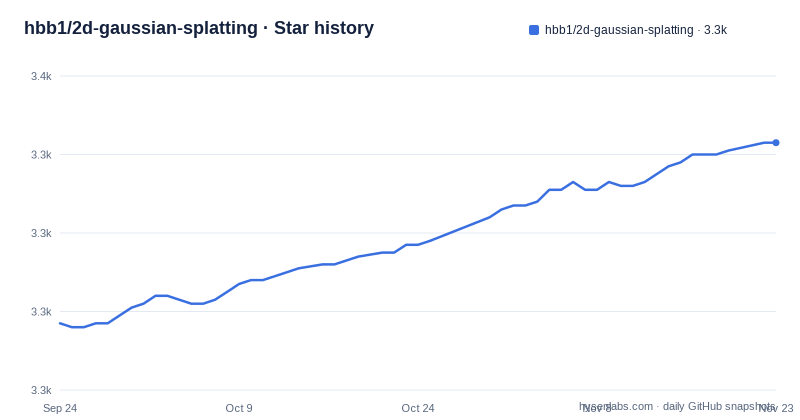
- hbb1/2d-gaussian-splatting3,337 ★ · +40
| Repository | 2026-09-24 | 2026-11-14 |
|---|---|---|
| hbb1/2d-gaussian-splatting | 3.3k | 3.3k |
40 Stars in the last 51 days, measured from the daily GitHub snapshot. Compare with other projects
Editorial analysis
What problem 2D Gaussian Splatting solves, and for whom
Standard 3D Gaussian Splatting represents a scene as volumetric ellipsoids. That works well for images, and badly for surfaces: the primitives have no preferred orientation, so extracting a clean mesh from them is an afterthought. This repository is the official implementation of the paper 2D Gaussian Splatting for Geometrically Accurate Radiance Fields, and it changes the primitive. A scene is represented as a set of 2D oriented disks, which the README calls surface elements or surfels, and those disks are rasterized with perspective correct differentiable rasterization. The README also states that the work develops regularizations that enhance reconstruction quality, and meshing approaches for Gaussian splatting. The intended reader is someone who needs geometry, not just pixels: surface reconstruction, normal maps, mesh export, or a downstream pipeline that consumes a triangle mesh rather than a point cloud of ellipsoids. If your only goal is photorealistic novel-view synthesis, the 2D constraint buys you nothing and costs you a separate CUDA rasterizer.
How the surfel representation and the meshing pipeline fit together
The architecture is a fork of the 3DGS training loop with a different rasterizer and different regularizers. The rasterizer is not in this repository: the README points to diff-surfel-rasterization as a CUDA submodule and to a Python colab notebook as a reference implementation. That submodule is cloned with --recursive, which tells you the training loop depends on code that lives outside the main tree. The training script train.py exposes three regularization arguments: lambda_normal for normal consistency, lambda_distortion for depth distortion, and depth_ratio, where 0 means mean depth and 1 means median depth. Mesh extraction happens in render.py and comes in two modes. Bounded extraction uses TSDF fusion inside a volume and takes voxel_size and depth_trunc; if those are not specified, the script estimates them from the camera information. Unbounded extraction uses space contraction into a sphere plus adaptive TSDF truncation, and is invoked with --mesh_res. The repository notes a 2024-05-30 fix for a bug related to unbounded meshing, which implies that the unbounded path is the newer and more delicate of the two.
Installing 2D Gaussian Splatting and training a first scene
The README gives a recursive clone because of the submodule, then a conda environment. The environment file is environment.yml at the repository root, and the environment is named surfel_splatting. The README notes that if you already have an environment used for 3DGS, you can use it instead of creating a new one.
# download
git clone https://github.com/hbb1/2d-gaussian-splatting.git --recursive

# if you have an environment used for 3dgs, use it
# if not, create a new environment
conda env create --file environment.yml
conda activate surfel_splatting
Training a scene is one command, pointed at a COLMAP or NeRF Synthetic dataset. The README's quick example uses MipNeRF360 and writes to an output directory you name.
python train.py -s <path to m360>/<garden> -m output/m360/gardenAfter training, the README's example for the unbounded mesh on the same scene adds --unbounded, --skip_test, --skip_train and --mesh_res 1024. The skip flags matter: without them render.py also runs the test and train rendering passes, which you do not need if you only want the mesh.
python render.py -s <path to m360>/<garden> -m output/m360/garden --unbounded --skip_test --skip_train --mesh_res 1024For the DTU dataset the README uses a different recipe, with image downscaling and median depth, because the scans are bounded and foreground-focused.
python train.py -s <path to dtu>/<scan105> -m output/date/scan105 -r 2 --depth_ratio 1
python render.py -r 2 --depth_ratio 1 --skip_test --skip_train
If you already installed the rasterizer submodule before the 2024-05-17 speed update, the README says to update it and reinstall, which is the upgrade path in miniature.
git submodule update --remote
pip install submodules/diff-surfel-rasterization
Where 2DGS breaks: aliasing, unbounded meshes and the missing viewer
The README is candid about one failure mode without naming it as one. For unbounded or large scenes it suggests mean depth, depth_ratio=0, for less disk-aliasing artifacts. That sentence is doing real work: thin, edge-on disks are hard to sample, and when the camera sees a disk nearly edge-on the rasterizer can alias. If your scene is a large outdoor capture with distant thin structures, expect to tune depth_ratio and the normal and distortion weights rather than accept the defaults. The unbounded meshing path had a correctness bug fixed on 2024-05-30, and the README's own framing (space contraction plus adaptive truncation) describes a heuristic, not an exact reconstruction; the mesh you get is a truncated signed distance surface built from rendered depths, so it inherits depth errors. The bounded path is the safer one when your subject sits inside a known volume. There is also no viewer in this repository. The README links to a pre-built SIBR viewer for Windows, a Viser-based remote viewer, a WebGL viewer and a WebGPU viewer, all maintained elsewhere. If you need to inspect results interactively, you are assembling that from third-party projects, and the Windows pre-built binary is the only packaged option the README offers.
2DGS compared with 3D Gaussian Splatting
The obvious alternative is 3D Gaussian Splatting, and the difference is not a matter of degree. 3DGS optimizes unconstrained volumetric ellipsoids against a photometric loss; nothing in the objective prefers a surface, so the recovered geometry is a cloud of blobs that happens to render correctly from the training views. 2DGS constrains each primitive to a flat disk with a normal, and adds lambda_normal for normal consistency and lambda_distortion for depth distortion. Those two terms are what make the depth maps coherent enough to fuse into a TSDF mesh. The cost is expressiveness: a disk cannot represent a fuzzy volumetric phenomenon as naturally as an ellipsoid, and the rasterizer is a separate CUDA project rather than the widely reused 3DGS rasterizer. The repository also reuses the same COLMAP loader as 3DGS, so dataset preparation is identical, and the README points to the 3DGS repository for custom data instructions. That shared loader is the reason switching between the two is cheap on the data side and expensive on the build side.
Maintenance, licence and the cost of keeping up
The repository is not archived, and the last push was on 2026-08-25, roughly a month before this writing. The README's dated entries stop at 2025/12/19, when the work was featured in a LearnOpenCV blog post, so the recent commit activity is not reflected in the release notes. The repository has no published GitHub releases, which means upgrades arrive as commits and submodule updates rather than tagged versions. That has a concrete consequence: the 2024-05-17 entry tells users to run git submodule update --remote and reinstall submodules/diff-surfel-rasterization, and there is no documented rollback if a new submodule revision regresses against your CUDA version. Pin the submodule commit if you need reproducibility. On licensing, the repository's licence file is LICENSE.md and the metadata reports NOASSERTION, meaning the licence could not be classified automatically. The README does not state terms for the code or for the datasets it references, and the datasets (DTU, MipNeRF360) are hosted externally under their own conditions. Read LICENSE.md yourself and check the rasterizer submodule's licence separately, since it is a different repository.
Editorial conclusion
Adopt 2D Gaussian Splatting if you need a mesh or a normal-consistent surface out of a radiance field and you already have COLMAP camera poses; the repository is the official implementation of the SIGGRAPH'24 paper and its last push was on 2026-08-25. Do not adopt it if you only want fast novel-view images: the surfel rasterizer is a separate CUDA submodule, and the whole pipeline assumes a working CUDA toolchain and a COLMAP or NeRF Synthetic dataset. Before committing, verify that the diff-surfel-rasterization submodule installs against your CUDA version, that your dataset has camera poses in the format the 3DGS loader expects, and that the voxel_size and depth_trunc defaults estimated from your cameras give a mesh at the resolution you need.
Frequently asked questions
What is 2D Gaussian Splatting?
It is the official implementation of the paper 2D Gaussian Splatting for Geometrically Accurate Radiance Fields, which represents a scene as a set of 2D oriented disks, called surfels, instead of volumetric 3D Gaussians. The README states that the surfels are rasterized with perspective correct differentiable rasterization, and that the work adds regularizations and meshing approaches.
Is Gaussian splatting free?
The repository metadata reports NOASSERTION for the licence, so the licence could not be classified automatically; the terms are in LICENSE.md and the README does not restate them. The CUDA rasterizer lives in a separate repository, diff-surfel-rasterization, with its own licence, and the datasets the README references are hosted externally.
What is a 2D Gaussian?
In this project the primitive is a 2D oriented disk, also called a surfel or surface element, rather than a volumetric ellipsoid. The README describes the scene as a set of these disks rasterized with perspective correct differentiable rasterization.
Official sources
Add this badge to your README
If you maintain this project, the badge below links readers to this analysis and shows its maintenance status from the daily GitHub snapshot. Paste the markdown into your README; add ?metric=license or ?metric=stars to the image URL for a different field.

[](https://hysenlabs.com/projects/hbb1-2d-gaussian-splatting)Star history chart for your README
[](https://hysenlabs.com/projects/hbb1-2d-gaussian-splatting)Was this useful?